
giriiş
This manual provides essential instructions for the proper use, setup, and maintenance of your BYTECH Lightning Cable (Model: CLMFCBLASST). This cable is designed for charging and data transfer with compatible Apple iOS devices, including iPhones, iPads, and iPods, as well as connecting to laptops and personal computers.
Ürün Bittiview
The BYTECH Lightning Cable is a durable accessory for your Apple devices. It features a Lightning connector on one end and a USB-A connector on the other, facilitating both power delivery for charging and data exchange. The cable supports fast charging capabilities for compatible devices.
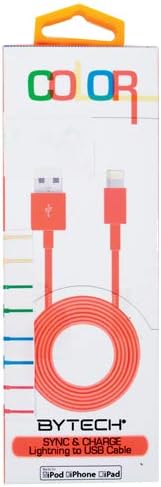
This image displays the retail packaging for the BYTECH Lightning to USB Cable. The packaging is white with 'COLOR' printed at the top in multi-colored letters. An orange Lightning to USB cable is visible through a clear window, coiled neatly. The bottom of the package indicates 'BYTECH SYNC & CHARGE Lightning to USB Cable' and compatibility with iPod, iPhone, and iPad.
Bileşenler:
- Lightning Konnektörü: Connects to your Apple iOS device (iPhone, iPad, iPod).
- USB-A Konektörü: Connects to a USB power adapter, computer USB port, or other USB charging source.
- Kablo: The flexible cord connecting the two connectors, designed for durability and efficient power/data transfer.
Kurmak
To begin using your BYTECH Lightning Cable, follow these steps:
- Bağlayıcıları Tanımlayın: Locate the Lightning connector (smaller, 8-pin) and the USB-A connector (larger, rectangular).
- Connect to Power Source or Computer:
- For charging, insert the USB-A connector into a compatible USB wall adapter or car charger.
- For charging and data transfer, insert the USB-A connector into an available USB port on your laptop or personal computer.
- Connect to iOS Device: Insert the Lightning connector into the charging port of your iPhone, iPad, or iPod. Ensure it is fully seated.
- Bağlantıyı Doğrulayın: Your device should indicate that it is charging or connected to a computer.
Kullanım Talimatları
Cihazınızı Şarj Etme:
Once connected as described in the "Setup" section, your iOS device will begin charging automatically. The cable supports fast charging when paired with a compatible power adapter and device.
Veri Transferi:
When connected to a computer, the cable enables data transfer between your iOS device and the computer. This allows for syncing media, documents, and other files using iTunes or Finder (macOS Catalina and later).
- Connect your iOS device to your computer using the BYTECH Lightning Cable.
- Unlock your iOS device and respond to any "Trust This Computer?" prompts by tapping "Trust" and entering your passcode if required.
- Open iTunes (Windows/older macOS) or Finder (macOS Catalina and later) on your computer.
- Select your device within the application to manage and transfer data.
Bakım
Proper care extends the life of your cable:
- Depolamak: When not in use, coil the cable loosely. Avoid tight coiling or sharp bends, especially near the connectors, as this can damage the internal wires.
- Temizlik: Kablo ve bağlantı noktalarını yumuşak, kuru bir bezle nazikçe silin. Sıvı temizleyiciler veya aşındırıcı malzemeler kullanmayın.
- İşleme: Always grasp the connector head when plugging or unplugging the cable. Avoid pulling directly on the cable itself.
- Çevre: Kabloyu aşırı sıcaklıklardan, doğrudan güneş ışığından ve nemden uzak tutun.
Sorun giderme
If you encounter issues with your BYTECH Lightning Cable, consider the following:
- Cihaz Şarj Olmuyor:
- Kablonun her iki ucunun da güvenli bir şekilde bağlandığından emin olun.
- Try a different USB power adapter or computer USB port.
- Check the charging port on your iOS device for debris or lint.
- Test the cable with a different compatible iOS device, if available.
- Veri Aktarım Sorunları:
- Ensure your iOS device is unlocked and you have tapped "Trust This Computer" when prompted.
- Restart both your iOS device and your computer.
- Update iTunes or Finder to the latest version.
- Bilgisayarınızda farklı bir USB bağlantı noktası deneyin.
- Kablo Hasarı: Inspect the cable for any visible signs of damage, such as fraying, cuts, or bent connectors. Discontinue use if damage is found.
Özellikler
| Bağlanmak | Detay |
|---|---|
| Marka | Baytek |
| Model Numarası | CLMFCBLASST |
| UPC | 805112016938 |
| Bağlayıcı Türü | Lightning (Male) to USB-A (Male) |
| Kablo Tipi | Yıldırım |
| Uyumlu Cihazlar | iPhone, iPad, iPod, Laptop, Personal Computer |
| Özel Özellik | Hızlı Şarj |
| Önerilen Kullanımlar | Charging, data transfer for iOS devices |
| Pin Sayısı | 8 (Lightning) |
| Ürün Ağırlığı | 1.76 ons |
| Ürün Boyutları | 1 x 1 x 1 inç (Ambalaj) |
Garanti ve Destek
For warranty information or technical support regarding your BYTECH Lightning Cable, please refer to the official Bytech webSite üzerinden satın alabilir veya doğrudan müşteri hizmetleriyle iletişime geçebilirsiniz. Garanti talepleriniz için satın alma fişinizi saklayın.
Genel sorularınız için lütfen ziyaret edin. Bytech brand page on Amazon.