
1. Ürün Bittiview
The Hemudu Universal Swivel TV Stand HT07B-002 is designed to provide a stable, adjustable, and versatile mounting solution for your television. Constructed with heavy-duty steel and a tempered glass base, it offers enhanced safety and a clean aesthetic for various room setups.
- Heavy Duty & Reliable: Features a solid steel elliptical tube, steel bracket panel, and heavy-duty tempered glass base, supporting TVs up to 88lbs.
- Son Derece Uyumlu: Suitable for 13 to 39 inch TVs, compatible with major brands like Samsung, Vizio, Sony, LG, Panasonic, Sharp, Toshiba, Philips, Pioneer.
- Yükseklik ayarlanabilir: Offers 4 levels of height adjustment for optimal viewIng.
- Döner Fonksiyon: Provides a 100-degree swivel range (-50 to +50 degrees) for flexible viewaçıları.
- Kablo yönetimi: Integrated wire management system to conceal cables for a tidy appearance.
2. Güvenlik Bilgileri
Please read and understand all instructions before installation and use. Keep this manual for future reference. Improper installation or use may result in property damage or personal injury.
- Ensure the TV weight and size are within the stand's specified limits (max 88lbs, 13-39 inches).
- Verify that the VESA mounting pattern of your TV is compatible with the stand.
- Montaj sırasında parçalara zarar vermemek için vidaları aşırı sıkmayın.
- Devrilmesini önlemek için standı sağlam ve düz bir yüzeye yerleştirin.
- Keep children and pets away from the TV stand during assembly and ensure all parts are securely fastened.
- Use all provided safety screws and rubber pads for maximum stability.
3. Paket İçeriği
Before starting assembly, ensure all parts listed below are present and undamaged. If any parts are missing or damaged, do not proceed with assembly and contact customer support.
- Steel Support Pillar
- Temperli Cam Taban
- TV Mounting Bracket (with various VESA holes)
- Mounting Arms (2 pieces)
- Various Screw Sets (S1, S2, S3, S4, etc.) for different TV models
- Spacers and Washers
- Cable Management Clips/Ties
- Allen Wrench and Open-end Wrench
- Kullanım Kılavuzu
4. Kurulum ve Montaj Talimatları
Follow these steps carefully to assemble your Hemudu Universal Swivel TV Stand.
Adım 1: Montaj Kollarını TV'ye Takın
Carefully place your TV face down on a soft, clean surface. Attach the two mounting arms to the back of your TV using the appropriate screws and spacers from the provided hardware kit. Ensure the arms are securely fastened and aligned with your TV's VESA mounting holes.

Figure 1: Back of TV with mounting arms attached, illustrating various VESA compatibility.
Step 2: Assemble the Stand Base and Pillar
Connect the steel support pillar to the tempered glass base using the designated screws. Ensure the connection is firm but do not fully tighten until all components are aligned. Attach the main TV mounting bracket to the top of the steel pillar.
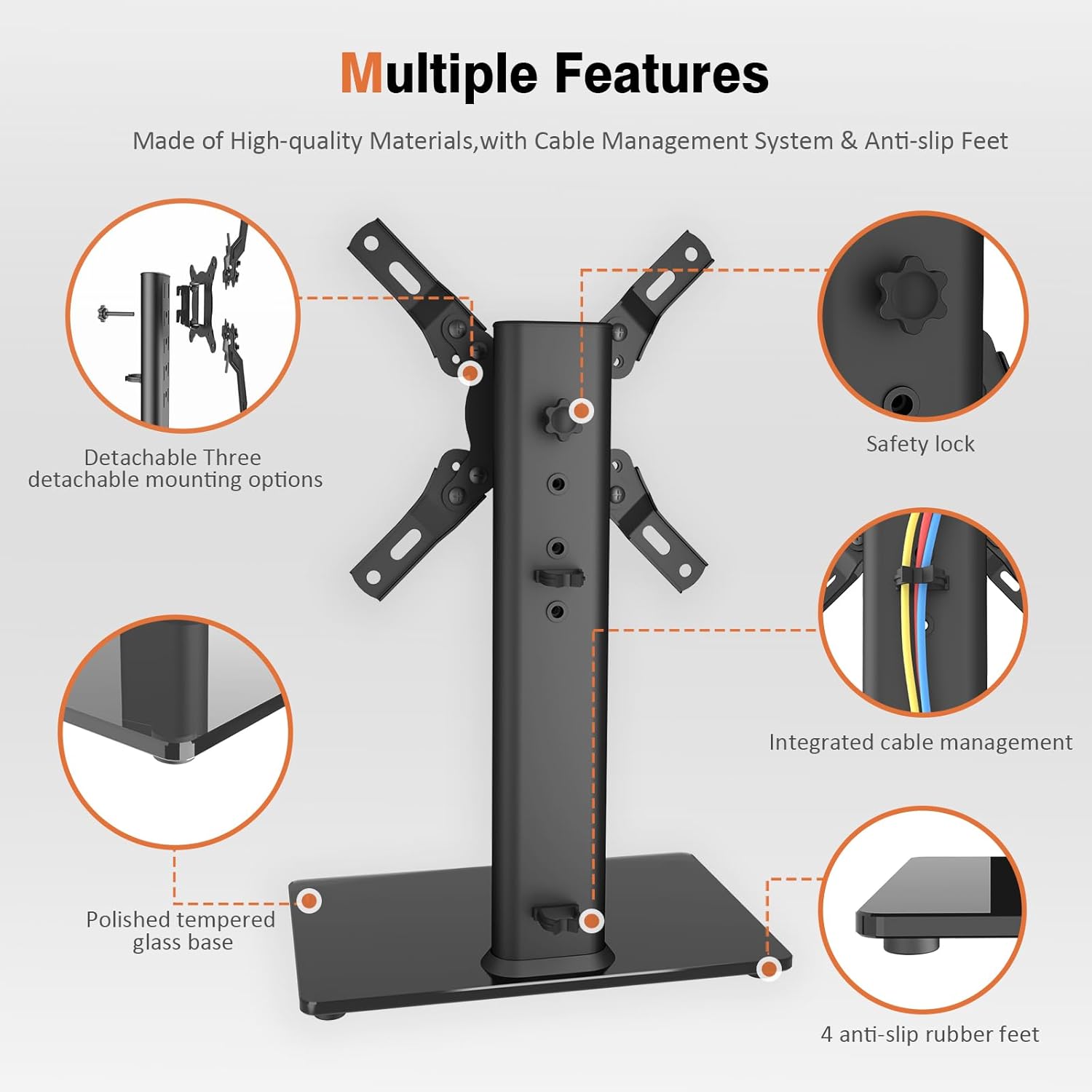
Şekil 2: Patlatılmış view of the stand's components and assembly points, including safety lock and anti-slip feet.
3. Adım: Televizyonu standa monte edin.
Carefully lift the TV (with mounting arms attached) and hook the arms onto the main TV mounting bracket. Ensure both arms are securely seated. Use the safety screws to lock the TV in place, preventing accidental dislodgement.
Video 1: Official Hemudu video demonstrating the assembly process of the Swivel TV Stand HT07B-002.
Video 2: Another official Hemudu video showcasing the assembly and features of the universal TV stand HT07B-002.
5. Kullanım Talimatları
Yükseklik Ayarı
The TV stand offers 4 levels of height adjustment. To adjust the height, you must first unhook the TV from the main bracket. Re-attach the mounting arms to a different set of holes on the steel pillar to achieve your desired viewing height. Secure with safety screws.

Figure 3: Illustration of the 4-level height adjustment feature, allowing users to optimize viewDeneyim.
Dönme Fonksiyonu
Once assembled, your TV can swivel 100 degrees (-50 to +50 degrees) left or right. Gently push the sides of the TV to adjust the viewing angle as needed. This feature allows for optimal viewing from various positions in your room.

Figure 4: Visual representation of the ±50° swivel adjustment, enhancing viewkonfor.
6. Bakım
To ensure the longevity and proper functioning of your TV stand, follow these maintenance guidelines:
- Temizlik: Use a soft, dry cloth to clean the steel components and tempered glass base. For stubborn marks on the glass, a mild glass cleaner can be used. Avoid abrasive cleaners or materials that could scratch the surfaces.
- Denetleme: Tüm vidaların ve bağlantıların sıkı ve güvenli olduğundan emin olmak için periyodik olarak kontrol edin. Gerekirse yeniden sıkın.
- Ağırlık Sınırları: Maksimum ağırlık kapasitesi olan 88 lbs'yi aşmayın.
- Kablo yönetimi: Regularly check the cable management system to ensure cables are not pinched or damaged.
7. Sorun Giderme
If you encounter any issues with your TV stand, refer to the following common troubleshooting tips:
- TV is Wobbly:
- Tüm vidaların güvenli bir şekilde sıkıldığından emin olun.
- Verify the stand is placed on a flat, stable surface.
- Check that the TV's weight does not exceed the stand's capacity.
- Confirm the rubber pads are correctly installed on the base.
- Televizyon Düz Değil:
- Recheck the mounting arms on the back of the TV to ensure they are aligned evenly.
- Adjust the height settings on the steel pillar to correct any tilt.
- Döndürmede Zorluk:
- Ensure no cables are obstructing the swivel mechanism.
- Check for any debris or foreign objects around the swivel joint.
- Kablolar Gizlenmemiş:
- Utilize the provided cable management clips to route and secure cables along the support pillar.
8. Özellikler
| Özellik | Detay |
|---|---|
| Model Numarası | HT07B-002 |
| Marka | Hemudu |
| Montaj Tipi | Masa Üstü Montaj |
| Hareket Türü | Swivel (100 Degree: -50 to +50) |
| Malzeme | Alaşımlı Çelik, Temperli Cam |
| Renk | Siyah |
| Uyumlu TV Boyutları | 13 ila 39 inç |
| Ağırlık Kapasitesi | 88 lbs'ye (40 kg) kadar |
| Yükseklik Ayarı | 4 Seviye |
| Ürün Ağırlığı | 5.98 pound |
| Paket Boyutları | 16.61 x 9.21 x 2.44 inç |

Figure 5: Product dimensions and VESA compatibility chart to ensure proper fit for your television.
9. Garanti ve Destek
For warranty information or technical support, please refer to the product packaging or contact Hemudu customer service directly. Keep your purchase receipt as proof of purchase.