
1. Giriş
This manual provides instructions for the FocalTop N2QAYB000953 replacement remote control. This remote is designed to function as a direct replacement for the original Panasonic Blu-ray Player remote control models N2QAYB000953, compatible with DMP-BDT360, DMP-BDT361, DMP-BDT460, and DMP-BDT460PS Blu-ray players.
No programming is required for this remote control. Simply insert batteries, and it is ready for use.
2. Kurulum
2.1 Pil Kurulumu
- Uzaktan kumandanın arkasındaki pil bölmesini bulun.
- Pil bölmesi kapağını açmak için aşağı doğru kaydırın.
- Insert two (2) AAA alkaline batteries (not included), ensuring the positive (+) and negative (-) terminals align correctly with the markings inside the compartment.
- Pil bölmesi kapağını yerine güvenli bir şekilde oturana kadar kaydırın.

Figure 2.1: Battery compartment with cover removed, showing battery placement.
Not: Ensure batteries are inserted with correct polarity. Incorrect installation may prevent the remote from functioning.
3. Uzaktan Kumandanın Çalıştırılması
The FocalTop N2QAYB000953 remote control is designed for intuitive operation of your compatible Panasonic Blu-ray Player. Point the remote directly at the Blu-ray player's infrared sensor for optimal performance.
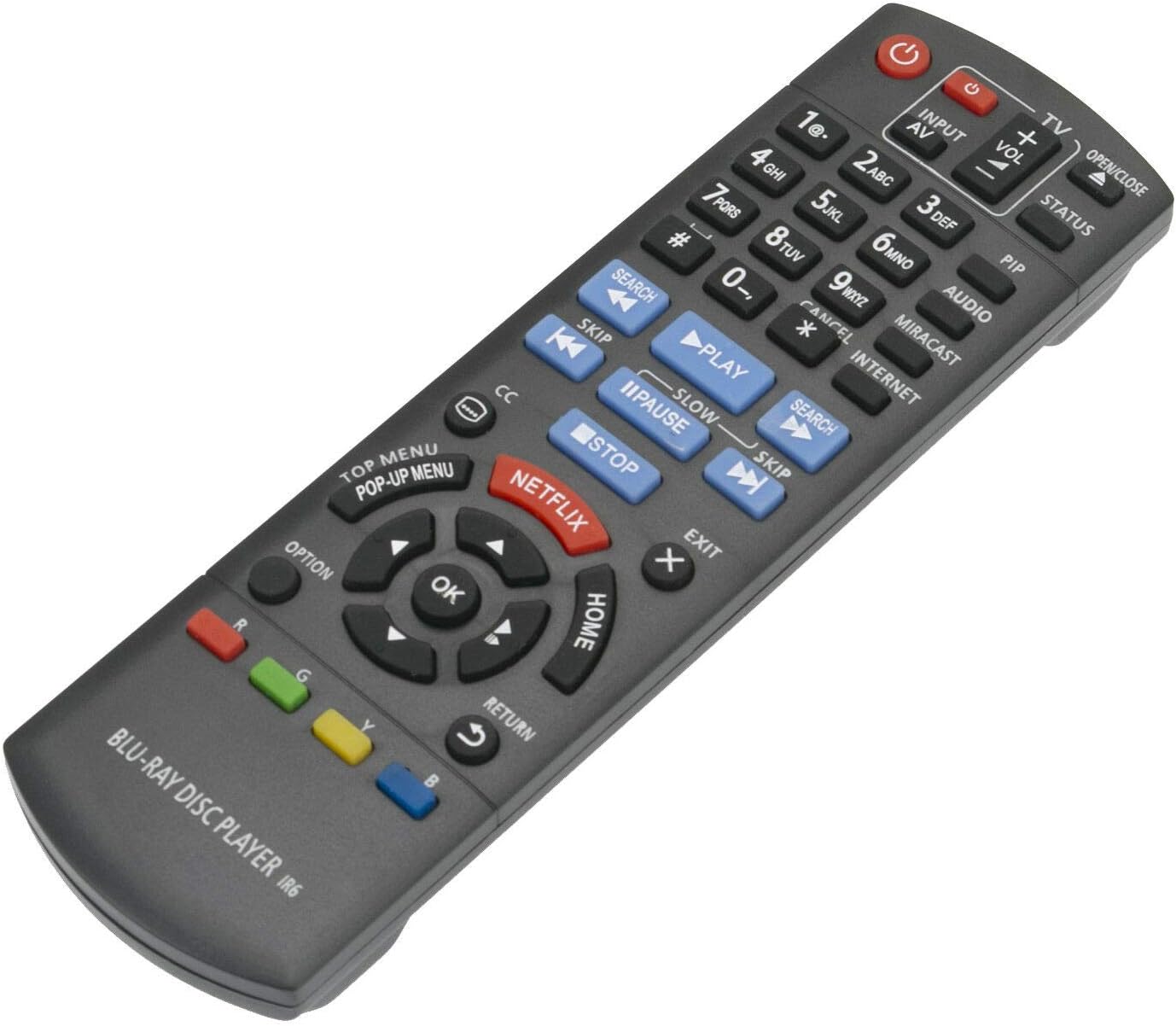
Şekil 3.1: Ön view düğme düzenine sahip uzaktan kumandanın.
3.1 Temel İşlevler
- Güç (⏻): Blu-ray oynatıcısını açar veya kapatır.
- Giriş/AV: Selects the input source on your television.
- Hacim (+/-): Adjusts the volume of the connected audio system (if supported by the Blu-ray player's HDMI-CEC or similar function).
- Sayı Düğmeleri (0-9): Used for direct track selection or entering numerical data.
- Oyna(▶), Duraklat (⏸), Durmak (■): Standart medya oynatma kontrolleri.
- Atlamak (⏭), Search (⏮): Navigate between tracks or fast-forward/rewind.
- Yön Tuş Takımı (Yukarı, Aşağı, Sol, Sağ) ve Tamam: Menülerde gezinir ve seçimleri onaylar.
- EV: Returns to the main menu of the Blu-ray player.
- TOP MENU/POP-UP MENU: Accesses the disc's top menu or pop-up menu.
- NETFLIX: Netflix uygulamasına doğrudan erişim düğmesi.
- GERİ DÖNMEK: Önceki ekrana veya menüye geri döner.
- SEÇENEK: Displays options relevant to the current screen or playback.
- Renkli Düğmeler (Kırmızı, Yeşil, Sarı, Mavi): Used for specific functions within menus or applications, as indicated on-screen.
4. Bakım
- Temizlik: Uzaktan kumandayı yumuşak ve kuru bir bezle silin. Sıvı temizleyiciler veya aşındırıcı malzemeler kullanmayın.
- Pil Değişimi: Uzaktan kumandanın tepkisi yavaşladığında veya çalışmayı durdurduğunda pilleri değiştirin. Her zaman her iki pili de aynı anda, aynı tipte (AAA alkalin) yeni pillerle değiştirin.
- Depolamak: Uzaktan kumanda uzun süre kullanılmayacaksa, pil sızıntısını ve olası hasarı önlemek için pilleri çıkarın.
- Çevre: Kumandayı aşırı sıcaklıklara, doğrudan güneş ışığına veya yüksek neme maruz bırakmaktan kaçının.
5. Sorun Giderme
| Sorun | Olası Neden | Çözüm |
|---|---|---|
| Uzaktan kumanda çalışmıyor. |
|
|
| Some buttons do not respond. |
|
|
| Uzaktan çalışma aralıklı olarak gerçekleşiyor. |
|
|
6. Özellikler
- Modeli: N2QAYB000953
- Marka: FocalTop
- Uyumluluk: Panasonic Blu-ray Player models DMP-BDT360, DMP-BDT361, DMP-BDT460, DMP-BDT460PS
- Bağlantı Teknolojisi: Kızılötesi (IR)
- Denetleyici Tipi: Düğme Kontrolü
- Güç Kaynağı: 2 adet AAA alkalin pil (dahil değildir)
- Özellik: Ergonomik tasarım
7. Garanti ve Destek
This product is a replacement remote control. For specific warranty information or technical support, please refer to the documentation provided by the original seller or contact FocalTop directly. No explicit warranty information is provided within this manual.