
1. Giriş
This manual provides comprehensive instructions for the IMILAB CMSXJ16A Smart Home Security Camera, a product of XIAOMI. It covers setup, operation, maintenance, and troubleshooting to ensure optimal performance and security monitoring. Please read this manual carefully before using the product and retain it for future reference.
2. Ürün Bittiview
2.1 Paket İçeriği
Paketin içinde tüm öğelerin mevcut olduğundan emin olun:
- IMILAB Home Security Camera Basic x 1
- Kullanım Kılavuzu x 1
- Güç Kablosu x 1
- Power Adapter (UK/EU/US) x 1
- Wall Mounting Package x 1 (includes screws and wall plugs)
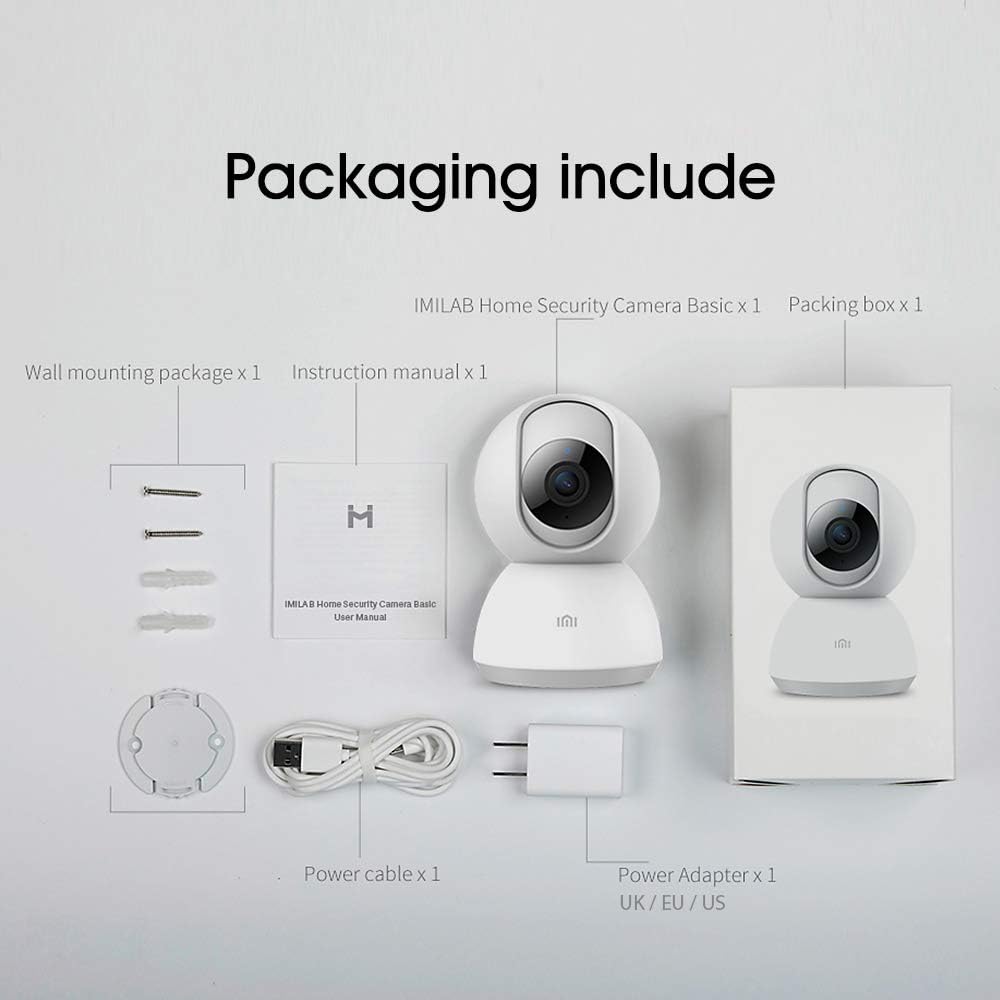
Image: Contents of the IMILAB CMSXJ16A camera package.
2.2 Kamera Bileşenleri
The IMILAB CMSXJ16A camera features a compact, spherical design with a rotating base for 360-degree coverage. Key components include the lens, microphone, speaker, status indicator light, and power port.

Resim: Ön view of the IMILAB CMSXJ16A camera.
2.3 Temel Özellikler
- FHD (1080P) Resolution: Provides clear and detailed image quality.
- 360° Dönüş: Panoramik teklifler viewing for comprehensive area coverage.
- Glare-Free Night Vision: Equipped with F2.1 aperture and 8x 940mm infrared LEDs for a visible distance of 10m.
- Gerçek Renkli Gece Görüşü: Maintains full color in low light conditions, even at 100 lumens.
- Yapay Zeka İnsan Tespiti: Advanced AI reduces unnecessary alerts by 70% for more accurate notifications.
- Crying Baby Notification: Alerts you to the sound of a crying baby.
- Çoklu Depolama Seçenekleri: Supports cloud storage, up to 64GB Micro TF card, and NAS storage.
- H.265 Video Kodlaması: Efficiently compresses video, saving storage space while maintaining quality.
3. Kurulum
3.1 Açma
- Güç kablosunu kameranın güç girişine bağlayın.
- Güç adaptörünü standart bir elektrik prizine takın.
- The camera will power on, and the status indicator light will begin to flash, indicating it is ready for connection.
3.2 Uygulama Kurulumu
Download the official IMILAB Home Security app from your smartphone's app store. The app is compatible with Android 4.4 and above, and iOS 8.0 and above.
- Arama "IMILAB Home Security" in the Google Play Store (for Android) or Apple App Store (for iOS).
- Uygulamayı indirin ve kurun.
- Uygulamayı açın ve hesap oluşturmak veya giriş yapmak için ekrandaki talimatları izleyin.
3.3 Wi-Fi'ye Bağlanma
Follow the in-app instructions to connect your camera to your home Wi-Fi network. This typically involves scanning a QR code generated by the app with the camera's lens.
3.4 Kamerayı Monte Etme
The camera supports wall mounting. Use the provided wall mounting package for secure installation.
- Montaj için uygun bir yer seçin ve görüş alanının açık olduğundan emin olun. view ve elektrik prizine erişim.
- Use the mounting base as a template to mark drill holes on the wall.
- Delikler açın ve dübelleri yerleştirin.
- Montaj tabanını vidalarla duvara sabitleyin.
- Kamerayı montaj tabanına takın.
4. Kullanım Talimatları
4.1 Canlı View ve Uzaktan Kumanda
Once connected, open the IMILAB Home Security app to access the live video feed from your camera. You can remotely control the camera's 360-degree rotation to view different areas of your space.

Görüntü: Canlı view of the camera feed on mobile devices, demonstrating H.265 encoding efficiency.
4.2 Gece Görüşü
The camera automatically switches to night vision mode in low light conditions. It features glare-free infrared night vision and true color night vision for clear visibility even in very dim environments.

Image: Demonstration of glare-free and true color night vision capabilities.
4.3 AI Human Detection and Notifications
The camera utilizes AI to detect human movement, significantly reducing false alarms from pets or other non-human movements. You will receive precise notifications on your smartphone when human activity is detected.

Image: AI movement notification interface in the mobile application.
4.4 Crying Baby Detection
Enable the crying baby detection feature in the app to receive alerts if the camera detects the sound of a baby crying, providing an additional layer of monitoring for nurseries.
4.5 Video Kaydı ve Depolama
The camera supports real-time video recording with multiple storage options:
- Bulut Depolama: Subscribe to cloud services for secure off-site storage of your recordings.
- Mikro TF Kartı: Insert a Micro TF card (up to 64GB, not included) into the camera for local storage.
- NAS Depolama: Connect the camera to a Network Attached Storage (NAS) device for expanded local storage capabilities.
4.6 H.265 Video Encoding
The camera uses H.265 video encoding, which allows for more efficient compression of video files. This means you can save the same quality video with approximately 50% less file size compared to H.264, optimizing storage and bandwidth usage.
5. Bakım
To ensure the longevity and optimal performance of your camera, follow these maintenance guidelines:
- Temizlik: Kamera lensini ve gövdesini yumuşak ve kuru bir bezle nazikçe silin. Sert kimyasallar veya aşındırıcı temizleyiciler kullanmayın.
- Atama: Kameranın sabit bir ortamda, doğrudan güneş ışığından, aşırı sıcaklıklardan ve yüksek nemden uzak bir yere yerleştirildiğinden emin olun.
- Donanım Yazılımı Güncellemeleri: Kameranızın en yeni özelliklere ve güvenlik geliştirmelerine sahip olduğundan emin olmak için, uygulamada bulunan yazılım güncellemelerini düzenli olarak kontrol edin.
6. Sorun Giderme
If you encounter issues with your IMILAB CMSXJ16A camera, refer to the following common solutions:
- Kamera Bağlantısı Kurmuyor: Ensure your Wi-Fi network is 2.4GHz (5GHz is not supported). Check Wi-Fi signal strength. Restart the camera and your router.
- Kötü Görüntü Kalitesi: Clean the camera lens. Ensure adequate lighting in the environment. Check your internet connection speed.
- Bildirim Yok: Verify that notifications are enabled in both the camera app settings and your smartphone's system settings. Check network connectivity.
- Kamera Çevrimdışı: Check the power connection. Ensure your Wi-Fi network is active and the camera is within range. Restart the camera.
- Micro TF Card Not Detected: Ensure the card is inserted correctly. Format the card through the app if it's new or has issues. Use a compatible Micro TF card (up to 64GB).
7. Özellikler
| Özellik | Şartname |
|---|---|
| Model Numarası | CMSXJ16A |
| Boyutlar (U x G x Y) | 10.8x7.6x7.6 cm |
| Ağırlık | 211 Gram |
| Video Çözünürlüğü | 1080p (FHD) |
| Alanı View / Angle of View | 360 Derece |
| Gece Görüş Mesafesi | 10 metre |
| Kızılötesi LED'ler | 8x940mm |
| Diyafram | F2.1 |
| Bağlantı Teknolojisi | Wired, Wireless (Wi-Fi 2.4GHz) |
| Güç Kaynağı | Mains Powered (via 5V, 5W adapter) |
| Uyumlu Cihazlar | Akıllı telefon (Android 4.4+, iOS 8.0+) |
| Depolama Seçenekleri | Cloud, Micro TF Card (max 64GB), NAS |
| Video Yakalama Formatı | MP4 (H.265 encoding) |
| İç/Dış Mekan Kullanımı | Kapalı |
| Montaj Tipi | Duvara Montaj |
8. Garanti ve Destek
Garanti bilgileri ve teknik destek için lütfen resmi IMILAB web sitesine başvurun. webSite üzerinden satın alabilir veya müşteri hizmetleriyle iletişime geçebilirsiniz. Garanti talepleriniz için satın alma belgenizi saklayın.