
1. Giriş
This manual provides detailed instructions for the safe and effective operation of the SNDWAY SW-TG100 Laser Distance Meter. Please read this manual thoroughly before using the device to ensure proper functionality and to prevent potential hazards.
2. Güvenlik Talimatları
Uyarı: This device emits a Class 2 laser. Avoid direct eye exposure to the laser beam. Do not stare into the beam or view doğrudan optik aletlerle.
- Cihazı değiştirmeye veya parçalarına ayırmaya çalışmayın.
- Cihazı çocukların erişemeyeceği yerde saklayınız.
- Cihazı patlayıcı ortamlarda veya yanıcı maddelerin yakınında kullanmayın.
- Ensure the battery compartment is securely closed to prevent water or dust ingress.
- Pilleri yerel düzenlemelere göre atın.
3. Ürün Bittiview
The SNDWAY SW-TG100 is a portable laser distance meter designed for accurate distance, area, and volume measurements. It features a clear LCD display, multiple measurement modes, and a durable design.
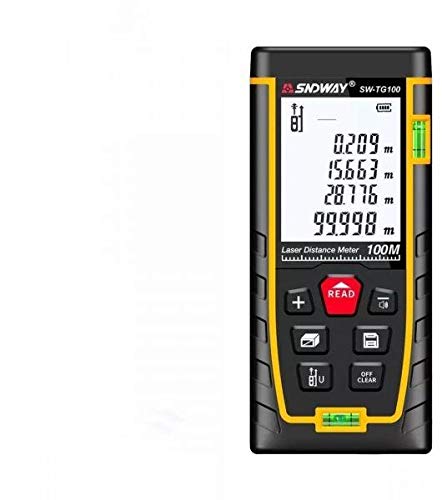
Şekil 1: Ön view of the SNDWAY SW-TG100 Laser Distance Meter. The device is black with yellow accents, featuring a large LCD screen displaying measurement values (e.g., 0.209m, 15.663m, 28.776m, 99.998m) and icons for measurement modes and battery status. Below the screen are several buttons: a red 'READ' button, '+' button, a button for unit/reference point, a button for area/volume, a button for Pythagorean mode, and an 'OFF/CLEAR' button. A horizontal bubble level is visible at the bottom, and a vertical one on the right side.
3.1 Bileşenler
- Laser Emission Aperture: Where the laser beam exits.
- Lazer Alıcı Lens: Yansıyan lazer ışınını algılar.
- LCD Ekran: Ölçümleri, pil durumunu ve mod göstergelerini gösterir.
- Klavye: For operating various functions.
- Pil Bölmesi: Located at the rear.
- Kabarcık Seviyeleri: For horizontal and vertical alignment.
4. Kurulum
4.1 Pil Kurulumu
- Cihazın arkasındaki pil bölmesi kapağını açın.
- İki adet AAA alkalin pili, doğru kutuplara (+/-) dikkat ederek takın.
- Pil bölmesi kapağını sıkıca kapatın.
4.2 Güç Açma/Kapatma
- Açmak için, düğmesine basın. OKUMAK butonuna basın. Lazer aktif hale gelecektir.
- Kapatmak için tuşunu basılı tutun. KAPALI/TEMİZ button for approximately 3 seconds. The device will also automatically power off after 150 seconds of inactivity.
5. Kullanım Talimatları
5.1 Temel Mesafe Ölçümü
- Basın OKUMAK Lazeri etkinleştirmek için düğmeye bir kez basın.
- Lazer noktasını hedef noktaya doğrultun.
- Basın OKUMAK Ölçüm yapmak için düğmeye tekrar basın. Ölçülen mesafe ekranda görüntülenecektir.
5.2 Sürekli Ölçüm (İzleme)
- Basılı tutun OKUMAK button for approximately 2 seconds. The device will enter continuous measurement mode, displaying real-time distance as you move the device.
- Basın OKUMAK button again to exit continuous measurement.
5.3 Alan Ölçümü
- Basın Alan / Hacim button once. An icon for area measurement will appear on the display.
- Measure the first side (length) by pressing OKUMAK.
- Measure the second side (width) by pressing OKUMAK.
- Hesaplanan alan görüntülenecektir.
5.4 Hacim Ölçümü
- Basın Alan / Hacim button twice. An icon for volume measurement will appear.
- Uzunluğu ölçmek için üzerine basın. OKUMAK.
- Genişliği bastırarak ölçün. OKUMAK.
- Basınca basarak yüksekliği ölçün OKUMAK.
- Hesaplanan hacim görüntülenecektir.
5.5 Pisagor Ölçümü
This mode allows indirect measurement of height or distance using the Pythagorean theorem.
- Basın Pisagorcu button (often depicted as a triangle icon) once or twice depending on the specific Pythagorean function needed (e.g., two-point or three-point).
- Follow the on-screen prompts to measure the required sides (hypotenuse, base).
- The calculated indirect measurement will be displayed.
5.6 Ünite Değiştirme
Basın Birim/Referans button (often depicted as 'ft/m/in' or similar) repeatedly to cycle through available measurement units (e.g., meters, feet, inches).
5.7 Referans Noktası Ayarlaması
The measurement reference point can be set to the front or rear of the device. Press and hold the Birim/Referans button to switch between front and rear reference points. An icon on the display will indicate the current reference point.
5.8 Data Storage (if applicable)
Some models allow storing measurements. If your device has this feature, a dedicated memory button (often depicted as a folder icon) will be present. Press it to save the current measurement or to recall stored data.
5.9 Clear Function
Basın KAPALI/TEMİZ button once to clear the last measurement or error message from the display.
6. Bakım
- Temizlik: Yumuşak bir d kullanınamp cloth to clean the device. Do not use abrasive cleaners or solvents. Clean the laser lens carefully with a soft cloth, similar to cleaning camera lenses.
- Depolamak: Uzun süre kullanılmadığında sızıntıyı önlemek için pilleri çıkarın. Cihazı serin, kuru bir yerde, doğrudan güneş ışığından ve aşırı sıcaklıklardan uzakta saklayın.
- Kalibrasyon: The device is factory calibrated. If you suspect inaccuracies, contact customer support.
7. Sorun Giderme
| Sorun | Olası Neden | Çözüm |
|---|---|---|
| Cihaz açılmıyor. | Pillerin zayıf veya bitmiş olması; pil kutuplarının yanlış takılması. | Pilleri değiştirin; kutupların doğru olmasına dikkat edin. |
| Hatalı ölçümler. | Unstable surface; laser blocked; target surface too reflective/absorbent; device not level. | Ensure stable position; clear laser path; use a target plate for difficult surfaces; use bubble levels for alignment. |
| Ekranda "Hata" mesajı görüntüleniyor. | Measurement out of range; strong light interference; internal error. | Ensure target is within range; avoid strong light; restart device. If error persists, contact support. |
8. Özellikler
| Özellik | Detay |
|---|---|
| Marka | Sndway |
| Örnek | SW-TG100 |
| Ölçüm Aralığı | 100m'ye kadar |
| Ölçüm Doğruluğu | Typically ±2mm |
| Birimler | Metre (m), Ayak (ft), İnç (inç) |
| Lazer Sınıfı | Sınıf 2 |
| Pil Türü | 2 x AAA Alkalin pil |
| Otomatik Lazer Kapatma | 30 saniye |
| Automatic Device Off | 150 saniye |
| Çalışma Sıcaklığı | 0°C ila 40°C (32°F ila 104°F) |
| Depolama Sıcaklığı | -20°C ila 60°C (-4°F ila 140°F) |
| Boyutlar | 16 x 8.8 x 5.2 cm (yaklaşık) |
| Uluslararası Koruma Derecelendirmesi | IP54 (Dust protected, splash proof) |
9. Garanti ve Destek
For warranty information and technical support, please refer to the documentation provided with your purchase or contact your retailer. Keep your purchase receipt as proof of purchase for warranty claims.