
1. Giriş
Thank you for choosing the Awei A831BL Bluetooth In-Ear Headset. This manual provides essential information for the safe and efficient use of your device. Please read it carefully before use and retain it for future reference.
The Awei A831BL is a wireless in-ear headset designed for mobile phone use, offering up to 8 hours of continuous talk and music playback. It features pure, high-quality bass sound and is suitable for various activities.
2. Paket İçeriği
Lütfen paketi aşağıdaki öğeler açısından kontrol edin:
- Awei A831BL Bluetooth In-Ear Headset
- USB Şarj Kablosu
- Kulak Uçları (çeşitli boyutlarda)
- Kullanıcı Kılavuzu
3. Ürün Bittiview
Familiarize yourself with the components of your Awei A831BL headset.
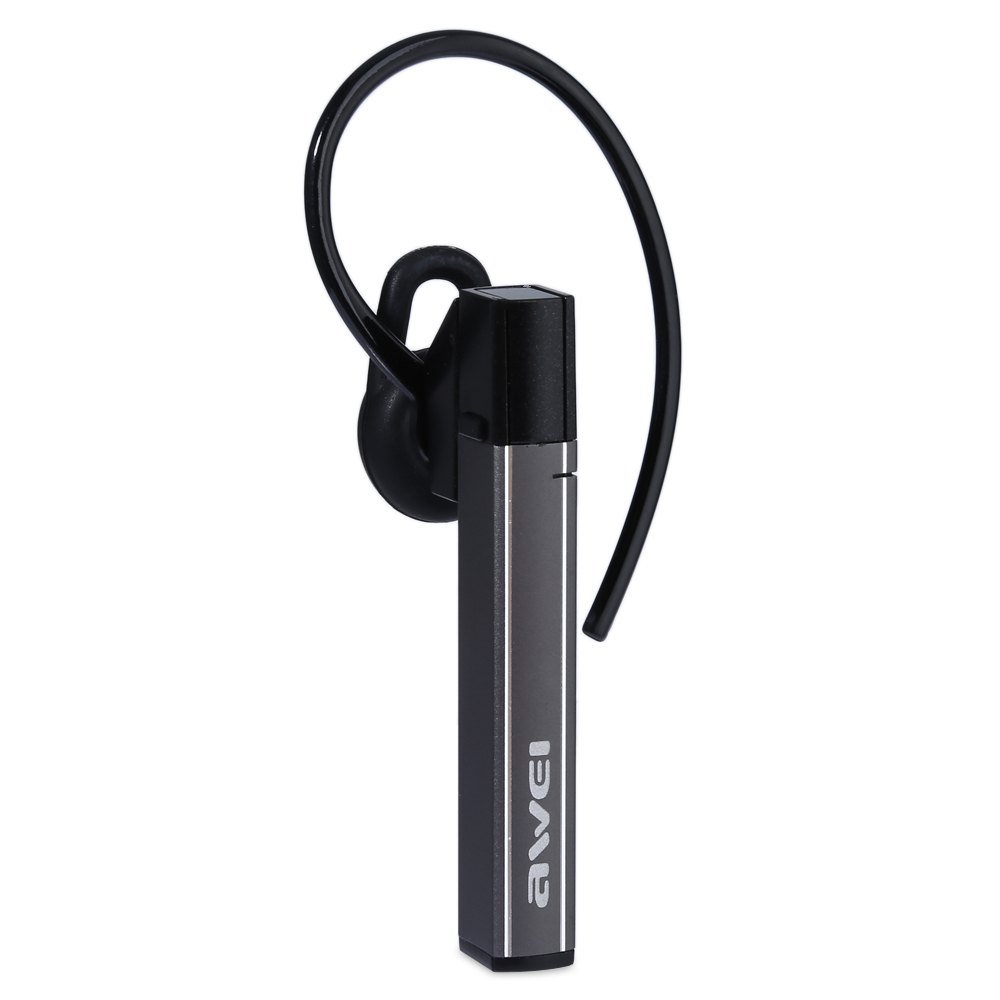
Image: The Awei A831BL Bluetooth In-Ear Headset in grey, showing the earbud design and inline controls.
The headset features an ergonomic in-ear design for comfortable wear, especially during activities. It includes an integrated microphone for hands-free calls and inline controls for managing audio and calls.
4. Kurulum
4.1 Kulaklığın Şarj Edilmesi
- USB şarj kablosunu kulaklığın şarj portuna takın.
- USB kablosunun diğer ucunu bir USB güç adaptörüne (dahil değildir) veya bir bilgisayarın USB portuna bağlayın.
- The indicator light will illuminate (e.g., red) during charging.
- Once fully charged, the indicator light will change (e.g., turn blue or turn off).
A full charge provides up to 8 hours of talk or music playback time.
4.2 Bluetooth Eşleştirme
- Kulaklığın tamamen şarj olduğundan ve kapalı olduğundan emin olun.
- Press and hold the Multi-function button (usually the center button on the inline control) for approximately 5-7 seconds until the indicator light flashes red and blue alternately, indicating pairing mode.
- Cep telefonunuzda veya Bluetooth özellikli cihazınızda Bluetooth'u etkinleştirin ve kullanılabilir cihazları arayın.
- Bulunan cihazlar listesinden "Awei A831BL"yi seçin.
- Şifre sorulursa "0000" (dört sıfır) girin.
- Once successfully paired, the indicator light will flash blue slowly, and you may hear a confirmation tone.
Kulaklık açıldığında otomatik olarak en son eşleştirilen cihaza yeniden bağlanmaya çalışacaktır.
5. Kullanım Talimatları
5.1 Güç Açma/Kapatma
- Güç Açık: Press and hold the Multi-function button for about 3 seconds until the blue indicator light flashes.
- Kapat: Press and hold the Multi-function button for about 3-4 seconds until the red indicator light flashes briefly and then turns off.
5.2 Müzik Oynatma
- Oynat/Duraklat: Çok işlevli düğmeye bir kez basın.
- Sesi aç: '+' tuşuna basın.
- Sesi kıs: '-' tuşuna basın.
- Sonraki Parça: '+' tuşuna basılı tutun.
- Önceki parça: '-' tuşuna basılı tutun.
5.3 Çağrı Yönetimi
- Cevap Çağrısı: Çağrı geldiğinde Çok Fonksiyonlu düğmeye bir kez basın.
- Çağrı Sonu: Görüşme sırasında Çok Fonksiyonlu düğmeye bir kez basın.
- Çağrıyı Reddet: Press and hold the Multi-function button for about 2 seconds when a call comes in.
- Son Numarayı Tekrar Ara: Çok işlevli düğmeye iki kez basın.
Entegre mikrofon, eller serbest görüşme imkanı sağlayarak net bir iletişim olanağı sunar.
6. Bakım
- Kulaklığı düzenli olarak yumuşak, kuru bir bezle temizleyin.
- Avoid exposing the headset to extreme temperatures, humidity, or corrosive substances.
- Kulaklığı sökmeye veya üzerinde değişiklik yapmaya çalışmayın, çünkü bu garantiyi geçersiz kılacak ve hasara neden olabilir.
- Kullanmadığınız zamanlarda kulaklığınızı serin ve kuru bir yerde saklayın.
7. Sorun Giderme
| Sorun | Çözüm |
|---|---|
| Kulaklık açılmıyor. | Kulaklığın tamamen şarj olduğundan emin olun. Güç kaynağına bağlayın ve tekrar deneyin. |
| Cihazla eşleştirme yapılamıyor. | Ensure the headset is in pairing mode (flashing red and blue). Turn off and on your device's Bluetooth. Move closer to the device. Clear previous Bluetooth connections on your device. |
| Ses yok veya ses seviyesi düşük. | Hem kulaklığınızın hem de bağlı cihazınızın ses seviyelerini kontrol edin. Kulaklığın doğru şekilde bağlı olduğundan emin olun. |
| Çağrı kalitesi düşük. | Ensure the microphone is not obstructed. Move to an area with less interference. Check your phone's signal strength. |
8. Özellikler
| Özellik | Detay |
|---|---|
| Marka | Awei |
| Model Numarası | A831BL |
| Renk | Gri |
| Bağlantı Teknolojisi | Kablosuz (Bluetooth) |
| Kulaklık Tipi | Kulak içi |
| Mikrofon | Evet |
| Gürültü Önleme | HAYIR |
| Pil Ömrü | Up to 8 hours (talk/music) |
| Ses Özellikleri | Pure, high-quality bass sound |
| Malzeme | Plastik |
| Uyumlu Cihazlar | Cep Telefonları |
9. Garanti ve Destek
Awei products are designed and manufactured to the highest quality standards. For warranty information and customer support, please refer to the warranty card included in your package or contact your local retailer. Keep your purchase receipt as proof of purchase.
Daha fazla bilgi için lütfen resmi Awei web sitesini ziyaret edin. websitesine bakın veya müşteri hizmetleri departmanıyla iletişime geçin.