
1. Giriş
This manual provides comprehensive instructions for the setup, operation, and maintenance of your Western Digital Easystore 5TB External USB 3.0 Portable Hard Drive. This device offers high-capacity storage and fast data transfer speeds, designed for reliable data backup and storage.
2. Paket İçeriği
Ürün ambalajınızda tüm öğelerin mevcut olduğundan emin olun:
- Western Digital Easystore 5TB Portable Hard Drive
- USB 3.0 Kablosu
- Quick Install Guide (or similar documentation)
3. Ürün Bittiview
Familiarize yourself with the components of your Easystore portable hard drive.

Şekil 3.1: Ön view of the Western Digital Easystore 5TB Portable Hard Drive, showcasing its sleek black design and the WD Easystore logo.
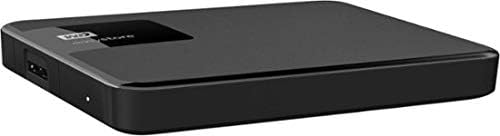
Şekil 3.2: Taraf view of the Easystore hard drive, highlighting the USB 3.0 port for connectivity and the power indicator light.

Şekil 3.3: Retail packaging for the Western Digital Easystore Portable Hard Drive, showing product branding and compatibility information.
4. Kurulum Talimatları
4.1 Connecting the Hard Drive
- Connect one end of the provided USB 3.0 cable to the USB port on the Western Digital Easystore portable hard drive.
- Connect the other end of the USB 3.0 cable to an available USB port on your computer (PC or Mac). For optimal performance, use a USB 3.0 port. The drive is backward compatible with USB 2.0 ports, but data transfer speeds will be reduced.
- The drive will power on automatically. The power indicator light on the drive will illuminate.
4.2 Windows için İlk Kurulum
The Western Digital Easystore drive is pre-formatted for Windows operating systems (NTFS). It should be recognized automatically by your computer and appear as a new drive letter in 'This PC' or 'My Computer'.
- No additional drivers are typically required for Windows.
- Aktarımlara başlayabilirsiniz. filehemen.
4.3 Initial Setup for Mac
For Mac users, the drive may require reformatting to HFS+ (Mac OS Extended) or APFS for full compatibility and optimal performance with macOS. Reformatting will erase all data on the drive, so ensure it is empty or back up any pre-loaded software if desired.
- Sürücüyü Mac'inize bağlayın.
- 'Disk Yardımcı Programı'nı açın (Uygulamalar > Yardımcı Programlar > Disk Yardımcı Programı).
- Select the Western Digital Easystore drive from the sidebar.
- Click 'Erase'.
- Choose a format (e.g., 'Mac OS Extended (Journaled)' or 'APFS') and a scheme (e.g., 'GUID Partition Map').
- Click 'Erase' again to confirm.
Alternatively, you can install the WD Discovery software for Mac, which may offer tools for managing the drive without reformatting, though reformatting is generally recommended for native Mac performance.
5. Kullanım Talimatları
5.1 Aktarma Files
Aktarmak için files, simply drag and drop them to and from the Easystore drive icon on your desktop or in your file explorer/finder window, similar to using any other folder.
- For Windows: Open 'This PC' or 'File Explorer', locate the drive, and drag files.
- For Mac: The drive icon will appear on your desktop. Drag files ve ondan.
5.2 Using Backup Software
The Western Digital Easystore drive supports backup software for scheduling regular automatic file transfers. Refer to the included software or download WD Discovery from the official Western Digital website for backup solutions. WD Discovery also allows management of drive settings, including LED control.
5.3 Safely Ejecting the Drive
Always safely eject the hard drive before disconnecting it to prevent data corruption.
- Pencereler: Click the 'Safely Remove Hardware and Eject Media' icon in the system tray, then select the Easystore drive.
- Mac: Masaüstünüzdeki sürücü simgesini Çöp Kutusu'na sürükleyin veya sürücü simgesine sağ tıklayın (Control tuşuna basılı tutarak tıklayın) ve 'Çıkar' seçeneğini seçin.
6. Bakım
- Fiziksel Bakım: Keep the drive in a clean, dry environment. Avoid extreme temperatures, direct sunlight, and high humidity.
- Koruma: The drive is portable but contains moving parts. Avoid dropping or subjecting it to strong impacts.
- Düzenli Yedeklemeler: While the Easystore drive is excellent for storage, it is recommended to maintain multiple copies of critical data across different storage solutions.
- Temizlik: Sürücünün dışını temizlemek için yumuşak ve kuru bir bez kullanın. Sıvı temizleyiciler veya çözücüler kullanmayın.
7. Sorun Giderme
7.1 Sürücü Tanınmıyor
- USB kablosunun hem sürücüye hem de bilgisayara güvenli bir şekilde bağlandığından emin olun.
- Sürücüyü bilgisayarınızdaki farklı bir USB portuna bağlamayı deneyin.
- Mümkünse sürücüyü farklı bir USB kablosuyla test edin.
- Bilgisayarınızı yeniden başlatın.
- For Mac users, ensure the drive has been formatted correctly (see Section 4.3).
7.2 Yavaş Veri Aktarım Hızları
- Sürücünün bilgisayarınızdaki bir USB 3.0 bağlantı noktasına bağlı olduğundan emin olun. USB 2.0 bağlantı noktaları önemli ölçüde daha yavaş hızlara neden olur.
- Bilgisayarınızın USB 3.0 sürücülerinin güncel olduğundan emin olun.
- Çok sayıda küçük parçayı transfer etmekten kaçının files simultaneously; large files transfer more efficiently.
- Sistem kaynaklarını kullanan veya disk işlemleri gerçekleştiren diğer uygulamaları kapatın.
7.3 Sürüş Işığı Yanmıyor
- Check the USB cable connection. The drive is USB-powered, so a secure connection is essential for power.
- Try a different USB port or computer to rule out a port issue.
8. Özellikler
| Özellik | Detay |
|---|---|
| Marka | Batı Dijital |
| Model Numarası | WDBKUZ0050BBK-WESN |
| Dijital Depolama Kapasitesi | 5 TB (5000 GB) |
| Bağlantı Teknolojisi | USB 3.0 (USB 2.0 ile geriye dönük uyumlu) |
| Sabit Disk Form Faktörü | 3.5 Inches (Internal drive type, external enclosure is portable) |
| Sabit Disk Açıklaması | Mekanik Sabit Disk |
| Donanım Platformu | Mac, PC |
| Renk | Siyah |
| Ürün Ağırlığı | 8.1 ons |
| Ürün Boyutları (UxGxY) | 4.6 x 6 x 1.6 inç |
| Özel Özellik | Taşınabilir |
9. Garanti ve Destek
For detailed warranty information and technical support, please visit the official Western Digital support website. You will typically need your product's model number (WDBKUZ0050BBK-WESN) and serial number (located on the drive itself or its packaging) when contacting support.
Çevrimiçi destek: support.wdc.com