
giriiş
This manual provides detailed instructions for the setup, operation, and maintenance of your CAMRY CR 1166 Weather Station. Please read this manual thoroughly before using the device to ensure proper function and longevity.
Güvenlik Talimatları
- Cihazı sudan ve yüksek nemden uzak tutun.
- Cihazı aşırı sıcaklıklara veya uzun süre doğrudan güneş ışığına maruz bırakmayın.
- Sadece belirtilen güç adaptörünü veya pilleri kullanın.
- Cihazı kendiniz sökmeye veya onarmaya çalışmayın. Yetkili servis personeliyle iletişime geçin.
- Çocukların erişemeyeceği yerde saklayınız.
Paket İçeriği
Paketin tüm bileşenlerinin mevcut olduğunu doğrulayın:
- CAMRY CR 1166 Weather Station (Main Unit)
- Uzak Dış Mekan Sensörü
- AC Güç Adaptörü
- Kullanım Kılavuzu

Image: Main unit, remote sensor, and power adapter included in the package.
Kurmak
1. Ana Ünitenin Çalıştırılması
- AC Gücünü Kullanma: Connect the provided AC power adapter to the main unit and plug it into a standard electrical outlet.
- Using Batteries (Optional): Open the battery compartment on the back of the main unit and insert the required batteries (not included), observing polarity.
2. Setting up the Remote Outdoor Sensor
- Open the battery compartment of the remote sensor and insert the required batteries (not included), observing polarity.
- Place the remote sensor in a sheltered outdoor location, away from direct sunlight and rain, to ensure accurate temperature and humidity readings. Ensure it is within range of the main unit (connectivity technology: 433 MHz, 868 MHz).
3. İlk Senkronizasyon
Once both the main unit and the remote sensor are powered, they should automatically synchronize. The outdoor temperature and humidity will appear on the main unit's display. If synchronization fails, refer to the Troubleshooting section.
Kullanım Talimatları
Ekran Üstüview
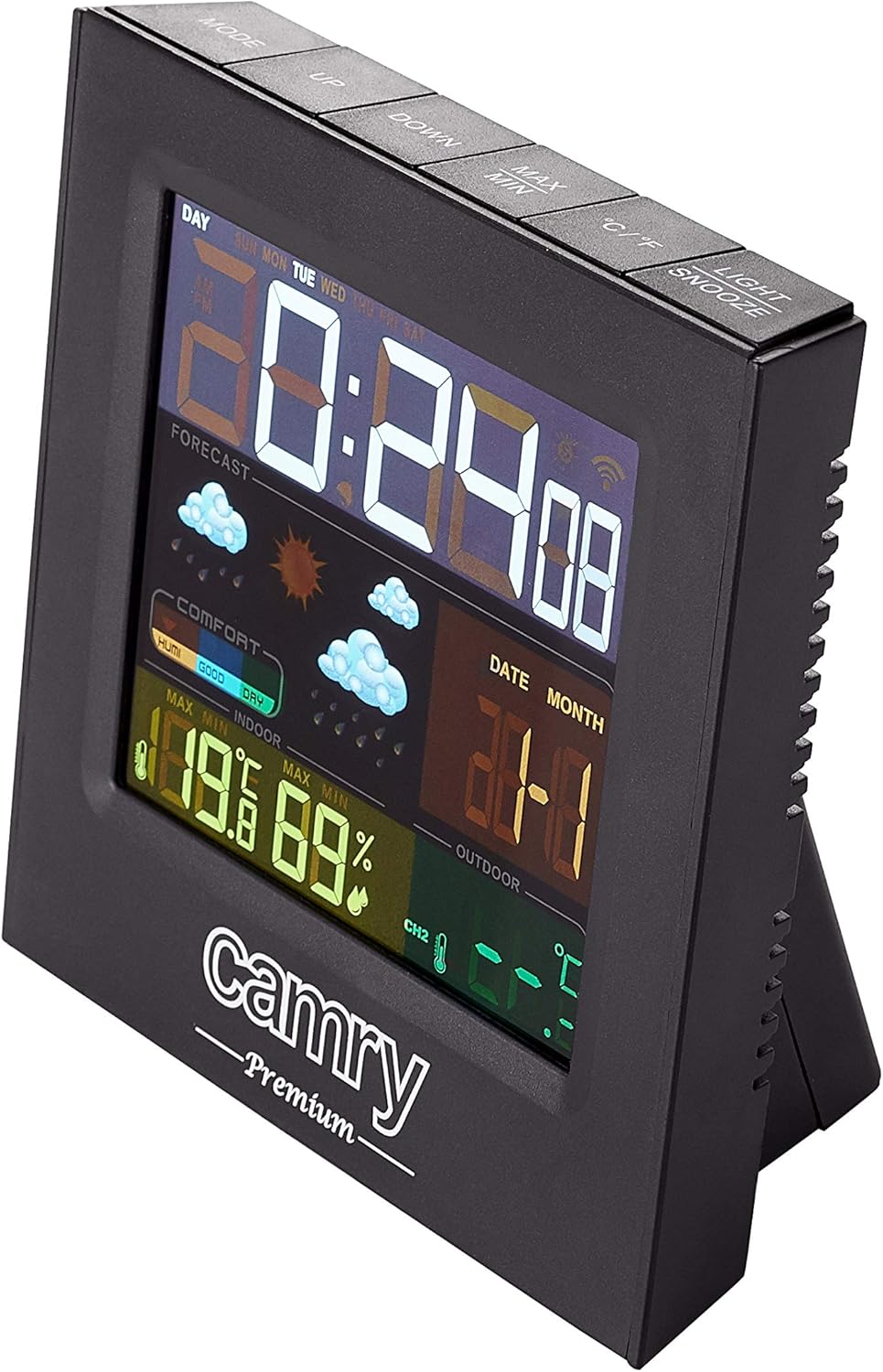
Resim: Ayrıntılı view of the weather station's multi-colored LCD display.
The multi-colored LCD display shows various information:
- Saat ve Tarih: Geçerli saati ve tarihi görüntüler.
- Hava Durumu tahmini: Icons indicate predicted weather conditions (e.g., sunny, cloudy, rainy).
- İç Mekan Sıcaklığı ve Nem Oranı: Current readings for the indoor environment.
- Dış Ortam Sıcaklığı ve Nem Oranı: Uzaktan sensörden alınan güncel okumalar.
- Konfor Seviyesi Göstergesi: Shows indoor comfort based on temperature and humidity.
Zaman ve Tarihin Ayarlanması
Refer to the buttons on the top of the unit (e.g., MODE, UP, DOWN).
- Basın MOD Zaman/tarih ayarı moduna girmek için kullanılan düğme.
- Kullanın UP Ve AŞAĞI Değerleri ayarlamak için düğmeler.
- Basmak MOD Tekrar onaylamak ve bir sonraki ayara geçmek için.
Alarm Fonksiyonu
The device includes an alarm clock function.
- Basın MOD button repeatedly until the alarm time is displayed.
- Kullanmak UP Ve AŞAĞI Alarm saatini ayarlamak için
- Activate/deactivate the alarm using the designated button (e.g., ALARM ON/OFF or a long press of MODE).
Sıcaklık Birimi Seçimi (°C/°F)
Basın °C/°F Santigrat ve Fahrenhayt arasında geçiş yapmak için düğme.
Bakım
- Temizlik: Cihazı yumuşak ve kuru bir bezle silin. Aşındırıcı temizleyiciler veya çözücüler kullanmayın.
- Pil Değişimi: Replace batteries in both the main unit and the remote sensor when the low battery indicator appears on the display.
- Sensör Yerleşimi: Periodically check the outdoor sensor's placement to ensure it remains protected from direct weather elements and is within effective range.
Sorun giderme
| Sorun | Olası Neden | Çözüm |
|---|---|---|
| Ana ünitede ekran yok. | Elektrik yok veya piller bitmiş. | Check AC adapter connection or replace batteries. |
| Dış mekan ölçümleri görüntülenmiyor veya hatalı. | Sensor out of range, dead sensor batteries, or interference. |
|
| Inaccurate indoor temperature/humidity. | Unit placed near heat/cold source or in high humidity. | Move the main unit to a location with stable ambient conditions. |
Özellikler
| Modeli: | CR 1166 |
| Marka: | CAMRİ |
| Ürün Ölçüleri (U x G x Y): | 24x24x76 cm |
| Ağırlık: | 384 gram |
| Malzeme: | Plastik |
| Renk: | Siyah |
| Görüntüleme Türü: | LCD |
| Güç Kaynağı: | AC Adapter or Battery |
| Bağlantı Teknolojisi: | 433 MHz, 868 MHz |
| Sıcaklık Doğruluğu: | 1-2 °C |
| Dahil Bileşenler: | Outdoor sensor, remote-controlled sensor |
| Menşei ülke: | Çin |
Garanti ve Destek
For warranty information or technical support, please refer to the documentation provided with your purchase or contact CAMRY customer service.