
1. Giriş
This manual provides essential information for the installation, operation, maintenance, and troubleshooting of your Chieftec Polaris 650W 80Plus Certified Power Supply Unit (PSU). Please read this manual thoroughly before installing and using the product to ensure proper function and safety. The Chieftec Polaris 650W PSU is designed to provide stable and efficient power to your personal computer system.
2. Güvenlik Bilgileri
Yaralanmaları veya ekipmanınızın hasar görmesini önlemek için her zaman aşağıdaki güvenlik önlemlerine uyun:
- Yapamaz PSU'yu açınasing. Yüksek hacimtages inside can cause electric shock. There are no user-serviceable parts inside.
- Yapamaz insert any objects into the PSU's ventilation openings.
- Yapamaz expose the PSU to water, moisture, or high humidity.
- Ensure the PSU is installed in a well-ventilated area, free from obstructions to airflow.
- Always disconnect the AC power cord from the wall outlet before installing, removing, or cleaning the PSU.
- Use only the modular cables provided with your Chieftec Polaris 650W PSU. Using incompatible cables may damage the PSU or connected components.
- Ensure all cable connections are secure before powering on the system.
3. Paket İçeriği
Paketinizde tüm öğelerin mevcut olduğundan emin olun:
- Chieftec Polaris 650W Power Supply Unit
- Modular Cable Set (e.g., 24-pin ATX, 8-pin EPS/CPU, PCIe, SATA, Molex)
- AC Güç Kablosu
- Montaj Vidaları
- Kullanım Kılavuzu (bu belge)
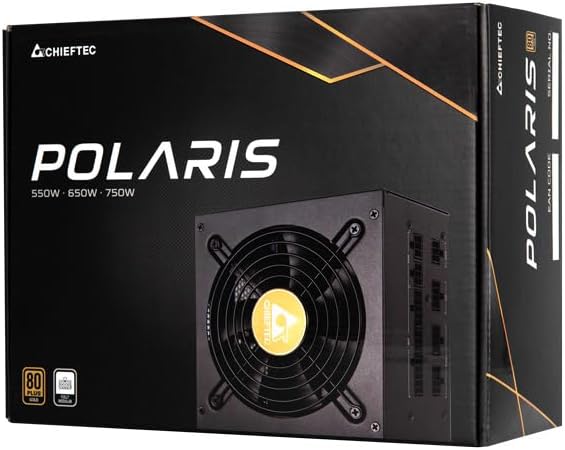
Image: The Chieftec Polaris 650W Power Supply Unit and its retail packaging.
4. Kurulum ve Kurulum
Follow these steps to install your Chieftec Polaris 650W PSU into your personal computer system:
- Sisteminizi Hazırlayın: Bilgisayarınızın tamamen kapalı olduğundan ve fişinin prizden çekildiğinden emin olun. PSU montaj alanına erişmek için bilgisayar kasanızı açın.
- Eski PSU'yu çıkarın (eğer varsa): If replacing an existing PSU, disconnect all cables from the components and motherboard, then unscrew and remove the old PSU.
- Yeni PSU'yu Takın: Carefully slide the Chieftec Polaris 650W PSU into the designated PSU bay in your computer case. Ensure the fan faces the correct direction (typically downwards for bottom-mounted PSUs, or as per case design for optimal airflow). Secure the PSU with the provided mounting screws.
- Modüler Kabloları Bağlayın: Identify the necessary modular cables for your system components (motherboard, CPU, graphics card, storage drives). Connect these cables to the corresponding ports on the back of the PSU. Refer to the image below for connector identification.
- Bileşenlere Bağlan: Connect the other end of the modular cables to your motherboard (24-pin ATX and 8-pin EPS/CPU), graphics card(s) (PCIe), and storage devices (SATA/Molex). Ensure all connections are firm and fully seated.
- Kablo yönetimi: Kasa içindeki hava akışını ve estetiği iyileştirmek için kabloları düzgün bir şekilde yönlendirin.
- Son Kontroller: Double-check all connections. Ensure no loose cables are obstructing fans. Close your computer case.
- AC Gücünü Bağlayın: Plug the AC power cord into the PSU's power inlet and then into a wall outlet.

Resim: Arka view of the Chieftec Polaris 650W PSU showing modular cable connection ports for M/B, SATA, PCIe, and CPU.

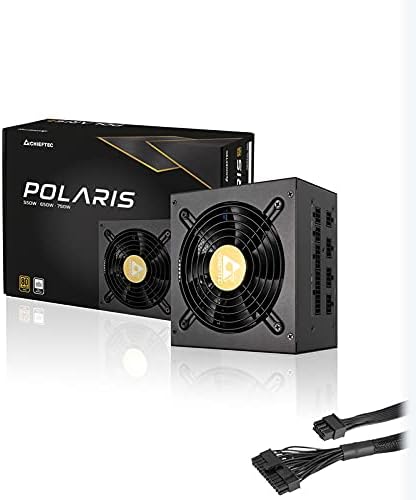
Image: The Chieftec Polaris 650W Power Supply Unit with its modular cables connected, ready for installation.
5. Kullanım Talimatları
Once the Chieftec Polaris 650W PSU is correctly installed and all connections are secure:
- Güç Açık: Locate the power switch on the back of the PSU (next to the AC power inlet). Ensure it is in the 'I' (On) position.
- Sistem Başlatma: Press the power button on your computer case. The system should power on, and the PSU fan will begin to spin, indicating normal operation.
- Fan Çalışması: The PSU features an air cooling method. The fan will operate to dissipate heat generated by the power supply components. Its speed may vary depending on the load and temperature to maintain optimal cooling and noise levels.
- Kapat: To shut down your system, use the operating system's shutdown procedure. For a complete power cut, switch the PSU's power switch to the 'O' (Off) position and unplug the AC power cord.
Resim: Yukarıdan aşağıya view of the Chieftec Polaris 650W Power Supply, highlighting the cooling fan and protective grille.
6. Bakım
Doğru bakım, güç kaynağınızın uzun ömürlü olmasını ve en iyi performansı göstermesini sağlar:
- Toz Temizleme: Periodically (e.g., every 3-6 months), power off your computer, unplug the AC cord, and open the case. Use compressed air to gently blow dust out of the PSU's fan and ventilation grilles. Yapamaz use a vacuum cleaner directly on the PSU as it can generate static electricity.
- Çevresel Koşullar: Ensure the computer operates in a clean, dry, and well-ventilated environment. Avoid extreme temperatures and direct sunlight.
- Kablo Bütünlüğü: Occasionally check that all modular cables are securely connected and not frayed or damaged.
7. Sorun Giderme
If you encounter issues with your Chieftec Polaris 650W PSU, consider the following troubleshooting steps:
- Güç Yok:
- AC güç kablosunun hem PSU'ya hem de duvar prizine güvenli bir şekilde takılı olduğundan emin olun.
- Check that the PSU's power switch on the back is in the 'I' (On) position.
- Başka bir cihaz takarak duvar prizinin çalışır durumda olduğunu doğrulayın.
- Confirm all internal power cables (24-pin ATX, 8-pin EPS/CPU) are firmly connected to the motherboard.
- Sistem Kararsızlığı/Rastgele Kapanmalar:
- Ensure the PSU is adequately ventilated and not overheating.
- Check all power connections to components (graphics card, storage) for looseness.
- If possible, test the PSU with a different set of components or in another system to rule out other hardware issues.
- Alışılmadık Sesler:
- A rattling or grinding noise may indicate a fan issue. Power off the system and inspect the PSU fan for obstructions (e.g., loose cables).
- If the noise persists and is not due to an obstruction, contact support.
If these steps do not resolve the issue, please refer to the Warranty and Support section.
8. Özellikler
| Özellik | Şartname |
|---|---|
| Marka | Şeftec |
| Model Adı | Kutup Yıldızı |
| Ürün Model Numarası | IN-ACT-ZDLCHFOBU0087 |
| Çıkış Watttage | 650 Watt |
| Form Faktörü | ATX |
| Soğutma Yöntemi | Hava |
| Bağlayıcı Türü | ATX |
| Uyumlu Cihazlar | Kişisel Bilgisayar |
| Ürün Boyutları (U x G x Y) | 8.66 x 3.15 x 1.18 inç (22 x 8 x 3 cm) |
| Ürün Ağırlığı | 4.4 pound (2 Kilogram) |
| Sertifikasyon | 80Plus Sertifikalı |
9. Garanti ve Destek
Chieftec products are manufactured to high-quality standards. For specific warranty terms and conditions, please refer to the warranty card included with your product or visit the official Chieftec webGaranti süreleri ve kapsamı bölgeye ve ürüne göre değişiklik gösterebilir.
For technical support, product inquiries, or warranty claims, please contact Chieftec customer service through their official website or the contact information provided in your product documentation. When contacting support, please have your product model number (IN-ACT-ZDLCHFOBU0087) and proof of purchase readily available.