
1. Önemli Güvenlik Talimatları
Please read all instructions carefully before using the ProfiCare PC-BSR 3043 Robot Vacuum Cleaner. Keep this manual for future reference.
- Bu cihaz yalnızca evlerde kullanım için tasarlanmıştır.
- Do not immerse the robot, charging station, or power adapter in water or other liquids.
- Robotu açık alevlerden ve ısı kaynaklarından uzak tutun.
- Güç hacmini sağlayıntage matches the rating label on the charging adapter.
- Robotu ıslak yüzeylerde veya su birikintisi olan alanlarda kullanmayın.
- Cihazla oynamadıklarından emin olmak için çocukları denetleyin.
- Only use original accessories and spare parts provided or approved by ProfiCare.
- The robot contains a lithium-ion battery. Do not expose it to high temperatures or direct sunlight.
- Güç kablosu hasar görmüşse, tehlikeyi önlemek için üretici, servis acentesi veya benzer vasıflı kişiler tarafından değiştirilmelidir.
2. Paket İçeriği
Ambalajı açtığınızda tüm bileşenlerin mevcut ve iyi durumda olduğunu doğrulayın:
- ProfiCare PC-BSR 3043 Robot Vacuum Cleaner
- Şarj istasyonu
- Şarj İstasyonu için Güç Adaptörü
- Uzaktan kumanda
- 2 x Side Brushes (one pair)
- 1 x HEPA Filter (pre-installed or spare)
- Kullanım Kılavuzu (bu belge)

Image: The ProfiCare PC-BSR 3043 robot vacuum cleaner, showcasing its sleek design, along with its remote control and a smartphone displaying the companion app interface.
3. Ürün Bittiview
The ProfiCare PC-BSR 3043 is a high-quality robot vacuum cleaner designed for efficient and autonomous floor cleaning. It features rotating floor and side brushes to effectively remove dirt, dust, crumbs, and pet hair from various surfaces.
- Çok Yönlü Temizlik: Suitable for all hard floors and short-pile carpets.
- Akıllı Navigasyon: Utilizes gyroscope technology for systematic and efficient cleaning paths.
- Kompakt Tasarım: Extra-flat dimensions (only 7.5 cm high) allow cleaning under furniture.
- Gelişmiş Filtrasyon: Equipped with a HEPA filter for high-efficiency particle air filtration.
- Otomatikleştirilmiş Fonksiyonlar: Automatic return to charging station, stair and obstacle detection.
- Çoklu Kontrol Seçenekleri: Sensor touch display, multi-function remote control, and Wi-Fi app control.

Resim: Yan view of the ProfiCare PC-BSR 3043 robot vacuum cleaner, highlighting its compact height of 75 mm and a diameter of 300 mm, ideal for cleaning under furniture.
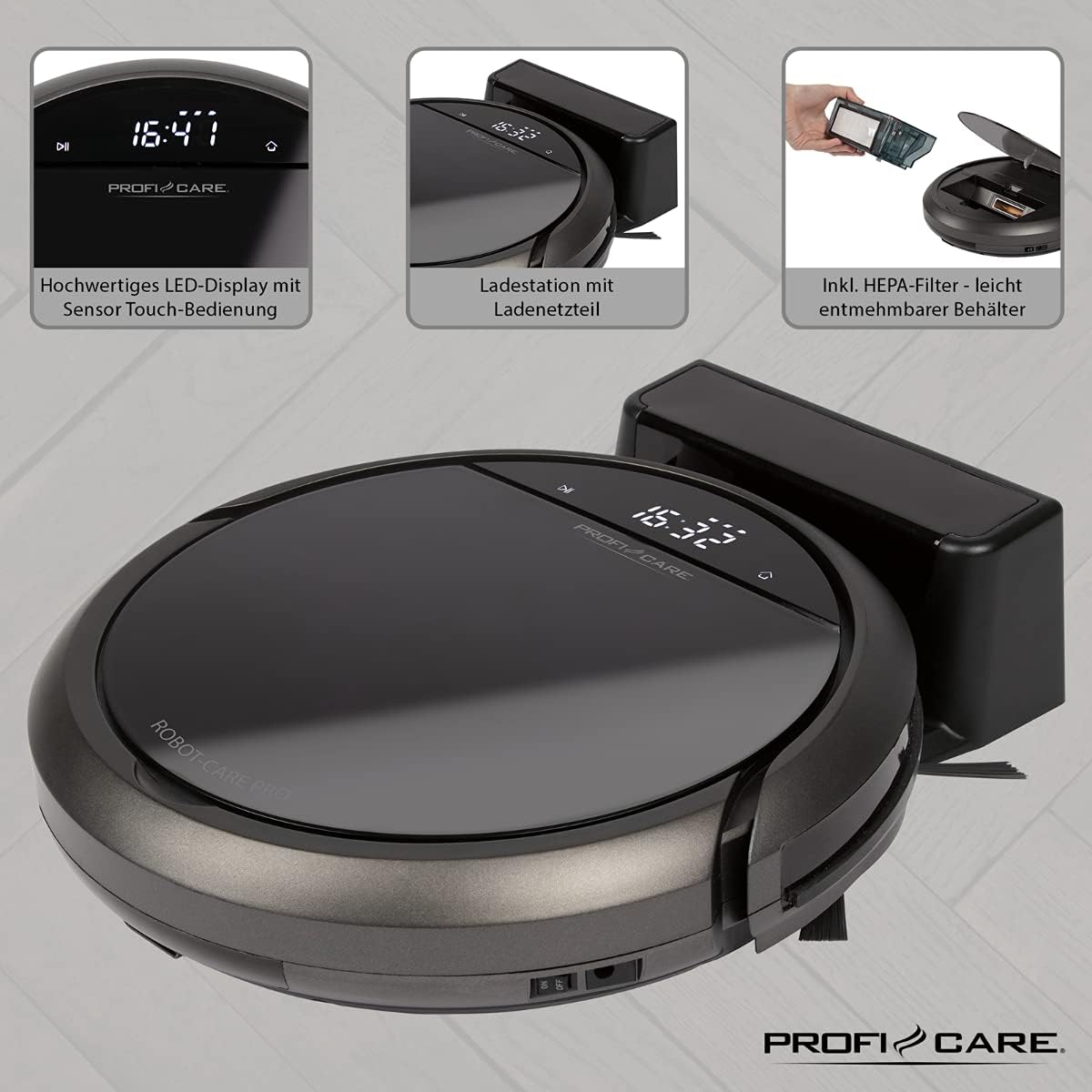
Resim: Üst view of the ProfiCare PC-BSR 3043 robot vacuum cleaner with key features labeled, including LED display, sensor touch operation, Wi-Fi app control, auto-return function, 2600 mAh / 14.8 V Lithium-ion battery, and 120 minutes runtime.
4. Kurulum
4.1 Robotu Şarj Etme
- Şarj istasyonunu açık bir alanda, yanlarda 1 metre ve önde 2 metre mesafede herhangi bir engel bulunmadığından emin olarak bir duvara yaslayın.
- Connect the power adapter to the charging station and plug it into a power outlet. The indicator light on the charging station will illuminate.
- Place the robot vacuum onto the charging station. Ensure the charging contacts on the robot align with those on the station. The robot will emit a sound and the display will show charging status.
- Allow the robot to fully charge before first use (approximately 3 hours).

Image: The ProfiCare PC-BSR 3043 robot vacuum cleaner docked on its charging station, illustrating the automatic return and charging capability.
4.2 Yan Fırçaların Takılması
Gently push the side brushes onto the square posts on the underside of the robot until they click into place.
4.3 Wi-Fi ve Uygulama Kurulumu
- Download the ProfiCare app from the Google Play Store (for Android 4.4 or higher) or Apple App Store (for iOS 9.0 or higher).
- Open the app and follow the on-screen instructions to register an account and add your PC-BSR 3043 robot.
- Ensure your Wi-Fi network is 2.4 GHz, as 5 GHz is not supported.
5. Robot Süpürgeyi Çalıştırma
5.1 Açma/Kapatma
Press and hold the power button on the robot's display or the remote control to turn the robot on or off.
5.2 Temizleme Modu
The robot offers four distinct cleaning programs:
- Otomatik mod: Robot, tüm alanı kapsayacak şekilde sistematik bir temizlik yapar.
- Nokta Modu: The robot cleans a concentrated area in a spiral pattern, ideal for heavily soiled spots.
- Corners Mode: The robot focuses on cleaning along walls and in corners.
- Systematic Mode (Gyroscope Controlled): Ensures independent orientation for faster and more efficient cleaning results.
5.3 Kontrol Seçenekleri
- Dokunmatik Sensörlü Ekran: Use the integrated LED display with touch controls for basic operations.
- Uzaktan kumanda: The multi-function remote allows for timer settings, individual control, and recalling the robot to the charging station.
- Uygulama Kontrolü: The smartphone app provides advanced features like 2D map function, live tracking, remote control functions, cleaning plan creation (day, time, frequency), cleaning program selection, and battery status display.
- Ses Kontrolü: The robot supports voice control for convenient operation.
5.4 Otomatik Fonksiyonlar
- Otomatik Geri Dönüş: The robot automatically returns to the charging station after completing a program or when the battery level is low.
- Engel Algılama: Infrared sensors detect obstacles, allowing the robot to navigate around furniture and other items. Mechanical soft protection is also included for sensitive furniture.
- Merdiven Algılama: Infrared sensors prevent the robot from falling down stairs.
- Otomatik Sıfırlama: After recharging, the robot continues cleaning from the last cleaned position.

Image: The ProfiCare PC-BSR 3043 robot vacuum cleaner actively cleaning a wooden floor in a home environment, demonstrating its ability to navigate and clean open spaces.
6. Bakım
Düzenli bakım robot süpürgenizin optimum performans göstermesini sağlar ve ömrünü uzatır.
6.1 Çöp Kutusunun Boşaltılması
- Press the dustbin release button and pull out the 400 ml dirt tank.
- Çöp kutusunun kapağını açın ve içindekileri çöp kutusuna boşaltın.
- Çöp haznesinin kapağını kapatın ve yerine oturana kadar robota tekrar takın.
6.2 HEPA Filtresinin Temizlenmesi
The HEPA filter should be cleaned regularly and replaced periodically (e.g., every 3-6 months, depending on usage).
- Çöp kutusunu yukarıda anlatıldığı gibi çıkarın.
- HEPA filtreyi çöp kutusundan dikkatlice çıkarın.
- Tap the filter gently over a trash can to remove loose dust. Do not wash the HEPA filter with water.
- Brush off any remaining debris with a soft brush.
- Reinsert the clean filter and dustbin.
6.3 Yan Fırçaların ve Ana Fırçanın Temizlenmesi
Regularly check the side brushes and main brush for tangled hair or debris. Use scissors to cut away any tangled hair and pull out debris.
6.4 Sensörlerin ve Şarj Kontaklarının Temizlenmesi
Wipe the infrared sensors (located around the robot's bumper and underside) and the charging contacts on both the robot and the charging station with a clean, dry cloth to ensure proper function.
7. Sorun Giderme
If you encounter issues with your ProfiCare PC-BSR 3043, refer to the following common problems and solutions:
| Sorun | Olası Neden | Çözüm |
|---|---|---|
| Robot açılmıyor. | Pil zayıf veya bitmiş. | Place the robot on the charging station and allow it to fully charge. |
| Robot şarj olmuyor. | Şarj kontakları kirli veya hizasız. | Clean the charging contacts on both the robot and the station. Ensure proper alignment. |
| Robot sık sık takılıyor. | Too many obstacles or tangled cables. | Clear the cleaning area of excessive clutter, cables, and small objects. |
| Zayıf temizleme performansı. | Dustbin is full, filter is clogged, or brushes are tangled. | Empty the dustbin, clean or replace the HEPA filter, and clean the side and main brushes. |
| Robot Wi-Fi'ye bağlanmıyor. | Incorrect Wi-Fi band (5 GHz not supported) or incorrect password. | Ensure your Wi-Fi network is 2.4 GHz. Re-enter Wi-Fi password carefully. Restart router and robot. |
| Robot merdivenlerden aşağı düşüyor. | Merdiven sensörleri kirli veya engellenmiş durumda. | Clean the stair sensors on the underside of the robot. |
For issues not listed here, or if problems persist, please contact ProfiCare customer support.
8. Teknik Özellikler
| Özellik | Şartname |
|---|---|
| Model Numarası | PC-BSR 3043 |
| Marka | ProfiCare |
| Boyutlar (U x G x Y) | 33 x 33 x 7 cm (approx. 31 x 22 x 13 cm packaged) |
| Ağırlık | 2.5 Kilogram |
| Pil Türü | Lityum iyon |
| Pil Kapasitesi | 14.8V, 2600mAh |
| Çalışma Süresi | Yaklaşık 120 dakika |
| Şarj Süresi | Yaklaşık 3 saat |
| Çöp Kovası Kapasitesi | 400 ml |
| Filtre Türü | HEPA Filtre |
| Gürültü Seviyesi | yaklaşık 61 dB |
| Bağlantı | Wi-Fi 2.4 GHz (5 GHz not supported) |
| Kontrol Türü | App Control, Remote Control, Sensor Touch |
| Yüzey Önerisi | Tiles, Hard Floors, Short-Pile Carpets |
9. Garanti ve Destek
ProfiCare products are manufactured with high quality standards. For information regarding warranty terms and conditions, please refer to the warranty card included with your product or visit the official ProfiCare webalan.
If you require technical assistance, have questions about product operation, or need to order spare parts, please contact ProfiCare customer support. Contact details can typically be found on the product packaging, the official websitenizden veya perakendeciniz aracılığıyla.
Please note that information regarding the availability of spare parts for this specific model is currently unavailable through standard channels. It is recommended to contact ProfiCare directly for any spare part inquiries.