1. Giriş ve Üzeriview
This manual provides detailed instructions for the installation, operation, and maintenance of your Soundstream VRN-DD7HB Double DIN Bluetooth In-Dash Car Stereo Receiver. Please read this manual thoroughly before using the product to ensure proper functionality and to prevent damage.
The VRN-DD7HB is designed to enhance your in-car audio experience with features such as Smart Sense Glass Panel Touch Screen Technology, Bluetooth V4.0 for hands-free calling and A2DP wireless audio playback, and compatibility with OEM steering wheel controls and rear view kameralar.
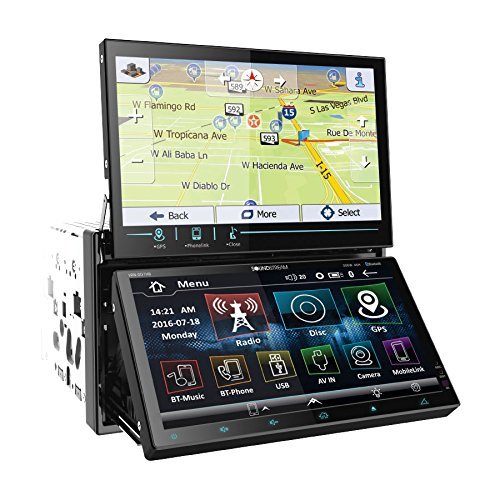
Şekil 1.1: Ön view of the Soundstream VRN-DD7HB Car Stereo Receiver, showcasing its double DIN form factor and touchscreen display.
2. Güvenlik Bilgileri
Güvenli çalışma sağlamak ve yaralanma veya hasarı önlemek için aşağıdaki önlemlere uyun:
- Üniteyi sürüş sırasında dikkatinizi dağıtacak şekilde kullanmayın. Yol güvenliğini her zaman ön planda tutun.
- Consult a professional for installation to avoid electrical damage or improper wiring.
- Üniteyi sökmeyin veya üzerinde değişiklik yapmayın. Bu, arızaya veya elektrik çarpmasına neden olabilir.
- Dışarıdaki trafik seslerini duyabileceğiniz bir ses seviyesinde kalın.
- Öneri 65 Uyarısı: Bu ürün, Kaliforniya Eyaleti tarafından kansere, doğum kusurlarına veya diğer üreme zararlarına neden olduğu bilinen kimyasallar içermektedir.
3. Kurulum ve Kurulum
Professional installation is highly recommended for this car stereo receiver. Incorrect wiring can cause severe damage to the unit or your vehicle's electrical system.
3.1 Kablo Bağlantıları
Ensure all power, ground, speaker, and accessory wires are connected correctly according to your vehicle's wiring diagram and the unit's wiring harness. Pay close attention to the following:
- Güç (Sarı): Sabit 12V güç kaynağına bağlayın.
- Aksesuar (Kırmızı): Anahtarlı 12V güce (ateşleme) bağlayın.
- Zemin (Siyah): Connect securely to a clean chassis ground point.
- Hoparlör Çıkışları: Aracınızın hoparlörlerine doğru polariteye dikkat ederek bağlayın.
- Arka View Kamera Girişi: Connect the video output of your rear view camera to the designated input on the receiver. Ensure the reverse trigger wire is connected to your vehicle's reverse light circuit.
- Direksiyon Kontrol Girişi: Connect to your vehicle's OEM steering wheel control interface (if applicable). Refer to your vehicle's manual and the steering wheel control interface instructions for proper connection.
3.2 Montaj
Mount the double DIN unit securely into your vehicle's dashboard using the provided mounting hardware. Ensure there is adequate space for ventilation and wiring.
4. Kullanım Talimatları
4.1 Güç Açma/Kapatma
Press the power button (usually located on the front panel or a soft-touch button on the screen) to turn the unit on or off. The unit will also power on/off with your vehicle's ignition.
4.2 Dokunmatik Ekranın Çalıştırılması
The VRN-DD7HB features a Smart Sense Glass Panel Touch Screen. Navigate menus, select functions, and adjust settings by touching the corresponding icons or areas on the display.
4.3 Bluetooth Bağlantısı
- Bir Cihazı Eşleştirme:
- Mobil cihazınızda Bluetooth'un etkinleştirildiğinden emin olun.
- On the VRN-DD7HB, navigate to the Bluetooth menu.
- Arama available devices on your mobile phone. The unit should appear as "Soundstream VRN-DD7HB" or similar.
- Select the unit on your phone to pair. Enter the PIN (usually "0000") if prompted.
- Eşleştirme tamamlandığında, ünite bağlantıyı onaylayacaktır.
- Eller Serbest Arama: After pairing, you can make and receive calls directly through the unit using the built-in front panel Bluetooth microphone and your car's speakers.
- A2DP Audio Playback: Stream audio wirelessly from your paired device. Select the Bluetooth audio source on the receiver and control playback (play/pause, skip) from the unit or your phone.
4.4 Arka View Kamera Girişi
When the vehicle is shifted into reverse, the unit will automatically display the image from the connected rear view camera on its 800x480 widescreen resolution display. This feature provides assistance for parking and maneuvering.
4.5 Direksiyon Kontrolü
If an OEM steering wheel control interface is connected, you can program the unit to respond to your vehicle's steering wheel buttons for functions such as volume control, track skipping, and mode selection. Refer to the unit's settings menu for steering wheel control configuration.
5. Bakım
Proper maintenance ensures the longevity and optimal performance of your car stereo receiver.
- Ekranın Temizlenmesi: Dokunmatik ekranı nazikçe silmek için yumuşak, tiftiksiz bir bez kullanın. İnatçı lekeler için hafifçe silin.ampBezi su veya ekran temizleyicisiyle silin. Aşındırıcı malzemelerden veya sert kimyasallardan kaçının.
- Genel Temizlik: Üniteyi toz ve kalıntılardan uzak tutun. Havalandırma deliklerini ve düğme alanlarını temizlemek için yumuşak bir fırça veya basınçlı hava kullanın.
- Aşırı Sıcaklıklardan Kaçının: Üniteyi aşırı sıcağa veya soğuğa maruz bırakmayın; bu, performansını ve kullanım ömrünü etkileyebilir.
6. Sorun Giderme
If you encounter issues with your VRN-DD7HB, refer to the following common problems and solutions:
| Sorun | Olası Neden / Çözüm |
|---|---|
| Ünite açılmıyor. |
|
| Hoparlörlerden ses gelmiyor. |
|
| Bluetooth device fails to pair. |
|
| Arka view Kamera görüntüsü görüntülenmiyor. |
|
7. Özellikler
| Özellik | Detay |
|---|---|
| Model Numarası | VRN-DD7HB |
| Görüntülemek | Smart Sense Glass Panel Touch Screen, 800x480 Widescreen Resolution |
| Bluetooth Sürümü | V4.0 (Hands-Free Calling, A2DP Audio Playback) |
| Mikrofon | Dahili Ön Panel Bluetooth Mikrofonu |
| Bağlantı Teknolojisi | Bluetooth, USB, 3.5 mm Jak |
| Uyumlu Cihazlar | Akıllı Telefon, Hoparlör |
| Denetleyici Türü | Android (via Bluetooth/USB connection) |
| Ses Çıkışı Modu | Stereo |
| Çevresel Ses Kanalı Yapılandırması | 4.0 |
| Çıkış Gücü | 220 Watt |
| Renk | SİYAH |
| Ürün Boyutları | 11.3 x 4.7 x 9.2 inç |
| Ürün Ağırlığı | 9.01 pound |
8. Garanti ve Destek
This product is offered as a renewed item. Renewed products are professionally inspected and tested to work and look like new. If not satisfied with the purchase, renewed products are typically eligible for replacement or refund under the Amazon Renewed Guarantee. Please refer to the specific terms and conditions of the Amazon Renewed Guarantee for details regarding your purchase.
For technical support or further assistance, please contact the seller or refer to the Soundstream official website for general product information.