
1. Giriş
The Korg Nu:Tekt NTS-1 is a unique digital synthesizer kit designed for enthusiasts to build and customize. This compact and portable instrument features a powerful sound engine with analog modeling and digital effects, offering a wide range of sonic possibilities. It is compatible with Korg's logue-SDK for custom oscillators and effects, providing extensive creative freedom.
Temel özellikler şunlardır:
- Easy-to-assemble DIY digital synthesizer kit.
- Compact and portable design for music creation anywhere.
- Powerful sound engine with analog modeling and digital effects.
- Versatile oscillator section for diverse sounds and textures.
- Integrated arpeggiator for dynamic and rhythmic patterns.
- Logue-SDK compatibility for custom oscillators and effects.
- Single-oscillator monosynth with a distinctive sound profile.
- Built-in multimode filter for precise sound shaping.
- Multiple modulation sources, including LFO and envelope generator.
- Onboard effects section with reverb, delay, and modulation effects.
2. Kurulum ve Montaj
The Korg Nu:Tekt NTS-1 is a DIY kit that requires assembly. Follow these steps to build your synthesizer:
2.1. Parça Listesi
Başlamadan önce tüm bileşenlerin mevcut olduğundan emin olun:
- Ana PCB (Baskılı Devre Kartı)
- Ön Panel
- Arka Panel
- Side Panels (metal)
- Corner Pieces (metal)
- Touch Keyboard Ribbon Cable
- Vidalar (çeşitli boyutlarda)
- Tornavida
- USB kablosu
- Kullanım Kılavuzu
Bir fazlaview of the kit components is shown below:

2.2. Montaj Adımları
- Şasiyi Hazırlayın: Carefully detach the front, back, and side panels from their perforated sheets. Ensure all edges are smooth.
- Yan Panelleri Birleştirin: Attach the metal side panels to the main PCB using the provided screws.
- Connect Touch Keyboard: Secure the touch keyboard ribbon cable to the designated connector on the main PCB.
- Ön Paneli Takın: Align the main PCB with the front panel, ensuring all knobs and buttons fit correctly. Secure with screws.
- Arka Paneli Takın: Place the back panel onto the assembled unit and secure it with the remaining screws.
- Add Rubber Feet: Apply the self-adhesive rubber feet to the designated spots on the bottom of the back panel for stability.
Once assembled, your Korg Nu:Tekt NTS-1 will resemble the image below:

2.3. Cihaza Güç Verme
The NTS-1 can be powered via USB. Connect the included USB cable to the USB port on the device and to a compatible USB power source (e.g., a computer, USB wall adapter, or power bank).

3. Kullanım Talimatları
The NTS-1 offers a range of controls for sound synthesis and manipulation. Familiarize yourself with the layout and functions:
3.1. Kontroller Üzeriview
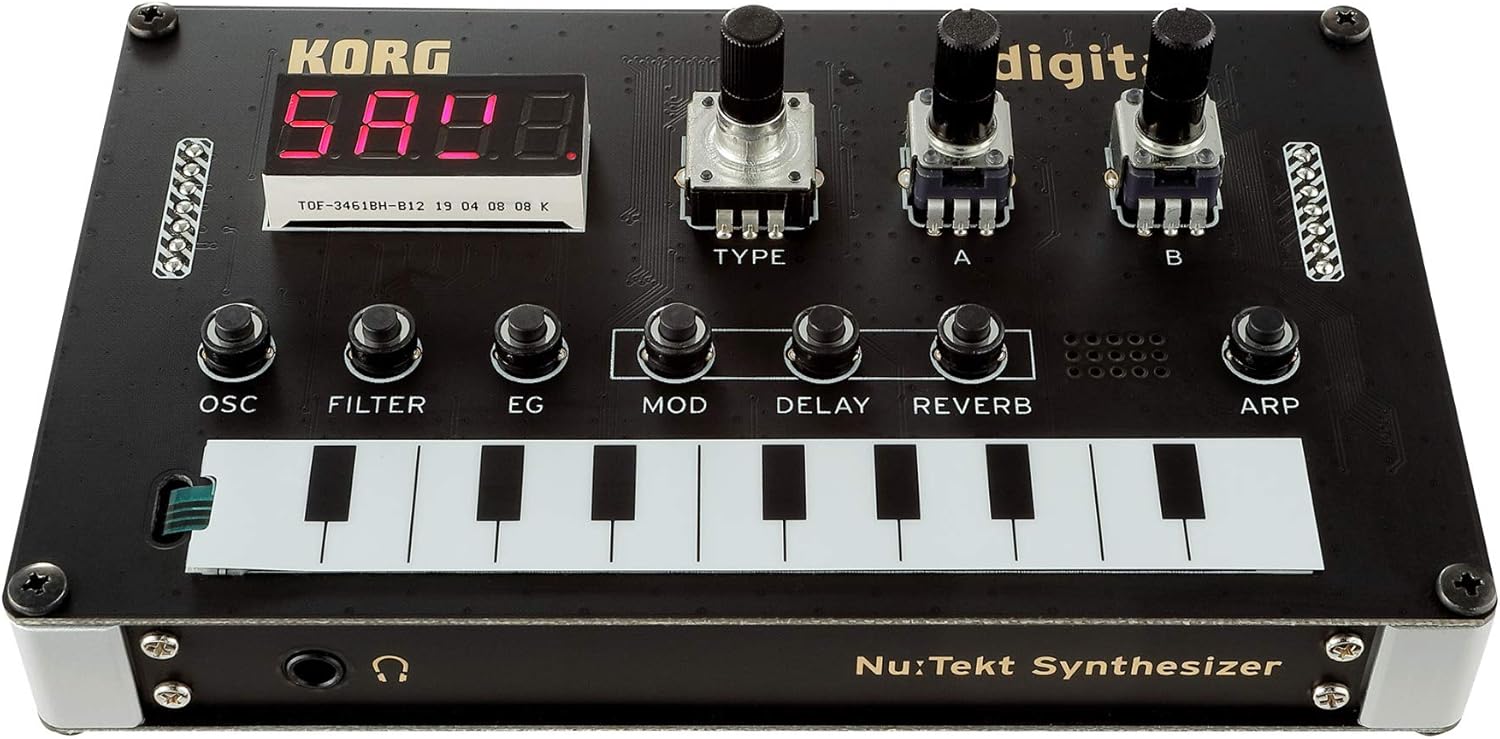
- OSC (Oscillator): Controls the primary sound source. Adjust TYPE, A, and B knobs to select and modify oscillator types and parameters.
- FİLTRE: Shapes the tonal characteristics of the sound. Use the dedicated knob to adjust the multimode filter.
- EG (Envelope Generator): kontrol eder ampsesin yükseklik zarfı.
- MOD (Modülasyon): Adjusts modulation sources and destinations, including LFO.
- GECİKME: Controls the delay effect parameters.
- yankı: Controls the reverb effect parameters.
- ARP (Arpeggiator): Activates and controls the arpeggiator for rhythmic patterns.
- Dokunmatik Klavye: A ribbon controller for playing notes and inputting sequences.
- LED ekran: Shows current parameter values and settings.
3.2. Temel İşlem
- Güç Açık: Connect the NTS-1 to a USB power source. The LED display will light up.
- Oyun Notları: Use the touch keyboard to play notes. Experiment with different pressure and slide techniques.
- Adjust Oscillator: Turn the OSC TYPE knob to select different oscillator types. Use knobs A and B to modify their characteristics.
- Apply Filter: Adjust the FILTER knob to change the cutoff frequency and resonance, shaping the sound.
- Use Effects: Experiment with the DELAY and REVERB knobs to add spatial effects to your sound.
- Arpejci: Press the ARP button to activate the arpeggiator. Adjust its parameters for varied rhythmic patterns.
3.3. Bağlantı

- USB BAĞLANTI: For power and MIDI communication with a computer.
- MIDI GİRİŞİ: Connect external MIDI controllers or sequencers.
- OUT/SYNC-IN: Audio output and synchronization input for other Korg Volca series devices.
- SES GİRİŞİ: Input for processing external audio signals through the NTS-1's effects.
3.4. Resmi Ürün Videoları
Watch these official videos from the seller for more insights into the Korg Nu:Tekt NTS-1:
4. Bakım
To ensure the longevity and optimal performance of your Korg Nu:Tekt NTS-1, follow these maintenance guidelines:
- Temizlik: Use a soft, dry cloth to wipe down the surface of the synthesizer. Avoid abrasive cleaners or solvents, as they may damage the finish.
- Depolamak: Store the NTS-1 in a cool, dry place away from direct sunlight, extreme temperatures, and high humidity.
- İşleme: Handle the device with care to prevent physical damage. Avoid dropping it or exposing it to excessive force.
- Güç: Always use the recommended USB power source. Disconnect power when the device is not in use for extended periods.
5. Sorun Giderme
If you encounter issues with your Korg Nu:Tekt NTS-1, try the following troubleshooting steps:
- Güç Yok: Ensure the USB cable is securely connected to both the NTS-1 and a working power source. Try a different USB cable or power source.
- Ses Yok: Check that the volume is turned up. Ensure headphones or speakers are properly connected to the output jack. Verify that an oscillator type is selected and the filter cutoff is open.
- MIDI Sorunları: Confirm that MIDI cables are correctly connected. Check MIDI settings on both the NTS-1 and your external device/software.
- Beklenmeyen Davranış: Try resetting the device to its factory settings (refer to the owner's manual for specific instructions).
6. Özellikler
| Özellik | Detay |
|---|---|
| Ürün Ağırlığı | 10.2 ons (290 Gram) |
| Ürün Boyutları | 5.08 x 3.07 x 1.54 inç |
| Gövde Malzemesi | Aluminum, Carbon Fiber |
| Bitiş Türü | Cilalı |
| Renk | Siyah |
| Güç Kaynağı | Corded Electric (USB Type B) |
| Cilttage | 9 Volt (AC) |
| Klavye Tuş Sayısı | 49 (virtual ribbon keyboard) |
| Üretici | KORG |
| İlk Mevcut Tarih | 3 Eylül 2019 |
7. Garanti ve Destek
KORG offers various protection plans for your Nu:Tekt NTS-1 Digital Synthesizer Kit:
- 3 Yıllık Koruma Planı: Available for a one-time payment of $21.99.
- 4 Yıllık Koruma Planı: Available for a one-time payment of $29.99.
- Tam Koruma: A monthly plan covering all eligible past and future purchases for $16.99.
For returns, a 30-day refund/replacement policy is typically available. For detailed warranty information and technical support, please refer to the official KORG websitesine gidin veya müşteri hizmetleriyle iletişime geçin.