
Yaheetech YT-00093701
Yaheetech Taşınabilir TV Sehpası Kullanım Kılavuzu
Modeli: YT-00093701
Marka: Yaheetech
1. Giriş
This manual provides detailed instructions for the assembly, operation, and maintenance of your Yaheetech Mobile TV Stand. Designed for flat panel screens ranging from 32 to 75 inches and supporting up to 110 pounds, this stand offers mobility, adjustable viewing angles, and convenient storage. Please read this manual thoroughly before assembly and use to ensure safe and optimal performance.

The Yaheetech Mobile TV Stand is equipped with multi-directional locking castors for easy movement and stability, adjustable height and tilt for optimal viewing, and integrated cable management to keep your setup tidy. It also includes multiple shelves for media devices and accessories.
2. Güvenlik Yönergeleri
Adhere to the following safety precautions to prevent injury or damage to the product:
- Ağırlık Kapasitesi: Do not exceed the maximum weight capacity of 110 pounds (50 kg) for the TV mount and 22 pounds (10 kg) for each shelf.
- Televizyon Boyutu: Ensure your TV is within the recommended size range of 32-75 inches.
- VESA Uyumluluğu: Verify your TV's VESA mounting pattern is compatible (100x100mm to 600x400mm).
- Toplantı: Assemble the stand on a soft, clean surface to prevent scratches. Follow all assembly steps precisely.
- Kararlılık: Always lock the wheels when the stand is stationary to prevent accidental movement.
- Çocuklar ve Evcil Hayvanlar: Montaj sırasında çocukları ve evcil hayvanları sehpadan uzak tutun ve devrilmeyi önlemek için televizyonun güvenli bir şekilde monte edildiğinden emin olun.
- Hareket: When moving the stand, ensure the TV is stable and move slowly, especially over uneven surfaces.
3. Paket İçeriği
Before beginning assembly, please verify that all parts are present and undamaged. Refer to the detailed parts list provided in the official PDF installation manual for a complete inventory.
You can access the official installation manual Burada.
4. Montaj Talimatları
For detailed, step-by-step assembly instructions, please refer to the official PDF installation manual linked above. The following provides a general overview montaj sürecinin.
4.1. Taban Montajı
Attach the support columns to the base frame, ensuring all screws are tightened securely. Install the universal wheels onto the base, making sure the locking wheels are positioned as desired for easy access.

4.2. Raf Montajı
The two main shelves and the top tray are adjustable. Position them at your desired height along the support columns. Ensure they are level and securely fastened. The non-slip large trays provide stable surfaces for your devices.
4.3. TV Mount Attachment
Attach the TV mounting brackets to the rear of your television using the appropriate screws and spacers provided. Ensure the VESA pattern on your TV matches the compatible patterns of the mount. The mount supports VESA patterns from 100x100mm to 600x400mm.

4.4. TV'nin montajı
Carefully lift your TV and hook the mounted brackets onto the TV stand's main mounting plate. Secure the TV in place using the safety screws or locking mechanisms to prevent accidental dislodgement. Ensure the TV is centered and stable.
5. Operasyon
5.1. Yükseklik Ayarı
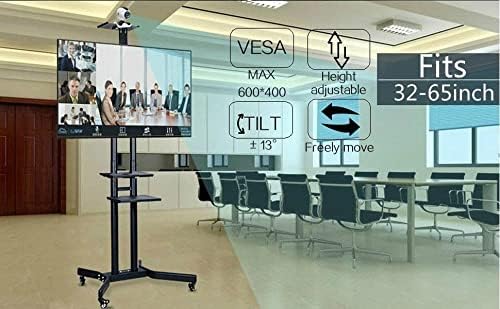
The TV mount plate can be adjusted in height from 43.3 inches to 63 inches (from the ground). To adjust, loosen the securing bolts on the main columns, carefully raise or lower the TV to the desired height, and then re-tighten the bolts firmly. Ensure both sides are adjusted equally.
5.2. Eğim Ayarı
The TV mount allows for a tilt adjustment of up to ±13 degrees. To adjust the tilt, loosen the tilt adjustment knobs on the side of the TV mount, angle the TV to your preferred viewing position, and then tighten the knobs to secure it.

5.3. Hareketlilik ve Kilitlenebilir Tekerlekler
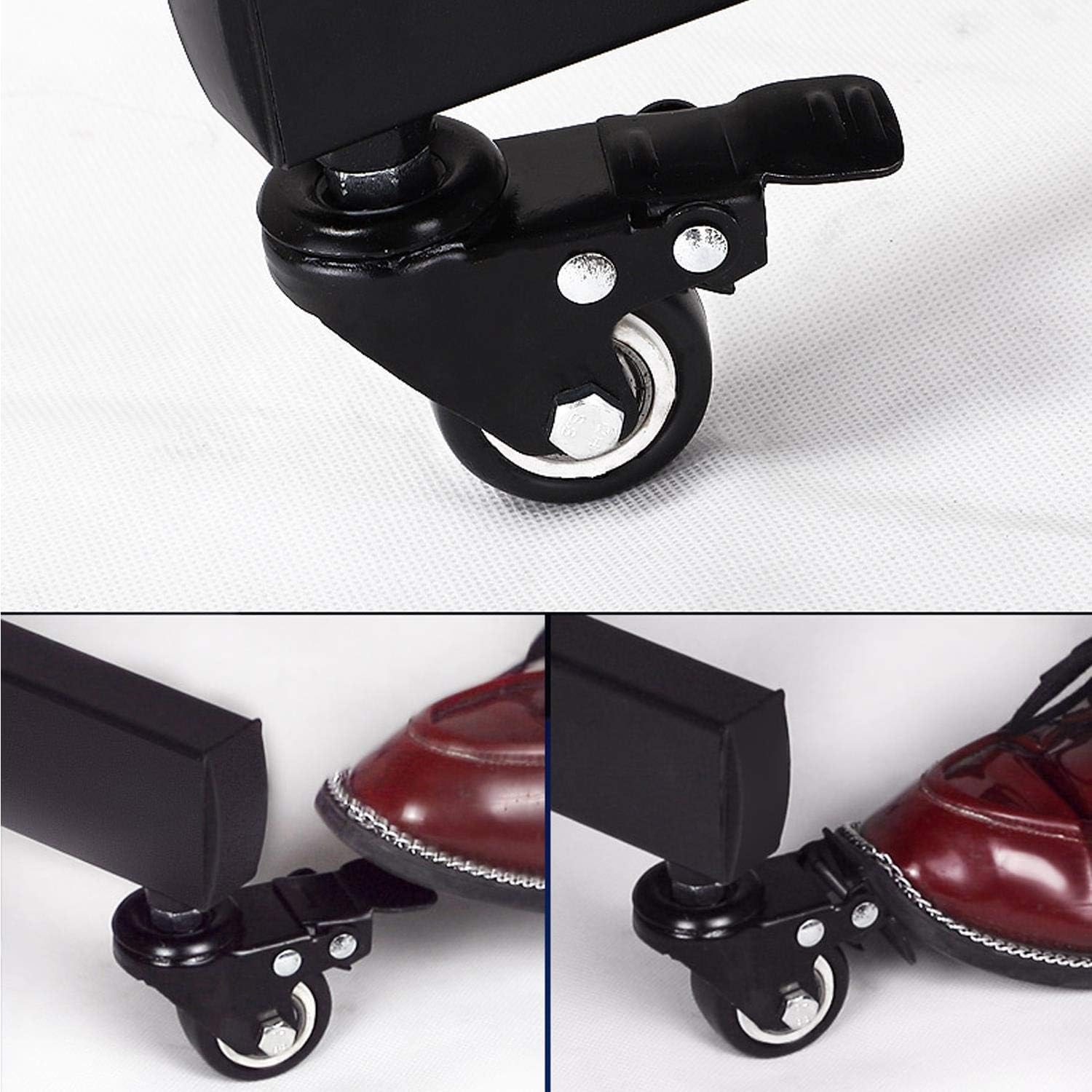
The stand features four 360° swivel castors for easy movement. Two of these wheels are equipped with brakes. To move the stand, unlock the braked wheels. To secure the stand in a stationary position, press down on the brake levers on the two locking wheels until they click into place.
5.4. Kablo Yönetimi
The main support columns are designed with hollow sections for cable management. Route your TV and device cables through these hollow tubes to maintain a clean and organized appearance, preventing tangles and potential hazards.

6. Bakım
- Temizlik: Sehpanın alt kısmını yumuşak bir bezle silin.amp Bez. Cilaya zarar verebilecek aşındırıcı temizleyicilerden veya çözücülerden kaçının.
- Denetimler: Tüm vidaların ve cıvataların sıkı kaldığından emin olmak için periyodik olarak kontrol edin. Gerekirse yeniden sıkın.
- Jant Bakımı: Tekerleklerin düzgün hareket etmesini sağlamak için tekerleklerin üzerinde biriken kalıntıları temizleyin.
7. Sorun Giderme
- Issue: Stand is unstable or wobbles.
- Çözüm: Ensure all assembly screws are fully tightened. Verify the TV is securely mounted and centered. Check that the floor surface is level. If moving, ensure wheels are locked when stationary.
- Issue: Wheels do not roll smoothly or lock properly.
- Çözüm: Check for any debris or obstructions in the wheels. Ensure the brake levers are fully engaged or disengaged. Clean the wheels if necessary.
- Issue: TV cannot be tilted or adjusted for height.
- Çözüm: Loosen the adjustment knobs/bolts sufficiently before attempting to adjust. Ensure no cables are obstructing movement. Re-tighten after adjustment.
8. Özellikler
| Özellik | Detay |
|---|---|
| Model Numarası | YT-00093701 |
| Uyumlu TV Boyutları | 32-75 inç |
| Maksimum TV Taşıma Kapasitesi | 110 lbs (50 kg) |
| VESA Uyumluluğu | 100x100mm ila 600x400mm |
| Yükseklik Ayar Aralığı | 43.3 - 63 inches (from ground) |
| Eğim Açısı | ±13 derece |
| Raf Ağırlık Kapasitesi | Raf başına 22 lbs (10 kg) |
| Malzeme | Alaşımlı Çelik |
| Renk | Siyah |
| Ürün Boyutları | 35.04 x 25.98 x 77.36 inç |
| Ürün Ağırlığı | 33.3 pound |

9. Garanti ve Destek
For warranty information, product support, or to purchase replacement parts, please contact Yaheetech customer service or visit the official Yaheetech store on Amazon:
Yaheetech Mağazasını ziyaret edin
Garanti talepleriniz için lütfen satın alma fişinizi saklayınız.
10. Ek Kaynaklar
While no official seller videos were provided in the product data, you may find additional visual guides or tips by searching for 'Yaheetech Mobile TV Stand assembly' on video platforms. Always refer to this manual and the official PDF for accurate product information.

İlgili Belgeler - YT-00093701
 |
BEISHI Mobil TV Arabası Kurulum Kılavuzu ve Parça Listesi BEISHI Mobil TV Arabası için resmi kurulum kılavuzu ve kapsamlı parça listesi, ayarlanabilir yükseklik ve VESA 600x400mm uyumluluğu ile 32-75 inç televizyonlar için tasarlanmış tekerlekli bir TV sehpasıdır. |
 |
Sylvox S50MCMA0 Mobile TV Cart Installation Guide Comprehensive installation guide for the Sylvox S50MCMA0 mobile TV cart. Learn how to assemble this heavy-duty stand, compatible with 65-75 inch TVs and VESA patterns up to 1200x600mm, supporting up to 60KG/132LBS. Includes warnings, parts list, step-by-step instructions, and technical specifications. |
 |
Espiron Optimum Mobil TV Sehpası Montaj Kılavuzu Espiron Optimum Mobil TV Sehpası, 32-75 inç televizyonlar için yüksekliği ayarlanabilir, eğme ve döndürme özelliklerine sahip tekerlekli bir TV sehpasıdır. |
 |
XZ50 Mobil TV Arabası Kurulum Kılavuzu 32 ila 65 inç arası düz panel ekranlar için tasarlanmış, yüksekliği ayarlanabilir tekerlekli TV sehpası olan XZ50 Mobil TV Arabası için adım adım kurulum talimatları. Parça listesi ve önemli güvenlik bilgileri de dahildir. |
 |
Yaheetech Ayarlanabilir Mobil TV Sehpası Montaj Talimatları Yaheetech ayarlanabilir mobil TV sehpası (Model # 610856) için montaj talimatları. Parça listesi ve adım adım montaj kılavuzu içerir. |
 |
Yaheetech 592071 Mobil TV Sehpası Montaj Talimatları Yaheetech 592071 mobil TV sehpası için kapsamlı montaj kılavuzu. Detaylı parça listesi, güvenlik uyarıları, şemaların metinsel açıklamalarıyla adım adım kurulum talimatları ve destek iletişim bilgilerini içerir. |
Ask a question about this manual
Ask about setup, troubleshooting, compatibility, parts, safety, or missing instructions. Manuals+ will review the question and use this page’s manual context to help answer it.