
1. Giriş
This manual provides detailed instructions for the safe and efficient operation of your Blackweb Portable Blu-ray/DVD Player, model SDVD1183-BW. Please read this manual thoroughly before using the device and retain it for future reference. This portable player features an 11.4-inch HD screen, USB and SD card slots for media playback, and supports both Blu-ray and DVD discs.
2. Güvenlik Bilgileri
- Güç Kaynağı: Use only the provided AC adapter. Ensure the voltage, adaptör üzerinde belirtilen gereksinimleri karşılamaktadır.
- Pil Güvenliği: The device contains a Lithium-Ion battery. Do not expose to extreme temperatures, puncture, or disassemble. Dispose of batteries according to local regulations.
- Havalandırma: Do not block ventilation openings. Ensure adequate airflow around the device during operation.
- Su ve Nem: Keep the device away from water, rain, and high humidity. Do not operate with wet hands.
- Temizlik: Disconnect power before cleaning. Use a soft, dry cloth. Avoid liquid cleaners or aerosols.
- Disk Kullanımı: Handle discs by their edges. Avoid touching the playback surface. Keep discs clean and free from scratches.
- Sıcaklık: Cihazı 5°C ile 35°C (41°F ile 95°F) arasındaki sıcaklık aralığında çalıştırın.
- Çocuklar: This device is not a toy. Keep out of reach of small children.
3. Ürün Bittiview
Familiarize yourself with the components and controls of your portable Blu-ray/DVD player.

Şekil 3.1: Ön view Siyahlarınweb Portable Blu-ray/DVD Player (SDVD1183-BW) with the screen open. The 11.4-inch display is visible at the top, and the control panel with navigation buttons, volume controls, and disc tray area is at the bottom.
3.1 Front Panel Controls (Open View)
- Ekran: 11.4-inch HD display.
- Disk Tepsisi: Area for inserting Blu-ray or DVD discs.
- Güç Düğmesi: Cihazı açar veya kapatır.
- MODE/SOURCE Button: Switches between input sources (Disc, USB, SD).
- Navigation Buttons (Left/Right/Up/Down/Enter): Menüde gezinme ve seçim için.
- Oynat/Duraklat Düğmesi: Oynatmayı başlatır veya duraklatır.
- Durdurma düğmesi: Oynatmayı durdurur.
- Hızlı İleri/Geri Sarma Düğmeleri: Skips chapters or fast forwards/rewinds playback.
- KURULUM Düğmesi: Sistem ayarları menüsüne erişim sağlar.
- VOL +/- Düğmeleri: Ses seviyesini ayarlar.
- Konuşmacılar: Entegre stereo hoparlörler.
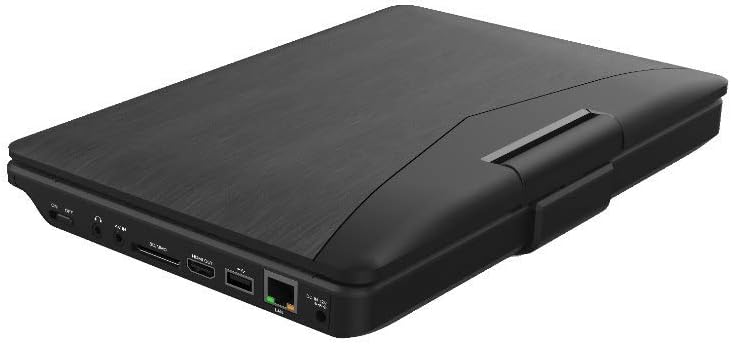
Şekil 3.2: Taraf view Siyahlarınweb Portable Blu-ray/DVD Player (SDVD1183-BW) when closed, highlighting the various input/output ports. These include the DC IN port, USB port, SD card slot, HDMI OUT port, and LAN (RJ45) port.
3.2 Yan Panel Bağlantı Noktaları
- DC IN: AC adaptörü için güç girişi.
- USB Bağlantı Noktası: Medya oynatmak için USB flash sürücüleri bağlayın.
- SD Kart Yuvası: Insert SD memory cards for media playback.
- HDMI ÇIKIŞI: Connect to an external display (TV, monitor) for larger viewIng.
- LAN (RJ45) Bağlantı Noktası: For wired network connection (if applicable for online features, though not explicitly stated for this model).
- Kulaklık girişi: 3.5mm audio output for private listening.
4. Kurulum
4.1 Pilin Şarj Edilmesi
- Connect the supplied AC power adapter to the DC IN port on the player.
- AC adaptörünün diğer ucunu standart bir duvar prizine takın.
- The charging indicator light will illuminate, typically red, during charging. It will change color (e.g., green or off) when fully charged.
- İlk kullanımdan önce tam şarj için yaklaşık 4-6 saat bekleyin.
4.2 Açma/Kapatma
- Açmak İçin: Open the screen and press the GÜÇ button. The screen will light up.
- Kapatmak İçin: Basılı tutun GÜÇ Ekran kapanana kadar düğmeye basın.
5. Kullanım Talimatları
5.1 Playing Blu-ray/DVD Discs
- Oynatıcının açık olduğundan emin olun.
- Disk tepsisi kapağını yavaşça açın.
- Place a Blu-ray or DVD disc onto the spindle with the label side facing up. Press down gently until it clicks into place.
- Close the disc tray cover. The player will automatically detect the disc and begin playback or display the disc menu.
- Gezinti düğmelerini kullanın ve GİRMEK to select options from the disc menu.
- Kullanın OYNAT/DURDUR, DURMAK, FF, Ve YENİDEN oynatmayı kontrol etmek için düğmeler.
5.2 Playing Media from USB/SD Card
- USB flash sürücüyü USB bağlantı noktasına veya SD kartı SD kart yuvasına takın.
- Basın MOD/KAYNAK button to select "USB" or "SD" as the input source.
- The player will display the file browser. Use the navigation buttons to browse your media file(videolar, fotoğraflar, müzik).
- Basmak GİRMEK seçmek ve oynamak file.
5.3 Ayarların Yapılması
- Basın KURMAK button to access the system settings menu.
- Use the navigation buttons to select categories such as "Video Setup," "Audio Setup," "Language Setup," etc.
- Basmak GİRMEK to enter a sub-menu and adjust settings like screen brightness, contrast, aspect ratio, audio output, and subtitle preferences.
- Basmak KURMAK Menüden çıkmak için tekrar
5.4 Harici Ekrana Bağlantı (HDMI)
- Ensure both the portable player and the external display (TV/monitor) are powered off.
- HDMI kablosunun (dahil değildir) bir ucunu HDMI ÇIKIŞI port on the portable player.
- Connect the other end of the HDMI cable to an HDMI input port on your external display.
- Power on both devices. Select the corresponding HDMI input on your external display.
- The portable player's output will now be displayed on the external screen. The portable player's screen may turn off or mirror the content, depending on settings.
5.5 Kulaklık Kullanımı
- Plug standard 3.5mm headphones into the headphone jack on the side of the player.
- The internal speakers will automatically mute when headphones are connected.
- Kullanarak ses seviyesini ayarlayın. SES +/- düğmeler.
6. Bakım
6.1 Cihazın Temizlenmesi
- Temizlemeden önce daima güç adaptörünün bağlantısını kesin.
- Dış yüzeyleri silmek için yumuşak, kuru ve tüy bırakmayan bir bez kullanın.
- For the screen, use a screen-specific cleaning cloth or solution, applying it to the cloth first, not directly to the screen.
- Aşındırıcı temizleyiciler, cilalar veya çözücüler kullanmayın.
6.2 Disk Bakımı
- Oynatma yüzeyinde parmak izi ve çizik oluşmasını önlemek için diskleri kenarlarından tutun.
- Diskleri kullanılmadıkları zaman kılıflarında saklayın.
- If a disc is dirty, wipe it gently from the center outwards with a soft, lint-free cloth. Do not use harsh chemicals.
7. Sorun Giderme
| Sorun | Olası Neden | Çözüm |
|---|---|---|
| Oynatıcı açılmıyor. | Pil bitmiş. Güç adaptörü bağlı değil veya arızalı. | Connect the AC adapter and charge the battery. AC adaptörünün hem oynatıcıya hem de çalışan bir elektrik prizine güvenli bir şekilde bağlı olduğundan emin olun. |
| Ekranda resim yok. | Screen brightness too low. HDMI cable connected to external display. | Adjust screen brightness in the SETUP menu. Disconnect HDMI cable or ensure external display is correctly configured. |
| Ses yok. | Ses çok düşük veya kısık. Kulaklıklar bağlı. Audio settings incorrect. | Hacmi artırmak için SES + düğme. Disconnect headphones if you want sound from speakers. Check audio settings in the SETUP menu. |
| Disk oynatılmıyor. | Disk kirli, çizik veya yanlış takılmış. Disc format not supported. Region code mismatch. | Clean the disc and reinsert it correctly. Ensure the disc is a supported Blu-ray or DVD format. This player supports region-free or compatible region discs. |
| USB/SD media not recognized. | Yanlış giriş kaynağı seçildi. File biçimi desteklenmiyor. USB drive/SD card corrupted or incompatible. | Basmak MOD/KAYNAK to select "USB" or "SD". Refer to specifications for supported file biçimleri. Try a different USB drive or SD card. Ensure it is formatted correctly (e.g., FAT32). |
8. Özellikler
- Modeli: SDVD1183-BW
- Ekran Boyutu: 11.4 inç
- Ekran Çözünürlüğü: 1280x720
- Medya Türü: Blu-Ray, DVD
- Bağlantı: USB, SD Card Slot, HDMI Out, LAN (RJ45), 3.5mm Headphone Jack
- Güç Kaynağı: AC Adapter, Built-in Lithium Ion Battery
- Ürün Ağırlığı: Yaklaşık 4.15 pound (1.88 kg)
- Ürün Boyutları (UxGxY): 16 x 14.5 x 3.5 inç (40.64 x 36.83 x 8.89 cm)
- Üretici: Siyahweb
9. Garanti ve Destek
For warranty information and technical support, please refer to the documentation provided at the time of purchase or contact the retailer. As this product is often sold as "Renewed," specific warranty terms may vary. Please consult the Amazon Renewed Guarantee for details regarding refurbished products purchased through Amazon.
For further assistance, you may also visit the official Blackweb Destek webLütfen web sitelerini ziyaret edin veya varsa müşteri hizmetleriyle iletişime geçin.