
1. Giriş
The Dual DAB 3A Digital Radio Adapter is designed to upgrade your existing audio system with modern digital radio reception and Bluetooth streaming capabilities. This adapter allows you to enjoy DAB+ and FM radio broadcasts with clear digital quality and stream audio wirelessly from compatible devices. Its user-friendly interface and remote control ensure convenient operation.
2. Güvenlik Bilgileri
- Güç Kaynağı: Yalnızca birlikte verilen AC güç adaptörünü kullanın. Ses seviyesinin doğru ayarlandığından emin olun.tage, adaptör üzerinde belirtilen gereksinimleri karşılamaktadır.
- Su ve Nem: Do not expose the device to rain, moisture, or dripping/splashing liquids. Keep it away from water sources.
- Havalandırma: Ensure adequate ventilation around the unit. Do not block ventilation openings. Avoid placing the device on soft surfaces that may obstruct airflow.
- Isı Kaynakları: Cihazı radyatörler, ısıtma petekleri, sobalar veya diğer ısı üreten cihazlar gibi ısı kaynaklarından uzak tutun.
- Temizlik: Disconnect the power before cleaning. Use a soft, dry cloth. Do not use liquid cleaners or aerosol sprays.
- Servis: Bu ürüne kendiniz servis vermeye çalışmayın. Tüm servis işlemleri için kalifiye servis personeline başvurun.
3. Paket İçeriği
Lütfen aşağıda listelenen tüm öğelerin paketinizde yer aldığından emin olun:
- Dual DAB 3A Digital Radio Adapter
- AC Güç Adaptörü
- Uzaktan kumanda
- Kullanım Kılavuzu
- External Wire Antenna
4. Ürün Bittiview
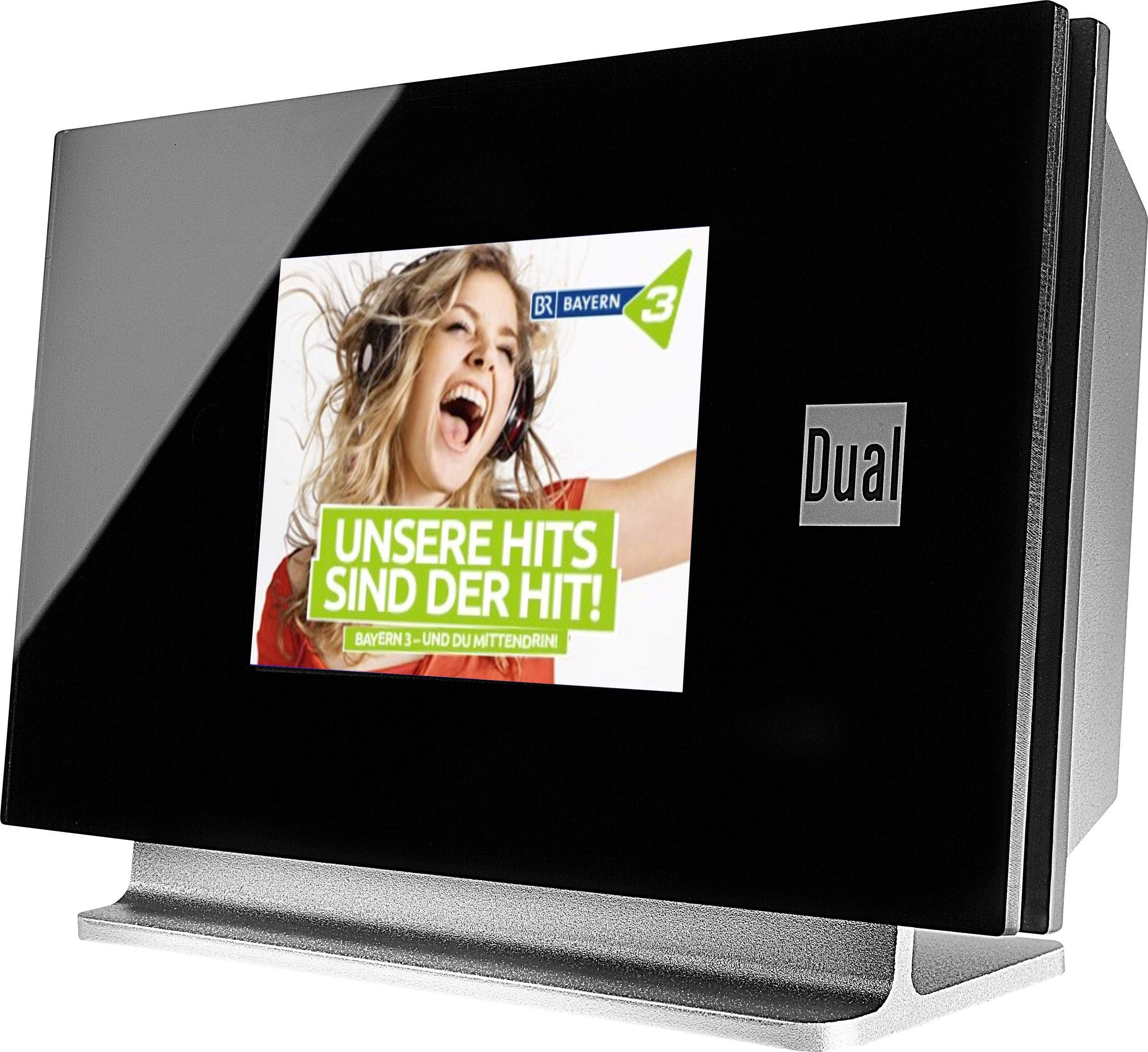
This image displays the Dual DAB 3A Digital Radio Adapter from a front-side angle. The front features a large, black TFT color display showing a radio station's album art and text. The side view indicates the product dimensions: 15 cm (width), 6 cm (depth), and 10.49 cm (height).
Ön Panel
- TFT Renkli Ekran: Shows station information, track details, album art, and menu options.
Arka Panel Bağlantıları
- Anten Girişi: For connecting the external wire antenna or a commercially available antenna.
- AUX-ÇIKIŞI: Audio output for connecting to an external ampLifier veya ses sistemi.
- Güç Girişi: AC güç adaptörünü bağlamak için.
Uzaktan kumanda
The included remote control provides full functionality for navigating menus, changing stations, adjusting volume, and selecting input modes.
5. Kurulum
- Anteni Bağlayın: Connect the supplied external wire antenna to the antenna input on the rear panel of the DAB 3A adapter. For optimal reception, extend the antenna fully.
- Ses Sistemine Bağlan: Use an appropriate audio cable (not included) to connect the AUX-OUT port on the rear of the DAB 3A to an available audio input (e.g., AUX-IN, Line-IN) on your existing amplifier veya stereo sistem.
- Gücü bağlayın: Plug the AC power adapter into the power input on the rear of the DAB 3A, then plug the adapter into a wall outlet.
- Güç Açık: Press the Power button on the unit or the remote control to turn on the adapter. The display will illuminate.
- İlk Tarama (DAB+): Upon first power-on, the unit may automatically perform a scan for available DAB+ stations. Allow this process to complete.
6. Çalıştırma
Güç Açık/Kapalı
- Basın Güç button on the unit or remote control to turn the device on or off.
DAB+ Radyo Modu
- Basın Mod button on the remote control until DAB+ mode is selected.
- If no stations are found or you wish to rescan, navigate to the 'Full Scan' option in the menu and confirm. The adapter will search for available DAB+ stations.
- Kullanın Yukarı/Aşağı navigation buttons on the remote to browse through the list of available stations.
- Basmak Tamam/Gir bir istasyon seçmek için.
- The TFT display will show station name, program information, and potentially album art or weather data.
FM Radyo Modu
- Basın Mod button on the remote control until FM mode is selected.
- İstasyonları otomatik olarak taramak için düğmeye basılı tutun. Tarama button (or equivalent on remote). The adapter will tune to the next strong station.
- Manuel olarak ayarlamak için, Yukarı/Aşağı navigation buttons to adjust the frequency.
Bluetooth Modu
- Basın Mod button on the remote control until Bluetooth mode is selected. The display will show 'Bluetooth Pairing' or similar.
- Akıllı telefonunuzda veya tabletinizde Bluetooth'u etkinleştirin ve kullanılabilir cihazları arayın.
- Select 'Dual DAB 3A' from the list of devices to pair.
- Once paired, you can stream audio from your device to the DAB 3A adapter.
AUX-IN Modu
- Connect an external audio source (e.g., MP3 player, CD player) to the AUX-IN port on the rear of the DAB 3A using a 3.5mm audio cable (not included).
- Basın Mod button on the remote control until AUX-IN mode is selected.
- Audio from the connected external device will now play through your audio system.
7. Bakım
- Ünitenin Temizlenmesi: Disconnect the power adapter before cleaning. Use a soft, dry, lint-free cloth to wipe the surface of the unit. Do not use abrasive cleaners, waxes, or solvents.
- Ekranın Temizlenmesi: Gently wipe the TFT display with a soft, dry microfiber cloth. Avoid pressing hard on the screen.
- Depolamak: Cihazı uzun süre saklayacaksanız, güç kaynağından ayırın ve doğrudan güneş ışığından ve aşırı sıcaklıklardan uzak, serin ve kuru bir yerde saklayın.
8. Sorun Giderme
| Sorun | Olası Neden | Çözüm |
|---|---|---|
| Güç yok | Güç adaptörü bağlı değil veya priz arızalı. | Güç adaptörünün cihaza ve çalışan bir elektrik prizine güvenli bir şekilde bağlı olduğundan emin olun. |
| Zayıf DAB+/FM alımı | Antenna not properly connected or poor signal strength. | Ensure the antenna is fully extended and properly connected. Try repositioning the antenna or the unit. Consider using a stronger external antenna if available. |
| Bluetooth eşleştirme başarısız oldu | Bluetooth not enabled on source device or adapter is not in pairing mode. | Ensure Bluetooth is enabled on your smartphone/tablet and the DAB 3A is in Bluetooth mode. Try restarting both devices. |
| Ses yok | Volume too low, incorrect input selected on amplifier, or audio cable issue. | Increase the volume on both the DAB 3A and your ampdaha yaşam dolu. Emin olun amplifier is set to the correct input (e.g., AUX-IN). Check the audio cable connections. |
9. Özellikler
- Modeli: 75862
- Ayarlayıcı Teknolojisi: DAB Plus, FM
- Bağlantı: Bluetooth
- Desteklenen Radyo Bantları: FM, DAB+
- Görüntüleme Türü: Renkli Ekran
- Güç Kaynağı: AC Adaptörü
- Donanım Arayüzü: Bluetooth
- Uyumlu Cihazlar: Akıllı telefon, Dizüstü bilgisayar
- Özel Özellikler: Bluetooth, Uzaktan Kumanda
- Ürün Ölçüleri: 15x6x10.5 cm
- Ürün Ağırlığı: 540 gr
10. Garanti ve Destek
This product comes with a standard manufacturer's warranty. For detailed warranty information, please refer to the warranty card included in your package or visit the official Dual website. For technical support, troubleshooting assistance, or service inquiries, please contact Dual customer support through their official channels.