
1. Giriş ve Üzeriview
ANTOP Akıllı Takviye Amplifier, model SBS-602B, is designed to enhance over-the-air (OTA) TV signals received by any non-amplified antenna. This device allows you to fine-tune your antenna's reception power through a simple dial adjustment. It features dual outputs, enabling simultaneous connection of your antenna to a primary television and a second device, such as an FM stereo, an additional TV, or an OTA-Ready streaming device or projector. The SBS-602B is fully compatible with TV converter boxes and modern digital televisions, supporting HD, 1080P, and 4K ULTRA HD resolutions.
Bu amplifier facilitates easier connections and helps achieve the optimal balance between short-range and long-range signal reception.
2. Kutuda Neler Var?
- ANTOP SBS-602B HD Akıllı Güçlendirme Anteni Ampcankurtaran
- AC/DC Güç Adaptörü
- Two (2) 5ft Coaxial Cables
- Two (2) Wall Screws/Anchors
- Instruction/User Manual (this document)

Image: Package contents of the ANTOP SBS-602B Smart Boost Antenna Ampcankurtaran.
3. Kurulum Talimatları
Follow these steps to set up your ANTOP SBS-602B Smart Boost Antenna Ampkaldırıcı:
- Connect Your Antenna: Connect the coaxial cable from your non-amplified TV antenna to the "ANT.IN" port on the ANTOP SBS-602B ampcankurtaran.
- Cihazlara Bağlan: Use one of the provided 5ft coaxial cables to connect the "TV/FM Device" output port on the amplifier to your primary television's antenna input. If connecting a second device (e.g., FM stereo, another TV, or streaming device), use the second 5ft coaxial cable to connect it to the other "TV/FM Device" output port.
- Gücü bağlayın: Plug the AC/DC Power Adapter into the "DC 12V" input port on the amplifier, then plug the adapter into a standard electrical outlet. The LED indicator on the ampLifer aydınlatmalı.
- Konumlandırma: Ensure your antenna is positioned optimally for signal reception. Keep the antenna away from metallic objects and high-power consumption devices to prevent interference.

Image: Connection diagram for the ANTOP SBS-602B ampcankurtaran.

Resim: Ön view of the ANTOP SBS-602B amplifier with connection ports.
4. Kullanım Talimatları
The ANTOP SBS-602B features a Smart Boost dial to adjust the signal gain:
- Kazancın Ayarlanması: Turn the Smart Boost dial clockwise to increase the signal gain (boost reception). Turn the dial counter-clockwise to decrease the signal gain. The adjustable range is 0 to 10dB.
- Kanal Tarama: After each adjustment of the Smart Boost dial, it is crucial to perform a channel scan on your television or connected device. This allows your device to detect and save the newly optimized channels.
- Regular Scans: It is recommended to scan for channels monthly to ensure you receive all available channels, including any newly added or changed broadcasts in your area.

Image: Smart Boost dial for adjusting reception power.
5. Bakım
To ensure the longevity and optimal performance of your ANTOP SBS-602B ampkaldırıcı:
- Temizlik: Cihazın dış yüzeyini temizlemek için yumuşak ve kuru bir bez kullanın. ampDaha yüksek kalitede temizleyiciler veya aşındırıcı maddeler kullanmayın.
- Çevre: Tut amplifier in a dry environment, away from direct sunlight, moisture, and extreme temperatures.
- Kullanıcı Tarafından Bakımı Yapılabilecek Parça Yok: açmaya çalışmayın. amplifier casing or perform any repairs yourself. This could void your warranty and cause damage to the unit.
6. Sorun Giderme
If you experience issues with your ANTOP SBS-602B ampbelirlemek için aşağıdakileri göz önünde bulundurun:
- No Signal or Poor Reception:
- Ensure all coaxial cable connections are secure at both the amplifier and your TV/devices.
- Verify the power adapter is firmly plugged into the amplifier and a working electrical outlet. The LED indicator on the amplifier should be lit.
- Adjust the Smart Boost dial and perform a channel scan on your TV after each adjustment.
- Check your antenna's outdoor or indoor placement. Obstructions or proximity to metallic objects can affect signal quality.
- Anteni yerinde tutun ve amplifier away from high-power consumption devices (e.g., microwaves, refrigerators) that can cause electromagnetic interference.
- Wobbly Power Connection: Ensure the power adapter plug is fully inserted and secure. If the connection remains loose, contact customer support.
- Limited Channels After Setup: Remember to perform a full channel scan on your TV after connecting the amplifier and adjusting the gain.
7. Özellikler
| Örnek | SBS-602B |
| Frekans Aralığı | 47-700MHz |
| Alma Aralığı | FM/VHF/UHF |
| Kazanmak | 14dB Maks. |
| Ayar Aralığı | 0~10dB |
| Çıkış Seviyesi | 98dBuV |
| Empedans | 75Ω |
| Gürültü Figürü | ≤3dB |
| Geri Dönüş Kaybı | >8 |
| Güç Kaynağı | Doğru Akım 12V |
| Boyutlar (U x G x Y) | 4.60 x 2.75 x 0.98 inç |
| Özellikler | Dual Outputs, Built-in 4G LTE Filter |
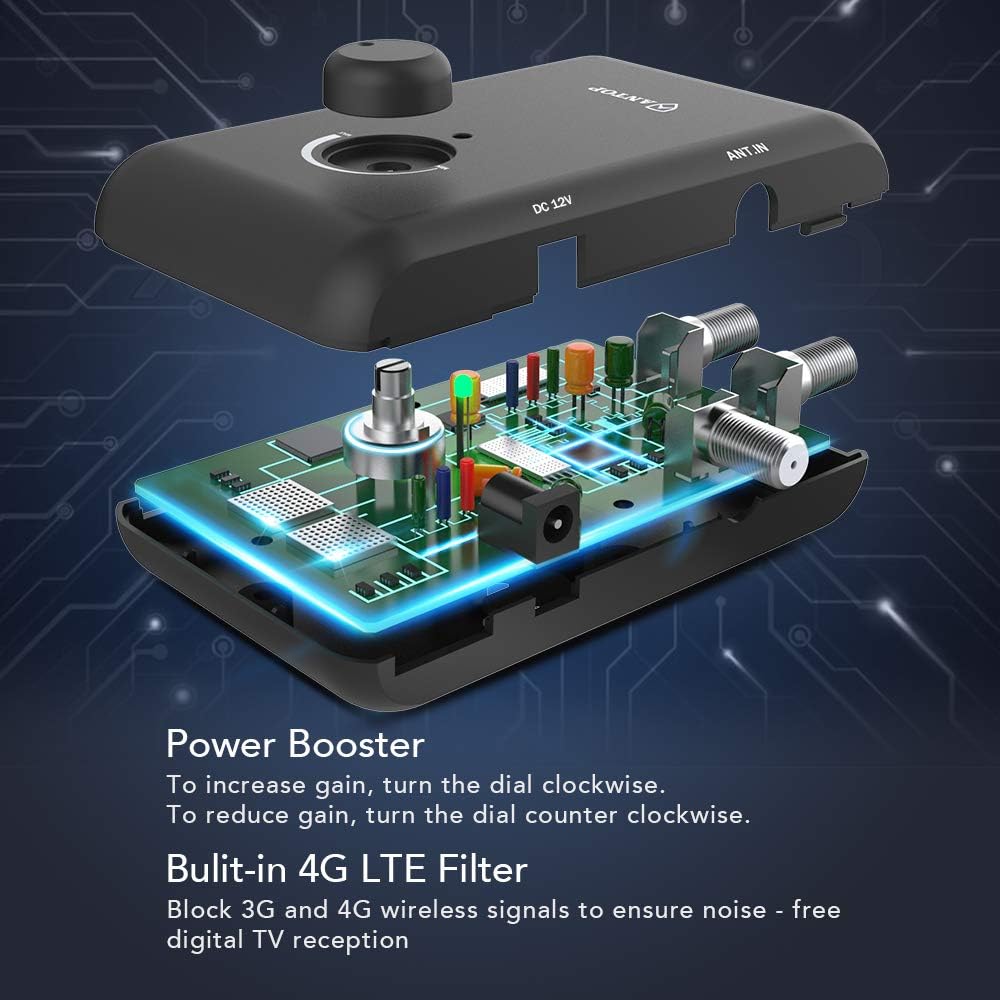
Image: Internal components and 4G LTE filter of the ampcankurtaran.
8. Garanti Bilgileri
For detailed warranty information regarding your ANTOP SBS-602B Smart Boost Antenna Amplifier, please refer to the documentation included with your purchase or visit the official ANTOP webSite. Garanti şartları ve koşulları değişiklik gösterebilir.
9. Müşteri Desteği
If you require further assistance, have questions, or encounter issues not covered in this manual, please visit the official ANTOP website for support resources, FAQs, and contact information. You may also refer to the contact details provided in your product packaging.