
PRITECH Universal Remote Control (Compatible with LG)
Pritech Universal Remote Control (Compatible with LG) - User Manual
Model: Universal Remote Control (Compatible with LG)
Ürün Bittiview
The Pritech Universal TV Remote Control is designed as an ideal replacement for your old or faulty remote. This convenient control allows you to operate your television as if it were the original remote. Simply insert the batteries, and it's ready to use.
Temel Özellikler:
- Perfect replacement for your existing TV remote.
- Guaranteed to work with all TV brands.
- Made from durable ABS material.
- Features soft plastic buttons for comfortable use.
- Hafif ve ergonomik tasarım.
- Operating range of up to 10 meters.

Image: Pritech Universal Remote Control highlighting its compatibility with LG, high performance, 8-meter range, comfortable design, and quick access buttons.
Kurulum ve Yükleme
The Pritech Universal Remote Control is designed for immediate use without complex setup. Follow these simple steps to begin using your remote.
1. Pil Kurulumu
The remote requires AAA batteries (not supplied). Ensure correct polarity when inserting the batteries.
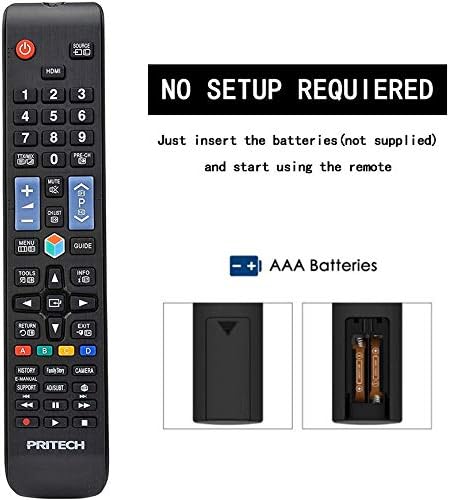
Image: A diagram illustrating the "NO SETUP REQUIRED" feature and the location for AAA battery insertion in the remote control.
- Pil Kapağını Çıkarın: Gently slide down the battery cover located on the back of the remote control.
- Pilleri Takın: Insert two AAA batteries, ensuring the positive (+) and negative (-) ends align with the markings inside the battery compartment.
- Pil Kapağını Değiştirin: Pil kapağını güvenli bir şekilde yerine oturana kadar yerine kaydırın.

Image: A four-panel visual guide demonstrating the steps for battery installation: 1. Removing the battery cover, 2. Distinguishing positive and negative electrodes, 3. Snapping batteries into place, and 4. Ready to control your TV.
2. İlk Kullanım
Once batteries are installed, the remote is ready to operate your LG compatible television. No programming or code entry is typically required.
Kullanım Talimatları
This universal remote control provides all the essential functions of your original LG TV remote. Familiarize yourself with the button layout for optimal use.

Resim: Şeffaf bir ön yüz view of the Pritech Universal Remote Control, showing all buttons and their labels, including power, input, channel, volume, navigation, and smart TV functions.
Ortak İşlevler:
- Güç düğmesi (●): Televizyonu açar veya kapatır.
- Giriş/Kaynak: Switches between different video inputs (HDMI, AV, etc.).
- Kanal Yukarı/Aşağı (▲/▼): TV kanallarını değiştirir.
- Sesi Artır/Azalt (+/-): Ses seviyesini ayarlar.
- Sesini kapatmak: TV sesini kapatır.
- Sayı Düğmeleri (0-9): Kanal numaralarını doğrudan girin.
- Gezinme Paneli (Yukarı, Aşağı, Sol, Sağ, Tamam): Menülerde gezinmek ve seçimleri onaylamak için kullanılır.
- Ana menü tuşu: Televizyonun ana akıllı merkezine veya ana ekranına erişim sağlar.
- Geri/Çıkış: Önceki ekrana döner veya bir menüden çıkar.
- Smart/My Apps: Direct access to smart TV features and installed applications.
For specific functions related to your LG TV model, refer to your television's user manual in conjunction with this remote control.
Bakım ve Özen
To ensure the longevity and optimal performance of your Pritech Universal Remote Control, follow these maintenance guidelines:
- Temizlik: Kumandayı temizlemek için yumuşak, kuru bir bez kullanın. İnatçı kirler için hafifçe kurulayın.ampen the cloth with water or a mild cleaning solution. Avoid abrasive cleaners or solvents.
- Pil Değişimi: Replace batteries when the remote's response becomes sluggish or stops working. Always replace both batteries at the same time.
- Depolamak: Uzaktan kumandayı serin, kuru ve doğrudan güneş ışığından ve aşırı sıcaklıklardan uzak bir yerde saklayın.
- Damlalardan Kaçının: While designed to be durable, avoid dropping the remote, as this can damage internal components.
- Sıvıya Maruz Kalma: Keep the remote away from liquids. If it gets wet, remove batteries immediately and allow it to dry completely before reinserting them.
Sorun giderme
If you encounter issues with your Pritech Universal Remote Control, try the following troubleshooting steps:
| Sorun | Olası Neden | Çözüm |
|---|---|---|
| Uzaktan kumanda yanıt vermiyor. | Pillerin bitmiş veya yanlış takılmış olması. Kumanda ile TV arasında engel olması. Kumandanın menzil dışında olması. | Check battery polarity and replace batteries if necessary. Ensure a clear line of sight to the TV's IR receiver. Move closer to the TV (within 10 meters). |
| Bazı düğmeler çalışmıyor. | Düğmelerin altında kir veya toz birikmiş. Dahili arıza. | Clean the remote surface. If problem persists, contact customer support. |
| Uzaktan çalışma aralıklı olarak gerçekleşiyor. | Pil gücü düşük. Parazit. | Replace batteries. Remove any potential sources of infrared interference. |
| Uzaktan kumanda televizyonu kontrol etmiyor. | Not compatible with TV model (despite being universal). | While designed for broad compatibility, some specific TV models might not be fully supported. Verify compatibility or contact Pritech support. |
Özellikler
| Özellik | Detay |
|---|---|
| Marka | PRITEK |
| Örnek | Universal Remote Control (Compatible with LG) |
| Renk | Black (Compatible with LG design) |
| Bağlantı Teknolojisi | Kızılötesi |
| Uyumlu Cihazlar | Television (specifically designed for LG compatibility) |
| Maksimum Menzil | 10 Metre |
| Malzeme | ABS Plastik |
| Güç Kaynağı | 2 x AAA Piller (dahil değildir) |
| ASIN | B07SRPZYWC |
| Üretici | Pritech |
Garanti ve Destek
Pritech offers a 2 yıllık garanti on this universal remote control. This warranty covers manufacturing defects and ensures the product functions as described.
For warranty claims, technical support, or further assistance, please contact Pritech customer service through their official webÜrünü satın aldığınız site veya perakendeciyle iletişime geçin. Garanti geçerliliği için satın alma belgenizi saklayın.
Not: Garanti, yanlış kullanım, kaza, yetkisiz değişiklikler veya normal aşınma ve yıpranma nedeniyle oluşan hasarları kapsamaz.
Ask a question about this manual
Ask about setup, troubleshooting, compatibility, parts, safety, or missing instructions. Manuals+ will review the question and use this page’s manual context to help answer it.