
1. Ürün Bittiview
The ezcap271 AV Recorder is a standalone device designed to convert analog video and audio signals into digital format. It allows users to record content from various sources such as VHS tapes, camcorders, DVD players, DVRs, and gaming systems directly to an internal 8GB memory card or an external Micro SD card, without the need for a computer. It features a 3-inch screen for previewing recordings and playback, and can also convert old music to digital MP3 format.

Resim 1.1: Açısal view of the ezcap271 AV Recorder, highlighting its 3-inch display and control buttons. The device is black with "ezcap" branding on the left side.
2. Paket İçeriği
Lütfen tüm öğelerin mevcut olduğundan emin olmak için paketi dikkatlice kontrol edin:
- 1 x ezcap271 AV Recorder
- 1 x Uzaktan Kumanda
- 1 x USB Cable (for power or data transfer)
- 1 x 3.5mm to 3RCA Cable
- 1 x 3RCA Adapter
- 1 x Kullanım Kılavuzu (İngilizce / Çince)
3. Temel Özellikler
- One-Click Digitalization: Convert analog video and audio tapes to digital format with a single button press.
- Bağımsız Çalışma: No computer required for recording.
- Entegre Ekran: 3-inch screen for live preview during recording and direct playback of recorded content.
- Dahili Depolama: Built-in 8GB memory for immediate use.
- Genişletilebilir Depolama: Supports external Micro SD cards up to 32GB (FAT32 format recommended).
- Çoklu Kaynak Uyumluluğu: Records from VHS, VCRs, DVD Players, DVRs, Camcorders, and Gaming Systems.
- Audio Conversion: Capable of converting old music from sources like CD players or cassette players to digital MP3 format.
- Çok Formatlı Oynatma: Supports playback of various video (RM, RMVB, AVI, MKV, WMV, VOB, MOV, FLV, ASF, DAT, MP4, 3GP, MPG, MPEG up to 720P) and audio (MP3, WMA, DRM, OGG, APE, FLAC, WAV, AAC) formats.
- Taşınabilir Tasarım: Compact and lightweight with a built-in 950mAh lithium battery for up to 2 hours of recording.
4. Teknik Özellikler
| Şartname | Detay |
|---|---|
| Arayüz | USB 2.0 |
| Video Girişi | 3.5mm AV Cable |
| Ses Girişi | 3.5mm Audio Cable, 3.5mm AV Cable |
| Video Çıkışı | 3.5mm AV Cable, HD (HDMI) |
| Ses Çıkışı | 3.5mm AV Cable, HD (HDMI), 3.5mm Earphone |
| Depolama Ortamı | Micro SD card (8GB internal, Max 32GB external, FAT32 format) |
| Kayıt Formatı | .avi (Video), .mp3 (Audio) |
| Kayıt Kalitesi | 480 30fps, PAL: 720*576; NTSC: 720*480 |
| Kayıt File Boyut | Video: approx. 8.5MB/Minute (0.5GB/Hour); Audio: approx. 1.4MB/Minute |
| Pil | Dahili 950mAh Lityum Pil |
| Çalışma Zamanı | Approx. 2 hours (full charge for recording) |
| Güç Kaynağı | 950mAh lityum pil, 5V/1A mini USB güç adaptörü |
| Desteklenen Diller | English, French, German, Japanese, Spanish, Simplified Chinese, Traditional Chinese |
| Video Oynatma Formatları | RM, RMVB, AVI, MKV, WMV, VOB, MOV, FLV, ASF, DAT, MP4, 3GP, MPG, MPEG (up to 720P) |
| Ses Oynatma Biçimleri | MP3, WMA, DRM, WMA, OGG, APE, FLAC, WAV, AAC |
| Boyutlar | 12.5 X 6.1 X 2.0 sm (4.92 X 2.40 X 0.78 olarak) |
| Ağırlık | 113g (3.97oz) |
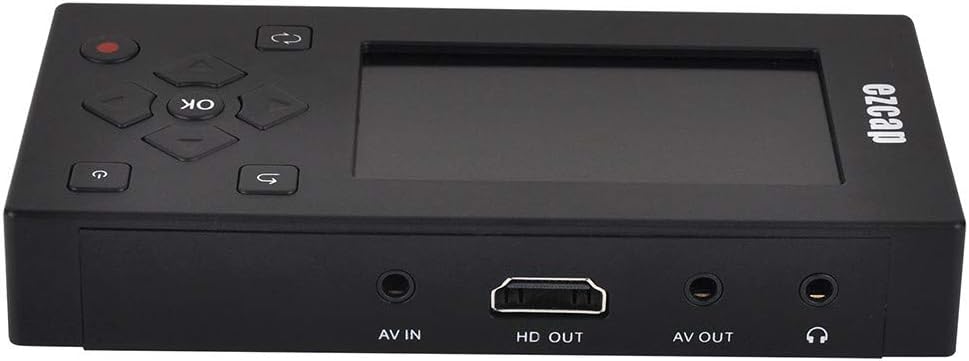
Resim 4.1: Arka view of the ezcap271 AV Recorder, displaying the AV IN, HD OUT (HDMI), AV OUT, and Earphone ports.
5. Kurulum Kılavuzu
5.1 Cihazı Şarj Etme
Before first use, fully charge the ezcap271. Connect the supplied USB cable to the device's Mini USB port and the other end to a 5V/1A USB power adapter (not included) or a computer's USB port. The charging indicator will show the charging status.
5.2 Mikro SD Kart Takma (İsteğe Bağlı)
The device has an internal 8GB memory. For additional storage, insert a Micro SD card (up to 32GB, FAT32 format) into the Micro SD card slot on the side of the device. Ensure the card is inserted correctly until it clicks into place.

Resim 5.1: Yan view of the ezcap271 AV Recorder, illustrating the Micro SD card slot and the Mini USB port.
5.3 Connecting to Video Source
To record from an analog video source (e.g., VCR, DVD player, camcorder):
- Connect the supplied 3.5mm to 3RCA cable to the AV IN port on the ezcap271.
- Connect the RCA (Red, White, Yellow) ends of the cable to the corresponding Audio/Video OUT ports on your source device (e.g., VCR).
- Ensure the source device is powered on and playing the content you wish to record.
5.4 Connecting to Display (Optional)
While the device has a built-in screen, you can connect it to an external display for a larger view:
- HDMI Çıkışı: Connect an HDMI cable (not included) from the HD Çıkışı port on the ezcap271 to an HDMI input on your TV or monitor.
- AV Çıkışı: Connect a 3.5mm to 3RCA cable (not included, or use the supplied one if not used for input) from the AV OUT port on the ezcap271 to the AV input on your TV.
6. Kullanım Talimatları
6.1 Açma/Kapatma
Basılı tutun Güç düğmesi ( ) on the top right of the device or remote control to power on or off the ezcap271.
6.2 Menüde Gezinme
Yön tuşlarını kullanın (Yukarı, Aşağı, Sol, Sağ) ve Tamam butonu in the center to navigate through the on-screen menu. The Geri dön düğmesi ( ) allows you to go back to the previous menu.

Resim 6.1: Üst view of the ezcap271 AV Recorder, clearly showing the 3-inch screen, directional pad with OK button, power button, return button, and record button.
6.3 Video Kaydetme
- Ensure your video source is connected and playing.
- From the main menu, select "Video Input" or the corresponding icon.
- You should see the live video feed on the ezcap271's screen (or external display).
- Basın Kayıt düğmesi (
 ) once to start recording. The recording indicator will light up.
 - Basın Kayıt düğmesi Kaydı durdurmak için tekrar. Kaydedilen file will be saved to the selected storage (internal or Micro SD card).
6.4 Ses Kaydetme
- Connect your audio source (e.g., CD player, smartphone) to the 3.5mm Audio Input port.
- From the main menu, select "Record" or the microphone icon.
- Basın Kayıt düğmesi to start audio recording.
- Basın Kayıt düğmesi again to stop recording. The audio file will be saved as an MP3.
6.5 Oynatma
- From the main menu, select "Video" or "Music" to browse your recorded files.
- Use the directional buttons to select the desired file.
- Basın Tamam butonu oynatmayı başlatmak için.
- During playback, use the directional buttons for fast forward/rewind, and the OK button for pause/play.
6.6 File Yönetmek
The device allows basic file management. From the "Settings" or "File Management" menu, you can delete files or format the Micro SD card. Caution: Formatting will erase all data on the card.
7. Bakım
- Keep the device dry. Do not expose it to moisture or liquids.
- Cihazı yumuşak ve kuru bir bezle temizleyin. Aşındırıcı temizleyiciler veya çözücüler kullanmayın.
- Avoid extreme temperatures. Do not expose the device to direct sunlight or very cold environments.
- Handle with care. Do not drop or subject the device to strong impacts.
- Cihazı kullanmadığınız zamanlarda temiz ve tozsuz bir ortamda saklayın.
8. Sorun Giderme
| Sorun | Olası Neden / Çözüm |
|---|---|
| Cihaz açılmıyor. | Battery is depleted. Connect to power source and charge. Ensure power button is pressed and held. |
| No video signal on screen during recording. |
|
| No audio during recording or playback. |
|
| Kaydedilemiyor veya saklanamıyor. files. |
|
| Kayıt kalitesi düşük. |
|
9. Garanti ve Destek
The ezcap271 AV Recorder typically comes with a standard manufacturer's warranty. Please refer to the warranty card included in your package or visit the official ezcap webAyrıntılı garanti şartları ve koşulları için siteyi ziyaret edin.
For technical support, troubleshooting assistance, or service inquiries, please contact ezcap customer support through their official website veya ürün dokümantasyonunuzda sağlanan iletişim bilgileri.
Not: Garanti talepleri için satın alma belgesi olarak satın alma fişinizi saklayın.