
1. Giriş
This manual provides essential instructions for the safe and efficient operation of your Ishida Digital Counting Scale CX-α 6000. Please read this manual thoroughly before using the scale and keep it for future reference. This scale is designed for precise weighing and accurate piece counting in various applications, with a maximum capacity of 6kg.
2. Güvenlik Bilgileri
To ensure safe operation and prevent damage to the device or injury to users, observe the following precautions:
- Güç Kaynağı: Use only the specified AC adapter. Ensure the power outlet matches the adapter's voltage gereksinimleri.
- Atama: Place the scale on a stable, level, and vibration-free surface. Avoid direct sunlight, extreme temperatures, high humidity, and strong air currents.
- Çevre: Do not operate the scale in environments with explosive gases or flammable materials. Keep liquids away from the scale to prevent electrical shock or damage.
- İşleme: Do not drop, strike, or subject the scale to excessive force. Do not attempt to disassemble or modify the scale; this will void the warranty and may cause malfunction.
- Temizlik: Temizlemeden önce elektriği kesin. Yumuşak bir bez kullanın.amp bezle silin. Aşındırıcı temizleyiciler veya çözücüler kullanmayın.
3. Paket İçeriği
Paket açıldığında tüm eşyaların mevcut ve hasarsız olduğundan emin olun:
- Ishida Digital Counting Scale CX-α 6000 Unit
- Tartım Tavası
- AC Adaptörü
- Kullanım Kılavuzu (bu belge)
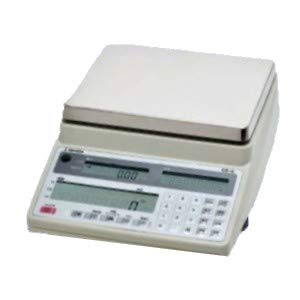
Şekil 1: Ishida Digital Counting Scale CX-α 6000. This image shows the complete scale unit with its weighing pan and control panel, featuring dual displays for weight and count, and a numeric keypad.
4. Kurulum
- Paketin açılması: Carefully remove the scale and all accessories from the packaging. Retain the packaging for future transport or storage.
- Atama: Place the scale on a firm, level, and stable surface. Ensure there are no vibrations, drafts, or rapid temperature changes in the vicinity that could affect measurement accuracy.
- Install Weighing Pan: Gently place the weighing pan onto the scale's platform. Ensure it is seated correctly and securely.
- Güç Bağlantısı: Connect the AC adapter to the power input port on the scale, then plug the adapter into a suitable electrical outlet.
- İlk Güç Açma: Basın GÜÇ button to turn on the scale. The display will perform a self-test and then show "0.000" or similar, indicating it is ready for use.
- Seviye Ayarı: Check the bubble level indicator (if present, typically on the front or side of the scale) and adjust the scale's feet until the bubble is centered. This ensures accurate measurements.
5. Kullanım Talimatları
5.1. Temel Tartım
- Güç Açık: Basın GÜÇ button. Wait for the display to stabilize at "0.000".
- Öğeyi Yerleştir: Tartılacak nesneyi dikkatlice tartım kabının ortasına yerleştirin.
- Ekranı Oku: The weight will be shown on the main display. Wait for the stability indicator (if present) to confirm a stable reading.
- Dara Fonksiyonu: If using a container, place the empty container on the pan and press the DARA button. The display will reset to "0.000". Now, add the items to be weighed into the container; only the net weight of the items will be displayed.
5.2. Sayma Fonksiyonu
The counting function allows for rapid and accurate counting of uniform items by determining their average unit weight.
- Enter Counting Mode: Basın MOD or SAYMAK button to switch to counting mode. The display may show "PCS" or a similar indicator.
- S'yi ayarlaampmiktar: Use the numeric keypad to enter the number of sample pieces you will place on the pan (e.g., 10, 20, 50). Press the GİRMEK or AYARLAMAK Onaylamak için düğmeye basın.
- Yeramptarih: Carefully place the exact number of sample pieces (e.g., 10 pieces) onto the center of the weighing pan.
- Confirm Unit Weight: The scale will calculate and display the average unit weight. Press GİRMEK or HESAPLAMA to confirm this unit weight. The display will then show the sample quantity (e.g., "10 PCS").
- Add Items for Counting: s'yi kaldırample pieces. Now, place the bulk quantity of items to be counted onto the pan. The scale will display the total count of the items.
- Clear Count: To start a new count, remove all items and press the SIFIR or TEMİZLEMEK düğme.
6. Bakım
- Temizlik: Regularly clean the scale's exterior and weighing pan with a soft, slightly damp cloth. Do not use harsh detergents, solvents, or abrasive materials, as these can damage the finish or internal components. Ensure no liquid enters the scale's housing.
- Depolamak: When not in use for extended periods, store the scale in a dry, stable environment, away from direct sunlight and extreme temperatures.
- Kalibrasyon: For continued accuracy, periodic calibration may be required. Refer to the detailed calibration section in the full technical manual or contact authorized service personnel for calibration procedures.
- Denetleme: Periodically inspect the power cord and adapter for any signs of damage. If damaged, discontinue use and replace with an authorized Ishida part.
7. Sorun Giderme
If you encounter issues with your scale, consult the table below before contacting service.
| Sorun | Olası Neden | Çözüm |
|---|---|---|
| Tartı açılmıyor. | No power, faulty AC adapter, or power outlet issue. | Check AC adapter connection. Ensure power outlet is functional. Try a different outlet. |
| Kararsız okumalar. | Unstable surface, drafts, vibrations, or temperature fluctuations. | Place scale on a firm, level surface. Avoid drafts. Ensure stable environment. Re-level the scale. |
| "Err" or "OL" displayed. | Aşırı yüklenme veya dahili hata. | Remove excess weight from the pan. Power cycle the scale. If error persists, contact service. |
| Yanlış sayma. | yanlış sample quantity, non-uniform items, or unit weight not properly set. | emin olunample quantity matches the number entered. Use uniform items. Re-establish unit weight with a precise sampley. |
If the problem persists after attempting these solutions, please contact Ishida customer support or an authorized service center.
8. Özellikler
- Modeli: CX-α 6000
- Marka: İshida
- Maksimum Kapasite: 6 kilo
- Güç Kaynağı: AC Adaptör (belirli ses seviyesi)tage/current details typically on adapter label)
- Çalışma Sıcaklığı: 0°C ila 40°C (32°F ila 104°F) (Assumed typical range for scales, if not specified)
- Görüntülemek: Dual LCD (Weight and Count)
9. Garanti ve Destek
Garanti: This Ishida Digital Counting Scale CX-α 6000 is covered by a manufacturer's warranty. Please refer to the warranty card included with your purchase or contact your local Ishida distributor for specific warranty terms and conditions. Keep your proof of purchase for warranty claims.
Müşteri Desteği: For technical assistance, service, or spare parts, please contact your authorized Ishida dealer or visit the official Ishida website for contact information in your region. When contacting support, please have your model number (CX-α 6000) and serial number (if applicable) ready.