Geekee G350

Geekee G350 True Wireless Earbuds Instruction Manual

Modeli: G350

1. Giriş

The Geekee G350 True Wireless Earbuds offer a high-fidelity audio experience with advanced Bluetooth 5.0 technology. Designed for comfort and versatility, these in-ear headphones feature deep bass, crystal clear treble, and noise-cancelling capabilities. They are sweatproof with an IPX5 rating, making them suitable for sports and active use. The earbuds provide a stable connection, instant pairing, and extended battery life with their portable charging case.

Geekee G350 True Wireless Earbuds in charging case

Image 1: Geekee G350 True Wireless Earbuds in their charging case.

2. Paket İçeriği

Lütfen paketinizde tüm öğelerin mevcut olduğundan emin olun:

Contents of the Geekee G350 Earbuds package

Image 2: All items included in the Geekee G350 package.

3. Kurulum

3.1 İlk Eşleştirme

For the first-time use, follow these steps to pair your Geekee G350 earbuds:

  1. Koruyucu Filmi Çıkarın: Before charging or first use, remove the plastic protective film from the charging contact points located on the bottom of each earbud.
  2. Şarj Edilebilir Kulaklıklar: Place both earbuds back into the charging case and allow them to charge for a short period.
  3. Automatic Power On & Pairing Mode: Her iki kulaklığı da şarj kutusundan çıkarın. Otomatik olarak açılacaklar ve eşleştirme moduna girecekler.
  4. Bluetooth ile bağlanın: On your smartphone or Bluetooth-enabled device, go to the Bluetooth settings menu and select "Geekee G350" to connect.

After the initial connection, the earbuds will automatically turn on and connect to your smartphone when removed from the case, and automatically turn off and charge when placed back in the case.

Steps for instant pairing of Geekee G350 earbuds

Image 3: Visual guide for initial pairing of the earbuds.

3.2 Şarj Etme

The earbuds and charging case have separate battery capacities and charging times:

  • Kulaklık Pil Kapasitesi: 50mAh/3.7V per earbud.
  • Kulaklık Şarj Süresi: Tam şarj için yaklaşık 1.5 saat.
  • Şarj Kutusu Pil Kapasitesi: 500mAh / 3.7V.
  • Şarj Kutusu Şarj Süresi: Tam şarj için yaklaşık 2.5 saat.

The charging case provides additional power, extending the total playtime. A fully charged case can boost the earbuds' playtime from 3-3.5 hours to 15 hours. In mono mode, using one earbud while the other charges, playtime can be extended up to 28 hours.

Battery life and charging times for Geekee G350 earbuds

Resim 4: Üzeriview of battery life and charging specifications.

4. Kullanım Talimatları

4.1 Kulaklık Kontrolleri

Each earbud features a multi-function button and an LED indicator. Refer to the diagram below for control functions:

Geekee G350 earbud function button and LED indicator guide

Image 5: Detailed functions of the earbud button and LED indicator.

  • Oynat/Duraklat: Fonksiyon tuşuna bir kez basın.
  • Sonraki Parça: Press the function button for 2 seconds (Right earbud).
  • Önceki parça: Press the function button for 2 seconds (Left earbud).
  • Sesli Asistanı (Siri) Etkinleştirin: Fonksiyon tuşuna iki kez basın.
  • Çağrıyı Cevapla/Sonlandır: Fonksiyon tuşuna bir kez basın.
  • Çağrıyı Reddet: İşlev düğmesine 2 saniye süreyle basın.

The LED indicator displays charging status and Bluetooth connection status.

4.2 Dinleme Modları

The Geekee G350 earbuds support two listening modes:

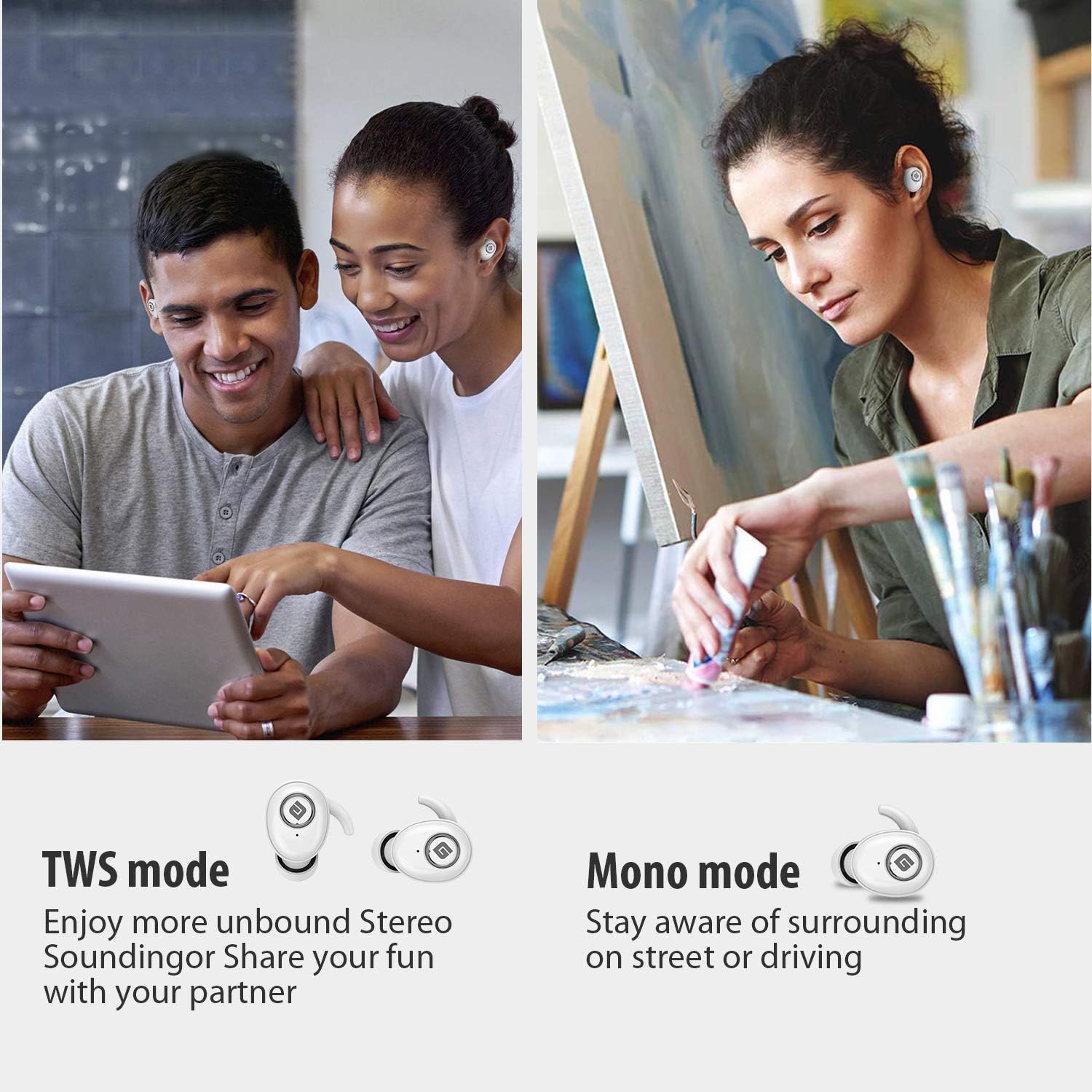
  • TWS (Gerçek Kablosuz Stereo) Modu: Use both earbuds simultaneously for a full stereo sound experience. This mode is ideal for immersive audio.
  • Mono Modu: Use a single earbud (only the Right earbud supports mono mode) to stay aware of your surroundings, such as when driving or walking in public.
Illustration of TWS and Mono listening modes for earbuds

Image 6: Comparison of TWS and Mono listening modes.

5. Bakım

6. Sorun Giderme

If you encounter issues with your Geekee G350 earbuds, please refer to the following common solutions:

7. Özellikler

Özellik Detay
Bluetooth Standart V5.0
Kablosuz Profesyonelfile HFP, HSP, A2DP, AVRCP
Çalışma Aralığı 10m (33ft)
Şarj Hacmitage DC 5V 1A
Bekleme Süresi 160 saat
Talk / Playing Time 2~3 hours (single charge), up to 15 hours with charging case, up to 28 hours in mono mode
Şarj Süresi (Kulaklık) 1.5 saat
Şarj Süresi (Şarj Kutusu) 2.5 saat
Pil Kapasitesi (Kulaklık) 50mAh/3.7V
Pil Kapasitesi (Şarj Kutusu) 500mAh/3.7V
Ürün Ağırlığı 1.76 ons (yaklaşık 50g)
Ürün Boyutları 0.8 x 0.4 x 0.4 inches (per earbud)
Suya Dayanıklılık IPX5 Terlemeye dayanıklı
Gürültü Kontrolü Aktif Gürültü Önleme
Mikrofon Dahil

8. Garanti ve Destek

Geekee is committed to providing high-quality service and professional support for its products. For any technical assistance or inquiries, please contact our support team.

Geekee customer support contact information

Image 7: Geekee customer support details.

Resmi Ürün Videosu

Video 1: Resmi bir açıklamaview of the Geekee G350 True Wireless Earbuds, highlighting key features and design.

İlgili Belgeler - G350

Önview Geekee G450 True Wireless Kulaklık Kullanım Kılavuzu
Geekee G450 True Wireless Kulaklık için paket içeriğini, ürün özelliklerini, şarjı, eşleştirmeyi, kullanımı, kontrolleri, SSS'leri, imhayı ve garantiyi kapsayan kullanıcı kılavuzu.
Önview Geekee G02 True Wireless Earbuds: User Manual, Features, and Specifications
Official user manual for Geekee G02 True Wireless Earbuds. Get detailed information on pairing, controls, charging, product specifications, tips, and important warnings. Enhance your audio experience with G02.
Önview Akıllı Pil Kamera Kullanım Talimatları ve Kurulum Kılavuzu
Akıllı Pil Kamerası'nın kurulumu ve çalıştırılması için ürün görünümü, hızlı başlatma, kurulum prosedürleri, sorun giderme ve teknik özellikler dahil kapsamlı kılavuz.
Önview Avaya G350 Medya Ağ Geçidi Donanım Kurulumu Hızlı Başlangıç ​​Kılavuzu
Bu kılavuz, Avaya G350 Media Gateway'in donanım kurulumu için hazırlık, ambalajdan çıkarma, montaj, modül kurulumu, güç bağlantısı ve ilk yapılandırma adımları dahil olmak üzere temel bilgileri sağlar.