
Nestling HK-688
Nestling HK-688 Walkie Talkies User Manual
Model: HK-688
1. Giriş
This manual provides comprehensive instructions for the safe and effective operation of your Nestling HK-688 Walkie Talkies. These mini 2-way radios are designed for clear communication over long distances, making them ideal for children's outdoor adventures, camping, hiking, and general play.
The Nestling HK-688 Walkie Talkies feature 22 UHF channels, a generous range, and user-friendly controls. Please read this manual thoroughly before using the device to ensure proper functionality and to maximize your experience.

Image: Three Nestling HK-688 walkie talkies in camo blue, camo pink, and camo green, displayed with their product packaging.
2. Ürün Bittiview
2.1 Paket İçeriği
Standart paket aşağıdaki öğeleri içerir:
- 3x Nestling HK-688 Camo Kids Walkie Talkies (Camo Blue, Camo Pink, Camo Green)
- 1x Kullanım Kılavuzu (bu belge)
- Not: AAA piller ürüne dahil değildir ve ayrı olarak satın alınmalıdır.
2.2 Temel Özellikler
- 22 FRS/GMRS Channels: Çoklu iletişim seçenekleri sunar.
- Uzun mesafe: Up to 3km (1.9 miles) in typical conditions, and up to 5km (3.1 miles) in open fields.
- Net Ses Kalitesi: Ensures effective communication.
- LCD Arkadan Aydınlatmalı Ekran: Kolaylık için viewing of channel, battery status, and other indicators.
- Built-in Mini LED Torch: Az ışıklı koşullar için kullanışlıdır.
- Automatic Channel Scan: Quickly finds active channels.
- Otomatik Susturma: Reduces background noise for clearer reception.
- CTCSS 99 Sub-codes: Enhances privacy by filtering unwanted signals.
- Çağrı Uyarısı: Notifies you of incoming calls.
- Kanal Kilidi: Yanlışlıkla kanal değiştirilmesini önler.
- PTT/VOX Function: Push-to-Talk for manual transmission or Voice Operated Exchange for hands-free communication.
- Pil Tasarrufu Fonksiyonu: Pil ömrünü uzatır.
- Düşük Güç Uyarısı: Pil seviyesinin düşük olduğunu gösterir.
- Ayarlanabilir Hacim: Control the listening level.
- Hafif ve Taşınabilir: Designed for easy carrying with a built-in belt clip.
- Drop Resistant Design: Enhanced durability for active use.

Image: Visual representation of the walkie talkie's dimensions and key features like drop resistance, low battery alert, flashlight, and communication range.

Image: Features of the walkie talkie, including 22 channels with privacy codes, extended range, noise reduction, drop resistance, and a built-in flashlight.
2.3 Cihaz Bileşenleri

Image: Detailed diagram illustrating the various parts of the walkie talkie, including buttons, display, and audio components.
- Anten: Sinyalleri iletmek ve almak için.
- Lamp (Flashlight): Dahili LED ışık.
- Mikrofon: For speaking into the device.
- PTT Düğmesi (Bas-Konuş): Sesinizi iletmek için basılı tutun.
- LCD Ekran: Shows channel, battery level, and other indicators.
- Call Lock Button: Locks the current channel.
- Monitör Düğmesi: Allows listening to weak signals on the current channel.
- Lamp Tarama Düğmesi: Activates the flashlight and initiates channel scan.
- Aşağı Düğmesi: Navigates menus or decreases values.
- Güç/Menü Düğmesi: Turns the device on/off and accesses the menu.
- Konuşmacı: For listening to incoming transmissions.
3. Kurulum
3.1 Pil Kurulumu
Each Nestling HK-688 Walkie Talkie requires 4x AAA batteries (not included).
- Release the Belt Clip: Press the lock on the top of the belt clip and lift the clip up to detach it from the radio.
- Pil Bölmesini Aç: Locate the battery cover on the back of the walkie talkie. Gently push down on the tab and slide the cover off.
- Pilleri Takın: Insert 4x AAA batteries into the compartment, ensuring correct polarity (+/-) as indicated inside the compartment.
- Pil Bölmesini Kapatın: Replace the battery cover and slide it until it clicks securely into place. Reattach the belt clip if desired.
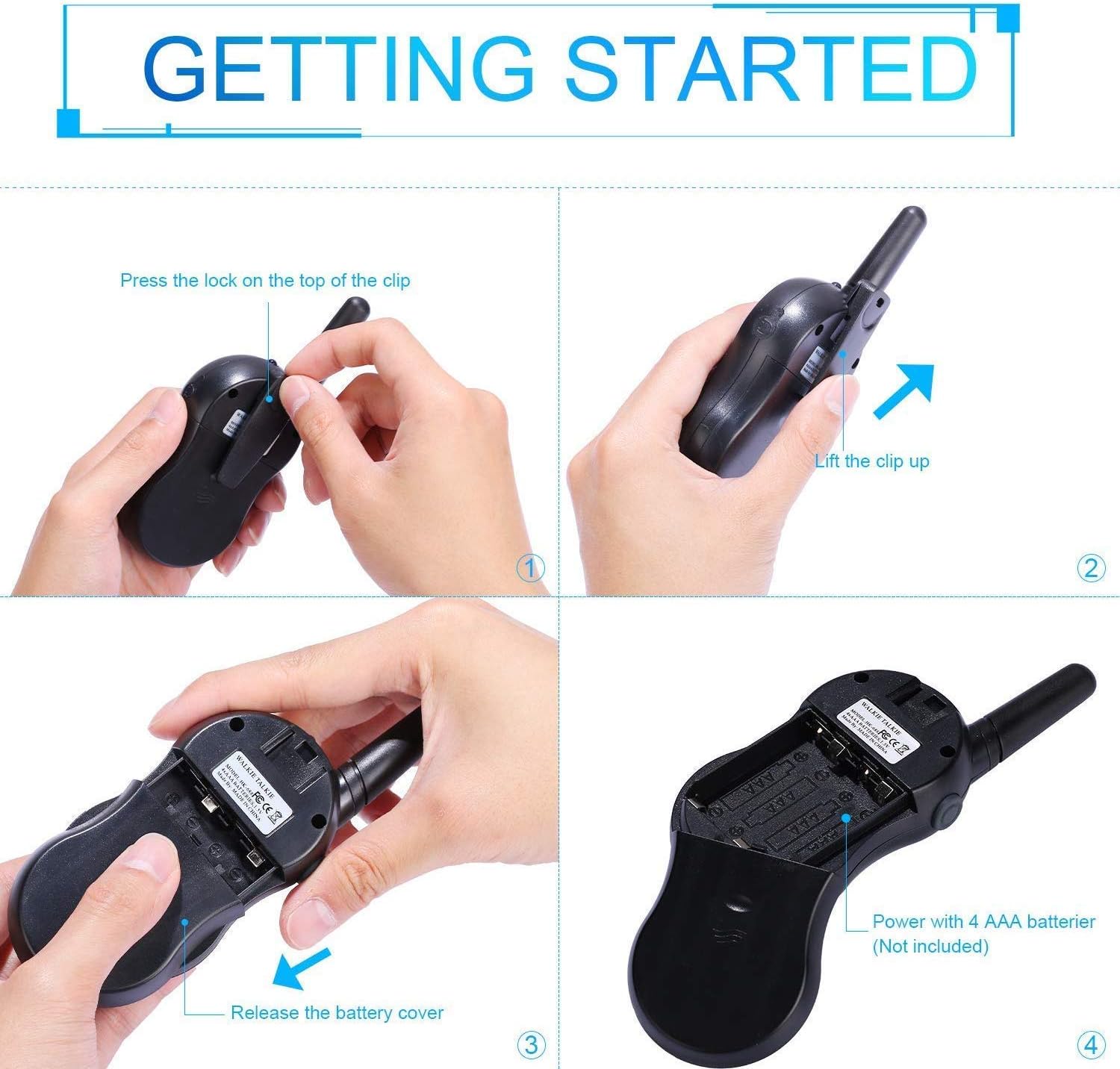
Image: Step-by-step instructions for opening the battery compartment and inserting AAA batteries into the walkie talkie.

Image: An open battery compartment of the walkie talkie, ready for battery insertion.
3.2 Açma/Kapatma
To turn the walkie talkie on or off, press and hold the Güç/Menü button until the LCD screen illuminates or turns off.
4. Kullanım Talimatları
4.1 Temel İletişim (Bas-Konuş)
- Bir Kanal seçin: Ensure all walkie talkies you wish to communicate with are set to the same channel and sub-code. Use the Up Ve Aşağı Kanalları değiştirmek için düğmeler.
- İlet: Basılı tutun PTT button (located on the side of the radio). Speak clearly into the microphone, holding the radio approximately 2-3 inches from your mouth.
- Almak: Serbest bırak PTT button to listen for incoming transmissions.
Tip: For optimal range and clarity, avoid obstructions like buildings, dense foliage, or large metal objects. Adverse weather conditions can also affect range.
4.2 Channel Selection and Sub-codes (CTCSS/DCS)
Your walkie talkie supports 22 FRS/GMRS channels and 99 CTCSS/DCS sub-codes. Sub-codes help filter out unwanted conversations on the same channel, enhancing privacy.
- Basın Menü button once to enter channel selection mode. The channel number will flash.
- Kullanın Up or Aşağı İstediğiniz kanalı seçmek için düğmeler (1-22).
- Basın Menü button again to enter sub-code selection mode. The sub-code number will flash.
- Kullanın Up or Aşağı buttons to select your desired sub-code (0-99). Setting to 0 disables the sub-code.
- Basın PTT button or wait a few seconds for the setting to be saved and exit the menu.
4.3 VOX Fonksiyonu (Sesle Çalışan Santral)
The VOX function allows for hands-free communication. When activated, the radio will automatically transmit when it detects your voice.
- Basın Menü button multiple times until the VOX icon (VOX) appears on the LCD and flashes.
- Kullanın Up or Aşağı buttons to select the VOX sensitivity level (e.g., 1-3, with 1 being most sensitive). Select "OFF" to disable VOX.
- Basın PTT button or wait a few seconds to save the setting and exit.
4.4 El Feneri Kullanımı
To turn the built-in LED flashlight on or off, briefly press the Lamp button (often combined with the Scan button).
4.5 Call Alert Tone
To send a call alert tone to other radios on the same channel, briefly press the Arama button (often represented by a musical note icon).
4.6 Kanal Kilidi
To prevent accidental channel changes, you can lock the current channel.
- Basılı tutun Call Lock button (often represented by a key icon) until a key icon appears on the LCD.
- Kilidi açmak için tuşuna basın ve basılı tutun. Call Lock Tuş simgesi kaybolana kadar düğmeye tekrar basın.

Resim: Eskiamples of suitable scenarios for using the walkie talkies, such as outdoor play, family activities, and leisure.

Image: Illustrations of walkie talkies being used for communication in both play and household settings.
5. Bakım
5.1 Pil Bakımı
- Her zaman yeni, yüksek kaliteli AAA piller kullanın.
- Remove batteries from the walkie talkie if it will not be used for an extended period to prevent leakage and damage.
- Kullanılmış pilleri yerel düzenlemelere uygun şekilde sorumlu bir şekilde atın.
5.2 Temizlik ve Depolama
- Clean the walkie talkie with a soft, damp bez. Sert kimyasallar veya aşındırıcı temizleyiciler kullanmayın.
- Do not immerse the walkie talkie in water, as it is not water-resistant.
- Telsizi serin, kuru ve doğrudan güneş ışığından ve aşırı sıcaklıklardan uzak bir yerde saklayın.
6. Sorun Giderme
| Sorun | Olası Neden | Çözüm |
|---|---|---|
| Güç yok | Piller bitmiş veya yanlış takılmış. | Pilleri yenileriyle değiştirin, kutupların doğru olmasına dikkat edin. |
| İletilemedi veya alınamadı | Not on the same channel/sub-code; out of range; PTT button not pressed/released. | Ensure all radios are on the same channel and sub-code. Move closer to the other radio. Press and hold PTT to transmit, release to receive. |
| Kötü ses kalitesi / Parazit | Out of range; obstructions; low battery; squelch setting. | Move closer. Avoid obstructions. Replace batteries. Check squelch settings. |
| Kanal değişiklikleri yanlışlıkla gerçekleşti. | Channel lock is not activated. | Activate the channel lock function. |
| VOX çalışmıyor | VOX hassasiyeti çok düşük veya VOX kapalı. | Adjust VOX sensitivity to a higher level or ensure VOX is enabled. |
7. Özellikler
| Özellik | Detay |
|---|---|
| Marka | Yavru kuş |
| Örnek | HK-688 |
| Frekans Aralığı | 400-470MHz |
| Kanallar | 22 FRS/GMRS Kanalı |
| alt kodlar | CTCSS99 |
| İletim Gücü | <=0.5W |
| Modülasyon Türü | FM-F3E |
| Menzil | Up to 3km (1.9 miles) typical, MAX 5km (3.1 miles) in open field |
| çiğnemek | Otomatik susturma |
| Görüntü Türü | LCD Arkadan Aydınlatmalı |
| Kulaklık girişi | 2.5mm / 0.1inch |
| Güç Kaynağı | 4x AAA batteries per radio (Not Included) |
| Ürün Boyutları (Y x U x D) | 14 cm x 5.5 cm x 3.5 cm (5.5 x 2.2 x 1.4 inç) |
| Paket Ağırlığı | 370 gr |
| Renk | Camo Blue, Camo Pink, Camo Green |
| Su Direnç Seviyesi | Suya dayanıklı değil |
8. Garanti ve Destek
Nestling HK-688 Walkie Talkies come with a 12 Ay Garanti satın alma tarihinden itibaren.
For any support inquiries, troubleshooting assistance beyond this manual, or warranty claims, please refer to the contact information provided on the product packaging or the retailer's webÜrünün satın alındığı yer.
Ask a question about this manual
Ask about setup, troubleshooting, compatibility, parts, safety, or missing instructions. Manuals+ will review the question and use this page’s manual context to help answer it.