
giriiş
The Brifit Criacr Digital Hygrometer Thermometer is designed to monitor both indoor and outdoor temperature and humidity levels in real-time. This device features a large LCD display for easy readability and offers flexible installation options. This manual provides essential information for the proper setup, operation, and maintenance of your device.
Paket İçeriği
- 1 x Indoor Outdoor Thermometer Hygrometer (Main Unit)
- 1 x Thermo-Hygrometer Transmitter (Remote Sensor)
- 1 x Kullanım Kılavuzu
Ürün Özellikleri
- Indoor & Outdoor Monitoring: Measures temperature and humidity values for both indoor and outdoor environments simultaneously.
- Büyük LCD Ekran: Features a clear, large-number LCD screen for easy reading of data.
- Kablosuz İletim: Equipped with a wireless transmitter (433MHz frequency) for a transmission distance of 30-100m (98-328ft) in open air.
- Geniş Ölçüm Aralığı:
- Indoor Temperature: 0°C to 60°C (32°F to 140°F)
- Outdoor Temperature: -40°C to 60°C (-40°F to 140°F)
- Nem: %10 ila %99
- Birim Anahtarı: Easily switch between Celsius (°C) and Fahrenheit (°F) units.
- Esnek Kurulum: Designed with a wall hanger and a retractable stand for tabletop placement or wall mounting.
Kurmak
1. Pil Kurulumu
The main unit and remote sensor require batteries (not included).
- Ana Ünite: Requires 2 x AAA 1.5V Alkaline batteries.
- Uzak Sensör: Requires 2 x AAA 1.5V Alkaline or Lithium batteries.
Open the battery compartment on the back of each device and insert the batteries, ensuring correct polarity (+/-).
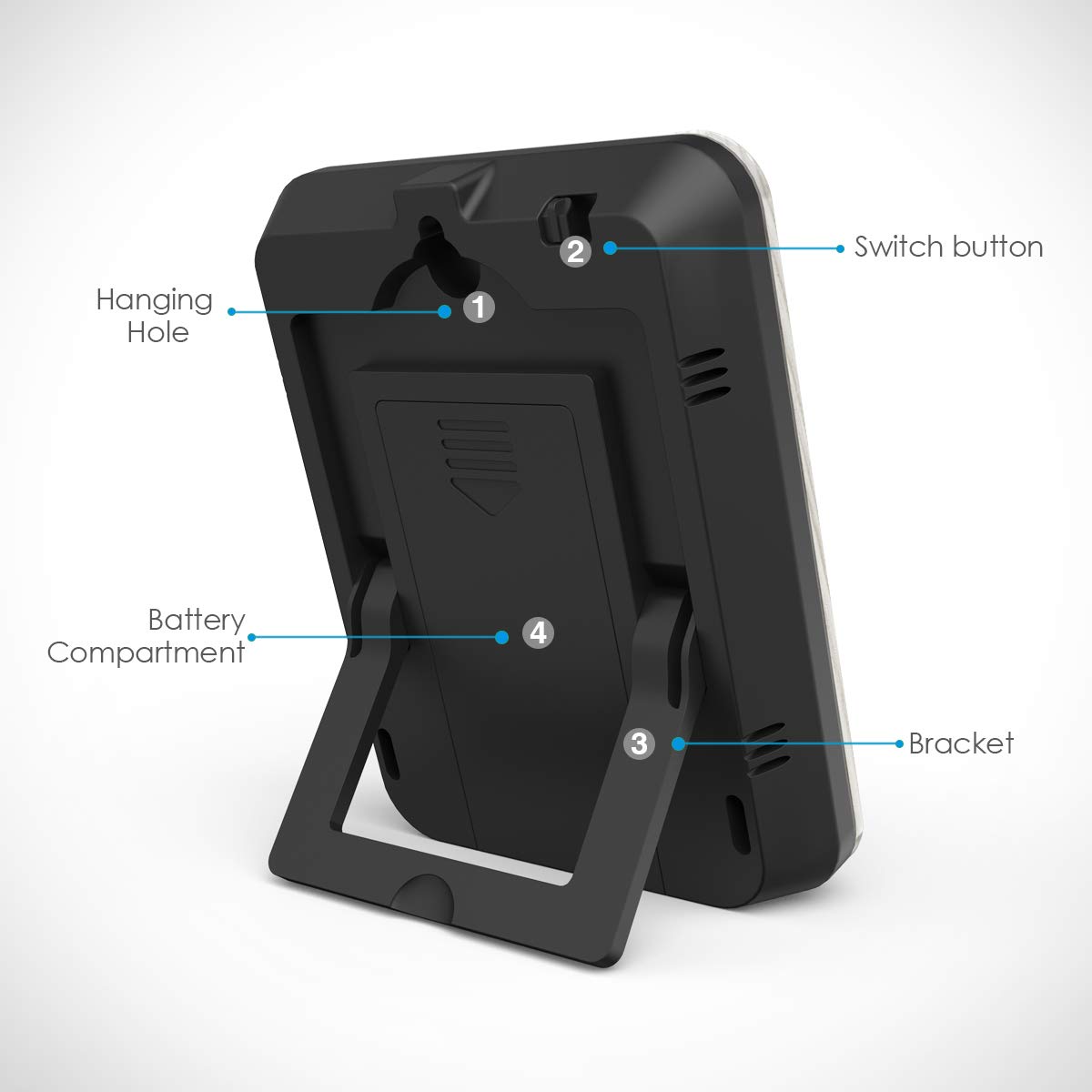
Resim: Arka view of the main unit, highlighting the battery compartment, hanging hole, and switch button.
2. Birim Seçimi (°C/°F)
Before installing batteries, or if the device is already working, you can switch between Celsius (°C) and Fahrenheit (°F). The default unit is Celsius.
- Locate the switch button on the top of the main unit.
- Press this button to toggle between °C and °F.
- Not: If the device is already working, you may need to disassemble and re-install the batteries after switching the unit for the change to take effect.
3. Sensör Yerleşimi
Place the main unit indoors and the remote sensor outdoors. Ensure the remote sensor is placed in a location protected from direct sunlight and rain for accurate readings and extended lifespan.
The wireless signal penetration is strong, but avoid placing the sensor behind large metal objects or thick walls that could obstruct the signal.

Image: Illustration of the main unit placed indoors and the remote sensor placed outdoors, demonstrating wireless communication.

Resim: Eskiamples of flexible installation, including tabletop placement using the retractable stand and wall mounting using the hanging hole.
Kullanım Talimatları
1. Ekranın Okunması
The large LCD screen displays both indoor and outdoor temperature and humidity readings. Data refreshes automatically every 60 seconds. Allow approximately 30 minutes for the sensor to stabilize after initial setup.

Resim: Ayrıntılı view of the LCD display, indicating the positions for outdoor temperature, outdoor humidity, indoor temperature, and indoor humidity readings.
- Dış Ortam Sıcaklığı: Displays the temperature measured by the remote sensor.
- Dış Mekan Nemi: Displays the humidity measured by the remote sensor.
- İç Mekan Sıcaklığı: Ana ünite tarafından ölçülen sıcaklığı gösterir.
- İç Mekan Nemi: Ana ünite tarafından ölçülen nem değerini gösterir.
2. İletim Menzili
The remote sensor can transmit data up to 100 meters (328 feet) in open air. Actual range may vary depending on obstacles such as walls, floors, and electronic interference.
Bakım
1. Genel Bakım
- Cihazı yumuşak bir bezle temizleyin.amp bezle silin. Aşındırıcı temizleyiciler veya çözücüler kullanmayın.
- Do not immerse the product in water, as this will cause damage.
- Avoid exposing the device to extreme temperatures, direct sunlight, or high humidity for prolonged periods.
2. Pil Değişimi
Replace batteries when the display becomes dim or readings become inconsistent. The battery life for the base station is a minimum of 24 months.
- Always replace all batteries in a unit at the same time.
- Use new batteries of the recommended type (AAA 1.5V Alkaline for main unit; AAA 1.5V Alkaline or Lithium for remote sensor).
- Eski pilleri yerel düzenlemelere uygun şekilde sorumlu bir şekilde atın.
Sorun giderme
- Ekran yok veya soluk ekran: Check battery polarity. Replace batteries if they are low.
- No outdoor readings:
- Ensure the remote sensor batteries are correctly installed and charged.
- Verify the remote sensor is within the transmission range (up to 100m/328ft in open air).
- Relocate the remote sensor or main unit to minimize interference from electronic devices or large metal objects.
- Try re-pairing the sensor with the main unit (if applicable, though not explicitly mentioned in product description, it's a common troubleshooting step for wireless devices).
- Yanlış okumalar:
- Ensure the remote sensor is not in direct sunlight or exposed to rain.
- Allow 30 minutes for stabilization after setup or battery replacement.
- Compare readings with another known accurate thermometer/hygrometer to verify.
Önemli Not: Never immerse the product in water. Always ensure the Celsius/Fahrenheit unit is set correctly before or immediately after battery installation.
Özellikler
| Özellik | Şartname |
|---|---|
| İç Sıcaklık Aralığı | 0°C ila 60°C (32°F ila 140°F) |
| Dış Sıcaklık Aralığı | -40°C ila 60°C (-40°F ila 140°F) |
| Sıcaklık Doğruluğu | ±1°C |
| Sıcaklık Çözünürlüğü | 0.1°C |
| İç Mekan Nem Aralığı | %10 ila %99 |
| Dış Mekan Nem Aralığı | %10 ila %99 |
| Nem Doğruluğu | ±5% (guaranteed between 20%-90%) |
| Nem Çözünürlüğü | 1% |
| Kablosuz Frekans | 433MHz |
| transmisyon Menzili | 30-100m (98-328ft) in open air |
| Ana Ünite Gücü | 2 x AAA 1.5V Alkaline batteries (not included) |
| Uzaktan Sensör Gücü | 2 x AAA 1.5V Alkalin veya Lityum pil (dahil değildir) |
| Main Unit Battery Life | Minimum 24 ay |
| Ürün Boyutları | 7.5x7.5x6.8 cm |
| Ürün Ağırlığı | 130 gr |
| Renk | Tahta tanesi |
| Model Numarası | EU-10W-WA |

Image: Dimensions of the main display unit and the wireless remote sensor.
Garanti ve Destek
Specific warranty information is not provided in the product description. For warranty claims or technical support, please refer to the contact information provided with your purchase or visit the official Brifit webalan.
For further assistance, please contact Brifit customer service.