
Awei A780BL
Awei A780BL Bluetooth 5.0 Over-Ear Headphones User Manual
Model: A780BL | Marka: Awei
giriiş
This manual provides comprehensive instructions for the Awei A780BL Bluetooth 5.0 Over-Ear Headphones. Please read this manual carefully before using the product to ensure proper operation and to maximize your listening experience. These headphones offer high-quality audio, a built-in microphone, and a comfortable over-ear design, suitable for various uses including gaming, music, and calls.
Paket İçeriği
Paketin içerisinde tüm ürünlerin mevcut olduğundan emin olun:
- 1 x Awei A780BL Bluetooth Headset
- 1 x USB Şarj Kablosu
- 1 x Kullanım Kılavuzu (bu belge)

Image: The Awei A780BL headphones shown alongside their retail packaging, highlighting the included components.
Ürün Bittiview

Resim: Ön view of the Awei A780BL Over-Ear Headphones in black, showcasing tasarımlarını.
The Awei A780BL headphones are designed for comfort and superior sound quality. They feature a foldable design for portability and intuitive controls for ease of use.
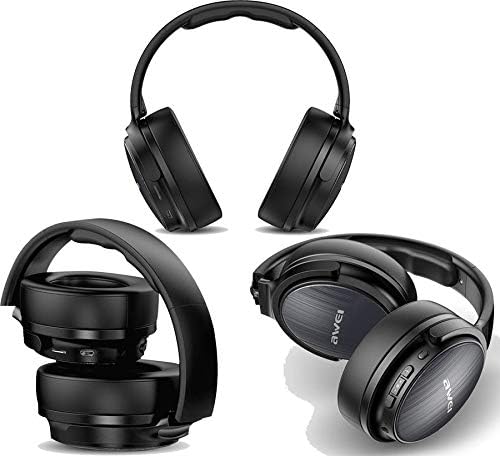
Resim: Çoklu views of the Awei A780BL headphones, demonstrating their foldable earcups and compact storage capability.
Temel Özellikler:
- Kararlı ve verimli kablosuz bağlantı için Bluetooth V5.0.
- Dynamic 40mm drivers for powerful and clear audio.
- Built-in microphone for hands-free calls and gaming communication.
- IPX5 water and sweat resistance, suitable for sports and outdoor activities.
- Supports both wireless (Bluetooth) and wired (3.5mm AUX) connectivity.
- Long battery life: Up to 15 hours of music/talk time.
- Yumuşak kulaklık yastıklarıyla rahat, kulak üstü tasarım.

Image: A graphic highlighting the "All-Around Stereo Sound" feature of the Awei A780BL headphones, noting the 40mm driver, 32 Ohm impedance, and 122dB sensitivity.
Kurmak
Kulaklıkları Şarj Etme:
- Locate the USB charging port on the headphones.
- Connect one end of the provided USB charging cable to the headphone's charging port.
- USB kablosunun diğer ucunu uyumlu bir USB güç kaynağına (örneğin, bilgisayarın USB portu, USB duvar adaptörü) bağlayın.
- Şarj sırasında gösterge ışığı yanacak ve tamamen şarj olduğunda sönecek veya renk değiştirecektir.
- Tam şarj yaklaşık 2 saat sürüyor.
Açma/Kapatma:
- Açmak İçin: Press and hold the Power button (usually the Multi-function button) for a few seconds until the indicator light flashes and you hear a power-on prompt.
- Kapatmak İçin: Press and hold the Power button for a few seconds until the indicator light turns off and you hear a power-off prompt.
Kullanım Talimatları
Bluetooth Eşleştirme:
- Kulaklığın tamamen şarj edilmiş ve kapalı olduğundan emin olun.
- Eşleştirme modunun aktif olduğunu gösteren kırmızı ve mavi gösterge ışığı dönüşümlü olarak yanıp sönene kadar Güç düğmesini yaklaşık 5-7 saniye basılı tutun.
- Cihazınızda (akıllı telefon, tablet, bilgisayar) Bluetooth'u etkinleştirin ve kullanılabilir cihazları arayın.
- Bulunan cihazlar listesinden "AWEI A780BL"yi seçin.
- Once paired, the indicator light will typically turn solid blue or flash slowly, and you will hear a connection confirmation.
- Şifre sorulursa "0000" girin.
Wired Connection (AUX Mode):
The headphones can also be used with a 3.5mm audio cable (not included) when the battery is low or for devices without Bluetooth.
- Connect one end of a 3.5mm audio cable to the AUX port on the headphones.
- Kabloyu diğer ucundan cihazınızın 3.5 mm ses girişine bağlayın.
- In wired mode, the headphone's battery is not consumed, and the power button is not required for operation.
Temel Kontroller:
| İşlev | Aksiyon |
|---|---|
| Müzik Çal/Duraklat | Çok işlevli düğmeye bir kez basın. |
| Sonraki Parça | Sesi Açma (+) tuşuna uzun basın. |
| Önceki Parça | Sesi Azaltma (-) tuşuna uzun basın. |
| Sesi Aç | Sesi Açma (+) tuşuna kısa basın. |
| Sesi Azalt | Sesi Azaltma (-) tuşuna kısa basın. |
| Cevapla/Çağrıyı Sonlandır | Gelen çağrı sırasında Çok Fonksiyonlu düğmeye bir kez basın. |
| Çağrıyı Reddet | Gelen arama sırasında çok fonksiyonlu düğmeye uzun süre basın. |
| Son Numarayı Tekrar Ara | Çok işlevli düğmeye iki kez basın. |
| Sesli Asistanı Etkinleştir | (Cihazınız destekliyorsa) Çok fonksiyonlu düğmeye üç kez basın. |
Bakım
- Temizlik: Kulaklığınızı temizlemek için yumuşak ve kuru bir bez kullanın. Aşındırıcı temizleyiciler veya çözücüler kullanmayın.
- Depolamak: Kullanmadığınız zamanlarda kulaklığınızı serin ve kuru bir yerde, doğrudan güneş ışığından ve aşırı sıcaklıklardan uzakta saklayın. Katlanabilir tasarımı sayesinde kompakt bir şekilde saklayabilirsiniz.
- Pil Bakım: Pil ömrünü uzatmak için kulaklıkların pilini sık sık tamamen boşaltmaktan kaçının. Sürekli kullanılmasa bile düzenli olarak şarj edin.
- Suya Dayanıklılık: The headphones are IPX5 water resistant, meaning they can withstand splashes and sweat. Do not submerge them in water or expose them to heavy rain.
Sorun giderme
| Sorun | Olası Çözüm |
|---|---|
| Kulaklık açılmıyor. | Ensure the headphones are fully charged. Press and hold the Power button for a longer duration. |
| Cihazla eşleştirilemiyor. |
|
| Ses yok veya ses seviyesi düşük. |
|
| Mikrofon çalışmıyor. |
|
| Kısa pil ömrü. |
|
Özellikler
| Özellik | Detay |
|---|---|
| Model Adı | A780BL |
| Marka | Awei |
| Bağlantı Teknolojisi | Wireless (Bluetooth V5.0), Wired (3.5mm AUX) |
| Bluetooth Protokolü | HSP/A2DP/HFP/AVRCP |
| Çalışma Mesafesi | 10 metreye kadar (engelsiz alan) |
| Kulaklık Form Faktörü | Kulak Üstü |
| Sürücü Boyutu | 40mm |
| Empedans | 32 Ohm |
| Hassasiyet | 122 dB |
| Frekans Aralığı | 2.402 GHz - 2.480 GHz |
| Mikrofon | Evet |
| Gürültü Kontrolü | None (No Active Noise Cancellation) |
| Suya Dayanıklılık Derecesi | IPX5 (Suya ve Tere Dayanıklı) |
| Pil Türü | Lityum Polimer |
| Pil Kapasitesi | 250 mAh |
| Şarj Süresi | Yaklaşık 2 saat |
| Müzik Çalma Süresi | 15 saate kadar |
| Konuşma Zamanı | 12 saate kadar |
| Bekleme Süresi | 300 saate kadar |
| Net ağırlığı | 270 gram |
| Renk | Siyah |
| Ürün Boyutları | 4x10x16.5 cm |
Garanti ve Destek
Specific warranty information for the Awei A780BL headphones is not provided in this manual. Please refer to the product packaging or the retailer's webGaranti kapsamı ve destek seçenekleri hakkında ayrıntılı bilgi için lütfen siteyi ziyaret edin.
For technical assistance or customer service, please contact the vendor or manufacturer directly through their official channels.
Ask a question about this manual
Ask about setup, troubleshooting, compatibility, parts, safety, or missing instructions. Manuals+ will review the question and use this page’s manual context to help answer it.