
1. Giriş
The Divoom Macchiato is a palm-sized, portable Bluetooth speaker with an integrated FM radio tuner, designed to deliver high-quality audio in a compact form factor.
2. Paket İçeriği
Lütfen aşağıdaki öğelerin kutucuğunu işaretleyin:
- Divoom Macchiato Bluetooth Speaker
- USB Şarj Kablosu
- Kullanıcı Kılavuzu
- (Ek aksesuarlar bölgeye göre değişiklik gösterebilir)
3. Ürün Bittiview
Hoparlörün bileşenlerini ve kontrollerini tanıyın.
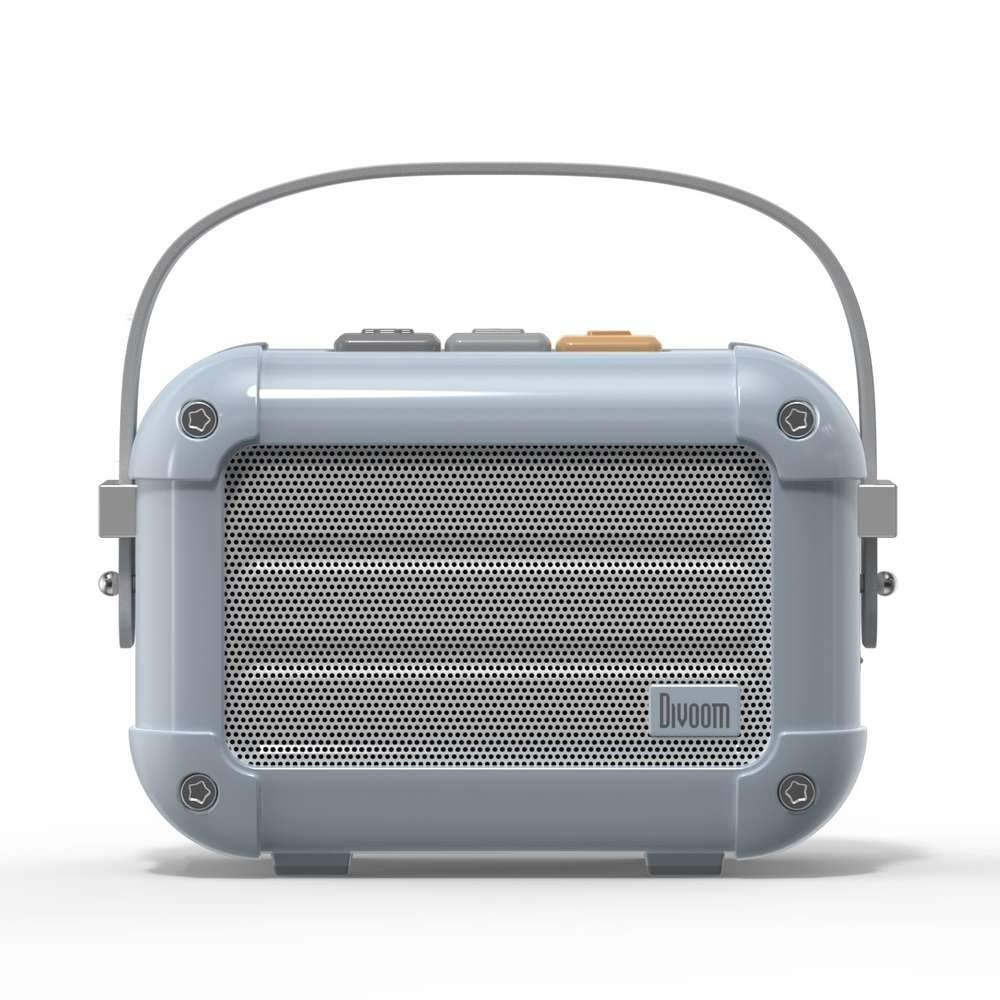
Şekil 3.1: Ön view of the Divoom Macchiato Bluetooth Speaker in blue.
3.1 Kontroller ve Bağlantı Noktaları
The Divoom Macchiato speaker features intuitive controls for easy operation.
- Üst Düğmeler: Typically control power, volume, track navigation, and mode selection (e.g., Bluetooth, FM).
- Şarj Portu: Usually a USB Type-C port for charging the device.
- TF Kart Girişi: Allows playback of music directly from a TF (MicroSD) card.
- FM Anteni: An extendable antenna for improved FM radio reception.

Şekil 3.2: Geri view of the Divoom Macchiato Bluetooth Speaker, showing the charging port and TF card slot.
4. Kurulum
4.1 Güç Açma/Kapatma
- Açmak İçin: Press and hold the power button (usually one of the top buttons) for approximately 2-3 seconds until you hear an audible cue or see an indicator light.
- Kapatmak İçin: Press and hold the power button for approximately 2-3 seconds until you hear an audible cue or the indicator light turns off.
4.2 Bluetooth Eşleştirme
- Ensure the speaker is powered on and in Bluetooth pairing mode. The indicator light will typically blink rapidly.
- Mobil cihazınızda (akıllı telefon, tablet vb.) Bluetooth’u etkinleştirin.
- Arama "Divoom Macchiato" in the list of available Bluetooth devices.
- Select "Divoom Macchiato" to connect. Once connected, the speaker will provide an audible confirmation, and the indicator light will turn solid.
Not: Hoparlör açıldığında, en son eşleştirilen cihaza otomatik olarak yeniden bağlanmayı deneyecektir.
4.3 FM Radyo Kurulumu
- Extend the FM antenna fully for optimal reception.
- Switch the speaker to FM radio mode using the mode button (refer to your specific model's button layout).
- Use the track navigation buttons (usually +/-) to scan for available FM stations.
- Some models may allow saving favorite stations; refer to your specific model's instructions for details.
5. Kullanım Talimatları
5.1 Music Playback (Bluetooth/TF Card)
- Oynat/Duraklat: Press the Play/Pause button (often integrated with the power button or a dedicated button).
- Ses Kontrolü: Ses açma (+) ve ses kısma (-) düğmelerini kullanın.
- Sonraki Parça: Press and hold or short press the next track button (often the + button).
- Önceki parça: Press and hold or short press the previous track button (often the - button).
- TF Kart Oynatma: MP3'lü bir TF kartı takın files into the TF card slot. The speaker should automatically switch to TF card mode or require manual selection via the mode button.
5.2 App Features (if applicable)
For enhanced functionality, download the Divoom companion app from your device's app store. The app may offer features such as:
- Customizing sound profiles.
- Accessing additional audio sources.
- Managing FM radio stations.
- Bellenim güncellemeleri.
6. Bakım
- Temizlik: Hoparlörün yüzeyini temizlemek için yumuşak, kuru bir bez kullanın. Aşındırıcı temizleyiciler veya çözücüler kullanmayın.
- Depolamak: Hoparlörü serin, kuru ve doğrudan güneş ışığından ve aşırı sıcaklıklardan uzak bir yerde saklayın.
- Pil Bakım: Pil ömrünü uzatmak için pili sık sık tamamen boşaltmaktan kaçının. Hoparlörü, uzun süre kullanılmasa bile düzenli olarak şarj edin.
- Suya Dayanıklılık: This model is NOT waterproof. Avoid exposure to water or high humidity.
7. Sorun Giderme
| Sorun | Çözüm |
|---|---|
| Hoparlör açılmıyor. | Pilin şarjlı olduğundan emin olun. Hoparlörü USB şarj kablosunu kullanarak bir güç kaynağına bağlayın. |
| Bluetooth üzerinden eşleştirme yapılamıyor. |
|
| Ses yok veya ses seviyesi düşük. |
|
| FM radyo alımı zayıf. |
|
8. Özellikler
| Özellik | Detay |
|---|---|
| Model Numarası | MACHIATO |
| Marka | Divoom |
| Bağlantı Teknolojisi | Bluetooth |
| Kablosuz İletişim Teknolojisi | Bluetooth |
| Hoparlör Maksimum Çıkış Gücü | 6 Watt |
| Hoparlör Tipi | Ses çubuğu |
| Montaj Tipi | Masa Üstü Montaj |
| Ürün İçin Önerilen Kullanımlar | Müzik |
| Kontrol Yöntemi | Ses |
| Su geçirmez | FALSE (Not Waterproof) |
9. Garanti ve Destek
For warranty information and customer support, please refer to the documentation included with your product or visit the official Divoom webSite. Satın alma fişinizi, garanti talepleriniz için satın alma belgeniz olarak saklayın.