
Önemli Güvenlik Bilgileri
Please read all instructions carefully before using the SKY LAND EM-1251 Treadmill. Retain this manual for future reference. Failure to follow these safety guidelines may result in injury or damage to the equipment.
- Herhangi bir yeni egzersiz programına başlamadan önce mutlaka bir doktora danışın.
- Koşu bandını, etrafında yeterli boşluk (arkada en az 2 metre ve her iki tarafta 0.6 metre) bulunan düz ve sağlam bir yüzeye yerleştirin.
- Çalışma sırasında çocukları ve evcil hayvanları koşu bandından uzak tutun.
- Koşu bandı hasarlı veya arızalıysa çalıştırmayın.
- Uygun spor ayakkabı ve kıyafetleri giyin.
- Emniyet anahtarını her zaman kullanın. Acil bir durumda, emniyet anahtarı koşu bandını durduracaktır.
- Koşu bandı hareket halindeyken üzerine çıkmayın veya üzerinden inmeyin.
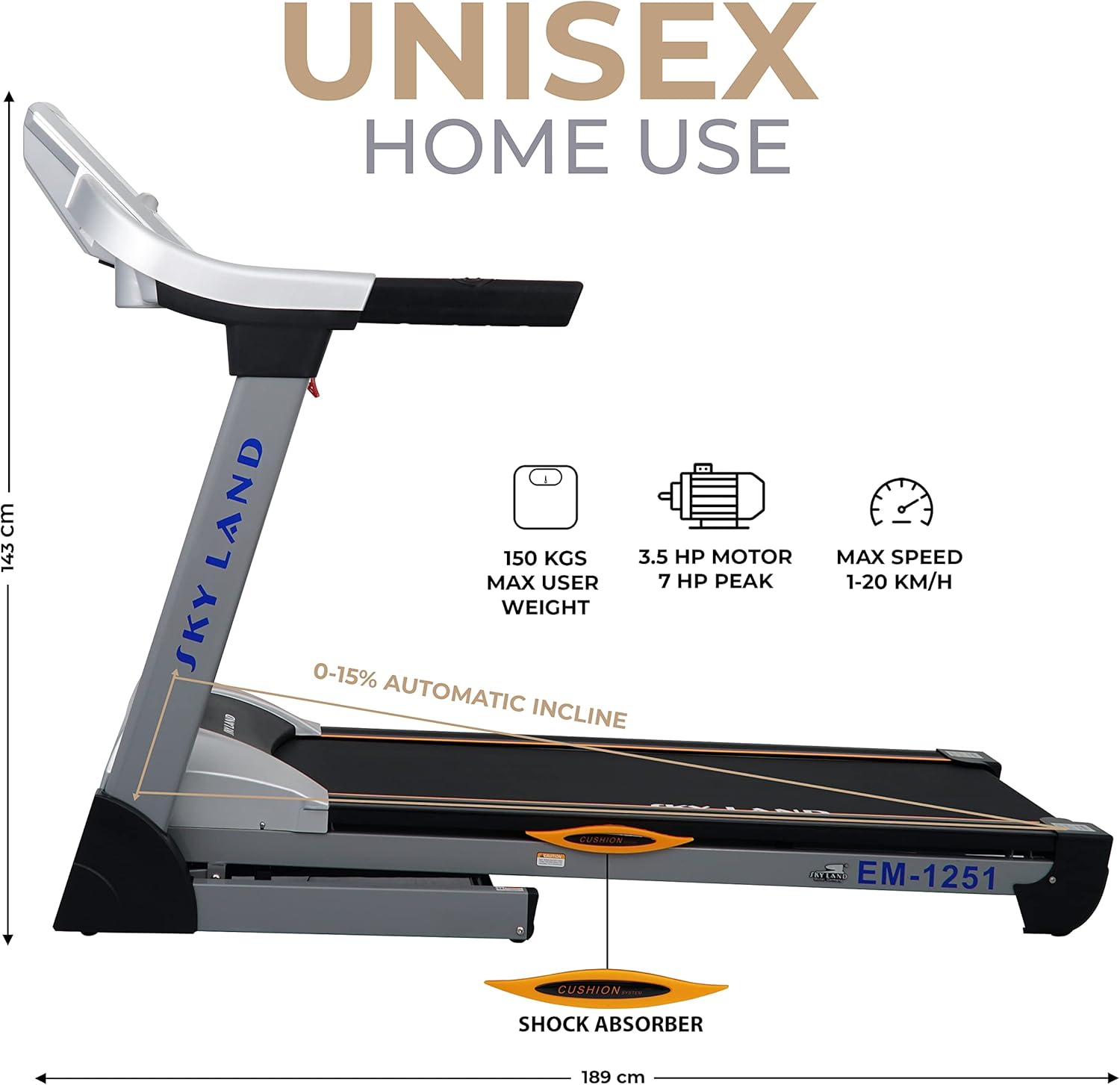
- The maximum user weight for this treadmill is 150 kg. For optimal performance and longevity, the ideal maximum user weight is 125 kg (150 kg - 25 kg).
- Unplug the treadmill from the power source when not in use or before cleaning and maintenance.
Ürün Bittiview
The SKY LAND EM-1251 is a heavy-duty treadmill designed for home use, offering a powerful motor, automatic incline, and smart connectivity for an effective cardio workout.
Montaj ve Kurulum
The EM-1251 treadmill features a simple folding design for space-saving storage and easy setup.
Koşu Bandının Açılması
- Ensure the treadmill is unplugged from the power source.
- Gently push the running deck downwards. The hydraulic assist system will slowly lower the deck into the operating position.
- Ensure the deck is fully locked into place before use.
Folding the Treadmill for Storage
- Koşu bandının kapalı olduğundan ve fişinin çekildiğinden emin olun.
- Lift the running deck until it clicks into the upright, folded position. The hydraulic assist system will help with the lift.
- For transportation, tilt the treadmill and use the integrated wheels to move it to your desired storage location.

Kullanım Talimatları
Konsol Özellikleri
The treadmill's console provides essential workout data and control options.
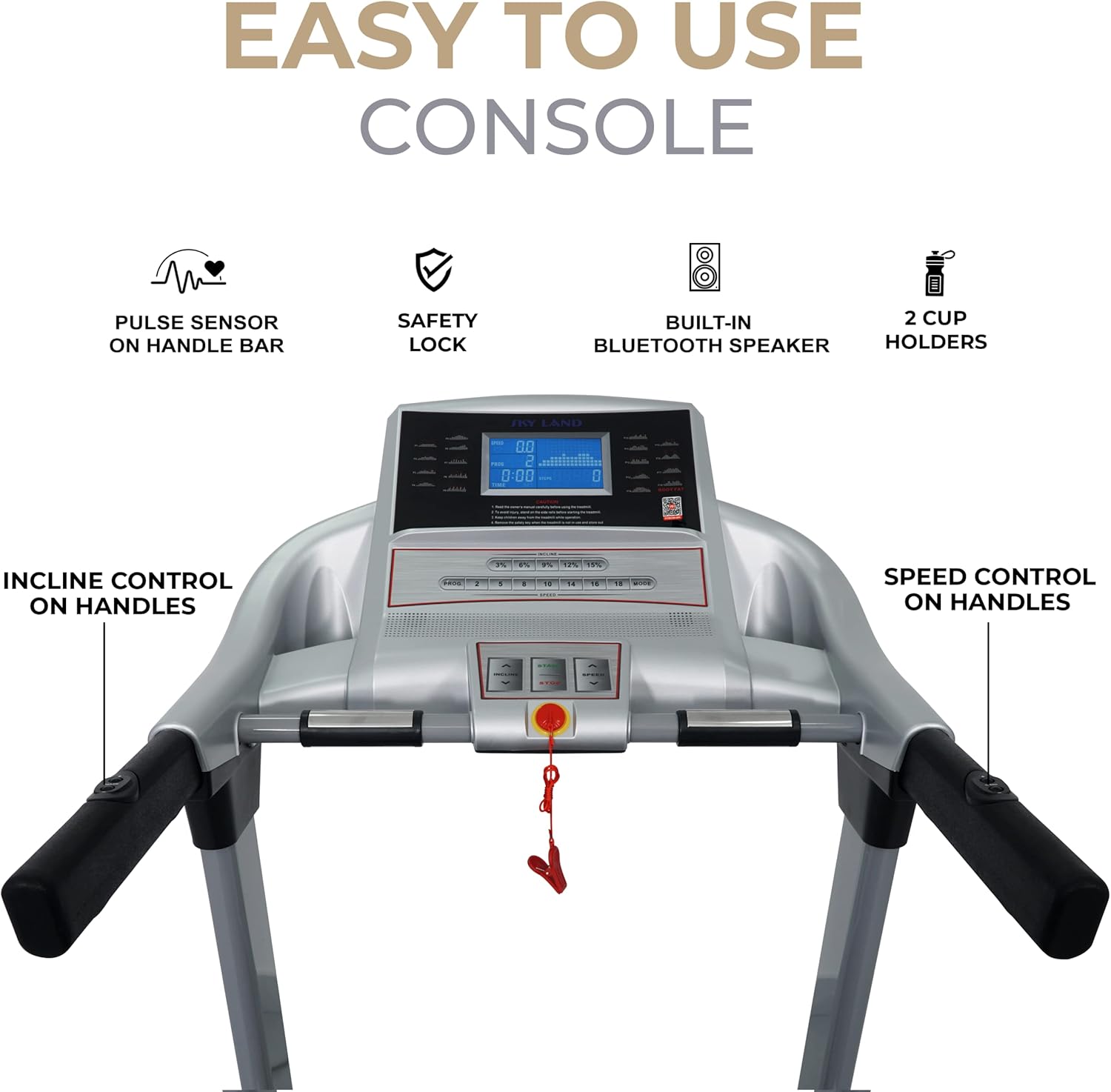
- LCD Ekran: Shows speed, distance, time, calories burned, and pulse rate.
- Nabız Sensörleri: Integrated into the handlebars to monitor heart rate.
- Güvenlik Anahtarı: A red clip that attaches to your clothing. If pulled, it immediately stops the treadmill.
- Hız Kontrolü: Buttons on the console and handlebars to adjust running speed (1-20 km/h).
- Incline Control: Buttons on the console and handlebars to adjust the automatic incline (0-15%).
- Dahili Bluetooth Hoparlör: Connect your device to play music.
- MP3 Player & AUX Input: Doğrudan ses bağlantısı için.
- Bardak Tutucular: Two holders for beverages.
Using the Fitshow App
Enhance your workout experience by connecting your treadmill to the Fitshow app via Bluetooth.

- Download the Fitshow app: Scan the QR code on the console or visit the app stores directly. Google Oyun | Uygulama Mağazası
- Mobil cihazınızda Bluetooth'u etkinleştirin.
- Open the Fitshow app and follow the on-screen instructions to connect to your EM-1251 treadmill.
- The app allows you to track speed, distance, time, calories, pulse, and BMI, as well as access various workout programs.
Bir Antrenmana Başlamak
- Plug in the treadmill and turn on the power switch (usually located at the front base).
- Attach the safety key clip to your clothing and insert the safety key into its designated slot on the console.
- Koşu bandının yan korkuluklarına çıkın.
- Press the 'START' button on the console. The belt will begin to move at a low speed after a short countdown.
- Dikkatlice hareketli banda çıkın ve yürümeye başlayın.
Hız ve Eğimin Ayarlanması
- Hız: Use the '+' and '-' buttons on the console or handlebars to increase or decrease speed. Quick speed buttons may also be available for instant speed changes.
- Eğim: Use the 'INCLINE +' and 'INCLINE -' buttons on the console or handlebars to adjust the incline level. Quick incline buttons may also be available.
Programları Kullanma
The EM-1251 comes with 18 pre-set exercise programs. Refer to the console's specific instructions for program selection and customization. These programs are designed for weight loss, endurance, and interval training.
Bakım
Düzenli bakım, koşu bandınızın uzun ömürlü ve güvenli çalışmasını sağlar.
- Temizlik: Konsolu ve diğer yüzeyleri ad ile silin.amp Her kullanımdan sonra bir bezle silin. Aşındırıcı temizleyiciler kullanmayın.
- Kayış Yağlama: The running belt requires periodic lubrication to reduce friction. Refer to the specific instructions for your model regarding lubrication frequency and type of lubricant.
- Kayış Gerginliği ve Hizalaması: Check the running belt tension and alignment regularly. Adjust if the belt slips or drifts to one side. Consult the detailed manual for adjustment procedures.
- Motor Kapağı: Periodically remove the motor cover and vacuum any dust or debris that may have accumulated. Ensure the treadmill is unplugged before doing so.
- Denetleme: Regularly inspect all nuts, bolts, and moving parts for tightness and wear. Tighten or replace as necessary.
Sorun giderme
Bu bölümde, koşu bandınızla ilgili karşılaşabileceğiniz yaygın sorunlar ele alınmaktadır.
| Sorun | Olası Neden | Çözüm |
|---|---|---|
| Koşu bandı başlamıyor | Power cord unplugged, safety key not in place, power switch off, circuit breaker tripped. | Check power connection, ensure safety key is inserted, turn on power switch, reset circuit breaker. |
| Koşu kemeri kaymaları | Kayış çok gevşek, yağlanması gerekiyor. | Adjust belt tension (refer to manual), lubricate the belt. |
| Çalışma sırasında olağandışı gürültü | Loose parts, belt friction, motor issues. | Check and tighten all bolts, lubricate belt, contact customer support if noise persists. |
| Console display not working | Kablo bağlantısında gevşeklik, güç sorunu. | Check all cable connections to the console, ensure power supply is stable. |
Özellikler
Key technical specifications for the SKY LAND EM-1251 Treadmill.
| Özellik | Şartname |
|---|---|
| Model Numarası | EM-1251 |
| Motor Beygir Gücü | 3.5 HP (7.0 HP Peak) |
| Maksimum Hız | 20 km/saat |
| Automatic Incline | 0-15% (15 levels) |
| Koşu Alanı | 141 cm x 50 cm |
| Maksimum Kullanıcı Ağırlığı | 150 kg (Ideal: 125 kg) |
| Ürün Boyutları (U x G x Y) | 189 cm x 82 cm x 143 cm |
| Ürün Ağırlığı | 87 kilo |
| Malzeme | Alaşımlı Çelik |
| Görüntü Türü | LCD |
| Programlar | 18 Önceden Ayarlanmış Program |
| Bağlantı | Bluetooth, Fitshow App, MP3, AUX |
| Özel Özellikler | Foldable design, Hydraulic assist, Transport wheels, Shock absorption |
Garanti ve Destek
For warranty claims, technical assistance, or any product-related inquiries, please contact SKY LAND customer support.
- İade politikasi: This product is eligible for a 15-day return period. Please refer to your purchase agreement for full details.

İletişim Bilgileri:
- WhatsApp: +971543084588, +971565015399
- Phone (U.A.E.): +97142269180
- E-posta: customercare@topskyland.com
- Webalan: www.topskyland.com