
1. Giriş
Satın aldığınız için teşekkür ederizasing the WamGra BY28 P Bluetooth Speaker Night Light Alarm Clock. This device combines a high-quality Bluetooth speaker, a versatile night light with touch control, a digital alarm clock, and an MP3 player, offering multiple functionalities in one compact unit. Please read this manual carefully to ensure proper use and optimal performance.

Resim 1.1: The WamGra BY28 P Bluetooth Speaker Night Light Alarm Clock, showcasing its main design and available color variations.
2. Paket İçeriği
Lütfen paketi aşağıdaki öğeler açısından kontrol edin:
- WamGra BY28 P Bluetooth Speaker Night Light Alarm Clock x 1
- Kullanıcı Kılavuzu x 1
3. Ürün Bittiview
Cihazınızın çeşitli parçalarını ve kontrollerini iyice öğrenin.

Resim 3.1: Üzerindeview of the device's features, including the control panel, Bluetooth connectivity, hands-free call function, and various input ports.
Kontrol Paneli (Üst)
- Touch Mesh Net: Controls light modes and brightness.
- Güç Düğmesi: Turns the device on/off, displays time when light is off.
- Mod Düğmesi: Switches between Bluetooth, MP3, AUX, and Clock modes.
- Sesi Aç/Sonraki Parça Düğmesi: Sesi artırır, sonraki parçaya geçer.
- Sesi Azaltma/Önceki Parça Düğmesi: Decreases volume, skips to previous track.
- Oynat/Duraklat/Ara Düğmesi: Müziği çalar/duraklatır, çağrıları cevaplar/sonlandırır.
Arka Bağlantı Noktaları
- Mikro SD Kart Yuvası: MP3 çalmak için files from a micro SD card.
- USB Ana Bilgisayar Bağlantı Noktası: MP3 çalmak için filebir USB flash sürücüden.
- AUX-IN Bağlantı Noktası: Harici ses cihazlarını 3.5 mm ses kablosuyla bağlamak için.
- USB DC 5V Charging Port: Cihazı şarj etmek için.
- Açma / kapama düğmesi: Ana güç düğmesi.
4. İlk Kurulum
4.1 Cihazı Şarj Etme
- İlk kullanımdan önce cihazınızı tam şarj edin.
- Connect the provided USB charging cable to the USB DC 5V charging port on the back of the speaker.
- Kablo ucunu bir USB güç adaptörüne (dahil değildir) veya bilgisayarın USB portuna bağlayın.
- Şarj gösterge ışığı yanacaktır. Tam şarj yaklaşık 6 saat sürer.
- Once fully charged, the indicator light will turn off or change color.
The built-in rechargeable battery provides approximately 8 hours of operation, depending on usage (volume, light brightness).
4.2 Güç Açma/Kapatma
- To power on, slide the ON/OFF switch on the back of the device to the 'ON' position. The display will light up.
- Cihazı kapatmak için, AÇMA/KAPATMA düğmesini 'KAPALI' konumuna getirin.
5. Çalışma Modları
5.1 Bluetooth Hoparlör Modu
The device functions as a Bluetooth 4.0 speaker, allowing wireless audio streaming from compatible devices up to 10 meters (32.81 feet).
- Cihazın açık olduğundan emin olun.
- Basın Mod button until you hear a voice prompt indicating Bluetooth mode. The Bluetooth indicator will flash.
- Akıllı telefonunuzda, tabletinizde veya Bluetooth özellikli diğer cihazınızda Bluetooth'u etkinleştirin ve kullanılabilir cihazları arayın.
- Select "BY28 P" from the list to pair. Once paired, you will hear a confirmation sound, and the Bluetooth indicator will stop flashing.
- You can now play audio from your connected device.
Eller Serbest Arama
- When a call comes in during Bluetooth mode, press the Oynat / Duraklat / Ara cevaplamak için düğme.
- Basın Oynat / Duraklat / Ara Aramayı sonlandırmak için tekrar düğmesine basın.
- Basılı tutun Oynat / Duraklat / Ara Gelen bir aramayı reddetmek için düğmesine basın.
5.2 Gece Işığı Modu
The device features a touch-activated lamp with warm white and color-changing light options.
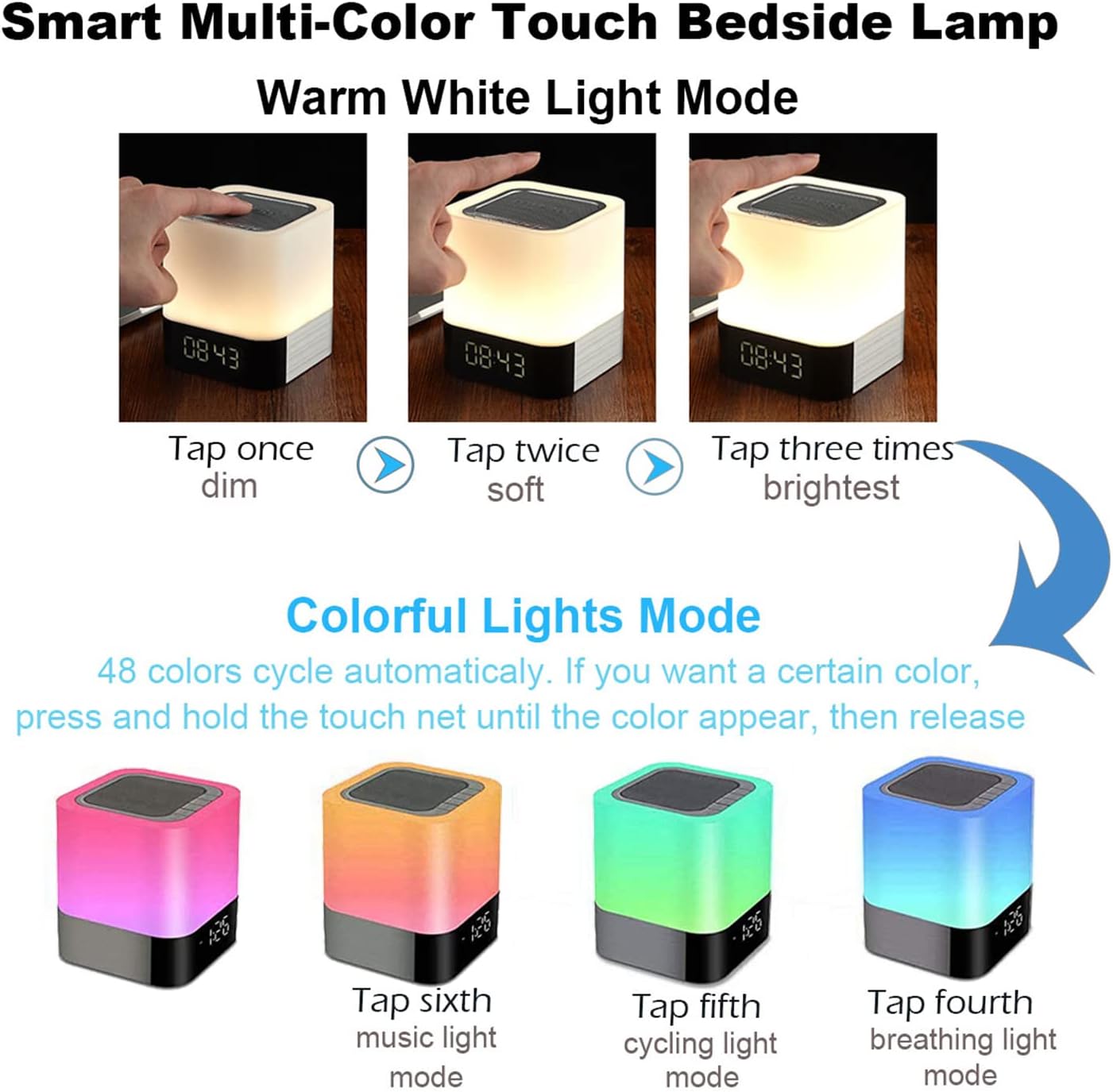
Resim 5.1: Visual guide for controlling the warm white and colorful light modes using the touch mesh net.
Sıcak Beyaz Işık Modu
- Tap the top mesh net once to turn on the dim warm white light.
- Tap a second time for soft warm white light.
- Tap a third time for the brightest warm white light.
- Tap a fourth time to turn off the warm white light.
Colorful Lights Mode (48 Colors)
- From any warm white light setting, press and hold the top mesh net until the light switches to the colorful mode.
- The colors will cycle automatically.
- To select a specific color, press and hold the touch net again when your desired color appears, then release. The light will stay on that color.
- To switch back to automatic color cycling, tap the mesh net.
- To turn off the colorful light, tap the mesh net until the light turns off.
5.3 Çalar Saat Modu
The device features a digital alarm clock with snooze function and the ability to set custom alarm sounds.
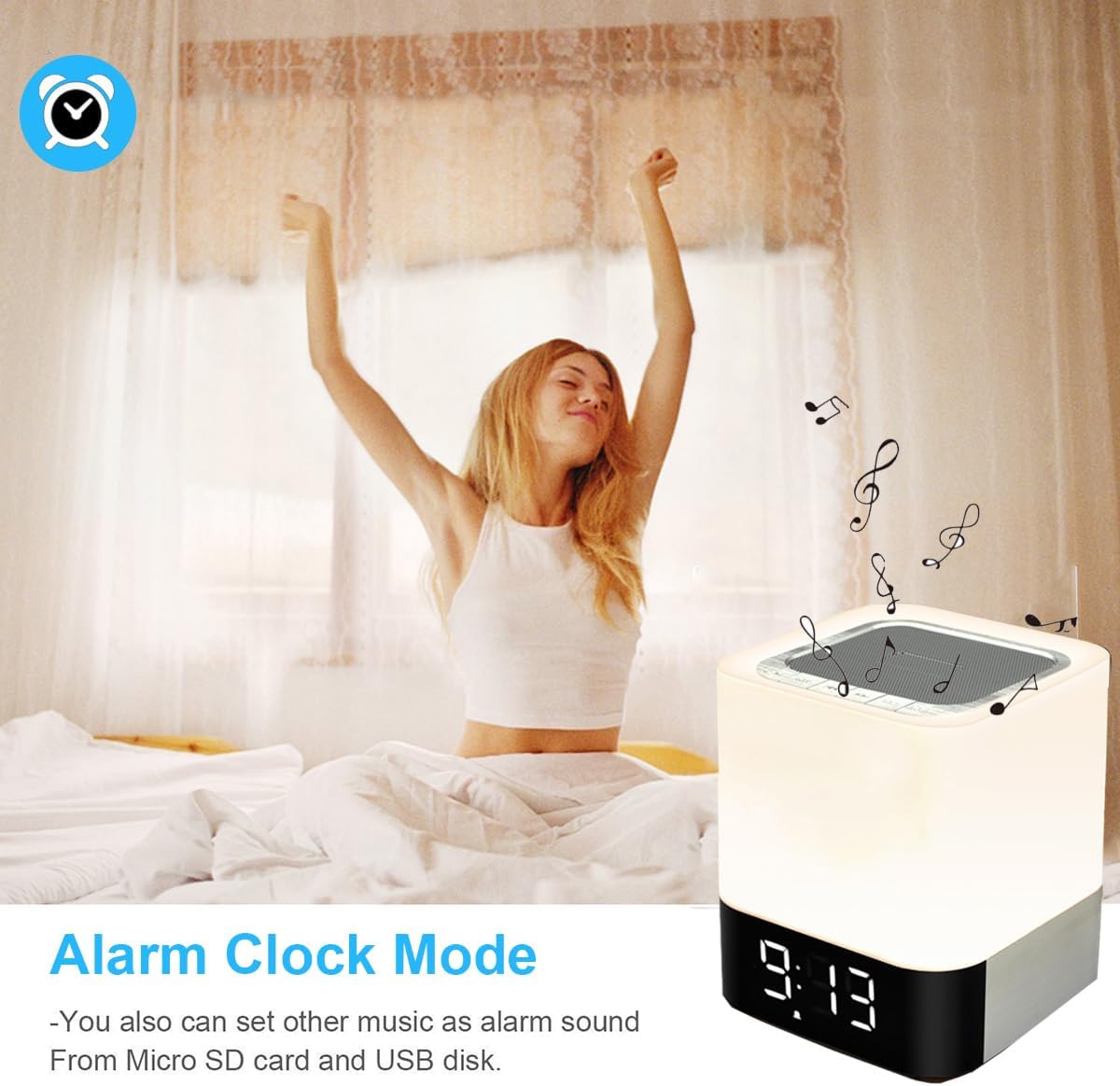
Resim 5.2: The alarm clock mode, highlighting the option to use custom MP3 songs as alarm sounds.
Zamanı Ayarlama
- Basın Mod button until the clock display is active.
- Basılı tutun Mod Saat haneleri yanıp sönmeye başlayana kadar tuşuna basın.
- Kullanın Sesi Aç/Sonraki Parça Ve Sesi Kısma/Önceki Parça Saati ayarlamak için düğmeler.
- Basın Mod button again to switch to minute adjustment. Adjust minutes using the volume buttons.
- Basın Mod button a third time to confirm the time setting.
Alarmı Ayarlama
- In clock display mode, press the Çalar saat button (usually indicated by an alarm icon, or a long press of the Mode button after time setting).
- Alarm saati rakamları yanıp sönecektir. Kullanın Sesi Aç/Sonraki Parça Ve Sesi Kısma/Önceki Parça Alarm saatini ayarlamak için düğmeler.
- Basın Çalar saat button again to switch to minute adjustment. Adjust minutes using the volume buttons.
- Basın Çalar saat button a third time to confirm the alarm setting. The alarm icon will appear on the display.
Custom Alarm Sound (MP3)
- To use your favorite song as an alarm, save an MP3 file to a micro SD card or USB flash drive.
- Create a folder named "ALARM" on the root directory of your micro SD card or USB flash drive and place your desired MP3 file(s) inside.
- Insert the micro SD card or USB flash drive into the corresponding port on the device.
- The device will automatically use the MP3 file(s) in the "ALARM" folder as the alarm sound.
Erteleme Fonksiyonu
- When the alarm rings, tap the top mesh net once to activate the snooze function. The alarm will ring again after 5 minutes.
- To stop the alarm completely, quickly tap the top mesh net twice.
5.4 MP3 Player Mode
Play music directly from a micro SD card or USB flash drive.
- Insert a micro SD card or USB flash drive containing MP3 files'yi ilgili porta takın.
- Basın Mod button until you hear a voice prompt indicating MP3 mode (or card/USB mode).
- The device will automatically start playing the MP3 files.
- Kullanın Sesi Aç/Sonraki Parça Ve Sesi Kısma/Önceki Parça Parçalar arasında gezinmek için düğmeler.
- Kullanın Oynat/Duraklat Oynatmayı duraklatmak veya sürdürmek için düğmesine basın.
5.5 AUX-IN Modu
Harici ses aygıtlarını 3.5 mm ses kablosu kullanarak bağlayın.
- Connect one end of a 3.5mm audio cable (not included) to the AUX-IN port on the back of the speaker.
- Diğer ucunu harici cihazınızın (örneğin, MP3 çalar, dizüstü bilgisayar) ses çıkış jakına bağlayın.
- Basın Mod button until you hear a voice prompt indicating AUX mode.
- Harici cihazınızdan ses çalın. Ses seviyesi hem hoparlör hem de harici cihaz üzerinden kontrol edilebilir.
6. Bakım
- Cihazı yumuşak ve kuru bir bezle temizleyin. Aşındırıcı temizleyiciler veya çözücüler kullanmayın.
- Keep the device away from water and excessive moisture. Although it has some water resistance, it is not fully waterproof.
- Cihazı aşırı sıcaklıklara veya doğrudan güneş ışığına maruz bırakmaktan kaçının.
- If not used for a long period, charge the battery at least once every three months to prolong its lifespan.
7. Sorun Giderme
| Sorun | Olası Çözüm |
|---|---|
| Cihaz açılmıyor. | Ensure the ON/OFF switch is in the 'ON' position. Check battery level and charge the device if necessary. |
| Hoparlörden ses gelmiyor. | Check volume levels on both the speaker and the connected device. Ensure the correct mode (Bluetooth, MP3, AUX) is selected. For Bluetooth, ensure successful pairing. |
| Bluetooth eşleştirme başarısız. | Ensure the speaker is in Bluetooth mode and discoverable. Turn off and on Bluetooth on your device. Move the speaker closer to your device. |
| Işık dokunmaya tepki vermez. | Ensure the device is powered on. Try tapping the mesh net firmly. |
| Alarm çalmıyor. | Verify the alarm time is set correctly and the alarm function is activated (alarm icon visible). Ensure MP3 files for custom alarms are correctly placed in an "ALARM" folder on the root directory of the storage device. |
8. Özellikler
| Özellik | Detay |
|---|---|
| Model Adı | BY28 P |
| Marka | WamGra |
| Ürün Boyutları | 3.9"D x 3.9"G x 4.4"Y (10 cm D x 10 cm G x 11.2 cm Y) |
| Ürün Ağırlığı | 1.35 Pound (0.61 kg) |
| Hoparlör Tipi | Taşınabilir Bluetooth Hoparlör |
| Hoparlör Maksimum Çıkış Gücü | 5 Watt |
| Kablosuz İletişim Teknolojisi | Bluetooth 4.0 |
| Bluetooth Menzili | 10 Metre (32.81 Ayak) |
| Bağlantı Teknolojisi | Bluetooth, Yardımcı (3.5 mm), USB |
| Kontrol Yöntemi | Dokunmak |
| Güç Kaynağı | Pille Çalışan (1 Lityum İyon pil dahil) |
| Pil Kapasitesi | 4400 mAh |
| Şarj Süresi | Yaklaşık 6 Saat |
| Özel Özellikler | Color Changing Light, Dimmable Light, Rechargeable, MP3 Player, Hands-Free Call |
9. Garanti ve Destek
This product comes with a limited warranty. Please refer to the warranty information provided at the time of purchase for details regarding coverage and duration.
For technical support, troubleshooting assistance, or warranty claims, please contact your retailer or the manufacturer directly. Contact information can typically be found on the product packaging or the brand's official webalan.