
Önemli Güvenlik Talimatları
To ensure safe operation and prolong the life of your monitor, please read and follow these instructions carefully:
- Monitörü temizlemeden önce daima güç kablosunu elektrik prizinden çıkarın.
- Elektrik çarpmasına yol açmamak için monitörü yağmura veya neme maruz bırakmayın.
- Aşırı ısınmayı önlemek için monitörün etrafında yeterli havalandırma olduğundan emin olun. Havalandırma açıklıklarını kapatmayın.
- Yalnızca üretici tarafından sağlanan güç adaptörünü ve kabloları kullanın.
- Güç kablosunun veya monitörün üzerine ağır nesneler koymaktan kaçının.
- If the monitor is damaged or malfunctions, do not attempt to repair it yourself. Contact qualified service personnel.
Paket İçeriği
Before proceeding with the setup, please check the contents of your package to ensure all items are present:
- Acer CB272U smiiprx LED Monitor
- Monitör Sehpası (Taban ve Kol)
- Güç Kablosu
- HDMI Kablosu
- Hızlı Başlangıç Kılavuzu / Garanti Kartı
Kurmak
1. Monitör Standının Montajı
- Carefully remove the monitor from its packaging. Place the monitor face down on a soft, clean cloth or surface to prevent scratches to the screen.
- Attach the stand arm to the back of the monitor panel. Ensure it is securely fastened, typically by sliding it into place until it clicks or by tightening screws.
- Connect the stand base to the bottom of the stand arm. Secure the base by tightening the captive screw located underneath the base.

Şekil 1: Arka view of the Acer CB272U smiiprx monitor with the stand attached, illustrating the assembly points.
2. Connecting the Monitor to Your Computer
- Connect one end of the provided HDMI cable to the HDMI port on the monitor.
- Connect the other end of the HDMI cable to the HDMI output port on your computer or graphics card.
- Plug the power cord into the monitor's power input, then plug the other end into a grounded electrical outlet.

Şekil 2: Açısal arka view showing the input ports of the monitor, including HDMI and power connections.
Monitörü Çalıştırma
Açma ve Kapatma
Locate the power button on the monitor's bezel. Press it once to turn the monitor on. The power indicator light will illuminate. Press it again to turn the monitor off.
Adjusting Display Settings (OSD Menu)
The On-Screen Display (OSD) menu allows you to customize various monitor settings. Use the control buttons (usually located on the back or bottom right of the monitor) to navigate the OSD menu. Common adjustments include:
- Parlaklık/Kontrast: Genel parlaklığı ve açık ile koyu alanlar arasındaki farkı ayarlayın.
- Renk ayarları: Renk sıcaklığını, gamayı ve bireysel RGB seviyelerini değiştirin.
- Giriş kaynağı: Manually select the video input (e.g., HDMI).
- Ses: Dahili hoparlörlerin ses seviyesini kontrol edin.
Ergonomik Ayarlamalar
The Acer CB272U smiiprx monitor stand offers multiple ergonomic adjustments to optimize your viewkonfor:
- Yükseklik Ayarı: Monitörü göz hizasına yükseltin veya alçaltın.
- Tilt: Adjust the screen angle forward or backward to reduce glare.
- Döner: Rotate the monitor horizontally to share your screen or adjust viewaçı.
- Pivot: Rotate the screen to a portrait orientation for document viewing or coding.
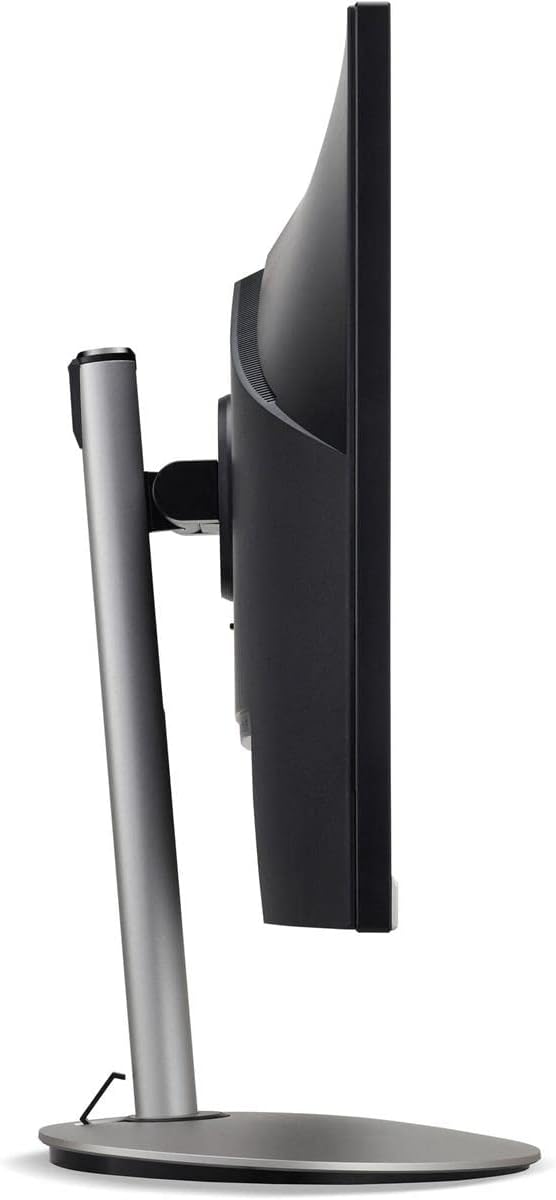
Şekil 3: Yan profile of the monitor, illustrating its adjustable stand for ergonomic positioning.
Bakım
Cleaning the Monitor Screen and Casing
To clean your monitor, first ensure it is turned off and unplugged from the power outlet. Use a soft, lint-free cloth. For stubborn marks, lightly dampen the cloth with water or a specialized non-abrasive screen cleaner. Sıvıyı doğrudan ekrana veya c'ye püskürtmeyin.asing. Sert kimyasallar, aşındırıcı temizleyiciler veya çözücüler kullanmaktan kaçının.
Depolama Yönergeleri
If you need to store the monitor for an extended period, it is recommended to use its original packaging to protect it from dust, moisture, and physical damage. Store in a cool, dry environment away from direct sunlight and extreme temperatures.
Sorun giderme
Yaygın sorunlar ve çözümleri için aşağıdaki tabloya bakın:
| Sorun | Olası Neden | Çözüm |
|---|---|---|
| Ekranda görüntü yok | Güç kablosu çıkarıldı; Video kablosu çıkarıldı; Yanlış giriş kaynağı seçildi. | Check power and video cable connections; Ensure the monitor is powered on; Select the correct input source via the OSD menu. |
| Görüntü bulanık veya bozuk | Incorrect resolution setting; Faulty video cable. | Set the display resolution to 2560 x 1440 at 75 Hz; Try a different HDMI cable. |
| Hoparlörlerden ses gelmiyor | Monitor volume too low or muted; Incorrect audio output selected on computer. | Adjust monitor volume via OSD; Unmute audio; Select the monitor as the audio output device in your computer's sound settings. |
| Monitör titriyor | Refresh rate mismatch; Interference; Faulty cable. | Ensure refresh rate is set to 75 Hz; Check for nearby electronic devices causing interference; Replace video cable. |
Özellikler
Key technical specifications for the Acer CB272U smiiprx LED Monitor:
| Özellik | Detay |
|---|---|
| Model Adı | CB272U smiiprx |
| Ekran Boyutu | 24.1 inç |
| Yerel Çözünürlük | 2560x1440 (WQHD) |
| Yenileme Hızı | 75 Hz |
| Tepki Süresi | 1 Millisecond (VRB) |
| En Boy Oranı | 16:9 |
| Görüntü Türü | LED-backlit LCD / TFT active matrix (IPS) |
| Parlaklık | 350 cd/m² |
| Kontrast Oranı | 1000:1 (Statik) |
| Bağlantı | HDMI |
| Uyarlanabilir Senkronizasyon | Serbest Senkronizasyon |
| Dahili Hoparlörler | Evet |
| Dimensions (WxDxH with stand) | 24.1 inç x 9.2 inç x 20.5 inç |
| Ağırlık (stand ile) | 18.1 Pound |

Figure 4: Monitor dimensions with stand, indicating width, depth, and height.
Garanti Bilgileri
The Acer CB272U smiiprx LED Monitor comes with a 3 yıllık üretici sınırlı garantisi. This warranty covers defects in materials and workmanship under normal use. For complete details regarding warranty coverage, limitations, and how to make a claim, please refer to the warranty documentation included with your product or visit the official Acer support webalan.
Please retain your proof of purchase (receipt or invoice) as it will be required for any warranty service.
Müşteri Desteği
Should you require further assistance, technical support, or wish to download the latest drivers and firmware updates for your monitor, please visit the official Acer support webalan:
You can also find contact information for Acer customer service in your region on the support webKişiselleştirilmiş yardım için site.