
1. Giriş
This manual provides detailed instructions for the installation, operation, and maintenance of your EMANER Model 7042-WH Dual-Head LED Security Light. Please read this manual thoroughly before installation and retain it for future reference.

Ön view of the EMANER Dual-Head LED Security Light, highlighting its two rotatable light heads and motion sensor. A 120V warning label is visible.
2. Güvenlik Bilgileri
UYARI: Risk of electric shock. Disconnect power at the fuse or circuit breaker before installation or servicing. All wiring connections must be in accordance with local and national electrical codes.
- Ensure the power supply is 120V AC.
- Yanıcı malzemelerin yakınına kurmayın.
- This product is designed for outdoor use and is IP65 waterproof rated.
- Kurulum sürecinden emin değilseniz, kalifiye bir elektrikçiye danışın.
- LED ışık kaynağı yandığında doğrudan gözlerinizi ışık kaynağına dikmeyin.
3. Ürün Bittiview ve Bileşenler
The EMANER Model 7042-WH is a dual-head LED security light featuring a rotatable design and multiple intelligent control modes. Key components include:
- Rotatable Light Heads: Two adjustable LED light panels.
- Pir hareket sensörü: Hareket algılama için pasif kızılötesi sensör.
- Kontrol Kadranları: For adjusting time delay and sensitivity.
- Montaj Donanımı: Includes mounting strap, screws, and wire nuts.

A diagram providing precise measurements of the security light's length, width, height, and the dimensions of the rotatable light heads and PIR motion sensor.
4. Özellikler
| Özellik | Şartname |
|---|---|
| Marka | EMANER |
| Model Numarası | 7042-WH |
| Renk | White Fixture |
| Malzeme | ABS Plastic + Aluminum internal |
| Işık Kaynağı Türü | NEDEN OLMUŞ |
| Netage | 28 Watt |
| Parlaklık | 2800 Lümen |
| Renk Sıcaklığı | 5000K Gün Işığı Beyazı |
| Cilttage | 120 Volt |
| Su Direnç Seviyesi | IP65 Su Geçirmez |
| Algılama Açısı | 180 derece |
| Algılama Mesafesi | 20-70 feet (adjustable) |
| Montaj Tipi | Wall mount, Eave/Soffit mount |
| Ürün Boyutları | 9"U x 7.4"G x 6.4"Y |
| Ürün Ağırlığı | 1.74 Pound |
5. Kurulum ve Kurulum
This LED security light is designed for easy installation. Follow these steps carefully:
5.1 Ön Kurulum
- Gücü kapatın: Disconnect power at the circuit breaker or fuse box before beginning installation.
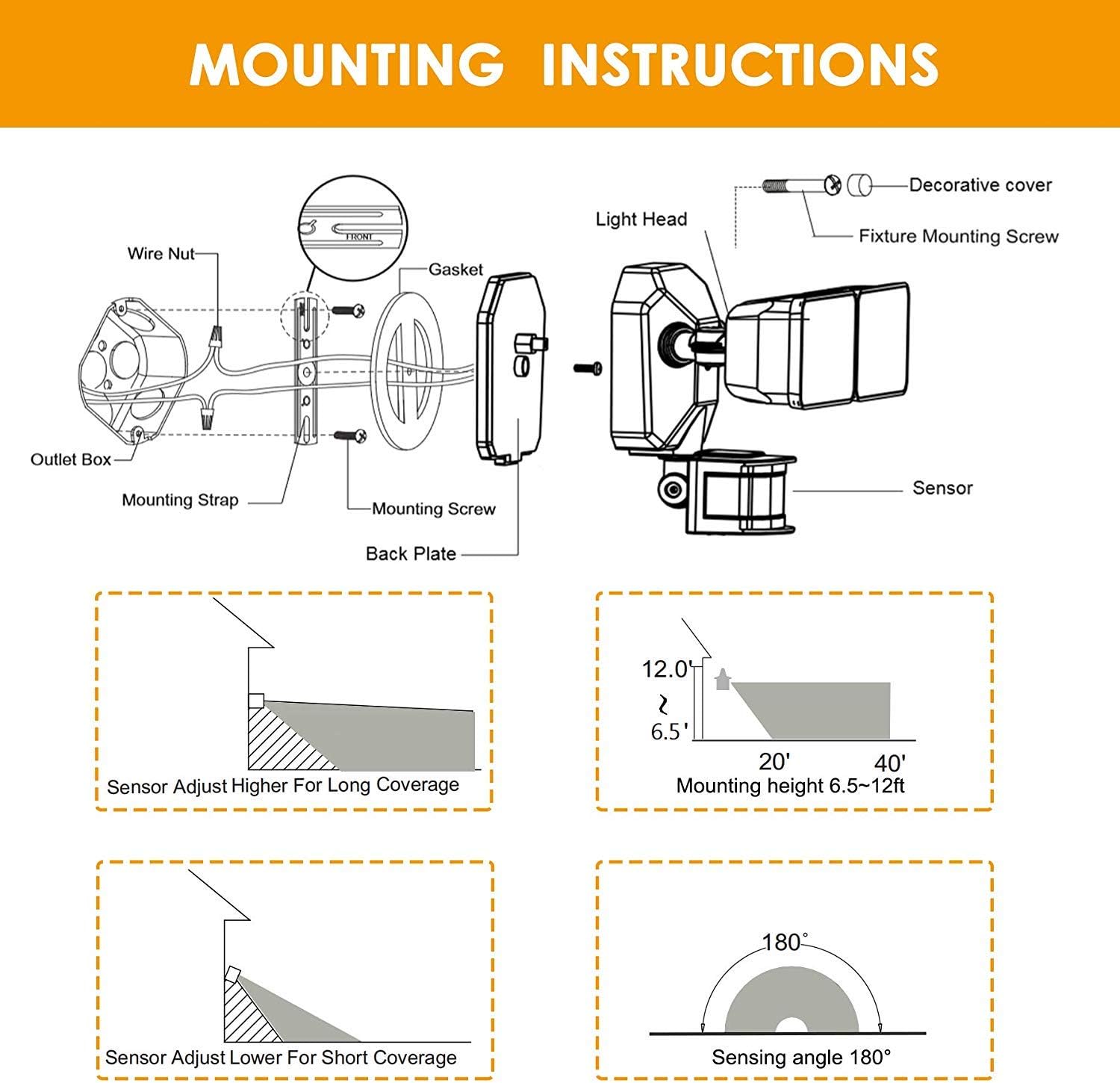
- Select mounting location: Choose a wall or eave/soffit location that provides the desired coverage and is within reach of existing wiring. Recommended mounting height is 6.5-12 feet.
- İçeriği açın: Ensure all components are present: light fixture, mounting strap, screws, and wire nuts.
5.2 Kablolama ve Montaj
- Attach the mounting strap to your existing electrical outlet box using the provided screws.
- Elektrik kablolarını bağlayın:
- Bağlan siyah (Canlı) kablo, armatürden şuraya siyah Priz kutusundan gelen (canlı) kablo.
- Bağlan beyaz (Nötr) kablo, armatürden diğerine beyaz (Nötr) kablo, priz kutusundan geliyor.
- Bağlan yeşil/çıplak bakır (Topraklama) kablosu armatürden şuraya yeşil/çıplak bakır (Topraklama) kablosu priz kutusundan geliyor.
- Carefully tuck the wires into the outlet box.
- Align the light fixture with the mounting strap and secure it with the decorative cover and fixture mounting screw.
- Adjust the light heads and motion sensor to your desired angles.
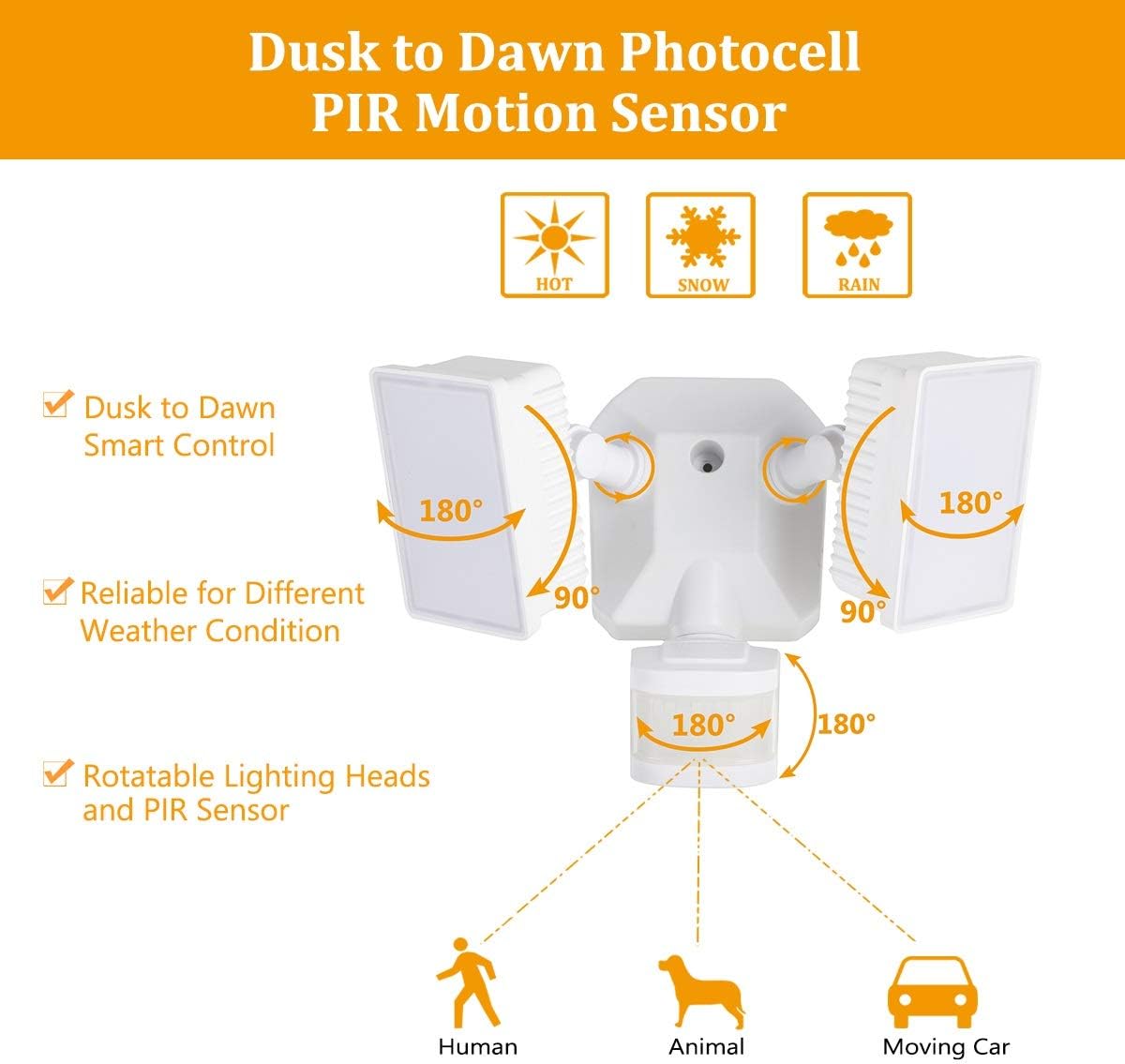
Diagram for installing the security light, detailing wire connections, mounting strap, back plate, and attaching the light head and sensor.
Illustrations showing two common installation methods: mounting the light under an eave or soffit, and mounting it directly onto a wall.
6. Çalışma Modları ve Ayarlar
The security light features a control panel with dials for TIME and SENSITIVITY, and a slide switch for selecting operating modes. All modes operate only at night or in dark environments, automatically turning off at dawn.

An infographic explaining the various operating modes: TEST, AUTO, Motion Sensor, 6 Hours, and Dusk to Dawn (PC) modes, along with their respective time delay and sensitivity settings.
6.1 Kontrol Paneli Üstüview

Ayrıntılı view of the control panel, showing the 'TIME' dial (5S, 3MIN, TEST) and 'SENSITIVITY' dial (+/-) for adjusting light duration and motion detection range.
- TIME Dial: Adjusts how long the light stays on after motion is detected (5 seconds to 3 minutes). The 'TEST' setting is for initial setup.
- SENSITIVITY Dial: Adjusts the motion sensor's detection range (Low to High sensitivity, 20-70 feet).
- Mode Slide Switch: Selects between AUTO, OFF (Motion Sensor), 6H (6 Hours), and PC (Dusk to Dawn Stay On) modes.
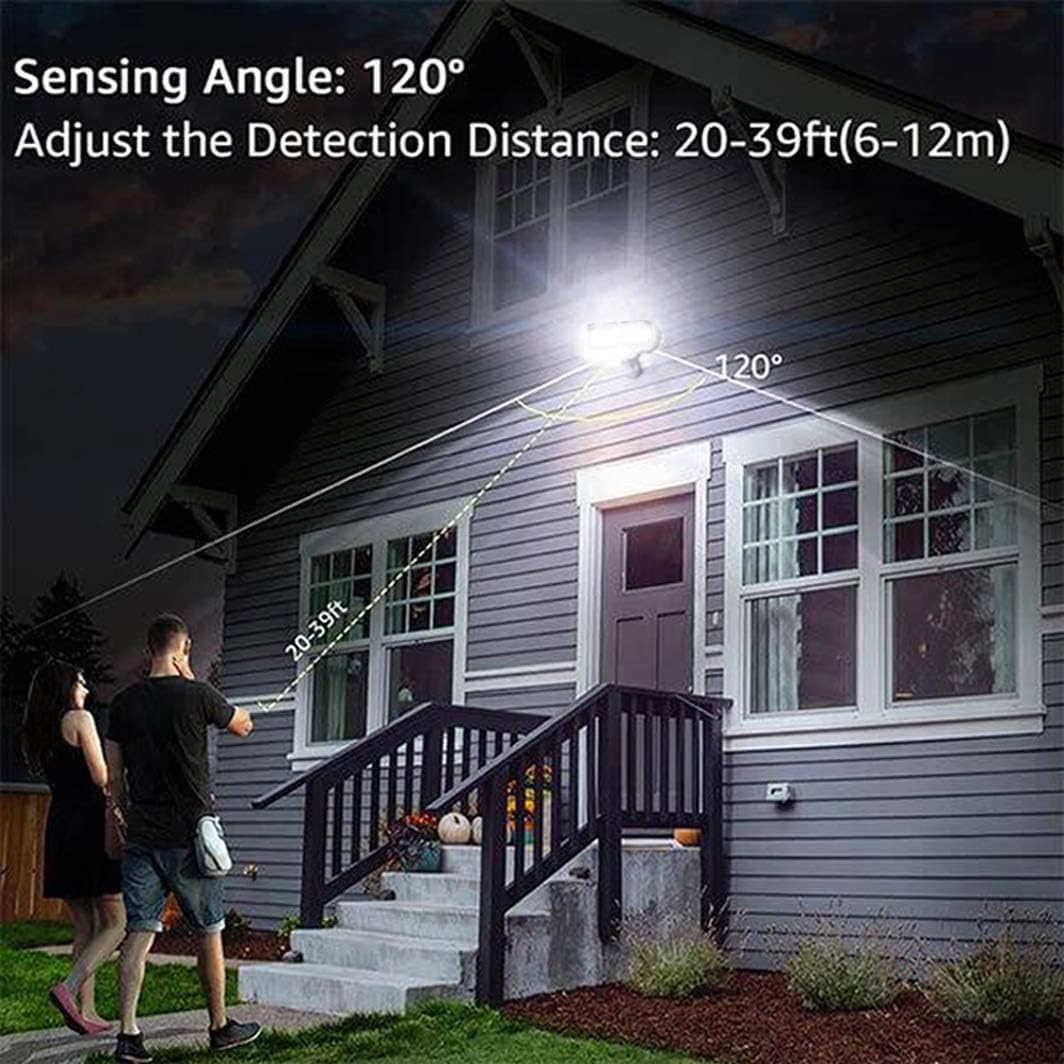
An illustration demonstrating the motion sensor's 120-degree sensing angle and adjustable detection distance of 20-39 feet (6-12 meters) from a mounting height of 6.5-12 feet.
6.2 Çalışma Modları
- TEST Modu: (Slide switch to 'TEST' on TIME dial) This mode is for testing after installation. When connected to AC power, the light will turn on for 5 seconds based on the time delay setting.
- AUTO Dim Light Mode: (Slide switch to 'AUTO') The security light turns on with dim light at dusk. When motion is detected, it switches to 100% brightness. After no motion is detected for the set time delay (5 seconds to 3 minutes), it returns to dim light. Automatically turns off at dawn.
- Motion On/Off Mode: (Slide switch to 'OFF') The security flood light only turns on at 100% brightness when motion is activated. It automatically turns off when no motion is detected for the set time delay. Automatically turns off at dawn.
- 6 Hours Mode: (Slide switch to '6H') The flood light turns on at 100% brightness and stays on for 6 hours. After 6 hours, it automatically switches to 'AUTO Dim Light Mode'. Automatically turns off at dawn.
- Dusk to Dawn Stay On Mode (PC Mode): (Slide switch to 'PC') The motion security light turns on with bright light (100% brightness) and stays on all night. It automatically turns off in the daytime.
7. Bakım
Regular maintenance ensures optimal performance and longevity of your EMANER LED Security Light.
- Temizlik: Işık başlıklarını ve hareket sensörü merceğini periyodik olarak yumuşak bir bezle temizleyin.amp bezle silin. Aşındırıcı temizleyiciler veya çözücüler kullanmayın.
- Denetleme: Kablolama ve bağlantı noktalarında aşınma, hasar veya gevşek bağlantı belirtileri olup olmadığını yıllık olarak kontrol edin.
- Kullanıcı Tarafından Bakımı Yapılabilecek Parça Yok: The LED light source is non-removable and not user-serviceable. Do not attempt to open the light heads.
8. Sorun Giderme
If you encounter issues with your security light, refer to the following common problems and solutions:
| Sorun | Olası Neden | Çözüm |
|---|---|---|
| Gece ışık yanmıyor. | 1. Güç kapalı. 2. Photocell sensor is detecting ambient light. 3. Kablolama sorunu. | 1. Devre kesiciyi/sigortayı kontrol edin. 2. Ensure the sensor is not obstructed or exposed to other light sources. 3. Verify all wiring connections are secure. |
| Işık sürekli açık kalır. | 1. Mode set to 'PC' (Dusk to Dawn Stay On). 2. Constant motion detected. 3. Kablolama hatası. | 1. Change mode to 'AUTO' or 'OFF'. 2. Adjust sensor sensitivity or angle to avoid constant triggers. 3. Kablolamayı tekrar kontrol edin. |
| Işık hızlı bir şekilde yanıp sönüyor veya döngüsel olarak açılıp kapanıyor. | 1. Intermittent power supply. 2. Sensor interference. 3. Faulty unit. | 1. Check power connections. 2. Ensure no objects are moving within the sensor's range. 3. Sorun devam ederse müşteri desteğiyle iletişime geçin. |
| Hareket sensörü algılamıyor. | 1. Hassasiyet çok düşük ayarlanmış. 2. Sensor obstructed or misaligned. 3. Temperature too high (reduces PIR effectiveness). | 1. Increase SENSITIVITY setting. 2. Clear obstructions and adjust sensor angle. 3. This is normal behavior in very hot weather. |
9. Garanti Bilgileri
The EMANER Model 7042-WH LED Security Light comes with a 2 yıllık üretici garantisiBu garanti, normal kullanım koşullarındaki malzeme ve işçilik kusurlarını kapsar. Garanti talepleriniz için lütfen satın alma belgenizi saklayın.
10. Müşteri Desteği
For technical assistance, warranty claims, or any questions regarding your EMANER product, please contact EMANER customer service. You can typically find contact information on the product packaging or through the retailer where the product was purchased.
Alternatively, you may visit the official EMANER brand store online or use the 'Ask a question' feature on the product's retail page.