
giriiş
This manual provides detailed instructions for the installation, operation, and maintenance of your Topvision Top808 8-Camera 1080P Lite DVR Security System. Please read this manual thoroughly before using the product to ensure proper setup and functionality. Keep this manual for future reference.
The Topvision Top808 system includes an 8-channel 1080P Lite DVR and eight 2MP 1080P bullet cameras, designed for both indoor and outdoor surveillance with night vision capabilities.
Paket İçeriği
Paketinizde tüm öğelerin mevcut olduğundan emin olun:
- 1x Topvision XDVR-1008 8-Channel 1080P Lite DVR
- 8x Topvision TCB200 2MP 1080P Bullet Cameras (Indoor/Outdoor)
- 8x 18-meter BNC Video/Power Cables
- 1 adet DVR için Güç Adaptörü
- 1x Power Adapter for Cameras
- 1x 8-way Power Splitter for Cameras
- 1x USB Fare
- Kullanım Kılavuzu (bu belge)
- Kameralar için Montaj Vidaları ve Dübelleri

Resim: Üzeriview of the Topvision Top808 security system kit, showing the DVR, eight cameras, cables, power adapters, and a mouse. Icons indicate 2MP resolution, indoor/outdoor use, mobile app compatibility, and night vision.
Kurulum ve Yükleme
1. Hard Drive Installation (Optional, Not Included)
The DVR requires a 3.5-inch SATA hard drive (up to 8TB, WD Purple recommended) for recording. If you plan to record video, install a hard drive before powering on the DVR.
- DVR'ın üst kapağını sökün ve çıkarın.
- DVR'dan gelen SATA veri kablosunu ve güç kablosunu sabit diske bağlayın.
- Verilen vidaları kullanarak sabit diski DVR kasasına sabitleyin.
- Üst kapağı yerine takın ve vidalarla sabitleyin.
2. Connecting the DVR

Resim: Ön ve arka views of the Topvision DVR, highlighting BNC video inputs, audio inputs/outputs, HDMI, VGA, LAN, and USB ports.
- Kameraları Bağlayın: Attach one end of each 18-meter BNC cable to a camera and the other end to a BNC video input port on the back of the DVR.
- Connect Power to Cameras: Connect the camera power cables to the 8-way power splitter, then connect the power splitter to the camera power adapter. Plug the adapter into a power outlet.
- Monitörü Bağla: Connect a monitor to the DVR using either an HDMI or VGA cable (cables not included).
- Fareyi Bağla: USB fareyi DVR üzerindeki USB bağlantı noktalarından birine takın.
- Ağ Bağlantısı (İsteğe bağlı): uzaktan kumanda için viewDVR'ın LAN portundan yönlendiricinize bir Ethernet kablosu bağlayın.
- DVR'ı Açın: Connect the DVR power adapter to the DVR and then to a power outlet. The system will boot up.
3. Kamera Yerleşimi

Resim: Yakın çekim view of multiple Topvision 1080P bullet cameras, emphasizing their 2MP resolution and night vision capabilities for indoor/outdoor use.
- Mount cameras in desired locations, ensuring a clear field of view.
- The cameras are designed for both indoor and outdoor use.
- Adjust the camera angle and focus as needed after installation.
Kullanım Talimatları
1. İlk Kurulum Sihirbazı
Upon first boot, the DVR will guide you through an initial setup wizard. Follow the on-screen prompts to:
- Set language, date, and time.
- Yönetici parolası oluşturun.
- Configure network settings (DHCP recommended for ease of use).
- Format the hard drive (if installed).
2. Canlı View
Kurulumdan sonra DVR canlı görüntüyü gösterecektir view from all connected cameras on the monitor. You can switch between single-camera view, çoklu kamera view, and sequence display using the on-screen menu or mouse controls.
3. Kayıt
The DVR supports continuous recording, scheduled recording, and motion-detection recording. Configure recording settings via the DVR's main menu:
- Git Main Menu > Record > Record Schedule to set up recording times.
- Git Ana Menü > Alarm > Hareket Algılama to enable and configure motion detection for specific cameras.
4. Oynatma
Yırttıview kaydedilmiş footage:
- Git Ana Menü > Oynatma.
- Select the date and time range, and the cameras you wish to view.
- Foo'da gezinmek için oynatma kontrollerini (oynat, duraklat, ileri sar, geri al) kullanıntage.
5. Uzaktan View(Mobil Uygulama)
To access your security system remotely via a smartphone or tablet:
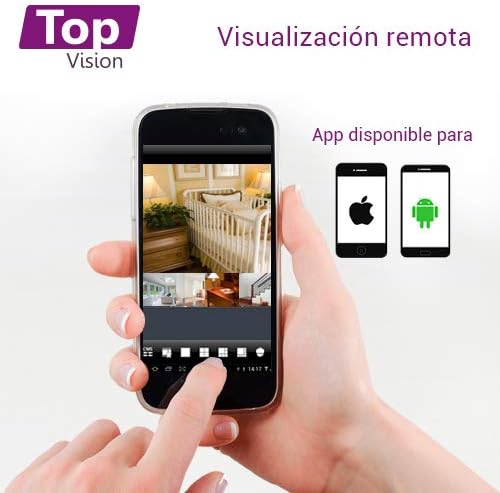
Image: A smartphone screen displaying live camera feeds, illustrating the remote viewing capability of the Topvision security system via a mobile application available for both Android and iOS.
- DVR'ın Ethernet kablosuyla ağınıza bağlı olduğundan emin olun.
- Download a compatible third-party surveillance app (e.g., XMEye, Danale, or similar apps recommended by Topvision support) from your device's app store (Android or iOS).
- Uygulama içinde bir hesap kaydedin.
- Add your DVR device to the app using its serial number or QR code (found in the DVR's network settings).
- Bir kez eklendiğinde, şunları yapabilirsiniz: view live feeds, playback recordings, and receive alerts remotely.
Bakım
- Temizlik: Gently wipe cameras and DVR with a soft, dry cloth. Avoid harsh chemicals.
- Donanım Yazılımı Güncellemeleri: Periodically check the Topvision webEn iyi performans ve güvenliği sağlamak için mevcut ürün yazılımı güncellemeleri hakkında bilgi almak üzere siteyi ziyaret edin veya destek ekibiyle iletişime geçin.
- Sabit Disk Sağlığı: Monitor the hard drive status through the DVR's menu. Replace if errors are detected.
- Kablo Bağlantıları: Periodically inspect all cable connections for secure fit and signs of wear or damage.
Sorun giderme
- Video Sinyali Yok:
- Check all BNC cable connections between cameras and DVR.
- Ensure cameras are receiving power from the power adapter and splitter.
- Verify the monitor is correctly connected to the DVR via HDMI/VGA and is set to the correct input.
- DVR Kayıt Yapmıyor:
- Confirm a hard drive is installed and properly connected.
- Check if the hard drive has been formatted (Main Menu > HDD > HDD Manage).
- Verify recording schedules are configured correctly (Main Menu > Record > Record Schedule).
- Check hard drive status for errors or full capacity.
- Uzak ViewÇalışmıyor:
- Ensure the DVR is connected to the internet via an Ethernet cable.
- Check network settings on the DVR (Ana Menü > Ağ) to ensure it has an IP address.
- Verify the mobile app is correctly configured with the DVR's device ID.
- Check your router's firewall settings if connection issues persist.
- Kötü Görüntü Kalitesi:
- Clean camera lenses if dirty.
- En iyi gündüz görüşü için yeterli aydınlatma sağlayın.
- For night vision, ensure no obstructions are blocking the infrared LEDs.
Özellikler
| Bileşen | Şartname |
|---|---|
| DVR Model | XDVR-1008 |
| Video Girişi | 8 Channels (BNC) + 1 IP Channel |
| Video Çözünürlüğü | 1080P Lite |
| Kamera Modeli | TCB200 |
| Kamera Çözünürlüğü | 2 MP (1080P) |
| Mercek | 2.8 mm |
| Gece Görüşü | Kızılötesi LED'ler |
| Depolamak | Supports 1x SATA HDD up to 8TB (not included) |
| Video Çıkışı | HDMI, VGA (simultaneous) |
| Bağlantı | Wired (Ethernet for network) |
| Boyutlar (DVR) | 30x25x7 cm |
| Ağırlık (Sistemi) | 5.85 kilo |
Garanti Bilgileri
Topvision products are covered by a limited warranty. Please refer to the warranty card included with your product or visit the official Topvision webAyrıntılı şartlar ve koşullar için web sitesini ziyaret edin. Satın alma belgenizi garanti talepleriniz için saklayın.
Müşteri Desteği
For technical assistance, troubleshooting, or product inquiries, please contact Topvision customer support. Refer to the contact information provided in your product packaging or on the official Topvision webalan.
Online resources such as FAQs and video tutorials may also be available on the Topvision support page.