
1. Giriş
The myTouchSmart In-Wall Push-Button Countdown Timer Switch (Model 40953) is designed to simplify your routine by providing convenient automation for indoor or outdoor lighting and various appliances. This timer replaces any standard single-pole light switch and offers preset countdown times to automatically turn off connected devices. It is compatible with LED, CFL, incandescent, and halogen bulbs.

The product packaging displays the in-wall digital countdown timer switch, highlighting its key features such as preset countdown times and compatibility with various bulb types.
2. Güvenlik Bilgileri
Before beginning installation, read all instructions carefully. Improper installation can result in electrical shock or fire. Always consult a qualified electrician if you are unsure about any part of the installation process.
- GÜCÜ KAPATIN at the circuit breaker or fuse box before wiring.
- Bu cihaz, Ulusal Elektrik Yasasına ve yerel yönetmeliklere uygun olarak kurulmak üzere tasarlanmıştır.
- Yalnızca bakır tel kullanın.
- NEUTRAL WIRE REQUIRED operasyon için.
3. Kurulum
3.1 Gerekli Araçlar
- Tornavida (Phillips ve Düz Uçlu)
- Tel Soyucular
- Elektrik Bandı
- Cilttage Test Cihazı (önerilir)
3.2 Kablolama Talimatları
- Gücü kapatın to the switch location at the circuit breaker or fuse box. Verify power is off using a voltage test cihazı.
- Remove the existing wall plate and switch from the wall box.
- Carefully disconnect the wires from the old switch. Identify and label the LINE (hot), LOAD, NEUTRAL, and GROUND wires. The timer requires a neutral wire for proper operation.
- Connect the wires to the myTouchSmart timer using the screw terminals:
- Bağlan ASTAR (hot) wire to the terminal labeled 'LINE'.
- Bağlan YÜK wire (to the light/appliance) to the terminal labeled 'LOAD'.
- Bağlan DOĞAL wire (typically white) to the terminal labeled 'NEUTRAL'.
- Bağlan ZEMİN wire (typically bare copper or green) to the terminal labeled 'GROUND'.
- Tüm kablo bağlantılarının güvenli olduğundan emin olun.
- Carefully push the wired timer into the wall box.
- Mount the timer to the wall box using the provided screws.
- Attach the desired color faceplate (White or Light Almond included, wallplate not included).
- Sigortadan elektriği geri verin.

Arka taraf view of the timer, displaying the screw terminals for Line, Load, Neutral, and Ground connections, essential for proper installation.

Bir yan profesyonelfile of the timer, showing its depth and how it fits into a standard electrical wall box, with wiring connections visible.
4. Kullanım Talimatları
The myTouchSmart timer features an ON/OFF door panel that conceals preset buttons and LEDs when closed. Opening the door provides access to all countdown options.
4.1 Activating a Countdown
- Open the front door panel to reveal the preset buttons.
- Press the desired countdown button: 5 Min, 10 Min, 30 Min, 60 Min, 2 Hour, or 4 Saat.
- A blue LED indicator light next to the selected button will illuminate, confirming the countdown is active. The connected device will turn on and remain on for the selected duration, then automatically turn off.
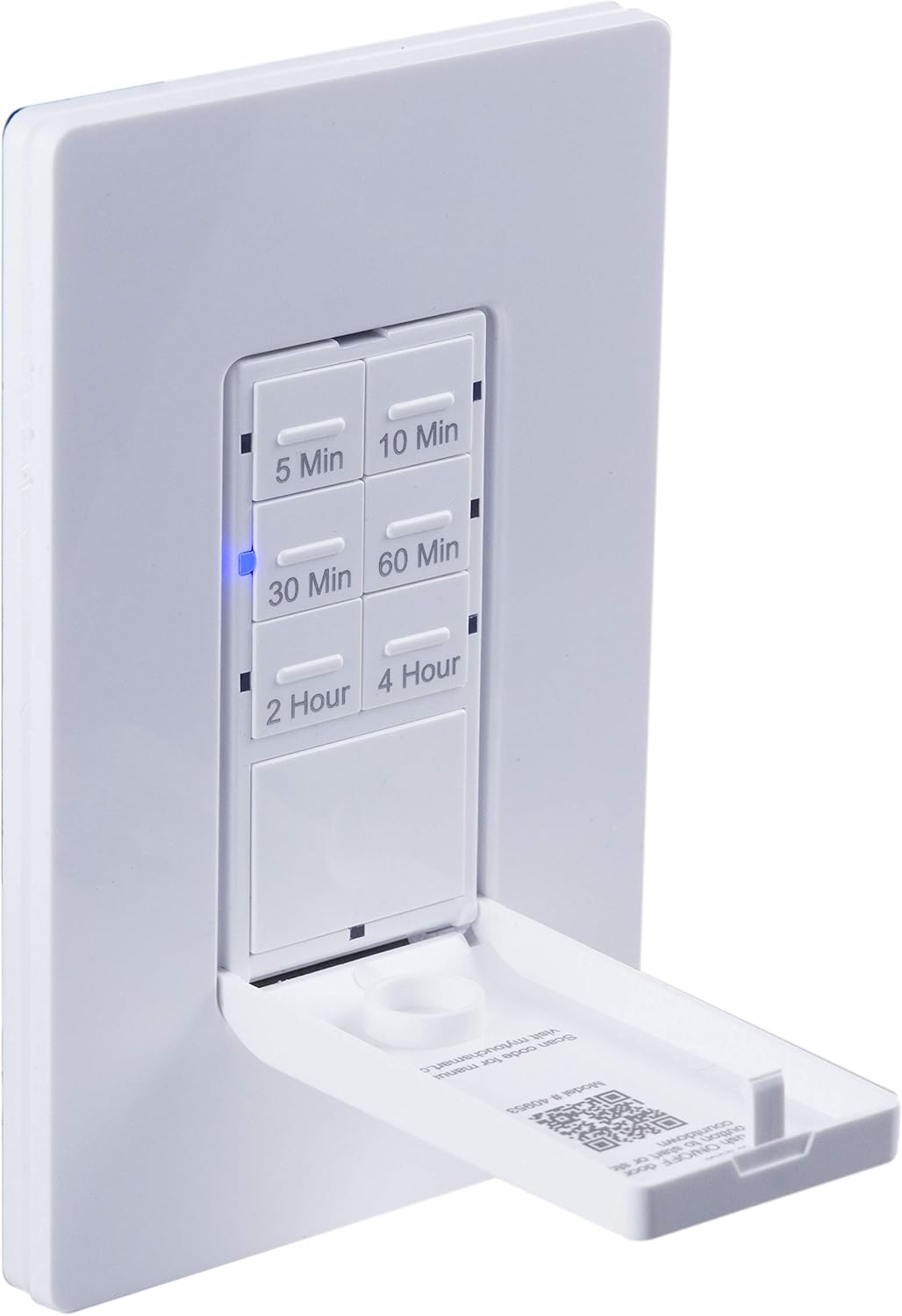
Yakın çekim view of the timer with its front door panel open, exposing the six preset countdown buttons (5, 10, 30, 60 minutes, 2, and 4 hours) and the manual ON/OFF button.

The in-wall timer with its door open, showing the preset buttons and a blue LED illuminated next to the '30 Min' button, indicating an active countdown.

A hand pressing one of the preset countdown buttons on the timer, demonstrating user interaction.
4.2 Manual ON/OFF Override
- To manually turn the connected device ON or OFF at any time, press the large ON/OFF button located at the bottom of the timer (this button is also the door panel when closed).
- Pressing this button will override any active countdown. If no countdown is active, it functions as a standard ON/OFF switch.
4.3 Uygulamalar
This timer is suitable for a variety of applications, including:
- İç ve dış mekan aydınlatması
- Egzoz fanları
- Isıtıcılar
- Other compatible appliances

An image illustrating various applications for the timer, including controlling indoor/outdoor lights, ceiling fans, and exhaust fans.
5. Bakım
The myTouchSmart timer requires minimal maintenance. Follow these guidelines:
- Temizlik: Temizlemeden önce devre kesicideki gücü kesin. Yüzeyi yumuşak bir bezle silin.amp bez. Sert kimyasallar veya aşındırıcı temizleyiciler kullanmayın.
- Denetleme: Periodically check for any loose connections or damage to the switch. If any damage is observed, discontinue use and consult a qualified electrician.
6. Sorun Giderme
If you experience issues with your myTouchSmart timer, refer to the following common problems and solutions:
| Sorun | Olası Neden | Çözüm |
|---|---|---|
| Timer does not turn on/off. | No power to the switch; Incorrect wiring (Line/Load reversed); Loose connections. | Check circuit breaker. Verify wiring connections (Line to Line, Load to Load, Neutral, Ground). Ensure all wires are securely fastened. |
| Countdown does not activate. | Button not fully pressed; Faulty unit. | Ensure the desired countdown button is pressed firmly until the blue LED illuminates. If issue persists, contact customer support. |
| LED göstergeler çalışmıyor. | No power; Unit malfunction. | Check power supply. If the timer functions but LEDs do not, contact customer support. |
| Aralıklı operasyon. | Loose wiring; Overload. | Check all wiring connections for tightness. Ensure the connected load does not exceed the timer's electrical ratings. |
Sorun giderme adımları sorunu çözmezse, lütfen müşteri desteğiyle iletişime geçin.
7. Özellikler
| Özellik | Şartname |
|---|---|
| Model Numarası | 40953 |
| Çalışma Modu | Automatically, Off, Push Button |
| Güncel Derecelendirme | 15 Amps |
| Çalışma Hacmitage | 120 VAC, 60Hz |
| Dirençli Yük | 15A |
| Tungsten Yükü | 1200W |
| Motor Değerlendirmesi | 1 / 2 HP |
| Uyumlu Ampuller | LED, CFL, Akkor, Halojen |
| Montaj Tipi | Duvara Montaj |
| Boyutlar (U x G x Y) | 2.75 x 4.85 x 6.85 inç |
| Ürün Ağırlığı | 5.9 ons |
| Nötr Tel | Gerekli |
| Dahil Bileşenler | In-Wall Timer, White/Light Almond Door Panels |
8. Garanti ve Destek
Garanti bilgileri ve teknik destek için lütfen üreticinin resmi web sitesine başvurun. webSite üzerinden veya müşteri hizmetleri departmanıyla iletişime geçin. Satın alma belgenizi saklayın.
Üretici: benimTouchSmart'ım
UPC: 030878409537
Webalan: www.mytouchsmart.com (Lütfen resmi bilgileri kontrol edin) web(En güncel destek bilgileri için lütfen siteyi ziyaret edin.)