
Ürün Bittiview
The TOPVISION TOP402 security camera system is a comprehensive surveillance solution designed for both indoor and outdoor monitoring. This kit includes a 4-channel Digital Video Recorder (DVR) and two 1080p lite bullet cameras, providing clear video capture and reliable performance.
Temel Özellikler:
- Two 1080p 2MP Cameras: Plastic bullet cameras with 2.8mm lenses, suitable for indoor/outdoor use, equipped with infrared LEDs for night vision.
- 4-Channel 1080p Lite DVR: One digital video recorder supporting 4 video channels plus 1 IP channel.
- Genişletilebilir Depolama: DVR supports up to an 8TB hard drive (HDD not included). A WD Purple hard drive is recommended for recording.
- Plug-and-Play Cables: Two 18-meter pre-terminated cables with BNC connectors for easy installation.
- Tam Aksesuarlar: Includes power adapters, power splitters, and a USB mouse.
- Versatile Video Output: Supports simultaneous HDMI and VGA video output (cables not included).

Image: The TOPVISION TOP402 kit, showing the 4-channel DVR unit and two 1080p bullet-style security cameras.
Paket İçeriği
Lütfen aşağıda listelenen tüm öğelerin paketinizde bulunduğundan emin olun. Herhangi bir öğe eksik veya hasarlıysa, müşteri desteğiyle iletişime geçin.
- 1 x TOPVISION 4-Channel 1080p Lite DVR (Model: XDVR-1004)
- 2 x TOPVISION 1080p 2MP Bullet Cameras
- 2 x 18-meter BNC Video/Power Cables
- 1 x DVR için Güç Adaptörü
- 1 x Power Adapter for Cameras
- 1 x 1-to-2 Power Splitter Cable for Cameras
- 1 x USB Fare
- 1 x Kullanım Kılavuzu (bu belge)

Image: All components of the TOPVISION TOP402 security system, including the DVR, two cameras, cables, power supplies, and a mouse.
Güvenlik Bilgileri
Please read and follow these safety guidelines to prevent damage to the product and ensure user safety.
- Yalnızca sistemle birlikte verilen güç adaptörlerini kullanın.
- Ensure proper ventilation for the DVR to prevent overheating.
- Do not expose the DVR or cameras to extreme temperatures, humidity, or direct water.
- Avoid placing the DVR near strong magnetic fields or sources of electrical interference.
- Installation should be performed by qualified personnel if you are unsure about any steps.
- Herhangi bir bakım veya kurulum işlemini gerçekleştirmeden önce elektrik bağlantısını kesin.
Kurulum Kılavuzu
1. Paketin Açılması ve Hazırlanması
- Tüm bileşenleri dikkatlice ambalajından çıkarın.
- Inspect all items for any signs of damage.
- Choose a suitable location for the DVR, ensuring it is dry, well-ventilated, and away from direct sunlight.
- Plan the camera placement to cover desired areas, considering cable length and power access.
2. DVR Bağlantısı
Connect the necessary peripherals to the DVR before powering it on.
- Monitör Bağlantısı: Connect a monitor to the DVR's HDMI or VGA port using a compatible cable (not included).
- Fare Bağlantısı: DVR'ın USB portlarından birine ürünle birlikte verilen USB fareyi takın.
- Ağ Bağlantısı (Opsiyonel): uzaktan kumanda için viewDVR'ın LAN portundan yönlendiricinize bir Ethernet kablosu bağlayın.
- Hard Drive Installation (Optional): If you plan to record video, install a compatible 3.5-inch SATA hard drive (up to 8TB, WD Purple recommended) inside the DVR. Refer to the separate HDD installation guide if provided, or consult online resources.

Image: The DVR unit, showing the front panel and the rear panel with various ports including BNC video inputs, audio inputs/outputs, HDMI, VGA, LAN, and USB ports.
3. Kamera Kurulumu
Mount the cameras in desired locations and connect them to the DVR.
- Montaj: Use screws and anchors (not included) to securely mount the cameras to a wall or ceiling. Adjust the camera angle as needed.
- Kablo bağlantısı: Connect one end of the 18-meter BNC cable to the camera's video and power ports.
- DVR Bağlantısı: Connect the other end of the BNC cable's video connector to an available BNC input port on the DVR (e.g., Video In 1, Video In 2).
- Güç Bağlantısı: Connect the power end of the BNC cable to the 1-to-2 power splitter, then connect the splitter to the camera power adapter.

Image: Two TOPVISION 1080p bullet cameras, highlighting their night vision capability and compatibility with mobile viewuygulamalar.
4. İlk Güç Açma
- Once all connections are secure, plug the DVR power adapter into an electrical outlet.
- Plug the camera power adapter into an electrical outlet.
- The DVR will power on automatically. Follow the on-screen instructions for initial setup, which may include setting the language, date/time, and creating a password.
Kullanım Talimatları
1. Basic DVR Operation
- Canlı View: After booting, the DVR will display the live feed from all connected cameras on the monitor.
- Menü Navigasyonu: Use the USB mouse to navigate the DVR's on-screen menu. Right-click to access the main menu.
- Sistem Ayarları: Access the 'System' or 'Configuration' menu to adjust video settings, network settings, user accounts, and other system parameters.
2. Uzaktan ViewKurulum
İle view your cameras remotely on a smartphone or tablet, follow these general steps:
- DVR'ı Ağa Bağlayın: DVR'ın Ethernet kablosuyla yönlendiricinize bağlı olduğundan emin olun.
- İndir uygulaması: Arama the official TOPVISION security app (often named 'XMeye' or similar for generic DVRs) on your smartphone's app store (iOS or Android).
- Hesap Kaydı: Uygulamanın içinde bir hesap oluşturun.
- Cihaz Ekle: Use the app to scan the QR code displayed on the DVR's monitor (usually found in the 'Network' or 'P2P' settings) or manually enter the DVR's serial number to add it to your account.
- Canlı View: Eklendikten sonra şunları yapabilmelisiniz: view your camera feeds remotely.
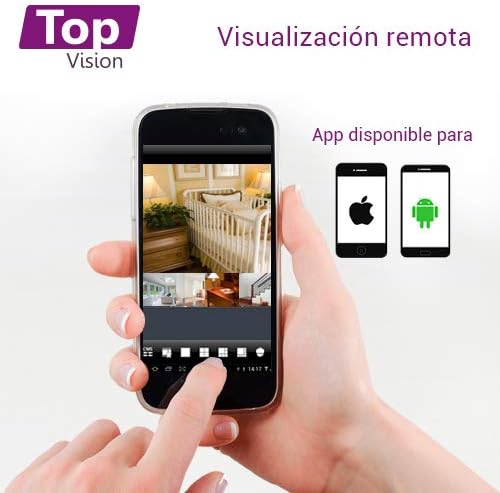
Image: A smartphone screen showing multiple live camera feeds, demonstrating the remote viewing capability of the security system.
3. Kayıt ve Oynatma
- Kayıt Ayarları: Access the 'Record' menu on the DVR to configure recording schedules, motion detection recording, and continuous recording options.
- Playback: Ana menüden 'Oynatma'yı seçerek tekrar oynatabilirsiniz.view kaydedilmiş footage. You can search by date, time, and event type.
- Yedekleme: Connect a USB flash drive to the DVR's USB port to back up recorded video files.
Bakım
Düzenli bakım, güvenlik sisteminizin optimum performans göstermesini ve uzun ömürlü olmasını sağlar.
- Temizlik: Periodically clean the camera lenses with a soft, dry cloth to remove dust and smudges. Clean the DVR exterior with a soft, damp kumaş. Sert kimyasallar kullanmayın.
- Donanım Yazılımı Güncellemeleri: Üreticinin kontrol edin website for available firmware updates for your DVR. Firmware updates can improve performance, add features, and fix bugs. Follow update instructions carefully.
- Sabit Disk Sağlığı: If a hard drive is installed, regularly check its health status through the DVR's system settings. Back up important footage periyodik olarak.
- Kablo Denetimi: Periodically inspect all cables for wear, damage, or loose connections.
Sorun giderme
This section addresses common issues you might encounter with your TOPVISION TOP402 system.
| Sorun | Olası Neden | Çözüm |
|---|---|---|
| Monitörde video görüntüsü yok. | Gevşek video kablosu, monitörde yanlış giriş seçimi, DVR'ın açık olmaması. | HDMI/VGA kablo bağlantılarını kontrol edin. Monitörün doğru girişe bağlı olduğundan emin olun. DVR'ın güç kaynağını doğrulayın. |
| Camera not showing video | Loose BNC cable, camera not receiving power, faulty camera/cable. | Check BNC video and power connections for the specific camera. Ensure power adapter and splitter are working. Test with a different cable or camera if possible. |
| Uzaktan kumanda yok viewinmek | DVR ağa bağlı değil, ağ ayarları yanlış, uygulama doğru yapılandırılmamış. | Verify Ethernet cable connection to router. Check DVR network settings (DHCP enabled). Ensure correct device ID/QR code is added to the mobile app. |
| Kayıt yok | Sabit disk takılı değil, sabit disk dolu, kayıt programı ayarlanmamış. | Install a compatible hard drive. Check HDD status in DVR settings. Configure recording schedules. |
| Gece görüşü çalışmıyor | IR LEDs blocked, insufficient power to camera. | Ensure nothing is obstructing the camera's IR LEDs. Verify camera power supply. |
Özellikler
| Özellik | Şartname |
|---|---|
| Model Numarası | EN İYİ402 |
| Marka | ÜST GÖRÜNÜM |
| DVR Kanalları | 4 Video Channels + 1 IP Channel |
| Video Yakalama Çözünürlüğü | 1080p Lite |
| Kamera Çözünürlüğü | 2 Megapiksel (1080p) |
| Kamera Merceği | 2.8mm |
| Özel Özellik | Night Vision (Infrared LEDs) |
| Bağlantı Teknolojisi | Kablolu |
| Sabit Disk Desteği | Up to 8TB (3.5-inch SATA, HDD not included) |
| Video Çıkışı | HDMI, VGA (simultaneous) |
| Ürün Boyutları (DVR) | Yaklaşık 30x25x7 cm |
| Ürün Ağırlığı | Approximately 3.6 kg (total kit) |
Garanti ve Destek
TOPVISION products are designed for reliability and performance. For specific warranty details, please refer to the warranty card included with your product or visit the official TOPVISION webalan.
If you encounter any issues or require technical assistance, please contact TOPVISION customer support through the contact information provided on the official website or your purchase platform. When contacting support, please have your product model number (TOP402) and purchase details ready.
For the latest drivers, software, and FAQs, please visit the TOPVISION support page online.