
MEE audio EP-X5G2-GM
MEE audio X5-G2-2019 Wireless In-Ear Sport Headphones
Kullanıcı Kılavuzu
Model: EP-X5G2-GM
1. Kurulum
1.1 Paket İçeriği
Ürün ambalajınızda tüm öğelerin mevcut olduğundan emin olun:
- X5 Wireless In-Ear Headset
- Mikro-USB Şarj Kablosu
- Kulaklık uçları (4 boy)
- Kulak Yüzgeçleri
- Kullanıcı Kılavuzu

Image: Retail packaging of the MEE audio X5-G2-2019 headphones, showing the product and accessories.
1.2 Kulaklıkların Şarj Edilmesi
Before first use, fully charge the headphones. Connect the supplied Micro-USB charging cable to the charging port on the control module and plug the other end into a USB power source (e.g., computer USB port or wall adapter). The LED indicator will show charging status.
1.3 Kulaklıkların Takılması
The X5-G2-2019 headphones are designed for a secure and comfortable fit. Experiment with the different sizes of eartips and ear fins to find the best seal and stability for your ears. The ergonomic design ensures they stay in place during physical activity.
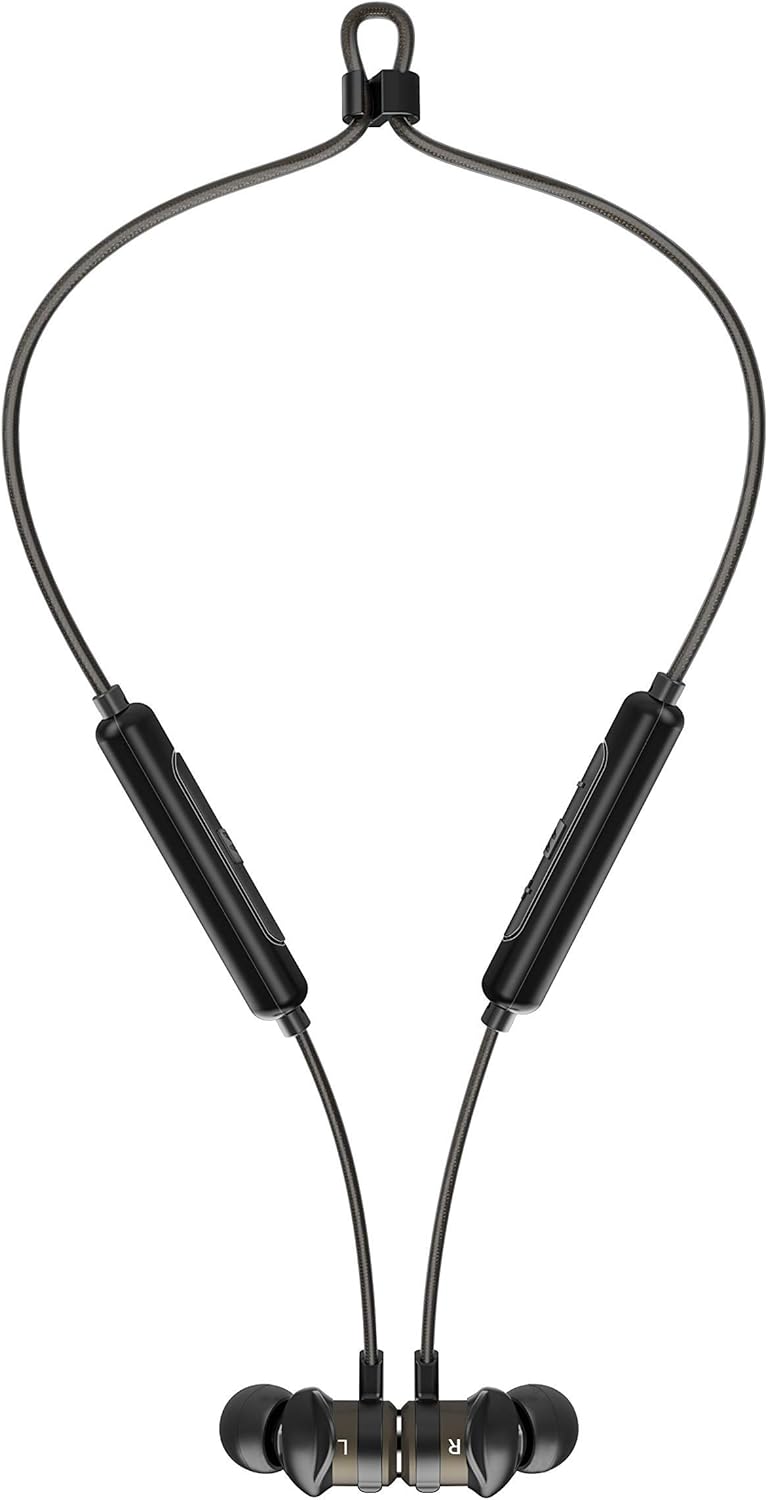

Image: The headphones shown worn around the neck and with earpieces magnetically connected for secure storage.
1.4 Bluetooth Eşleştirme
- Kulaklığınızın şarjlı ve kapalı olduğundan emin olun.
- Press and hold the multi-function button on the control module until the LED indicator flashes blue and red, indicating pairing mode.
- Cihazınızda (akıllı telefon, tablet vb.) Bluetooth'u etkinleştirin ve yeni cihazları arayın.
- Select "MEE audio X5-G2-2019" from the list of available devices.
- Bağlantı kurulduktan sonra, LED göstergesi periyodik olarak mavi renkte yanıp sönecektir.
2. Kulaklıkların Kullanımı
2.1 Kontrollerview
The X5-G2-2019 features an integrated remote and microphone for convenient control of calls and music playback.

Image: Close-up of the MEE audio X5-G2-2019 headphones showing the inline control module with volume and multi-function buttons.
- Çok Fonksiyonlu Düğme: Açma/kapama, oynatma/duraklatma, aramaları cevaplama/sonlandırma.
- Sesi Aç (+): Increase volume, next track (long press).
- Sesi kıs (-): Decrease volume, previous track (long press).
2.2 Güç Açma/Kapatma
- Güç Açık: Press and hold the multi-function button until the LED flashes blue.
- Kapat: Press and hold the multi-function button until the LED flashes red and turns off.
2.3 Müzik Oynatma
- Oynat/Duraklat: Çok işlevli düğmeye bir kez basın.
- Sonraki Parça: Sesi Açma (+) tuşuna uzun basın.
- Önceki parça: Sesi Azaltma (-) tuşuna uzun basın.
2.4 Çağrı Yönetimi
- Çağrıyı Cevapla/Sonlandır: Çok işlevli düğmeye bir kez basın.
- Çağrıyı Reddet: Çok fonksiyonlu düğmeye basılı tutun.
3. Bakım
3.1 Temizlik
Clean the headphones regularly with a soft, damp cloth. Do not use harsh chemicals or abrasive materials. Remove eartips and clean them separately with mild soap and water if necessary, ensuring they are completely dry before reattaching.
3.2 Depolama
When not in use, store the headphones in a cool, dry place away from direct sunlight and extreme temperatures. The magnetic earpieces allow for tangle-free storage around your neck or in a pouch.
3.3 Su ve Ter Direnci
The MEE audio X5-G2-2019 headphones feature an IPX5 sweat and weather-resistant design, protecting them from splashes and sweat. Do not submerge the headphones in water or expose them to running water.
4. Sorun Giderme
4.1 Yaygın Sorunlar ve Çözümler
- Güç Yok: Kulaklığın tamamen şarj olduğundan emin olun. Bir güç kaynağına bağlayın ve şarj göstergesini kontrol edin.
- Eşleştirilemiyor: Ensure the headphones are in pairing mode (flashing blue and red). Turn off and on your device's Bluetooth. Try forgetting the device on your phone and re-pairing.
- Ses Yok: Check the volume level on both the headphones and your connected device. Ensure the headphones are properly paired and connected.
- Kötü Ses Kalitesi: Ensure the eartips provide a good seal in your ear. Move closer to your connected device to avoid interference.
5. Özellikler
| Marka | MEE ses |
| Model Adı | EP-X5G2-GM |
| Model Numarası | EP-X5G2-GM |
| Bağlantı Teknolojisi | Kablolu, Kablosuz |
| Kablosuz İletişim Teknolojisi | Bluetooth |
| Kulak Yerleşimi | Kulak içi |
| Form Faktörü | Kulak içi |
| Kulaklık girişi | Mikro USB |
| Renk | Silah metali |
| Ürün Boyutları | 2 x 2 x 2 cm; 50 Gram |
| Piller | 1 Lithium-Polymer Battery required (included) |
| Pil Ömrü (Müzik Çalma) | 8.5 saate kadar |
| Pil Ömrü (Konuşma Süresi) | 9 saate kadar |
| Suya Dayanıklılık Derecesi | IPX5 (Ter ve Hava Koşullarına Dayanıklı) |
| Dahil Bileşenler | X5 Wireless In-Ear Headset, Micro-USB charging cable, Eartips (4 sizes), Ear fins, User Manual |
6. Garanti ve Destek
6.1 Garanti Bilgileri
MEE audio products are covered by a manufacturer's warranty. Please refer to the warranty card included in your product packaging or visit the official MEE audio webBölgenize özgü ayrıntılı garanti şartları ve koşulları için siteyi ziyaret edin.
6.2 Müşteri Desteği
For technical assistance, troubleshooting, or warranty claims, please contact MEE audio customer support through their official website. Have your product model number (EP-X5G2-GM) and purchase information ready when contacting support.
Ask a question about this manual
Ask about setup, troubleshooting, compatibility, parts, safety, or missing instructions. Manuals+ will review the question and use this page’s manual context to help answer it.