
giriiş
This manual provides comprehensive instructions for the Anderic RRLC16.2 Universal Replacement Remote Control. Designed specifically for Sharp Roku TVs, this remote offers immediate functionality for compatible Sharp models without requiring any initial programming. It features dedicated shortcut keys for popular streaming services and a secure battery compartment for enhanced durability and safety. For other Roku TV brands or Roku Boxes, programming may be required.
Ürün Özellikleri
- Fully Universal: Compatible with all Roku TVs. Note: Not for Roku Streaming Sticks.
- Tavizsiz Kalite: Engineered for superior performance and durability compared to original remotes.
- Zahmetsiz İşlem: Works identically to the original remote for Sharp Roku TVs without complex setup. (Some shortcut keys may differ).
- Quick Access to Streaming Services: Dedicated shortcut keys for NETFLIX, AMAZON, RDIO, and MGO provide instant access to these streaming platforms.
- Güvenli Pil Bölmesi: Includes an optional screw to secure the battery cover, preventing accidental opening.
Kurmak
1. Pillerin Takılması
The Anderic RRLC16.2 remote requires two AAA batteries (not included). To install:
- Uzaktan kumandanın arkasındaki pil bölmesini bulun.
- Pil kapağını açmak için aşağı doğru kaydırın.
- İki adet AAA pili, doğru kutuplara (+ ve -) dikkat ederek takın.
- Replace the battery cover by sliding it upwards until it clicks into place. For added security, use the optional screw to fasten the cover.

Image: Back of the remote control, highlighting the battery compartment and optional screw.
2. Initial Use (Sharp Roku TVs)
For Sharp Roku TV models (e.g., LC-43LB371U, LC-43LB371UA, LC-43LB371UB, LC-50LB371U), the Anderic RRLC16.2 remote is pre-programmed and ready to use immediately after battery installation. No additional setup is required.
3. Programming for Other Roku TVs or Roku Boxes
If you are using the remote with other Roku TV brands (Hisense, Insignia, TCL, Hitachi) or a Roku Box, programming may be necessary. Refer to the "Programming Instructions (via Learning)" section below for detailed steps.
Kullanım Talimatları

Resim: Ön view of the Anderic RRLC16.2 remote control.
- Güç düğmesi (●): Located at the top, press to turn your TV on or off.
- Directional Pad (Purple Arrows) & OK Button: Use the arrow buttons to navigate menus and select options. Press the central "OK" button to confirm selections.
- Geri butonu (←): Önceki ekrana veya menüye döner.
- Ana menü tuşu (⌂): Roku ana ekranına geri döner.
- Volume & Mute Buttons: Located on the side of the remote. Use the volume up/down buttons to adjust audio levels and the mute button to silence audio.
- Oynat/Duraklat, Geri Sar, İleri Sar: Standard media control buttons for content playback.
- Kısayol tuşları: Dedicated buttons for NETFLIX, AMAZON, RDIO, and MGO provide instant access to these streaming platforms.
Uyumluluk
The Anderic RRLC16.2 remote control is designed for broad compatibility with Roku TVs. Please review Aşağıda uyumluluk detayları yer almaktadır:
- Pre-Programmed for Sharp Roku TV Models: LC-43LB371U, LC-43LB371UA, LC-43LB371UB, LC-50LB371U.
- Compatible with Other Roku TV Brands (Requires Programming): Hisense, Insignia, TCL, Hitachi.
- Compatible with Roku Box (Requires Programming).
- NOT Compatible with Roku Streaming Sticks.
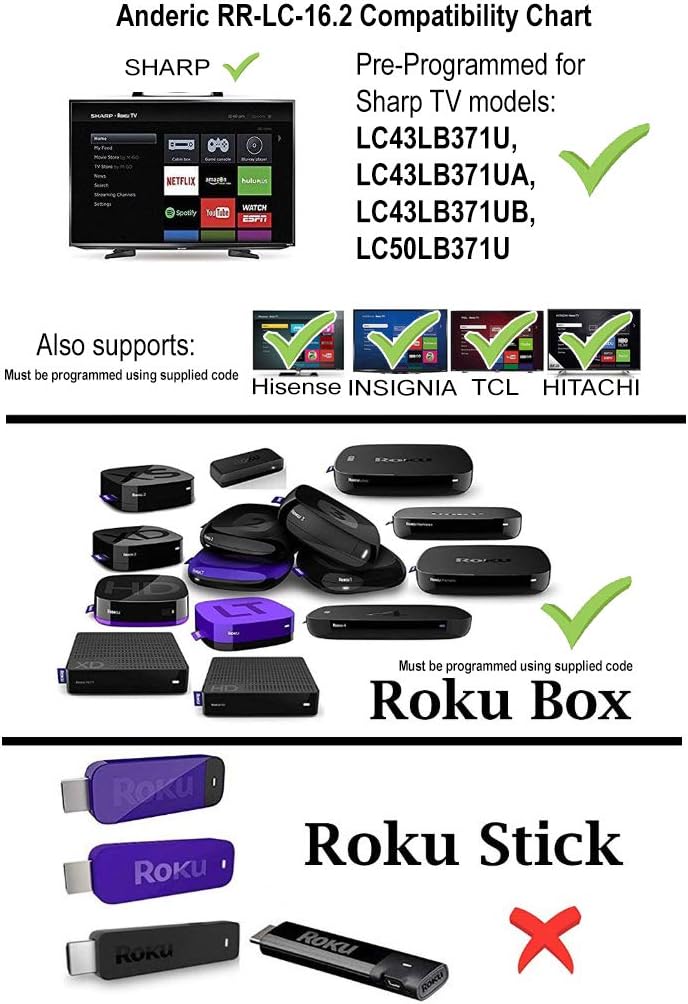
Image: Anderic RR-LC-16.2 Compatibility Chart.
Programming Instructions (via Learning)
This remote can be programmed to work with any TV via the learning method. This method does not require codes. Note: All keys on the RR-LC-16.2 may be learned. Original remote is needed.
- Basılı tutun ⌂ (Ev) ve ← (Back) keys simultaneously for about 3 seconds. The indicator light will light up and remain on. Release the keys.
- Press and release the key to be learned. The indicator light will flash slowly.
- Point the original remote control head-to-head with the RR-LC-16.2, making sure the IR (infrared) light bulb at the top edge of the remote aligns directly with the lens on the front of the RR-LC-16.2, with a distance of about 3cm.
- Press and hold the key on the original remote that you want the RR-LC-16.2 to learn. The indicator light will flash 3 times to confirm and then remain on, waiting for the next entry.
- Diğer tuşları öğrenmek için 2-4 arasındaki adımları tekrarlayın.
- Basmak ⌂ (Home) to save and exit, or the remote will exit automatically after 20 seconds.
Fabrika Varsayılan Durumuna Sıfırla
Basılı tutun ⌂ (Ev) ve ← (Back) keys simultaneously for 3 seconds. The indicator will flash 3 times to confirm. Remote has successfully been reset to factory default status.
Öğrenilen Tüm Anahtarları Sil
Basılı tutun ⌂ (Ev) ve ★ (Star) keys simultaneously for 3 seconds. The indicator will flash 3 times to confirm. All learned keys have been successfully deleted.

Image: Anderic RR-LC-16.2 Advanced Universal Operating Guide with programming details.
Özellikler
| Ürün Boyutları | 5.75 x 1.75 x 1 inç |
| Ürün Ağırlığı | 1.76 ons |
| Ürün Model Numarası | RRLC16.2 |
| Piller | 2 adet AAA pil gereklidir |
| Marka | Anderik |
| Özel Özellik | Evrensel |
| Renk | Siyah |
| Maksimum Desteklenen Cihaz Sayısı | 2 |
| Uyumlu Cihazlar | Streaming Device, Television |
Sorun giderme
- Uzaktan Kumanda Yanıt Vermiyor: Pillerin doğru şekilde takıldığından ve bitmediğinden emin olun. Gerekirse değiştirin.
- Görüş Hattı: The remote operates using infrared (IR) technology. Ensure there is a clear line of sight between the remote and your TV's IR receiver.
- Yanlış İşlevsellik: If buttons are not performing as expected, verify compatibility with your specific Roku TV model. For non-Sharp Roku TVs or Roku Boxes, ensure the remote has been correctly programmed using the learning method.
- Kısayol Tuşları Çalışmıyor: While the remote is universal, some shortcut keys may differ from your original remote. Ensure your streaming apps are installed and updated on your Roku TV.
Garanti ve Destek
Anderic products are designed for quality and reliability. For any issues or support inquiries, please refer to the manufacturer's official webSite üzerinden satın alabilir veya müşteri hizmetleriyle iletişime geçebilirsiniz. Garanti talepleriniz için satın alma fişinizi saklayın.
Anderic is a registered trademark of Dan's Electronics Etc., Inc. All Rights Reserved. We are not affiliated with Roku. Roku is a registered trademark of Roku Inc.
Destek için ziyaret edin: www.anderic.com