
1. Giriş
This manual provides essential information for the setup, operation, and maintenance of your Blackweb BWC18SB001 2.0 Channel Google Assistant Smart Soundbar. Please read these instructions carefully before using the product to ensure proper functionality and to maximize your audio experience. This smart soundbar integrates speaker functionality with Google Assistant capabilities, enhancing your home entertainment system.
2. Kutuda Neler Var?
Paketi açtığınızda tüm bileşenlerin mevcut olduğundan emin olun:
- Siyahweb BWC18SB001 2.0 Channel Google Assistant Smart Soundbar
- Uzaktan kumanda
- Güç Adaptörü
- Relevant Audio Cables (e.g., Optical, Aux)
- Kullanım Kılavuzu (bu belge)
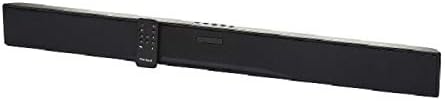
Resim: Siyahweb BWC18SB001 Smart Soundbar, shown with its included remote control. The soundbar is black and rectangular, designed to sit beneath a television.
3. Ürün Özellikleri
- 2.0 Kanal Ses: Delivers clear stereo sound for an enhanced listening experience.
- Entegre Google Asistan: Control your soundbar and smart home devices using voice commands.
- Çoklu Bağlantı Seçenekleri: Supports HDMI, Optical, AUX, and Bluetooth for versatile audio input.
- Kontrol Yöntemleri: Features on-device buttons and a dedicated remote control for easy operation.
- Kompakt Tasarım: Designed to fit seamlessly into your home theater setup.
4. Kurulum
4.1 Yerleştirme
Place the soundbar on a stable, flat surface directly in front of your television or mount it on a wall (mounting hardware not included). Ensure there is adequate ventilation around the unit.
4.2 Güç Bağlantısı
- Güç adaptörünü ses çubuğunun arkasındaki DC IN bağlantı noktasına bağlayın.
- Güç adaptörünün diğer ucunu duvar prizine takın.
4.3 Ses Bağlantısı
Choose one of the following methods to connect your soundbar to your TV or other audio source:
- HDMI (Önerilir): Connect an HDMI cable (not included) from the HDMI ARC port on your TV to the HDMI ARC port on the soundbar. This allows for high-quality audio and control via your TV remote.
- Optik: Connect an Optical cable (included) from the OPTICAL OUT port on your TV to the OPTICAL IN port on the soundbar.
- YARDIMCI: Connect a 3.5mm audio cable (included) from the AUX OUT port on your TV or audio device to the AUX IN port on the soundbar.
5. Kullanım Talimatları
5.1 Güç Açma/Kapatma
- Güç tuşuna baş (U) on the soundbar or the remote control to turn the unit on or off.
- A green indicator light on the soundbar signifies that it is powered on.
5.2 Ses Kontrolü
- Use the Volume Up (HACİM+) and Volume Down (cilt) buttons on the soundbar or remote control to adjust the volume.
- Sessiz düğmesine basın (X) on the remote to mute or unmute the sound.
5.3 Giriş Seçimi
Giriş düğmesine basın (M) on the soundbar or the corresponding input buttons (AUX, OPTICAL, HDMI, Bluetooth) on the remote control to switch between audio sources.
6. Google Asistan Entegrasyonu
Senin Siyahınweb soundbar features integrated Google Assistant. To activate, ensure the soundbar is connected to your home Wi-Fi network (refer to the separate Google Home app setup guide for detailed instructions). Once connected, you can use voice commands:
- "Hey Google" veya "Ok Google" dedikten sonra komutunuzu söyleyin.
- Examples: "Hey Google, play music," "Ok Google, what's the weather?" "Hey Google, turn up the volume."
You can also mute the Google Assistant microphone using the dedicated button on the soundbar or remote control if you prefer privacy.
7. Bluetooth Bağlantısı
Bir Bluetooth cihazını bağlamak için:
- Bluetooth düğmesine basın (BT) on the remote control or cycle through inputs on the soundbar until "BT" is displayed or indicated. The soundbar will enter pairing mode.
- Mobil cihazınızda (akıllı telefon, tablet, dizüstü bilgisayar) Bluetooth'u etkinleştirin ve kullanılabilir cihazları arayın.
- "Siyah"ı seçin.web BWC18SB001" from the list of devices.
- Eşleştirme işlemi tamamlandıktan sonra, ses çubuğu başarılı bir bağlantı olduğunu gösterecek ve cihazınızdan ses çalabileceksiniz.
Bluetooth'un menzili yaklaşık 10 metredir (33 fit).
8. Bakım
Ses çubuğunuzun uzun ömürlü ve en iyi performansı göstermesi için:
- Temizlik: Use a soft, dry cloth to wipe the exterior of the soundbar. Do not use liquid cleaners or abrasive materials.
- Havalandırma: Havalandırma açıklıklarının tıkanmadığından emin olun.
- Çevre: Ses sistemini aşırı sıcaklıklara, neme veya doğrudan güneş ışığına maruz bırakmaktan kaçının.
9. Sorun Giderme
- Güç Yok: Ensure the power adapter is securely connected to both the soundbar and a working wall outlet.
- Ses Yok:
- Check that the soundbar is powered on and not muted.
- Ses çubuğunda doğru giriş kaynağının seçili olduğundan emin olun.
- Ensure audio cables (HDMI, Optical, AUX) are securely connected to both the soundbar and your TV/audio source.
- Adjust the volume on both the soundbar and your TV/audio source.
- Bluetooth Bağlanmıyor:
- Ses çubuğunun Bluetooth eşleştirme modunda olduğundan emin olun.
- Make sure your device's Bluetooth is enabled and within range.
- Cihazın eşleştirmesini kaldırıp yeniden eşleştirmeyi deneyin.
- Google Asistan Yanıt Vermiyor:
- Wi-Fi bağlantınızı kontrol edin.
- Ensure the Google Assistant microphone is not muted.
- Verify the soundbar is properly set up in the Google Home app.
10. Özellikler
| Özellik | Şartname |
|---|---|
| Model Adı | BWC18SB001 |
| Hoparlör Tipi | Ses çubuğu |
| Çevresel Ses Kanalı Yapılandırması | 2.0 |
| Kontrol Yöntemi | Voice, Remote, On-device Buttons |
| Bağlantı Teknolojisi | HDMI, Optical, AUX, Bluetooth |
| Bluetooth Menzili | 10 Metre |
| Hoparlör Maksimum Çıkış Gücü | 150 Watt |
| Ses Çıkışı Modu | Stereo, Surround |
| Güç Kaynağı | Kablolu Elektrik |
| Ürün Boyutları | 32 x 2.77 x 3.26 inç |
| Ürün Ağırlığı | 3.97 pound |
| UPC | 681131237703 |
11. Garanti ve Destek
For warranty information and technical support, please refer to the documentation provided at the time of purchase or visit the official Blackweb webSite. Satın alma belgenizi garanti talepleriniz için saklayın.