
giriiş
This manual provides essential information for the safe and effective use of your Canon PowerShot SX740 HS Digital Camera. Please read it thoroughly before operating the camera to ensure proper handling and to maximize its features. The Canon PowerShot SX740 HS is a compact digital camera featuring a 20.3-megapixel CMOS sensor, 40x optical zoom, 4K video recording capabilities, and built-in Wi-Fi and Bluetooth connectivity.

Şekil 1: Ön view of the Canon PowerShot SX740 HS Digital Camera with the lens retracted.
Kutuda Neler Var?
Paketinizde aşağıdaki tüm öğelerin bulunduğunu doğrulayın:
- Canon PowerShot SX740 HS Dijital Fotoğraf Makinesi
- NB-13L Lithium-Ion Battery Pack
- CB-2LH Battery Charger
- Bilek Kayışı
- HDMI Kablosu
- Üçayak
- SanDisk 64GB SDHC Memory Card
- Premium Camera Case
- Yüksek Hızlı USB Kart Okuyucu
Kurmak
1. Pilin Şarj Edilmesi ve Takılması
- Insert the NB-13L battery into the CB-2LH charger.
- Plug the charger into a power outlet. The charging indicator light will show the charging status.
- Tamamen şarj olduktan sonra pili şarj cihazından çıkarın.
- Kameranın alt kısmındaki pil yuvası kapağını açın.
- Insert the charged battery into the compartment, ensuring correct orientation. Close the cover securely.
2. Hafıza Kartını Takma
- Genellikle pil bölmesinin yakınında bulunan hafıza kartı yuvasının kapağını açın.
- Insert the SDHC memory card with the label facing the front of the camera until it clicks into place.
- Hafıza kartı yuvası kapağını kapatın.
3. İlk Açılış ve Temel Ayarlar
- Kamerayı açmak için güç düğmesine basın.
- Ekrandaki talimatları izleyerek tarihi, saati ve dili ayarlayın.
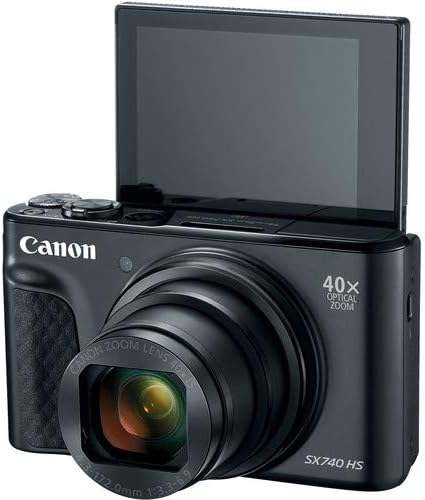
Şekil 2: Ön view of the camera with the LCD screen tilted upwards, ready for use.
Kameranın Çalıştırılması
1. Güç Açma/Kapatma
Basın GÜÇ Kameranın üst kısmında bulunan açma/kapama düğmesi.
2. Çekim Modları
The camera offers various shooting modes. Use the mode dial or menu options to select:
- Otomatik Mod: Basit, kullanımı kolay çekim modu; kamera ayarları otomatik olarak yapılır.
- Program (P) Modu: Fotoğraf makinesi pozlamayı ayarlarken, ayarlar üzerinde daha fazla kontrol sağlar.
- Sahne Modları: Optimized settings for specific scenarios like portraits, landscapes, or night scenes.
- Feature Assistant: Provides on-screen explanations to help you understand and use various camera features.
3. Yakınlaştırma İşlemi
The camera features a 40x optical zoom lens. Use the zoom lever around the shutter button to zoom in (telephoto) or out (wide-angle). Digital zoom can extend the range further, but may reduce image quality.

Şekil 3: Ön view of the camera with the lens extended for zooming.
4. Odaklanma
The camera primarily uses autofocus. Point the camera at your subject and half-press the shutter button to focus. The focus frame will appear on the LCD screen. For specific situations, manual focus options may be available in the menu.
5. Video Kaydı
To record videos, switch to video mode (if available via a dedicated button or mode dial) or press the dedicated movie recording button. The camera supports 4K video capture. Press the button again to stop recording.
6. Using the Tilting LCD Screen
The 3.0-inch LCD screen can tilt 180 degrees, allowing for easy framing of selfies or shots from various angles. Adjust the screen to your desired position.

Şekil 4: Geri view Kameranın LCD ekranını ve kontrol düzenini gösteren bir ekran.
7. Wi-Fi ve Bluetooth Bağlantısı
The camera features built-in Wi-Fi and Bluetooth for connecting to compatible mobile devices. Download the Canon Camera Connect app to your smartphone or tablet to transfer images, remotely control the camera, and share photos.
- Enable Wi-Fi or Bluetooth in the camera's menu.
- Open the Canon Camera Connect app on your mobile device and follow the pairing instructions.
Bakım
1. Kamerayı Temizleme
- Mercek: Use a soft, lint-free cloth or a lens brush to gently remove dust. For smudges, use a specialized lens cleaning solution and cloth. Avoid touching the lens directly with your fingers.
- LCD Ekran: Wipe gently with a soft, dry cloth. Do not use harsh chemicals.
- Kamera Gövdesi: Use a soft, dry cloth to wipe away dust and dirt.
2. Pil Bakımı
- Pilleri kullanılmadığı zaman serin ve kuru bir yerde saklayın.
- Pilinizin ömrünü uzatmak için sık sık tamamen boşaltmaktan kaçının.
- Remove the battery from the camera if it will not be used for an extended period.
3. Depolama
When storing the camera for long periods, ensure it is clean, dry, and stored in a protective case to prevent dust and damage. Remove the battery and memory card.
Sorun giderme
Kameranızla ilgili sorunlarla karşılaşırsanız aşağıdaki yaygın çözümlere bakın:
- Kamera açılmıyor: Pilinin tamamen dolu olduğundan ve doğru şekilde takıldığından emin olun. Mümkünse, farklı bir dolu pil deneyin.
- Hafıza kartı hatası: Check if the memory card is inserted correctly. Format the card (this will erase all data) if the error persists, or try a different compatible SDHC card.
- Görüntüler bulanık: Ensure the lens is clean. Check your focus settings and make sure the camera has successfully focused on your subject before taking the shot. Use optical image stabilization for handheld shots.
- Wi-Fi/Bluetooth bağlantı sorunları: Ensure Wi-Fi/Bluetooth is enabled on both the camera and your mobile device. Restart both devices and try pairing again. Confirm the Canon Camera Connect app is up to date.
- Flaş ateşlenmiyor: Check the flash mode settings. Ensure the flash is popped up if it's a manual pop-up type.
For more complex issues or persistent problems, please consult the official Canon support website veya müşteri hizmetleriyle iletişime geçin.
Özellikler
| Özellik | Şartname |
|---|---|
| Model Adı | PowerShot SX740HS |
| Foto Sensör Çözünürlüğü | 20.3 Megapiksel |
| Optik Yakınlaştırma | 40x |
| Video Yakalama Formatı | 4K |
| Görüntü İşlemcisi | Canon DIGIC 8 |
| Bağlantı | Bluetooth, HDMI, USB, Wi-Fi |
| Görüntü Türü | Eğimli LCD |
| Görüntü Sabitleme | Optik |
| Pil Türü | Lityum İyon (NB-13L) |
| Uyumlu Bellek | SDHC (up to 64 GB) |
| Sürekli Çekim | Saniyede 10 kare |
| Desteklenen File Biçim | JPEG, HAM |
Garanti ve Destek
Your Canon PowerShot SX740 HS Digital Camera is covered by a manufacturer's warranty. Please refer to the warranty card included with your product for specific terms and conditions. For technical support, service, or additional information, please visit the official Canon website or contact Canon customer service directly. Keep your purchase receipt as proof of purchase for warranty claims.
Çevrimiçi Kaynaklar: Canon USA Official Webalan