
1. Giriş
This user manual provides comprehensive instructions for the setup, operation, and maintenance of your SHARP LC-32HI5012E HD Ready Smart LED TV. Please read this manual thoroughly before using your television to ensure proper functionality and safety.
The SHARP LC-32HI5012E is an 81 cm (32-inch) HD Ready Smart LED TV featuring Active Motion 200 technology for enhanced picture quality and a Triple Tuner for versatile reception options. It includes integrated Wi-Fi and a Harman/Kardon sound system for a complete entertainment experience.
2. Paket İçeriği
Paketi açtığınızda lütfen aşağıdaki tüm öğelerin pakette bulunduğundan emin olun:
- SHARP LC-32HI5012E Main Unit
- Uzaktan Kumanda (pilli)
- Kullanım Kılavuzu (bu belge)

Resim: Ön view of the SHARP LC-32HI5012E television, displaying a vibrant city skyline on its screen. This image shows the slim bezel design and the central SHARP logo.
3. Kurulum
3.1 Standın Montajı
Carefully place the TV screen-down on a soft, flat surface to prevent damage. Attach the two stand feet to the designated slots at the bottom of the TV, securing them with the provided screws. Ensure the stand is firmly attached before proceeding.
3.2 Çevre Birimlerini Bağlama
Televizyonunuz harici cihazlar için çeşitli bağlantı seçenekleri sunar:
- HDMI Bağlantı Noktaları (x3): Blu-ray oynatıcıları, oyun konsollarını veya set üstü kutuları bağlayın.
- USB Bağlantı Noktaları (x2): USB sürücülerden medya oynatmak için.
- Antenna In (RF): Connect your terrestrial antenna for DVB-T/T2HD reception.
- Sat In: DVB-S/S2 yayını almak için uydu anteninizi bağlayın.
- RJ45 (LAN): Kablolu internet bağlantısı için.
- CI+ Port: For conditional access modules (CAM) to view şifreli kanallar
- Mini Component/YPbPr, Mini AV Composite: Eski analog cihazlar için.
- Dijital Optik Ses Çıkışı: Harici ses sistemlerine bağlanmak için.
- Audio out / Headphone: Kulaklık veya harici hoparlörler için.

Resim: Arka view of the SHARP LC-32HI5012E television, highlighting the arrangement of various input and output ports for connecting external devices.
3.3 İlk Çalıştırma ve İlk Kurulum
After connecting all necessary cables, plug the power cord into an electrical outlet. Press the power button on the remote control or the TV. The first-time setup wizard will guide you through:
- Dil seçimi.
- Ağ bağlantısı (Wi-Fi veya kablolu LAN).
- Channel scanning for DVB-C, DVB-S/S2, or DVB-T/T2HD.
- Saat dilimi ve diğer temel ayarlar.
4. Kullanım Talimatları
4.1 Temel TV İşlevleri
- Güç Açma/Kapatma: Uzaktan kumanda veya televizyon üzerindeki güç düğmesini kullanın.
- Ses Kontrolü: VOL +/- düğmelerini kullanın.
- Kanal Seçimi: Use CH +/- or number buttons.
- Giriş kaynağı: Press the SOURCE button to switch between HDMI, AV, TV, etc.
- Menü Navigasyonu: Use arrow keys and OK button to navigate menus.
4.2 Akıllı TV Özellikleri
Your SHARP LC-32HI5012E is equipped with integrated Wi-Fi and offers access to various smart features:
- Önceden Yüklenmiş Uygulamalar: Access popular streaming services like Netflix and YouTube directly.
- Web Tarayıcı: İnternette doğrudan televizyonunuzdan gezinin.
- Aquos Net+: Access additional online content and services provided by Sharp.
Ensure your TV is connected to the internet for full Smart TV functionality.
4.3 Ses Sistemi
The integrated Harman/Kardon sound system provides a high-quality audio experience with excellent dynamics and clarity. Adjust audio settings in the TV menu to customize your sound preferences.
5. Bakım
5.1 Ekranı Temizleme
Ekranı temizlemek için yumuşak, tiftiksiz bir bezle hafifçe silin. İnatçı lekeler için hafifçe silin.ampBezi su veya özel bir ekran temizleyici ile temizleyin. Yapamaz Sıvıyı doğrudan ekranın üzerine püskürtün.
5.2 Genel Bakım
- Televizyonu doğrudan güneş ışığından ve ısı kaynaklarından uzak tutun.
- Televizyonun etrafında yeterli havalandırma olduğundan emin olun.
- Yıldırımlı havalarda veya uzun süre gözetimsiz bırakılacaksa televizyonun fişini prizden çekin.
6. Sorun Giderme
If you encounter any issues with your TV, please refer to the following common problems and solutions before contacting support.
| Sorun | Olası Neden | Çözüm |
|---|---|---|
| Güç Yok | Power cord unplugged, power outlet issue. | Güç kablosu bağlantısını kontrol edin. Farklı bir priz deneyin. |
| Görüntü yok, ancak ses var. | Yanlış giriş kaynağı, arızalı kablo. | Doğru giriş kaynağını doğrulayın. HDMI/AV kablo bağlantılarını kontrol edin. |
| Ses Yok | Ses seviyesi çok düşük veya tamamen kapalı, harici ses sistemi sorunu. | Unmute volume, increase volume. Check external audio connections. |
| Wi-Fi'ye bağlanılamıyor | Incorrect password, router issue, TV too far from router. | Re-enter password. Restart router. Move TV closer or use wired connection. |
7. Özellikler
| Özellik | Detay |
|---|---|
| Marka | KESKİN |
| Model Numarası | LC-32HI5012E |
| Ekran Teknolojisi | NEDEN OLMUŞ |
| Çözünürlük | HD'ye Hazır (1366 x 768 piksel) |
| Ekran köşegeni | 81.3 cm (32 inç) |
| Yenileme Hızı | 60 Hz |
| Özel Özellik | Internet (Smart TV) |
| Desteklenen İnternet Hizmetleri | Netflix, YouTube, Browser |
| Bağlantı Teknolojisi | USB, HDMI, LAN, Wi-Fi |
| Ayarlayıcılar | DVB-C, DVB-S/S2, DVB-T/T2HD |
| Ses Sistemi | Harman/Kardon |
| Ürün Boyutları (G x Y x D) | 74 x 49.1 x 18 cm (standlı) |
| Ağırlık | 4.8 Kilogram |
| Montaj Tipi | Masa Montajı |
7.1 Enerji Verimliliği
The SHARP LC-32HI5012E has an energy efficiency rating of F. For detailed energy consumption information, please refer to the energy label and product information sheet.

Image: Energy efficiency label for the SHARP LC-32HI5012E television, showing its energy class F and power consumption details.
Daha fazla bilgi için resmi EPREL veri tabanını ziyaret edin: https://eprel.ec.europa.eu/qr/402565
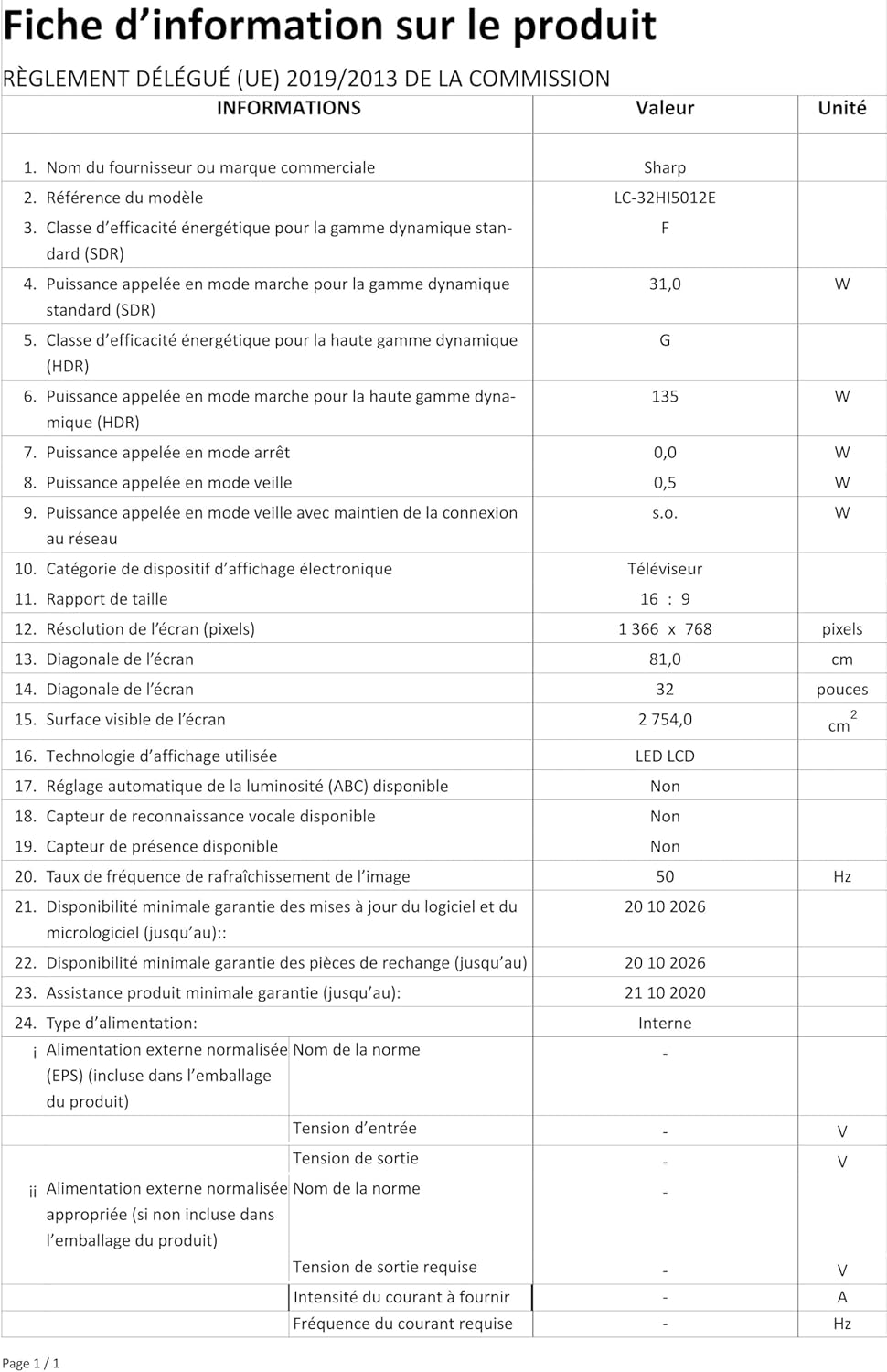
Image: Product information sheet detailing technical specifications and compliance information for the SHARP LC-32HI5012E television.
8. Garanti ve Destek
For warranty information, please refer to the warranty card included with your product or visit the official SHARP website. Herhangi bir garanti talebi için satın alma belgeniz olarak satın alma makbuzunuzu saklayın.
For technical support or service inquiries, please contact SHARP customer service. Contact details can typically be found on the SHARP official webSitede veya ürün ambalajında.