
1. Giriş
This manual provides essential instructions for the proper use and care of your ProCase Leather Protective Stand Folio Case. Designed to offer robust protection and enhanced functionality, this case is compatible with specific Lenovo 10.1-inch tablet models. Please read this manual thoroughly to ensure optimal performance and longevity of your product.
2. Uyumluluk
This ProCase folio case is specifically designed for the following 10.1-inch Lenovo tablet models:
- Lenovo Tab P10: Models TB-X705F, TB-X705L
- Lenovo Tab M10 HD: Models TB-X505F, TB-X505L
- Lenovo Tab M10: Models TB-X605F, TB-X605L
To verify your tablet's model number, navigate to Ayarlar > Tablet Hakkında > Model Numarası Cihazınızda.
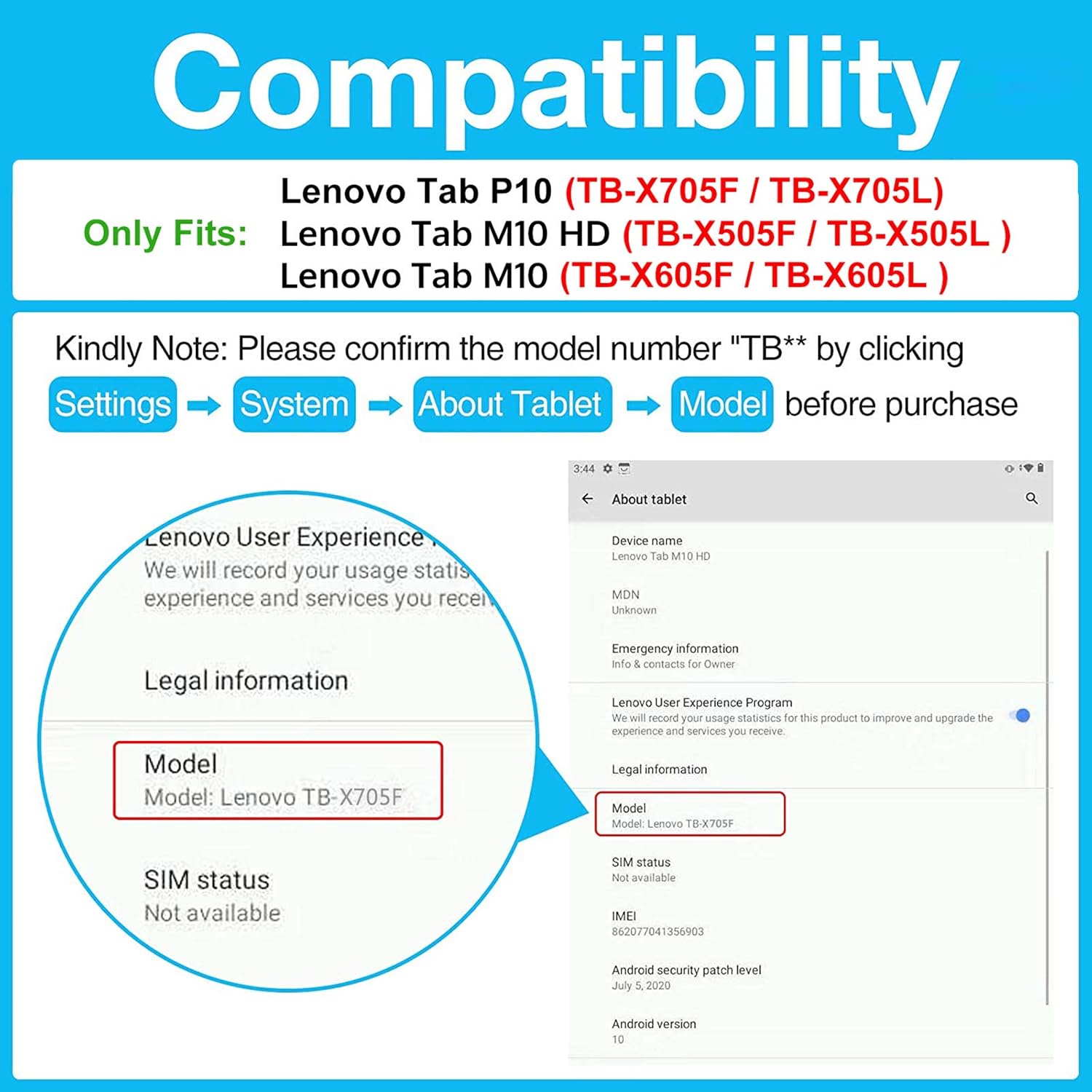
Figure 2.1: Visual guide for checking tablet compatibility and model numbers.
3. Paket İçeriği
Your ProCase Leather Protective Stand Folio Case package should contain:
- 1 x ProCase Leather Protective Stand Folio Case
- 1 x Installation Guide/Instruction Card
Please inspect all items upon receipt. If any components are missing or damaged, contact customer support.
4. Kurulum ve Kurulum
Follow these steps to properly install your tablet into the ProCase folio case:
- Kutuyu açın: Carefully remove the case from its packaging. Remove any internal foam or paper inserts.
- Kasayı Açın: Lay the case flat on a clean surface and open the front cover. Locate the Velcro flap designed to secure your tablet.
- Tableti takın: Gently slide your tablet into the main compartment of the case, ensuring it aligns with the frame. Push the tablet firmly towards the top edge of the case.
- Güvenli Tablet: Fold the Velcro flap under the tablet and firmly press it onto the corresponding Velcro tab (uncut pile) to secure your device in place. Ensure all corners are properly seated within the case's frame.
- Uygunluğu Kontrol Edin: Verify that all ports, buttons, and cameras are accessible through the precise cutouts.
Video 4.1: General installation guide for ProCase Vintage Stand Folio Cover. While this video features an iPad Pro, the installation steps are similar for your Lenovo tablet.

Figure 4.1: Open case interior, ready for tablet insertion.

Figure 4.2: Precise cutouts ensure full access to all tablet features.
5. İşletim Özellikleri
Your ProCase folio case offers several features to enhance your tablet experience:
5.1 Çoklu Viewing and Typing Angles
The case features three anti-slip stripes on the interior cover, allowing you to set up your tablet in multiple horizontal stand angles. This is ideal for hands-free viewing of videos, reading, or comfortable typing.

Figure 5.1: Tablet positioned in a stand angle for viewIng.
5.2 Otomatik Uyku/Uyanma Fonksiyonu
The integrated magnetic closure supports your tablet's auto sleep/wake function. Closing the cover will put your tablet to sleep, and opening it will wake it up, conserving battery life.
5.3 Built-in Stylus Pen Holder
An elastic loop is built into the side of the case to securely hold your stylus pen, keeping it conveniently at hand when needed.

Figure 5.2: Front pocket and integrated stylus pen holder.
5.4 Front Document Pocket
The front cover features a large document card pocket, providing a convenient space to store small papers, cards, or other personal belongings.
6. Bakım
To maintain the appearance and functionality of your ProCase folio case:
- Temizlik: Dış yüzeyini yumuşak bir bezle silin.amp Bez. Sert kimyasallardan veya aşındırıcı temizleyicilerden kaçının.
- Depolamak: Kılıfı kullanılmadığı zamanlarda serin, kuru ve doğrudan güneş ışığından ve aşırı sıcaklıklardan uzak bir yerde saklayın.
- Aşırı Doldurmaktan Kaçının: Do not overfill the document pocket, as this may stretch the material or prevent the case from closing properly.
7. Sorun Giderme
Davanızla ilgili herhangi bir sorunla karşılaşırsanız, aşağıdakileri dikkate alın:
- Tablet Does Not Fit: Double-check your tablet's model number against the compatibility list in Section 2. Ensure the tablet is inserted correctly and fully seated within the frame.
- Stand Slips: Ensure the tablet is placed firmly into one of the anti-slip grooves. The grooves are designed to provide stability on flat surfaces.
- Otomatik Uyku/Uyanma Çalışmıyor: Confirm your tablet's settings allow for magnetic sleep/wake functionality. Ensure the case is closed completely and the magnetic flap is aligned.
For further assistance, please contact ProCase customer support.
8. Özellikler
| Özellik | Detay |
|---|---|
| Marka | ProKasa |
| Model Numarası | PC-08361488 |
| Uyumlu Cihazlar | Lenovo Tab P10/M10/M10 HD 10.1" (TB-X705F, TB-X705L, TB-X505F, TB-X505L, TB-X605F, TB-X605L) |
| Renk | Siyah |
| Malzeme | Leather (Composition) |
| Form Faktörü | folyo Kılıf |
| Ek Özellikler | Anti-Slip Stand, Magnetic Closure (Auto Sleep/Wake), Stylus Holder, Front Document Pocket |
| Ürün Boyutları | 6.58 x 9.52 x 0.28 inç |
| Ürün Ağırlığı | 3.5 Ons |
9. Garanti ve Destek
ProCase products are designed for quality and durability. For information regarding warranty coverage, returns, or technical support, please refer to the contact information provided with your purchase or visit the official ProCase website. Please have your model number (PC-08361488) and purchase details ready when contacting support.