
1. Ürün Bittiview
The Itek SIISBE 3.0 is a gaming middle tower PC case designed to combine high-level features with a modern aesthetic. It features a fully perforated front panel for optimal airflow and a tempered glass side panel with a convenient hinged closure, allowing for easy access and showcasing your internal components.
The case comes equipped with three 12 cm ARGB fans: two located at the front and one at the rear. These fans can be controlled via a dedicated button on the front panel or through your motherboard's ARGB software, providing customizable lighting effects and efficient cooling.
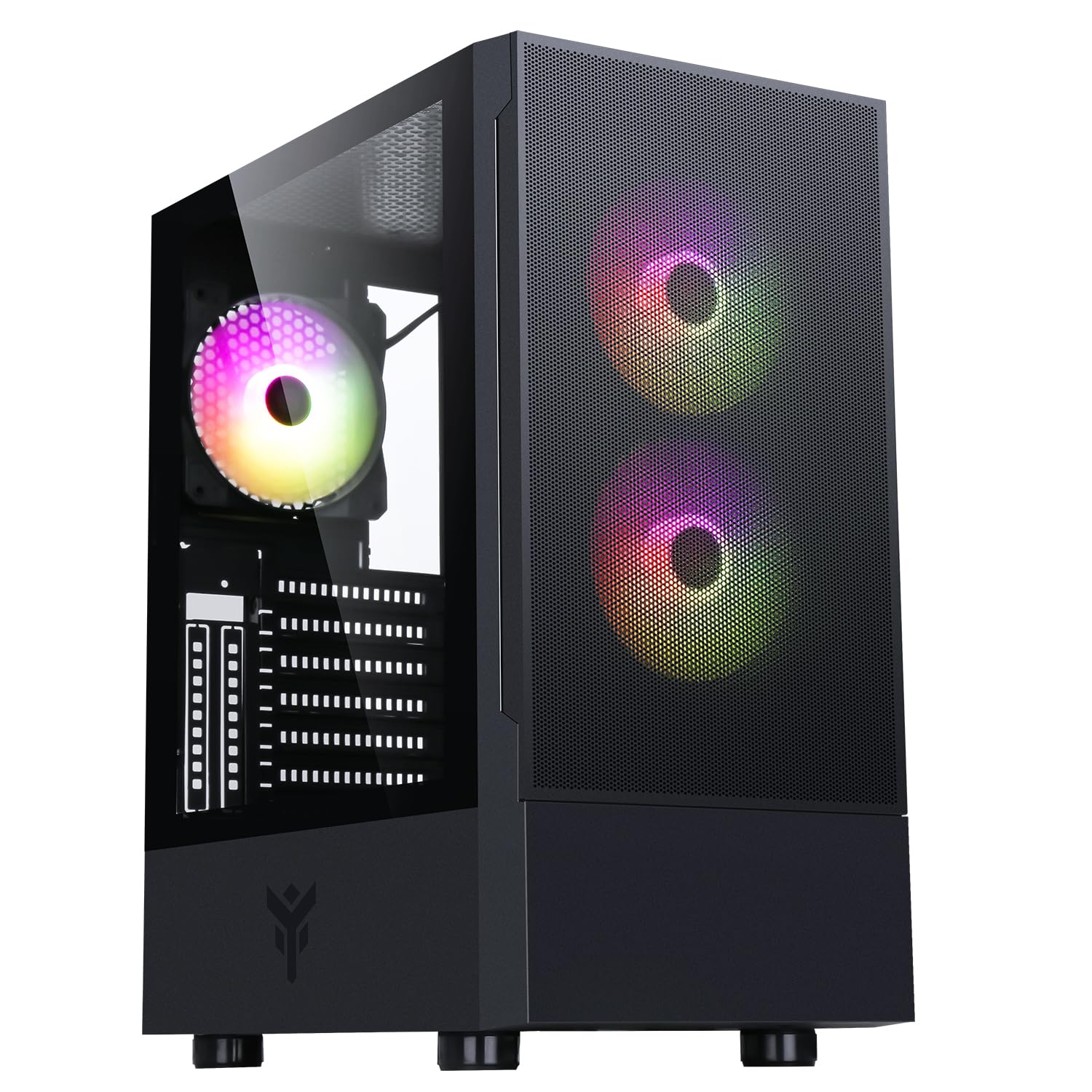
Şekil 1: Ön taraf view of the Itek SIISBE 3.0 Gaming PC Case, showcasing the perforated front panel and tempered glass side panel.
The SIISBE 3.0 supports a wide range of hardware, including ATX, Micro-ATX, and Mini-ITX motherboards. It accommodates graphics cards up to 315 mm in length, CPU coolers up to 160 mm in height, and liquid cooling radiators up to 280 mm. The case also offers 28 mm of space for efficient cable management, ensuring a clean and organized build.
2. Kurulum ve Kurulum
2.1 Davanın Hazırlanması
- Kutuyu açın ve tüm ambalaj malzemelerini çıkarın.
- Open the tempered glass side panel by gently pulling it open from the hinge.
- Locate the accessory box inside the case, which contains screws and other mounting hardware.
2.2 Anakart Kurulumu
- Install the necessary standoffs for your motherboard form factor (ATX, Micro-ATX, or Mini-ITX) onto the motherboard tray.
- Anakartınızı dikkatlice desteklerin üzerine yerleştirin ve vida deliklerini hizalayın.
- Anakartı verilen vidalarla sabitleyin.

Şekil 2: Dahili view of the Itek SIISBE 3.0, highlighting the motherboard mounting area and cable routing options.
2.3 Güç Kaynağı Ünitesi (PSU) Kurulumu
- Mount the PSU in the dedicated bottom compartment of the case.
- PSU'yu kasanın arkasından vidalarla sabitleyin.
2.4 Depolama Sürücüsü Kurulumu
- Install 2.5-inch SSDs or 3.5-inch HDDs into the designated internal bays. Refer to the case's internal layout for specific mounting points.
- Secure drives with the appropriate screws.

Şekil 3: Arka iç kısım view of the Itek SIISBE 3.0, showing the motherboard tray, SSD mounting points, and ample space for cable management.
2.5 Grafik Kartı ve Genişletme Kartı Kurulumu
- Kasanın arka tarafındaki gerekli genişletme yuvası kapaklarını çıkarın.
- Ekran kartınızı veya diğer genişletme kartlarınızı anakartınızdaki PCIe yuvalarına takın.
- Secure the cards with screws. The case supports graphics cards up to 315 mm in length.
2.6 Soğutma Sistemi Kurulumu
- The case includes three 12 cm ARGB fans (two front, one rear). Connect their power and ARGB cables to the motherboard or the integrated fan controller.
- For additional cooling, install extra fans or a liquid cooling radiator (up to 280 mm) in the designated mounting points.
- Install your CPU cooler. The case supports CPU coolers up to 160 mm in height.
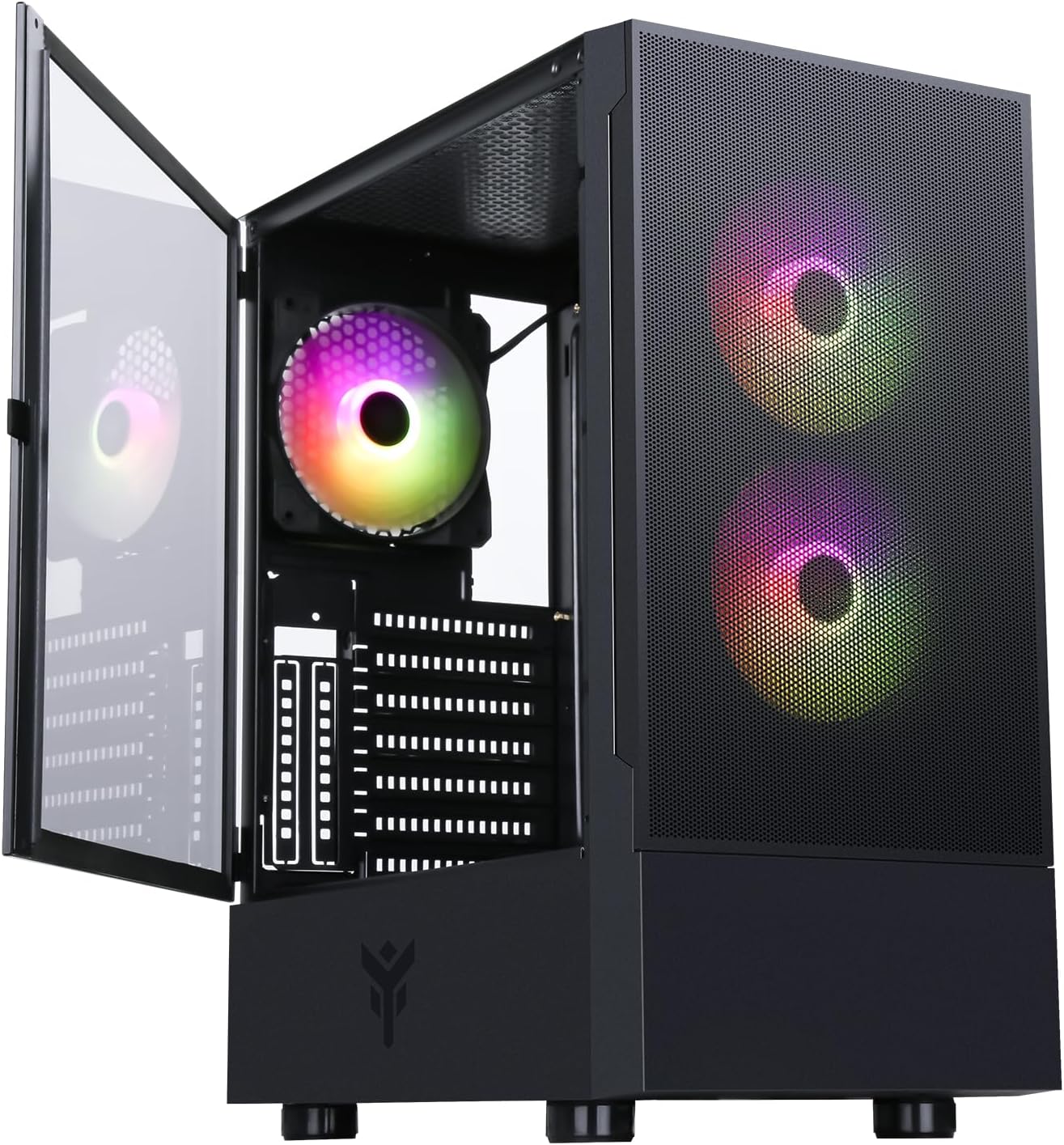
Figure 4: The Itek SIISBE 3.0 with its hinged tempered glass panel open, revealing the pre-installed ARGB fans and internal layout.
2.7 Kablo Yönetimi
- Utilize the 28 mm cable management space behind the motherboard tray to route and organize all power and data cables.
- Use cable ties (not included) to secure cables and maintain optimal airflow.
3. Kullanım Talimatları
3.1 Açma
- Ensure all components are correctly installed and connected.
- Connect the power cable to your PSU and a wall outlet.
- Press the power button located on the top I/O panel of the case to start your system.
3.2 ARGB Fan Kontrolü
- The pre-installed ARGB fans can be controlled via the dedicated LED control button on the front panel. Press the button to cycle through various lighting modes and colors.
- Alternatively, if the fans are connected to an ARGB header on your motherboard, you can use the motherboard's proprietary software (e.g., ASUS Aura Sync, MSI Mystic Light, Gigabyte RGB Fusion) to synchronize and customize the lighting effects.
3.3 Ön Giriş/Çıkış Bağlantı Noktaları
- The front I/O panel includes USB 3.0 and USB 2.0 ports for connecting peripherals and external storage devices.
- Audio jacks are also available for headphones and microphones.
4. Bakım
4.1 Toz Filtresi Temizliği
- The SIISBE 3.0 case is equipped with dust filters to prevent dust buildup inside. Regularly check and clean these filters.
- Gently remove the dust filters (typically located on the top, front, and/or bottom) and clean them with compressed air or by rinsing them with water. Ensure they are completely dry before re-installing.
4.2 Genel Temizlik
- Yumuşak bir d kullanınamp cloth to wipe down the exterior surfaces of the case, including the tempered glass panel. Avoid abrasive cleaners.
- İç temizlik için, fanlardan, soğutuculardan ve diğer bileşenlerden tozu temizlemek için basınçlı hava kullanın. Temizliğe başlamadan önce sistemin kapalı ve fişinin çekilmiş olduğundan emin olun.
5. Sorun Giderme
This section provides general troubleshooting tips for common issues. For more specific problems, consult the manuals for your individual PC components (motherboard, PSU, GPU, etc.) or contact Itek support.
5.1 Sistem Açılmıyor
- Güç Bağlantılarını Kontrol Edin: Ensure the PSU is properly connected to the wall outlet and the power switch on the PSU is in the 'ON' position. Verify all internal power cables (24-pin ATX, 8-pin CPU, PCIe, SATA) are securely connected to the motherboard and components.
- Ön Panel Konektörleri: Confirm that the front panel power switch cable is correctly connected to the motherboard's front panel header.
5.2 Fans Not Spinning / ARGB Not Working
- Fan Bağlantıları: Verify that the fan power cables are securely connected to the motherboard fan headers or the integrated fan controller.
- ARGB Bağlantıları: Ensure ARGB cables are correctly connected to the motherboard's ARGB header or the case's ARGB controller.
- Software/Button Control: If using the case's LED button, try pressing it to cycle modes. If using motherboard software, ensure it is installed and configured correctly.
5.3 Aşırı Isınma Sorunları
- Hava akışı: Ensure fans are installed in the correct orientation for optimal airflow (front fans typically intake, rear/top fans exhaust).
- Toz Oluşumu: Bakım bölümünde açıklandığı gibi toz filtrelerini ve iç bileşenleri temizleyin.
- Kablo yönetimi: Hava akışını engelleyen unsurları azaltmak için kablo yönlendirmesini iyileştirin.
6. Özellikler
| Özellik | Şartname |
|---|---|
| Üretici | İTEK |
| Ürün Model Numarası | ITGCASIB30 |
| Marka | İtek |
| Anakart Uyumluluğu | ATX, Mikro ATX, Mini ITX |
| Dava Türü | Orta Kule |
| Önerilen Ürün Kullanımları | Gaming, Professional |
| Renk | Siyah |
| Malzeme | Temperli Cam |
| Güç Kaynağı Montaj Tipi | Alt Montaj |
| Soğutma Yöntemi | Hava |
| Model Adı | Case SIISBE 3.0 |
| Fan Boyutu | 120 Milimetre |
| Total Expansion Slots | 7 |
| Total USB 2.0 Ports | 2 |
| Total USB 3.0 Ports | 1 |
| Toplam USB Bağlantı Noktaları | 4 |
| Ürün Özellikleri | LED Control Button, Dust Filter, Integrated Fan |
| Maksimum CPU Soğutucu Yüksekliği | 160 Milimetre |
| Number of Internal Bays | 7 |
| Uyumlu Cihazlar | ATX Motherboards, Full-size Graphics Cards, Standard Cooling Solutions |
| Hayran Sayısı | 3 |
| Açık Renk | RGB |
| Ürün Boyutları (D x G x Y) | 37.6D x 37.6G x 44.6Y santimetre |
7. Garanti Bilgileri
Specific warranty details for the Itek SIISBE 3.0 PC Case may vary by region and retailer. Please refer to the warranty card included with your product or visit the official Itek webEn doğru ve güncel garanti bilgileri için bu siteyi ziyaret edin.
Satın alma belgenizi (fiş veya fatura) saklayın; garanti taleplerinizde bu belgeye ihtiyacınız olacaktır.
8. Müşteri Desteği
For technical assistance, product inquiries, or support regarding your Itek SIISBE 3.0 PC Case, please contact Itek customer support through their official channels.
- Resmi Webalan: Visit the Itek official webDestek kaynakları, SSS ve iletişim bilgileri için site.
- E-posta Desteği: Look for a support email address on the Itek webalan.
- Telefon Desteği: Check the Itek webBölgesel telefon destek numaraları için site.
When contacting support, please have your product model (SIISBE 3.0) and item model number (ITGCASIB30) ready to help expedite the process.