
Itek ITMC30V201FHD
iTek GGC 30-inch Curved Monitor User Manual
Model: ITMC30V201FHD
Hoş geldin
Thank you for choosing the iTek GGC 30-inch Curved Monitor. This manual provides essential information for setting up, operating, and maintaining your new monitor. Please read it thoroughly before use to ensure optimal performance and safety.
Önemli Güvenlik Talimatları
To prevent damage and ensure safe operation, please observe the following precautions:
- Monitörü yağmura, neme veya aşırı sıcaklıklara maruz bırakmayın.
- Monitörün etrafında yeterli havalandırma olduğundan emin olun. Havalandırma açıklıklarını kapatmayın.
- Yalnızca monitörle birlikte verilen güç adaptörünü kullanın.
- Güç kablosunun üzerine ağır nesneler koymaktan kaçının.
- Monitör uzun süre kullanılmayacaksa elektrik fişini prizden çekin.
- Monitörün bakımını kendiniz yapmaya çalışmayın. Tüm bakım işlemlerini yetkili personele yaptırın.
- Monitör ekranını temizleyin ve...asinYumuşak, kuru bir bezle silin. Aşındırıcı temizleyiciler veya çözücüler kullanmaktan kaçının.
Paket İçeriği
Lütfen paketi aşağıdaki öğeler açısından kontrol edin:
- iTek GGC 30-inch Curved Monitor
- Monitör Standı (Taban ve Boyun)
- Güç Adaptörü ve Kablosu
- DisplayPort Kablosu
- HDMI Kablosu
- Kullanıcı Kılavuzu
- Stand Montajı için Vidalar
Ürün Bittiview
The iTek GGC 30-inch Curved Monitor is designed for an immersive viewing experience, ideal for gaming and professional use. It features a WFHD (2560x1080) resolution, a high 200Hz refresh rate, and a rapid 1ms MPRT response time.

Key Performance Highlights
- 200Hz Refresh Rate & AMD FreeSync Technology: Experience ultra-smooth visuals and tear-free gaming with a high refresh rate and adaptive sync technology.

Figure 2: 200Hz Refresh Rate and AMD FreeSync Technology in action. - Flicker-Free & Low Blue Light: Designed to reduce eye strain during prolonged use, providing a more comfortable viewDeneyim.

Figure 3: Flicker-Free and Low Blue Light features for eye comfort. - 1 ms MPRT Tepki Süresi: Minimizes motion blur and ghosting, crucial for fast-paced games and action sequences.

Figure 4: Rapid Refresh Rate and Response Time for smooth visuals. - 1800R Kavisli Ekran: The immersive curvature brings the edges of the screen closer to your field of view, enhancing depth perception and reducing distortion.

Figure 5: 1800R Curved Display for an immersive experience.
Kurmak
Standın Montajı
- Monitör ve stand bileşenlerini ambalajından dikkatlice çıkarın.
- Attach the stand neck to the monitor panel using the provided screws. Ensure it clicks securely into place or is fastened tightly.
- Attach the stand base to the stand neck, securing it with the thumb screw or screws from underneath.
- Montajı tamamlanmış monitörü sağlam, düz bir yüzeye yerleştirin.
Monitörünüzü Bağlama
The iTek GGC monitor offers multiple connectivity options for various devices:
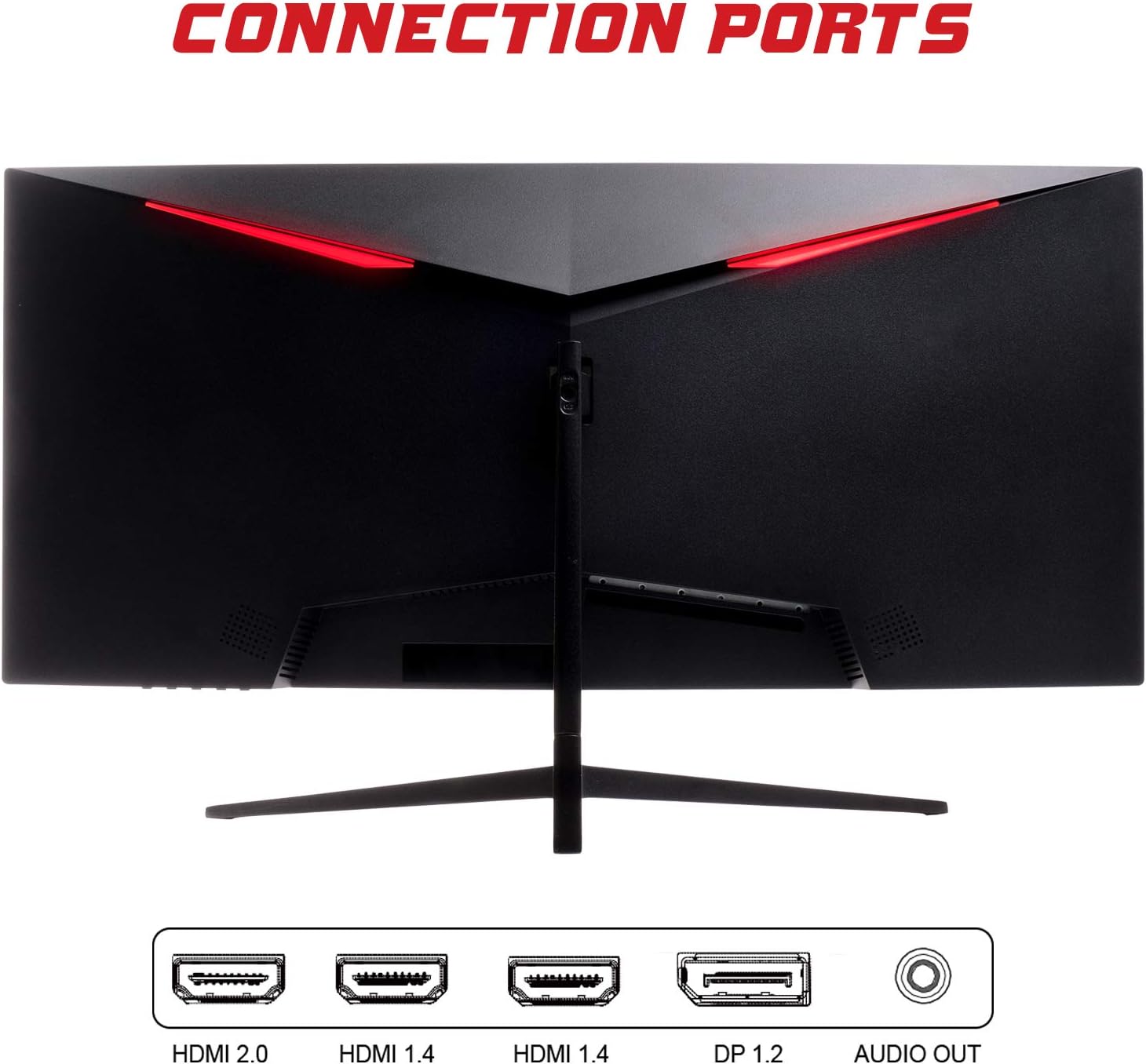
- DisplayPort (DP 1.2): For high-resolution and high-refresh-rate connections to your PC.
- HDMI (HDMI 2.0, HDMI 1.4 x2): Connect to PCs, gaming consoles, and other multimedia devices. HDMI 2.0 supports higher refresh rates at certain resolutions.
- Ses çıkışı: Harici hoparlör veya kulaklık bağlayın.
Video kablosunu bağladıktan sonra, güç adaptörünü monitöre ve ardından bir elektrik prizine bağlayın.
Monitörü Çalıştırma
Güç Açık/Kapalı
Monitörü açmak veya kapatmak için genellikle monitörün altında veya arkasında bulunan güç düğmesine basın. Monitör açık olduğunda güç gösterge ışığı yanacaktır.
Ekran Görüntüsü (OSD) Menüsü
OSD menüsü, çeşitli monitör ayarlarını yapmanıza olanak tanır. Menüde gezinmek için monitör üzerindeki düğmeleri (genellikle arkada veya sağ altta) kullanın.
- Resim Ayarları: Parlaklığı, kontrastı, keskinliği ve gama değerini ayarlayın.
- Renk ayarları: Renk sıcaklığını, tonunu ve doygunluğunu değiştirin.
- Giriş Seçimi: DisplayPort ve HDMI girişleri arasında manuel olarak geçiş yapın.
- Ses: Ses çıkışının ses seviyesini ayarlayın.
- Sistem Ayarları: Access language, OSD timeout, and reset options.
- Oyun Özellikleri: Enable/disable FreeSync, adjust response time overdrive, and activate crosshair overlays if available.
Bakım
Proper care ensures the longevity of your monitor:
- Temizlemeden önce daima monitörü kapatın ve güç kablosunu çıkarın.
- Ekranı nazikçe silmek için yumuşak, tüy bırakmayan bir bez kullanın. İnatçı lekeler için, hafifçe bastırarak silin.ampBezi su veya aşındırıcı olmayan yumuşak bir ekran temizleyicisiyle silin.
- Clean the monitor casinYumuşak ve kuru bir bezle silin.
- Avoid spraying liquids directly onto the screen or casing.
- Do not use benzene, thinner, ammonia-based cleaners, or abrasive materials.
Sorun giderme
If you encounter issues with your monitor, please refer to the following table for common problems and solutions:
| Sorun | Olası Çözüm |
|---|---|
| Güç yok | Ensure the power cable is securely connected to the monitor and the power outlet. Check if the power outlet is working. |
| Sinyal yok / Boş ekran | Verify the video cable (DisplayPort or HDMI) is firmly connected to both the monitor and your computer. Select the correct input source via the OSD menu. Ensure your computer is powered on and not in sleep mode. |
| Görüntüde titreme veya kararsızlık | Check the video cable connection. Try a different cable or port. Ensure your graphics card drivers are up to date. Adjust the refresh rate in your computer's display settings. |
| Poor image quality (blurry, distorted colors) | Adjust brightness, contrast, and color settings in the OSD menu. Ensure the display resolution on your computer matches the monitor's native resolution (2560x1080). |
| Ses çıkışından ses gelmiyor. | Check the audio cable connection to your speakers/headphones. Verify the volume setting in the OSD menu and on your computer. Ensure the correct audio output device is selected in your computer's sound settings. |
Teknik Özellikler
| Özellik | Şartname |
|---|---|
| Marka | İtek |
| Örnek | ITMC30V201FHD |
| Ekran Boyutu | 30 inç |
| Panel Tipi | VA |
| Eğrilik | R1800 |
| Çözünürlük | 2560 x 1080 (WFHD) |
| En Boy Oranı | 21:9 |
| Yenileme Hızı | 200 Hz |
| Tepki Süresi | 1ms MPRT |
| Parlaklık | 350 cd/m² |
| Kontrast Oranı | 3000:1 |
| ViewAçı | 178° (Yatay/Dikey) |
| Bağlantı | 1x DisplayPort 1.2, 1x HDMI 2.0, 2x HDMI 1.4, Audio Out |
| Özel Özellikler | HDR Ready, FreeSync, Low Blue Light, Flicker Free, VESA Mountable |
| Ürün Boyutları (standlı) | 70.68x40.89x18.48 cm |
| Ağırlık | 6.9 kilo |
Enerji Verimliliği

For detailed energy consumption information and product registration, please refer to the official EPREL database:
Garanti ve Destek
Your iTek GGC monitor is backed by a manufacturer's warranty. Please retain your proof of purchase for warranty claims.
- Guaranteed Product Support: This product is guaranteed to have support available until at least January 1, 2031.
- For technical support, warranty inquiries, or service requests, please contact iTek customer service through their official webSiteye veya satın alma işleminizle birlikte verilen iletişim bilgilerine.
Ask a question about this manual
Ask about setup, troubleshooting, compatibility, parts, safety, or missing instructions. Manuals+ will review the question and use this page’s manual context to help answer it.