
1. Ürün Bittiview
The Sato One-Touch Timer TM-22 is a versatile digital timer designed for various timing needs, from kitchen use to laboratory applications. It combines ease of use with practical features to enhance your daily tasks.
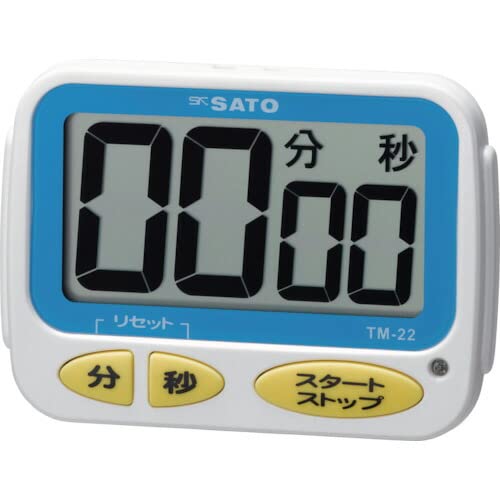
Resim 1: Ön view of the Sato One-Touch Timer TM-22. The timer features a clear digital display and control buttons.
Temel Özellikler:
- Automatic Reset Alarm: The alarm sounds for 5 seconds at the set time and automatically resets to the initial set time.
- Basit İşlem: The primary key is for starting; no complex operations are required to stop the timer's alarm cycle.
- Dual Notification: Alerts users with both sound (70dB) and light.
- Drip-Proof Construction: Designed to resist splashes, making it suitable for kitchen environments.
- Çoklu Montaj Seçenekleri: Equipped with a magnet on the back for attachment to metal surfaces and a strap for hanging.
- Geri Sayım ve Geri Sayım İşlevleri: Supports both decreasing ve artışasing time measurements.
2. Kurulum
Pil Montajı:
The TM-22 timer requires one AAA battery for operation. A battery is included with the unit.
- Locate the battery compartment cover on the back of the timer.
- Bölmeyi açmak için kapağı kaydırın veya açın.
- Bir adet AAA pil takın ve pozitif (+) ve negatif (-) kutupların bölmenin içindeki işaretlerle doğru şekilde hizalandığından emin olun.
- Pil bölmesi kapağını güvenli bir şekilde yerine takın.
The timer should power on, and the display will show '00:00' or the last set time.
3. Kullanım Talimatları
The TM-22 timer features both countdown and count-up functionalities.
3.1. Geri Sayım Sayacı
This function allows you to set a specific duration, and the timer will count down to zero.
- Zaman Ayarı: Use the 'M' (Minute) button and 'S' (Second) button to adjust the desired countdown duration. The timer can be set from 1 second up to 99 minutes and 59 seconds.
- Geri Sayımı Başlat: Press the 'START' button to begin the countdown.
- Alarm Bildirimi: When the time reaches zero, an alarm will sound for 5 seconds, accompanied by a flashing light.
- Otomatik Sıfırlama: After the 5-second alarm, the timer automatically resets to the initial set time, ready for the next countdown without manual intervention.
- Duraklat/Durdur: To pause the countdown, press the 'START' button again. To resume, press 'START' once more. To clear the set time, press the 'RESET' button (if available) or hold the 'START' button for a few seconds.
3.2. Count-up Timer
This function measures elapsed time from zero.
- Start Count-up: Ensure the timer display shows '00:00'. If not, press the 'RESET' button to clear any previous settings. Press the 'START' button to begin counting upwards from zero.
- Duraklat/Sürdür: To pause the count-up, press the 'START' button. To resume, press 'START' again.
- Reset: To reset the count-up timer to '00:00', press the 'RESET' button (if available) or hold the 'START' button for a few seconds while paused.
4. Bakım
Temizlik:
To maintain the timer's appearance and functionality:
- Wipe the exterior of the timer with a soft, dry cloth.
- Aşındırıcı temizleyiciler, çözücüler veya kimyasal maddeler kullanmayın, çünkü bunlar yüzeye zarar verebilir.asing veya göster.
- The timer is drip-proof, but do not immerse it in water or expose it to heavy splashing.
Pil Değişimi:
Replace the battery when the display becomes dim or the timer's functions become erratic.
- Follow the battery installation steps outlined in the "2. Setup" section.
- Always use a fresh AAA battery.
- Kullanılmış pilleri yerel düzenlemelere göre atın.
5. Sorun Giderme
If you encounter issues with your TM-22 timer, refer to the following common problems and solutions:
| Sorun | Olası Neden | Çözüm |
|---|---|---|
| Zamanlayıcı açılmıyor. | Pil bitmiş veya yanlış takılmış. | Pil kutuplarını kontrol edin. Yeni bir AAA pille değiştirin. |
| Display is faint or flickering. | Pil gücü düşük. | AAA pili değiştirin. |
| Alarm çalmıyor. | Volume obstruction or internal issue. | Ensure the speaker is not covered. Check battery level. If problem persists, contact support. |
| Timer does not reset automatically after alarm. | This feature is specific to the countdown function. | Ensure you are using the countdown function. For count-up, manual reset is required. |
6. Özellikler
| Özellik | Detay |
|---|---|
| Model Numarası | TM-22 |
| Maksimum Zamanlama | 99 dakika 59 saniye |
| Minimum Timing | 1 saniye |
| Boyutlar (Y x G x D) | 67 mm x 93 mm x 20 mm |
| Ağırlık | 96 gr |
| Güç Kaynağı | AAA pil x 1 (dahil) |
| Alarm Sesi | 70 dB |
| Fonksiyonlar | Countdown, Count-up |
| Özel Özellikler | Drip-proof construction, Magnet on back, Hanging strap, Sound and light notification |
7. Garanti ve Destek
For warranty information, technical assistance, or customer support regarding your Sato One-Touch Timer TM-22, please contact your authorized retailer or the manufacturer, Sato Corporation. Keep your purchase receipt as proof of purchase.
Please visit the official Sato webEn güncel destek bilgileri ve iletişim bilgileri için siteyi ziyaret edin.