
1. Giriş
The SAM4S ER-915 is a commercial-grade electronic cash register designed for various retail environments. It features receipt and journal printers, along with an adjustable two-line alphanumeric backlit liquid crystal operator display. This manual provides essential information to help you set up, operate, and maintain your ER-915 unit effectively.

Resim: Ön view of the SAM4S ER-915 Electronic Cash Register, showing the main unit with keyboard, display, and integrated cash drawer.
2. Kurulum ve Kurulum
Before operating the SAM4S ER-915, ensure proper installation and connection.
2.1 Paketin Açılması ve İçerik
Carefully unpack the cash register and verify all components are present:
- SAM4S ER-915 Cash Register Unit
- Starter Paper Roll
- Anahtar Seti
- Kullanım Kılavuzu (bu belge)
- Power Switch Cover
- Cable Router Clip
- Paper Take-Up Spool
2.2 Yerleştirme
Place the unit on a stable, flat surface. Consider the dimensions for adequate space:
- Ünite Boyutları: 16.5"D x 16.5"G x 11.81"Y
- Birim Ağırlık: Yaklaşık 25 pound
2.3 Güç Bağlantısı
Connect the power cable to the unit and a standard 120V AC outlet. The unit requires 120 AC ± 10%, 50/60 Hz power supply.
2.4 Çevresel Bağlantılar
The ER-915 supports various peripheral connections:
- Seri bağlantı girişleri: Standard COM1 & COM2 (D-Sub-9M). Optional COM3 & COM4 (RJ45).
- Para Çekmecesi Bağlantı Noktası: One additional RJ11 (24V) port for cash drawer control.
- SD Port: Standard SD card slot for data management.
- Kart okuyucu: Optional integrated dual track MCR.

Resim: Arka view of the SAM4S ER-915, showing various connectivity ports including COM ports, LAN, and cash drawer connection.
3. Operasyon
The SAM4S ER-915 is designed for efficient transaction processing and reporting.
3.1 Temel Özellikler
- Up to 22,000 PLUs (Price Look-Ups)
- Up to 99 Clerks/Cashiers
- Up to 99 Group Totals
- Support for up to 500 Hard or Soft Guest Checks
- Two price levels per PLU
- Up to 100 Mix & Match Discounts
- Up to 50,000 lines of Electronic Journal
- Programmable Keyboard Functions: 8 Charge Keys, 10 One-Touch Macro Keys, 4 Automatic Currency Conversion Keys
- Gıda Stamp Sorting and Tendering for Stores that accept Food Stamps
- Automatic Tax Calculation for up to 4 rates or tables
- Cancel Sale Function, Key Lock Controlled Transaction Void
- Check Cashing, Post Tendering, Hash PLU Status, Training Mode, Not-Found PLU
- Condensed Journal
3.2 Ekran Birimleri
The ER-915 features two display units for operator and customer visibility.
- Operator Display: A 2-line x 16 character alphanumeric backlit LCD for clear transaction monitoring.
- Customer Display: A 9-digit LED display for customer viewing of prices and totals.

Image: Close-up of the operator display showing transaction details.

Image: Close-up of the rear customer display showing a numerical total.
3.3 Printing System
The unit includes a dual-station direct thermal, drop-and-print system for receipts and journals.
- Yazıcı Türü: Direct Thermal, Drop-and-Print
- Printer Stations: Dual Station, Receipt and Journal Printers
- Printer Speed: Saniyede 22 Satır
- Kağıt Rulosu: 2-1/4" (58mm) width
3.4 Cash Drawer
The integrated cash drawer features a 5 bill, 5 coin configuration with an adjustable coin divider, two media slots, and a standard security lock and key.

Image: Open view of the SAM4S ER-915 cash drawer, showing bill and coin compartments.
3.5 SD Card Utilities
The standard SD port allows for program save/load, report capture, firmware updates, and graphics uploading.

Image: Close-up of the SAM4S ER-915 showing the SD card slot for data management.
3.6 Management Reports
The ER-915 provides comprehensive reporting capabilities:
- Individual Clerk/Cashier Report
- Hourly Sales Analysis
- Reporting for up to 99 Clerks/Cashiers
- PLU, Group and Stock Reports
- Period-To-Date Financial, Hourly, Cashier, Group and PLU Reports
- Sales by Day Report for 31 Days
- Open Check Report
4. Bakım
Regular maintenance ensures the longevity and optimal performance of your cash register.
4.1 Temizlik
Ünitenin dışını yumuşak bir bezle silin.amp cloth. Avoid abrasive cleaners or solvents. Keep the printer area free of dust and paper debris.
4.2 Kağıt Rulosu Değişimi
The ER-915 uses 2-1/4" (58mm) thermal paper rolls. Refer to the printer mechanism for specific loading instructions. Ensure the paper is loaded correctly for both receipt and journal printers.
4.3 Memory Protection
The unit's memory is protected for 90 days with a full charge for 24 hours. Ensure the unit remains powered or charged to retain data.
5. Sorun Giderme
This section addresses common issues you might encounter with your SAM4S ER-915.
5.1 Güç Sorunları
- Ünite açılmıyor: Verify the power cable is securely connected to both the unit and a working electrical outlet. Check the power switch position.
5.2 Yazdırma Sorunları
- No printout or blank receipts: Check if the paper roll is installed correctly and has sufficient paper. Ensure the thermal paper is loaded with the correct side facing the print head. Clean the print head if necessary.
- Jammed paper: Open the printer cover and carefully remove any jammed paper. Ensure no debris is obstructing the paper path.
5.3 Ekran Sorunları
- Display is blank or unreadable: Check power connection. Adjust display brightness if available. If the issue persists, contact support.
5.4 Cash Drawer Not Opening
- Drawer does not open: Ensure the cash drawer cable is securely connected to the register. Check for any obstructions preventing the drawer from opening. Verify the key lock is in the unlocked position.
For issues not covered here, or if problems persist, please refer to the support section.
6. Özellikler
Detailed technical specifications for the SAM4S ER-915 Electronic Cash Register.
| Özellik | Şartname |
|---|---|
| Marka | SAM4s |
| Model Numarası | ER-915 |
| Ürün Boyutları (D x G x Y) | 16.5" x 16.5" x 11.81" |
| Ürün Ağırlığı | 25 Pound |
| Renk | Siyah |
| Malzeme | Alaşımlı Çelik |
| Kilit Tipi | Elektronik |
| Montaj Tipi | Solo |
| Özel Özellik | Taşınabilir |
| Alarm | Görsel |
| Su Direnç Seviyesi | Suya dayanıklı değil |
| UPC | 672550687941 |
| Üretici | Sam4s |
| Yazıcı Türü | Direct Thermal, Drop-and-Print |
| Printer Stations | Dual Station; Receipt/Requisition Printer |
| Yazıcı Hızı | Saniyede 22 Satır |
| Kağıt Rulo | 2-1/4" (58 mm) |
| Operatör Ekranı | 2-Line x 16 Character Alpha-Numeric Backlit LCD |
| Müşteri Ekranı | 9 Haneli LED |
| Keyboard Capacity | Up to 41 Keys / 7-14 Department Keys |
| Serial Ports (Standard) | COM1 & COM2 (D-Sub-9M) |
| Serial Ports (Optional) | COM3 & COM4 (RJ45) |
| Cash Drawer Ports | One Additional RJ11 (24V) Port (Supports Open/Close) |
| SD Bağlantı Noktası | Standart |
| Kart Okuyucu | Optional Integrated Dual Track MCR |
| Standard Cash Drawer | 5 Bill, 5 Coin with Drawer Lock and Two Media Slots |
| Güç Gereksinimleri | 120 AC ± 10%, 50/60 Hz |
| Güç Tüketimi | yaklaşık 25 Watt |
| Çalışma Sıcaklığı | 32° – 104°F (0° – 40°C) |
| nem Aralığı | %30 - %80 RH (Yoğuşmasız) |
| Bellek Koruması | Full Charge for 24 Hours will Protect Memory for 90 Days |
| İlk Mevcut Tarih | 29 Kasım 2018 |
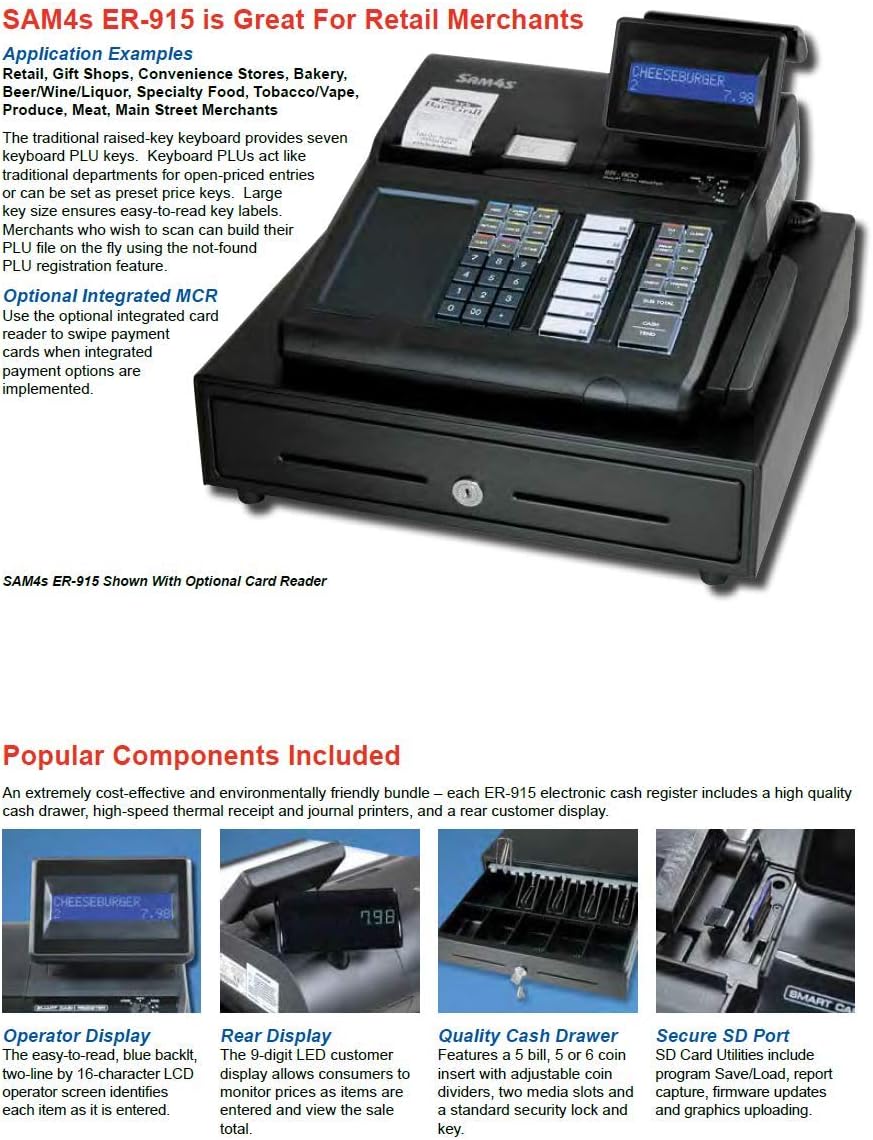
Image: A visual representation of the SAM4S ER-915 specifications and features.
7. Garanti Bilgileri
Specific warranty details for the SAM4S ER-915 are not provided in this manual. Please refer to the documentation included with your purchase or contact SAM4S customer support for warranty terms and conditions.
8. Müşteri Desteği
For further assistance, technical support, or service inquiries regarding your SAM4S ER-915 Electronic Cash Register, please contact your authorized SAM4S dealer or visit the official SAM4S webiletişim bilgileri için site.
When contacting support, please have your model number (ER-915) and any relevant purchase information ready.