
Defiant 9a843b7d-eaac-472e-b6d2-4b1006f6f6a5
Defiant Electronic Deadbolt Door Lock
Model: 9a843b7d-eaac-472e-b6d2-4b1006f6f6a5
Yaşlı Bronz Kaplama
giriiş
This manual provides detailed instructions for the installation, operation, and maintenance of your Defiant Electronic Deadbolt Door Lock. Please read this manual thoroughly before installation and use to ensure proper function and safety.
The Defiant Electronic Deadbolt offers convenient keyless access with a touch keypad, along with the security of a traditional mechanical key. It is designed for use on garage, entry, home office, computer room, or utility room doors.
Güvenlik Bilgileri
Always follow basic safety precautions when installing and operating this product to reduce the risk of injury or damage.
- Do not attempt to disassemble or modify the lock beyond the instructions provided in this manual.
- Use only the specified battery type (not included).
- Anahtarları kilitten uzakta, güvenli bir yerde saklayın.
- Ensure all components are securely fastened during installation.
Paket İçeriği
Verify that all parts are present before beginning installation:
- Dış Tuş Takımı Aksamı
- Interior Assembly with Thumb Turn
- Sürgü Mandalı
- Grev plakası
- Montaj Vidaları
- Tuşlar (2)
- Installation Template (if applicable)

Image: Included components such as keys, strike plate, and the cylinder housing.
Kurulum Kılavuzu
Gerekli Araçlar: Philips screwdriver (included), measuring tape, pencil.
- Kapıyı Hazırlayın: Ensure your door has the standard bore holes for a deadbolt. If not, use the provided template (if applicable) to drill necessary holes.
- Mandalı takın: Insert the deadbolt latch into the edge of the door. Ensure the "UP" arrow on the latch is pointing upwards. Secure with screws.
- Harici Tuş Takımı Kurulumu: Feed the cable from the exterior keypad through the cross bore hole. Align the keypad with the latch and press it firmly against the door.
- İç Montajın Kurulumu: Connect the cable from the exterior keypad to the interior assembly. Align the interior assembly with the mounting posts from the exterior keypad and secure with screws. Ensure the thumb turn operates smoothly.
- Kilitleme plakasını takın: Install the strike plate on the door frame, aligning it with the deadbolt latch. Secure with screws.
- Pilleri Takın: Open the battery cover on the interior assembly and insert 4 AA batteries (not included), observing polarity.
- Test İşlemi: Test the lock with the mechanical key and by entering a default code (if any) or a newly programmed code.
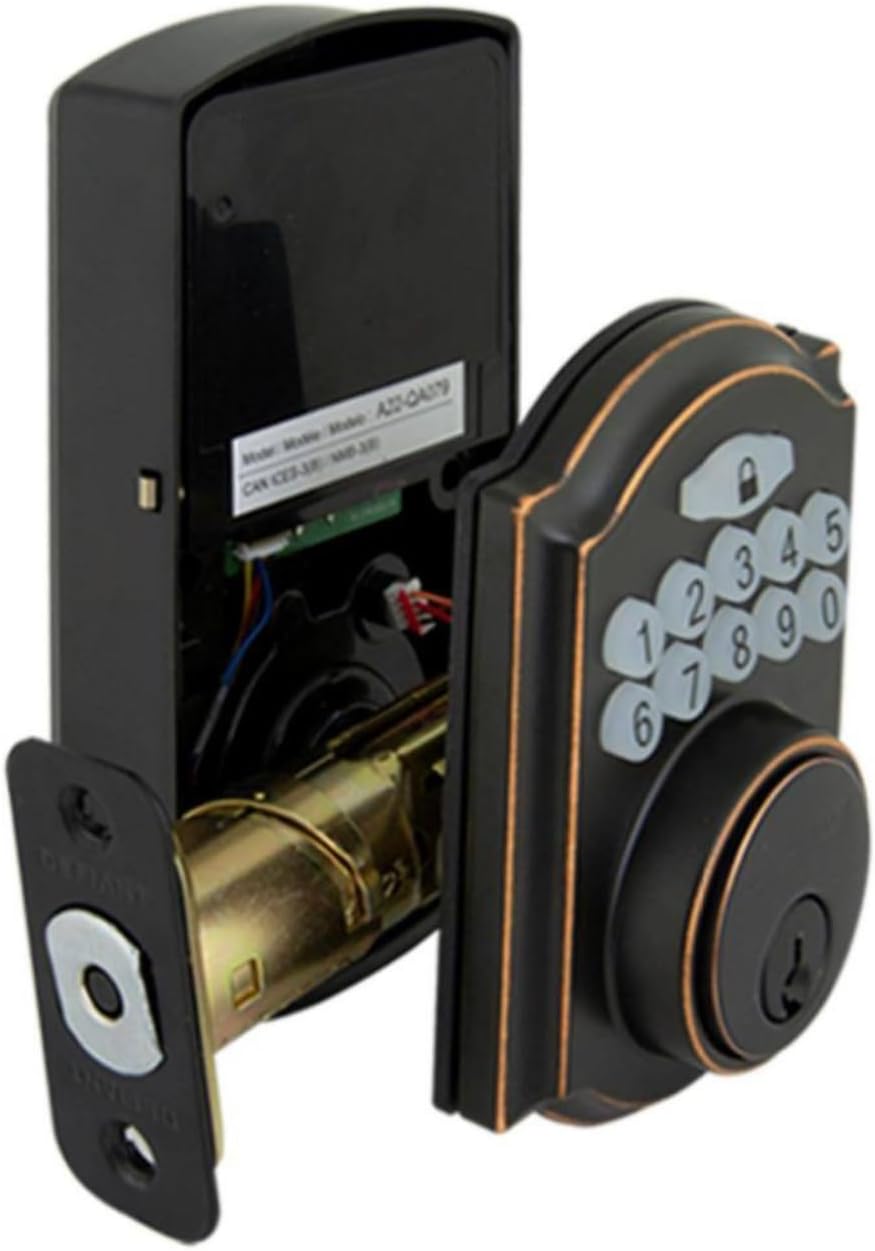
Image: The electronic deadbolt assembly, showing the interior mechanism and exterior keypad.

Resim: Dış mekan view of the electronic deadbolt installed on a door, showcasing the keypad.
Kullanım Talimatları
Kullanıcı Kodlarının Programlanması
The lock can hold up to 10 user codes and 5 single-entry codes.
- Programlama Moduna Girin: Locate the program button on the interior assembly (usually on the battery cover or near the battery compartment). Press it once. The keypad will illuminate.
- Yeni Kullanıcı Kodu Ekle: Enter your desired 4-digit user code. Press the Lock button (padlock icon) to confirm. The lock will beep to confirm successful programming.
- Kullanıcı Kodunu Sil: Enter programming mode. Enter the 4-digit user code you wish to delete. Press the Lock button. The lock will beep to confirm deletion.
Kilitleme ve Kilit Açma
- Kilidini Açmak İçin: Enter your 4-digit user code on the keypad. The keypad will illuminate, and the deadbolt will retract after a few seconds.
- To Lock (from outside): Press the Lock button (padlock icon) on the keypad. The deadbolt will extend after a few seconds.
- To Lock (from inside): Turn the thumb turn on the interior assembly to the locked position.
Otomatik Kilitleme Özelliği
The lock features an auto-lock function with an adjustable delay from 10 to 99 seconds. Refer to the full programming guide (usually a separate sheet or detailed section in the manual) for instructions on enabling and adjusting this feature.

Image: Close-up of the electronic keypad for code entry.
Bakım
- Temizlik: Kilidi yumuşak bir bezle temizleyin.amp Bez. Cilaya veya elektronik bileşenlere zarar verebilecek aşındırıcı temizleyicilerden veya çözücülerden kaçının.
- Pil Değişimi: When the battery indicator light flashes or the lock makes a low battery warning sound, replace all four AA batteries. Use only new, high-quality alkaline batteries.
- Yağlama: Periodically lubricate the deadbolt mechanism with a silicone-based lubricant to ensure smooth operation. Do not lubricate the keypad.
Sorun giderme
| Sorun | Olası Neden | Çözüm |
|---|---|---|
| Tuş takımı yanmıyor. | Pillerin bitmiş olması veya pilin yanlış takılması. | Pilleri doğru kutuplara yerleştirerek değiştirin. |
| Lock does not respond to code. | Incorrect code entered, code not programmed, or lock is jammed. | Verify code, reprogram code, check for obstructions in door frame or latch. |
| Sürgü tam olarak açılıp/kapanmıyor. | Misalignment of strike plate or latch, low battery. | Adjust strike plate, replace batteries. |
| Sürekli bip seslerini kilitleyin. | Düşük pil uyarısı. | Pilleri hemen değiştirin. |
Özellikler
- Marka: Meydan okuyan
- Model Numarası: 9a843b7d-eaac-472e-b6d2-4b1006f6f6a5
- Kilit Tipi: Elektronik Sürgü
- Malzeme: Bronz
- Stil: Modern
- Özellik: Keyless Entry, Back-up Mechanical Key
- Kullanıcı Kodları: 10'e kadar
- Single Entry Codes: 5'e kadar
- Otomatik Kilit Gecikmesi: 10-99 saniye (ayarlanabilir)
- Güç Kaynağı: 4 AA Pil (dahil değildir)
- Ürün Ağırlığı: 2.26 pound
- Paket Boyutları: 7.48 x 5.51 x 4.61 inç
- UPC: 050134991163
Garanti ve Destek
For warranty information or technical support, please refer to the official Defiant webSite üzerinden satın alabilir veya müşteri hizmetleriyle iletişime geçebilirsiniz. Garanti talepleriniz için satın alma fişinizi saklayın.
Çevrimiçi Kaynaklar: Visit the Defiant website for FAQs, additional guides, and product registration.
Müşteri Hizmetleri: Contact Defiant customer support for assistance with installation, programming, or troubleshooting issues.
Ask a question about this manual
Ask about setup, troubleshooting, compatibility, parts, safety, or missing instructions. Manuals+ will review the question and use this page’s manual context to help answer it.