
Yaheetech YA-00097936
Yaheetech Multistore 2002 Computer Desk User Manual
Modeli: YA-00097936 | Marka: Yaheetech
giriiş
Thank you for choosing the Yaheetech Multistore 2002 Computer Desk. This manual provides detailed instructions for assembly, operation, maintenance, and troubleshooting to ensure safe and efficient use of your new desk. Please read this manual thoroughly before beginning assembly or use, and retain it for future reference.
Güvenlik Bilgileri
- Keep all parts and packaging materials out of reach of children.
- Çizilmeleri önlemek için masayı yumuşak ve temiz bir zemine kurun.
- Kullanmadan önce tüm vidaların ve bağlantı elemanlarının iyice sıkıldığından emin olun. Periyodik olarak kontrol edin ve gerektiğinde tekrar sıkın.
- Do not overload the desk. Refer to the "Specifications" section for weight capacities.
- Avoid placing hot items directly on the desk surface.
- Use caution when moving the desk, especially on uneven surfaces. Ensure casters are unlocked if moving.
Parça Listesi
Montajdan önce, aşağıda listelenen tüm bileşenlerin mevcut ve hasarsız olduğundan emin olun. Herhangi bir parça eksik veya hasarlıysa, lütfen müşteri hizmetleriyle iletişime geçin.

Şekil 1: Patladı view of the desk showing main components and their names. This image highlights the heavy MDF boards, thickened frame, smooth steel ball drawer, open middle shelf, open bottom shelf, and lockable casters.
- A: Top Board (1 pc)
- B: Middle Shelf (1 pc)
- C: Bottom Shelf (1 pc)
- D: Side Frames (2 pcs)
- E: Drawer Front (1 pc)
- F: Drawer Sides (2 pcs)
- G: Drawer Back (1 pc)
- H: Drawer Bottom (1 pc)
- I: Drawer Slides (2 sets)
- J: Casters (4 pcs, 2 lockable)
- K: Hardware Pack (Screws, bolts, Allen wrench)
Montaj Talimatları
Doğru montaj için bu adımları dikkatlice izleyin. Montaj için iki kişi olmanız önerilir.
- Step 1: Attach Casters to Side Frames.
Carefully attach the four casters (J) to the bottom of the two side frames (D). Ensure the two lockable casters are placed on the front side for easy access. Tighten securely with the provided wrench.

Şekil 2: Detail of a caster wheel attached to the desk's metal frame. This shows the sturdy connection point and the wheel's design.
- Adım 2: Ana gövdeyi monte edin.
Connect the bottom shelf (C) and middle shelf (B) to the side frames (D) using the appropriate screws from the hardware pack (K). Do not fully tighten screws until all parts are aligned.
- Step 3: Assemble the Drawer.
Assemble the drawer components (E, F, G, H) using the provided screws. Ensure the drawer bottom (H) slides into the grooves correctly. Attach the drawer slides (I) to the sides of the assembled drawer.

Şekil 3: The desk's pull-out drawer, shown partially open, revealing its interior space. This image demonstrates the drawer's functionality and capacity.
- Step 4: Install Drawer Slides to Desk Frame.
Attach the other part of the drawer slides (I) to the designated points on the desk's main frame, just below where the top board will sit. Ensure they are level and aligned.

Şekil 4: Ayrıntılı view of the smooth steel ball drawer slide mechanism. This highlights the quality of the sliding components for the drawer.
- Step 5: Attach the Top Board.
Place the top board (A) onto the assembled frame and secure it with screws. Ensure all pre-drilled holes align.
- Step 6: Insert the Drawer.
Carefully slide the assembled drawer into the installed drawer slides until it clicks into place.
- Adım 7: Son Sıkıştırma.
Once all components are in place and aligned, fully tighten all screws and fasteners. Do not overtighten.
Kullanım Talimatları
The Yaheetech Multistore 2002 Computer Desk is designed for versatile use in various settings, including home offices, living rooms, or bedrooms.

Şekil 5: The computer desk positioned next to a sofa in a living room, demonstrating its compact size and suitability for small spaces. A laptop is placed on the top surface.
- Atama: Position the desk on a flat, stable surface. If using on carpet, ensure the casters can move freely.
- Hareketlilik: To move the desk, unlock the two lockable casters by flipping their levers. Push or pull the desk gently to its desired location. Once in place, lock the casters to prevent accidental movement.
- Depolamak:
- The top surface is suitable for laptops, monitors, or writing.
- The pull-out drawer provides enclosed storage for small items like pens, notebooks, or external hard drives.
- The open middle shelf is ideal for books, documents, or small electronic devices.
- The open bottom shelf can accommodate larger items such as a CPU tower, printer, or storage boxes.
- Ağırlık Kapasitesi: Adhere to the maximum weight capacities specified in the "Specifications" section to prevent damage.
Bakım
Regular maintenance will help prolong the life and appearance of your Yaheetech Multistore 2002 Computer Desk.
- Temizlik: Yüzeyleri yumuşak bir bezle silin.amp Kumaşı sert kimyasallardan, aşındırıcı temizleyicilerden veya cilalardan uzak tutun. Cilaya zarar verebilecek maddeler kullanmaktan kaçının.
- Dökülmeler: Clean up spills immediately to prevent staining or damage to the MDF boards.
- Bağlantı Elemanları: Tüm vidaları ve bağlantı elemanlarını periyodik olarak kontrol ederek sıkılıklarını koruyun. Stabiliteyi sağlamak için gerektiğinde yeniden sıkın.
- Tekerlekler: Tekerleklerin düzgün hareket etmesini sağlamak için, tekerleklerin üzerinde saç, toz vb. kalıntıların birikmesini önleyin.
- Sunlight/Heat: Avoid prolonged exposure to direct sunlight or extreme heat, which can cause fading or warping.
Sorun giderme
Masanızda herhangi bir sorunla karşılaşırsanız, aşağıdaki yaygın sorunlara ve çözümlere bakın:
| Sorun | Olası Neden | Çözüm |
|---|---|---|
| Masa sallanıyor. | Gevşek bağlantı elemanları; düzensiz zemin. | Ensure all screws are fully tightened. Move desk to a level surface or use shims if necessary. |
| Çekmece düzgün bir şekilde kaymıyor. | Drawer slides misaligned; debris in tracks. | Çekmecelerin raylarının doğru şekilde takılıp hizalandığından emin olun. Rayları toz ve kirden temizleyin. |
| Tekerlekler serbestçe dönmüyor. | Casters locked; debris in wheels. | Unlock casters if they are engaged. Remove any hair or debris from the wheels. |
| Kutudan çıkarıldıktan sonra bazı parçalar eksikti. | Paketleme hatası. | Contact Yaheetech customer support with your purchase details and the specific missing parts. |
Özellikler
Detailed dimensions and material information for the Yaheetech Multistore 2002 Computer Desk.
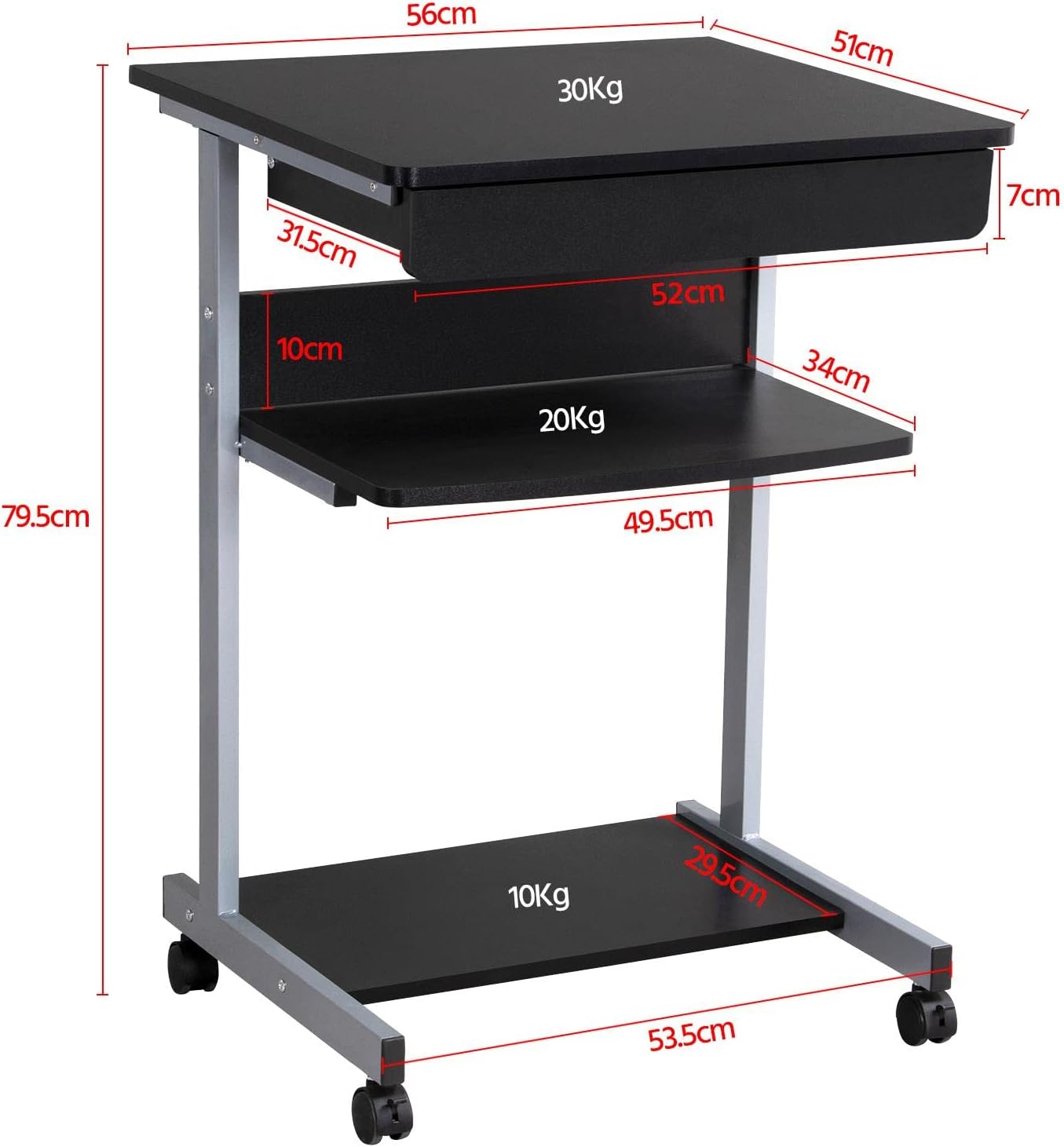
Şekil 6: Detailed dimensional drawing of the desk, including measurements for overall height, width, depth, and individual shelf and drawer dimensions. Also shows weight capacities for each surface.
| Özellik | Detay |
|---|---|
| Model Numarası | YA-00097936 |
| Genel Boyutlar (U x G x Y) | 56 x 51 x 79.5 cm (22 x 20.1 x 31.3 inç) |
| Top Board Dimensions | 56 x 51 cm (22 x 20.1 inç) |
| Drawer Dimensions (Inner) | 45 x 30 x 6 cm (17.7 x 11.8 x 2.4 inç) |
| Middle Shelf Dimensions | 50 x 34 cm (19.7 x 13.4 inç) |
| Bottom Shelf Dimensions | 50 x 30.5 cm (19.7 x 12 inç) |
| Malzeme | MDF (Medium Density Fiberboard) with Metal Frame |
| Renk | Siyah |
| Net ağırlığı | Yaklaşık 10.9 kg (24 lbs) |
| Max. Load Capacity (Top Board) | 30 kg (66 lbs) |
| Maksimum Yük Kapasitesi (Orta Raf) | 20 kg (44 lbs) |
| Maksimum Yük Kapasitesi (Alt Raf) | 10 kg (22 lbs) |
| Tekerlekler | 4 (2'si kilitleme mekanizmalı) |
Garanti ve Destek
Yaheetech products are manufactured to high-quality standards. For specific warranty information, please refer to the warranty card included with your product or visit the official Yaheetech website. If you have any questions, require assistance with assembly, or need to report missing/damaged parts, please contact our customer support team:
- Webalan: www.yaheetech.com (Lütfen bölgesel kontrol edin webSiteler)
- E-posta: Müşteri hizmetleri e-postası için lütfen satın alma belgelerinize bakın.
- Telefon: Müşteri hizmetleri telefon numarası için lütfen satın alma belgelerinize bakın.
When contacting support, please have your model number (YA-00097936) and purchase date ready.
Ask a question about this manual
Ask about setup, troubleshooting, compatibility, parts, safety, or missing instructions. Manuals+ will review the question and use this page’s manual context to help answer it.