
giriiş
Thank you for choosing Groov-e Bluetooth DJ Style Wireless On-Ear Headphones. These headphones are designed for young users, offering wireless freedom, comfortable wear, and an audio-sharing feature. This manual provides essential information for setting up, operating, maintaining, and troubleshooting your new headphones to ensure a safe and enjoyable listening experience.
Paket İçeriği
Lütfen aşağıdaki öğelerin kutucuğunu işaretleyin:
- 1 x Groov-e Bluetooth Kids Headphones with Audio Sharing Port
- 1 x 3.5 mm Ses Jakı Kablosu
- 1 x Mikro USB Şarj Kablosu
- 1 x Kullanım Kılavuzu (bu belge)
Ürün Bittiview
Familiarize yourself with the various parts and controls of your Groov-e headphones.
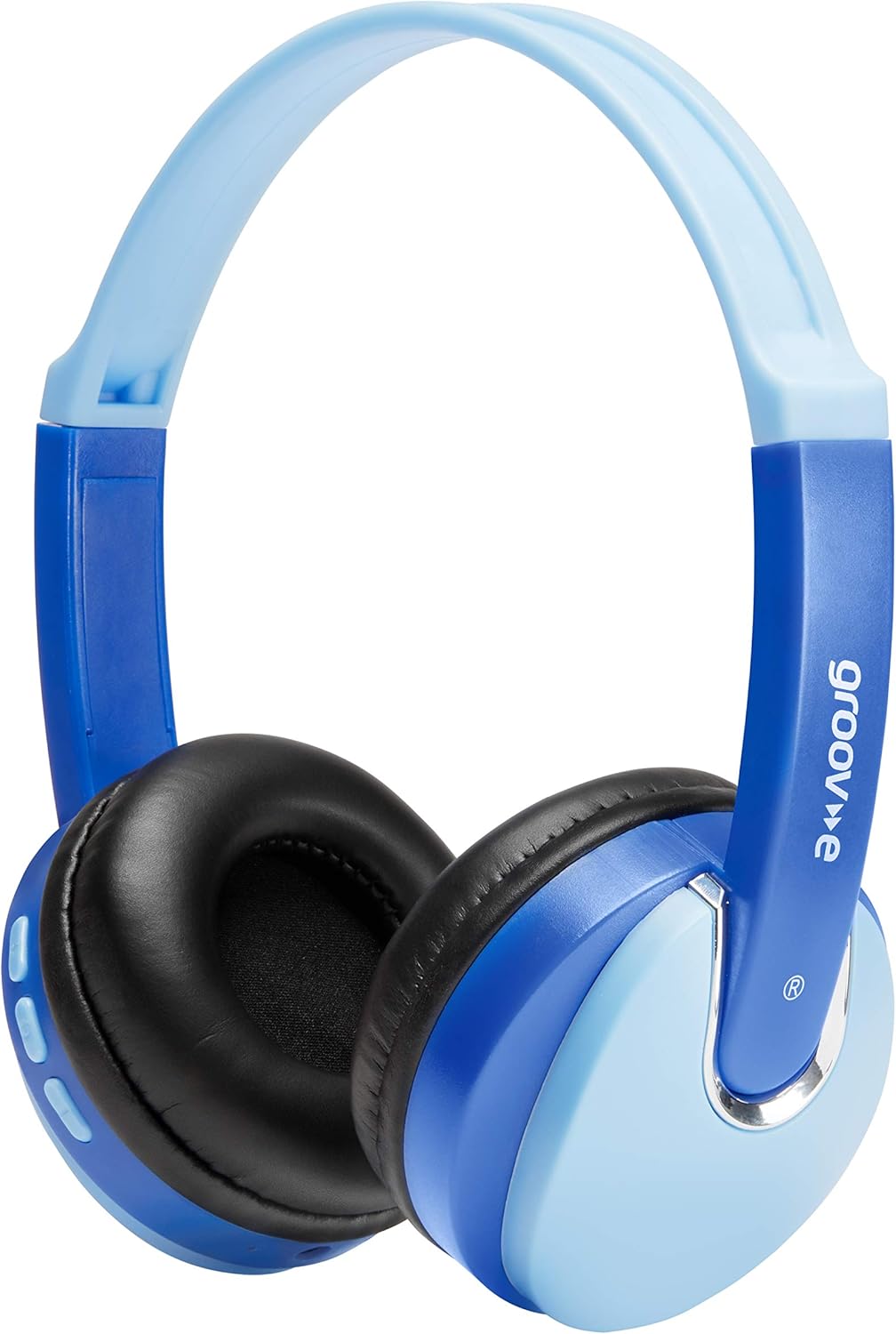
Ön view of the Groov-e Bluetooth DJ Style Wireless On-Ear Headphones in blue.

Taraf view of the right earcup, displaying the volume and track control buttons.
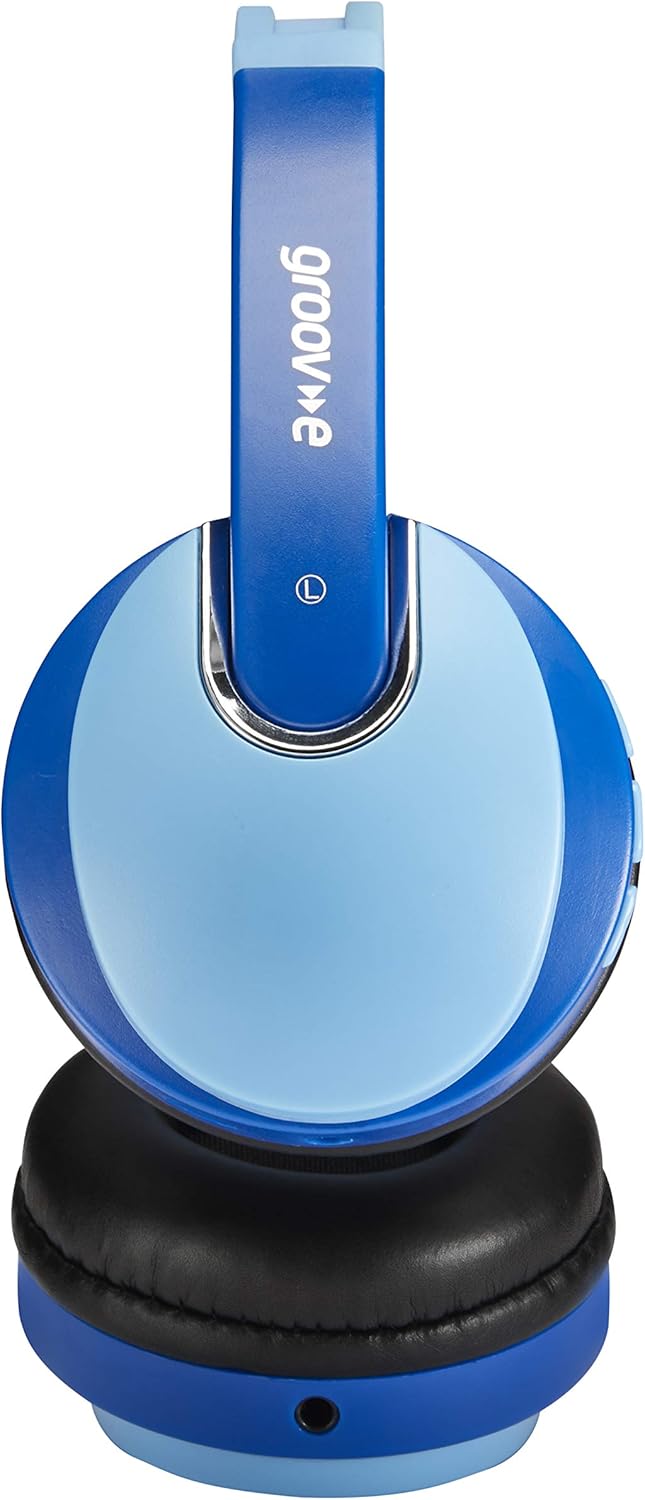
Taraf view of the left earcup, showing the 3.5mm audio input and the audio sharing port.
- Ayarlanabilir Kafa Bandı: Rahat ve güvenli bir uyum için.
- Yumuşak Kulak Yastıkları: Uzun süreli kullanım konforu için tasarlanmıştır.
- Kontrol Düğmeleri: Located on the earcup for power, volume, and track control.
- Mikrofon: Eller serbest görüşme için dahili.
- 3.5 mm Ses Jakı: Cihazlara kablolu bağlantı için.
- Mikro USB Şarj Bağlantı Noktası: Dahili bataryayı şarj etmek için.
- Audio Sharing Port: Allows another pair of headphones to connect and share audio.
Kurmak
Kulaklıkları Şarj Etme
Before first use, fully charge the headphones. Connect the Micro USB charging cable to the charging port on the headphones and the other end to a USB power source (e.g., computer USB port, USB wall adapter). The LED indicator will show charging status (typically red while charging, turning off or blue when fully charged). A full charge provides up to 7.5 hours of wireless playback.
Bluetooth Eşleştirme
- Kulaklıkların kapalı olduğundan emin olun.
- Eşleştirme modunu gösteren LED göstergesi sırayla mavi ve kırmızı renkte yanıp sönene kadar Güç düğmesini basılı tutun.
- Cihazınızda (akıllı telefon, tablet, dizüstü bilgisayar) Bluetooth'u etkinleştirin ve yeni cihazları arayın.
- Select "Groov-e Kidz DJ" (or similar name) from the list of available devices.
- Once connected, the LED indicator will typically flash blue slowly or remain solid blue.
Kablolu bağlantı
If Bluetooth is not available or the battery is depleted, you can use the included 3.5mm audio cable. Simply plug one end into the 3.5mm audio jack on the headphones and the other end into the audio output of your device.
Kullanım Talimatları
Güç Açık/Kapalı
- Güç Açık: LED göstergesi yanana kadar Güç düğmesini yaklaşık 3 saniye basılı tutun.
- Kapat: LED göstergesi kapanana kadar Güç düğmesini yaklaşık 3 saniye basılı tutun.
Müzik Çalma
- Oynat/Duraklat: Oynat/Duraklat düğmesine kısa basın.
- Sesi aç: "+" düğmesine kısa süre basın.
- Sesi kıs: "-" düğmesine kısa süre basın.
- Sonraki Parça: "+" düğmesine uzun süre basın.
- Önceki parça: "-" düğmesine uzun süre basın.
Eller Serbest Arama
- Çağrıyı Cevapla/Sonlandır: Oynat/Duraklat düğmesine kısa basın.
- Çağrıyı Reddet: Oynat/Duraklat düğmesine uzun basın.
- Son Numarayı Tekrar Ara: Oynat/Duraklat düğmesine iki kez basın.
Audio Sharing (Daisy Chain)
The headphones feature a 'daisy chain' audio-sharing port. To share audio with another pair of headphones:
- Connect your Groov-e headphones to your audio source (via Bluetooth or 3.5mm cable).
- Plug a 3.5mm audio cable into the Audio Sharing Port on your Groov-e headphones.
- Connect the other end of the 3.5mm audio cable to the audio input of a second pair of headphones.
- Both pairs of headphones will now play the same audio.
Bakım
Temizlik
Wipe the headphones with a soft, dry cloth. Do not use abrasive cleaners or solvents. Avoid getting moisture into any openings.
Depolamak
Kulaklıkları serin, kuru ve doğrudan güneş ışığından ve aşırı sıcaklıklardan uzak bir yerde saklayın. Üzerlerine ağır nesneler koymaktan kaçının.
Pil Bakımı
To prolong battery life, avoid fully discharging the battery frequently. If storing for a long period, charge the headphones at least once every three months.
Sorun giderme
| Sorun | Olası Neden | Çözüm |
|---|---|---|
| Kulaklık açılmıyor. | Pil zayıf veya bitmiş. | Kulaklığı tam şarj edin. |
| Bluetooth üzerinden eşleştirme yapılamıyor. | Kulaklık eşleştirme modunda değil; cihazın Bluetooth'u kapalı; cihazdan çok uzakta. | Kulaklığın eşleştirme modunda olduğundan emin olun (kırmızı/mavi yanıp sönüyor). Cihazın Bluetooth özelliğini açın. Kulaklığı cihaza yaklaştırın (10 metre içinde). |
| Ses yok. | Ses çok düşük; ses kaynağı yanlış; kulaklık bağlı değil. | Increase volume on headphones and device. Ensure headphones are properly connected (Bluetooth or wired). Check if the correct audio output is selected on your device. |
| Ses bozulması. | Too far from device; interference. | Move closer to the Bluetooth device. Avoid strong electromagnetic interference. |
Özellikler
| Özellik | Detay |
|---|---|
| Model Adı | GV590 KIDS DJ |
| Model Numarası | GVBT590BE |
| Bağlantı Teknolojisi | Bluetooth, Wired (3.5mm Jack), USB (Charging) |
| Kablosuz İletişim | Bluetooth |
| Oynatma Süresi | Up to 7.5 hours (wireless) |
| Sürücü Boyutu | 40mm |
| Yaş Aralığı (Açıklama) | Kid (Suitable for children aged 3+) |
| Malzeme | Plastik |
| Uyumlu Cihazlar | All Bluetooth devices, devices with 3.5mm jacks (MP3, smartphone, tablet, PC, laptop, portable DVD) |
| Ürün Ağırlığı | 298 Gram (0.3 Kilogram) |
| Ürün Boyutları | 7.7x18.2x24 cm |
| Pil Türü | 1 Lityum İyon pil (dahil) |
| Renk | Bluetooth Mavisi |
| Form Faktörü | Kulakta |
Garanti Bilgileri
Groov-e products are manufactured to high standards. For specific warranty details, please refer to the warranty card included with your purchase or visit the official Groov-e webSite. Satın alma belgenizi herhangi bir garanti talebi için saklayın.
Müşteri Desteği
If you encounter any issues not covered in this manual or require further assistance, please contact Groov-e customer support. Contact details can typically be found on the product packaging, the official Groov-e websitenizden veya perakendeciniz aracılığıyla.