
1. Giriş ve Üzeriview
The Alphacool Eiszyklon Aurora LUX fan is designed to provide efficient cooling and vibrant digital RGB illumination for your PC system. These fans are particularly effective on radiators due to their high static pressure, ensuring optimal performance even at lower rotational speeds. The unique light-diffusing areas distribute the aRGB light evenly, creating stunning visual effects.
Each fan features a naturally decoupled frame to minimize vibrations and noise. A single 6-pin cable simplifies connectivity, handling both fan power and aRGB control. When used with the Alphacool Aurora LUX Digital RGB controller, this single cable allows for comprehensive control over fan speed and lighting effects.

Image: Three Alphacool Eiszyklon Aurora LUX Digital RGB fans, showcasing their illuminated blue rings and central logos. These fans are designed for efficient cooling and vibrant lighting within a PC system.
2. Paket İçeriği
Kurulum işlemine geçmeden önce lütfen aşağıda listelenen tüm bileşenlerin paketinizde mevcut olduğunu doğrulayın.
- 3x Alphacool Eiszyklon Aurora LUX Digital RGB Fans (120x120x25mm)
- 1x Alphacool Aurora LUX Digital RGB Controller
- 1x Remote Controller for RGB and fan speed adjustment
- Mounting Screws for fans
- Necessary connection cables (6-pin fan connectors, controller power cable)

Image: The Alphacool Aurora LUX Digital RGB controller, its accompanying remote control, a set of mounting screws, and various connection cables. These components are essential for the setup and operation of the Eiszyklon Aurora LUX fans.
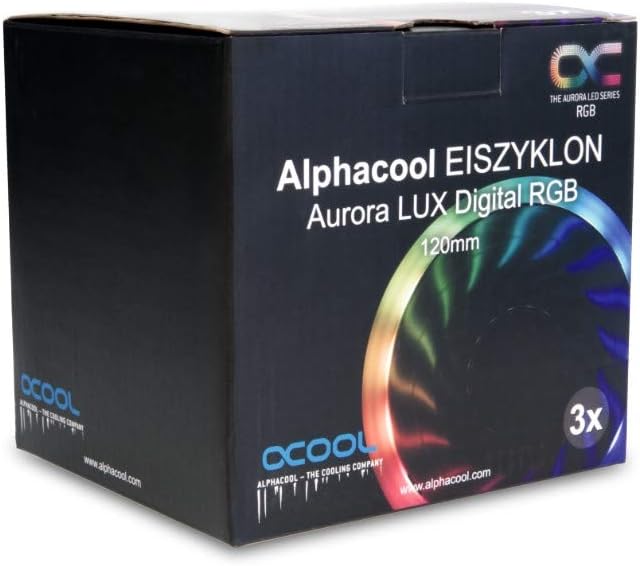
Image: The retail packaging for the Alphacool Eiszyklon Aurora LUX Digital RGB fans, indicating a 3-pack of 120mm fans. The box features product branding and an image of an illuminated fan.
3. Kurulum ve Kurulum
Follow these steps to properly install your Alphacool Eiszyklon Aurora LUX fans and controller.
- Fanların Montajı: Securely attach the 120mm fans to your PC case, radiator, or desired mounting points using the provided mounting screws. Ensure proper airflow direction for optimal cooling.
- Connecting Fans to Controller: Each Eiszyklon Aurora LUX fan has a single 6-pin connector. Connect these 6-pin cables from the fans to the corresponding 6-pin fan connectors on the Alphacool Aurora LUX Digital RGB Controller. The controller has 10 such fan connectors.
- Controller Power Connection: Connect the power cable from the Alphacool Aurora LUX Digital RGB Controller to a suitable power source in your PC (e.g., SATA power connector from your power supply).
- Kontrolörün Montajı: The controller can be mounted inside your PC case using the adhesive tape provided on its back. Choose a location that allows for easy cable management and remote signal reception.
- Optional LED Strip Connection: If you have additional digital RGB LED strips (JTS 4-Pin), you can connect them to the two dedicated JTS 4-Pin connectors on the controller.
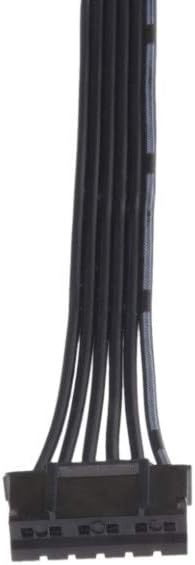
Resim: Yakın çekim view of the 6-pin connector cable, which combines both power and RGB signal lines for the Alphacool Eiszyklon Aurora LUX fans.
4. Kullanım Talimatları
The Alphacool Aurora LUX Digital RGB Controller and its remote allow for easy customization of your fan's performance and aesthetics.
- Güç Açma/Kapatma: Use the "On" and "Off" buttons on the remote controller to power the fans and lighting on or off.
- Fan Hız Kontrolü: The remote allows you to adjust the fan speed. Refer to the remote's specific buttons (e.g., S+, S-) for increasing veya decreasing fan RPM.
- Lighting Effects and Colors: Utilize the color buttons and mode buttons on the remote to cycle through various digital RGB lighting effects and select your preferred colors. The "AUTO" button may cycle through pre-programmed effects.

Resim: Eski bir sevgiliample of the blue illumination provided by three Alphacool Eiszyklon Aurora LUX Digital RGB fans, demonstrating the even light distribution.
5. Bakım
Regular maintenance helps ensure the longevity and optimal performance of your fans.
- Toz Giderimi: Periodically clean the fan blades and frame to remove accumulated dust. Use compressed air or a soft brush. Ensure the system is powered off before cleaning.
- Kablo Denetimi: Occasionally check all connected cables for secure connections and any signs of wear or damage.
6. Sorun Giderme
If you encounter issues with your Alphacool Eiszyklon Aurora LUX fans, refer to the following common troubleshooting steps:
- Fanlar Dönmüyor:
- Ensure the controller is properly powered (SATA power connected).
- Verify that the 6-pin fan cables are securely connected to the controller.
- Check if the remote control is functioning and sending signals (e.g., try pressing "On").
- RGB Işıkları Çalışmıyor:
- Confirm the 6-pin fan cables are fully seated in the controller, as they carry both power and RGB signals.
- Try cycling through different lighting modes or colors using the remote.
- Ensure the controller itself is receiving power.
- Uzaktan Kumanda Yanıt Vermiyor:
- Uzaktan kumandanın pilinin değiştirilmesi gerekip gerekmediğini kontrol edin.
- Ensure there are no obstructions between the remote and the controller's IR receiver.
If problems persist, please contact Alphacool customer support for further assistance.
7. Özellikler
Detailed technical specifications for the Alphacool Eiszyklon Aurora LUX Digital RGB fans and controller:
| Özellik | Şartname |
|---|---|
| Fan Boyutu | 120x120x25 mm |
| Maksimum Dönme Hızı | 1100 dev/dak |
| Statik Basınç | 2.23 mm H2O |
| Hava Akış Oranı | 87.32 m³/saat |
| Yataklar | Hidrolik |
| Fan/aRGB Connector | 6-Pin (proprietary) |
| Aydınlatma | Digital addressable 5V RGB LEDs |
| Kontrol Ünitesi Boyutları (U x G x Y) | 93x47x17 mm |
| Controller Fan Connectors | 10 x 6-Pin |
| Controller Digital RGB LED Strip Connectors | 2x JTS 4-Pin |
| Hayran Sesitage | 12V |
| Digital RGB LED Voltage | 5V |
| Max. Power Output (Controller) | 50W |
| Kontrol Yoluyla | Uzaktan kumanda |
| Kontrolör Montajı | Yapışkan bant |
| Gürültü Seviyesi | 29 dB |
| Item Weight (per fan) | 5.3 ons |
| Model Numarası | 24804 |
| ASIN | B07H2FN9VJ |

Image: A single Alphacool Eiszyklon Lux RGB fan, showing its design and the technical specifications printed on the central hub, including speed, voltage ve netage.

Resim: Bir yan profesyonelfile view of an Alphacool Eiszyklon fan, highlighting its 25mm thickness and the design of its frame, which contributes to its decoupled operation.
8. Garanti ve Destek
For warranty information, technical support, or any inquiries regarding your Alphacool Eiszyklon Aurora LUX Digital RGB fans, please contact Alphacool directly through their official website veya yetkili distribütörler.
You can visit the official Alphacool store on Amazon for more information: Alphacool Store