
SAM4s ER-925
SAM4s ER-925 Cash Register User Manual
Modeli: ER-925
giriiş
This manual provides comprehensive instructions for the setup, operation, and maintenance of your SAM4s ER-925 Cash Register, including its integrated Metrologic Fusion Barcode Scanner. Please read this manual carefully to ensure proper use and to maximize the lifespan of your equipment.
Ürün Bittiview
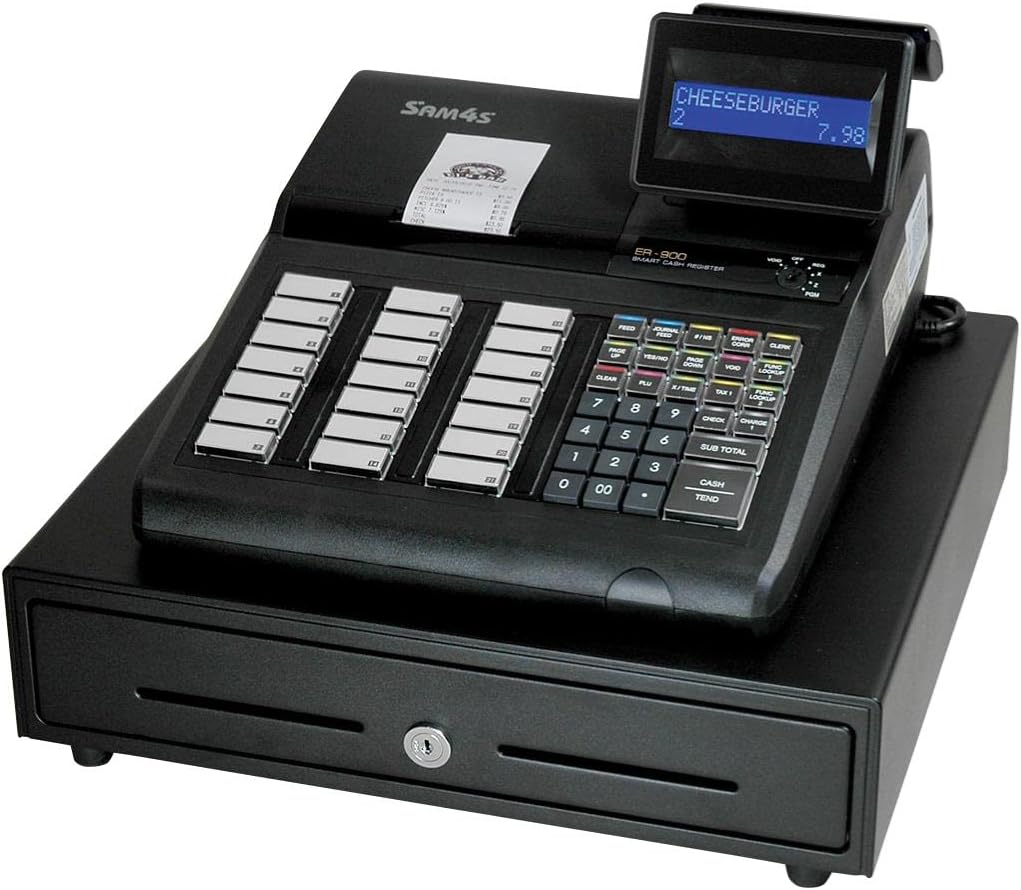
Figure 1: SAM4s ER-925 Cash Register with Metrologic Fusion Barcode Scanner. The image shows the main unit with a display showing "CHEESEBURGER 2 7.98", a receipt printer, a numeric keypad, function keys, and a cash drawer below.
The SAM4s ER-925 is a robust cash register designed for efficient transaction processing. It comes pre-configured with a Metrologic Fusion Barcode Scanner, enabling fast and accurate item entry. The system is designed for ease of use and reliability in various retail environments.
Kurmak
Paket Açma ve Muayene
Carefully remove all components from the packaging. Verify that all items are present and undamaged. The package should contain the ER-925 cash register unit, the Metrologic Fusion Barcode Scanner, power cord, and any included documentation.
Atama
Place the cash register on a stable, flat surface. Ensure adequate ventilation around the unit. Avoid placing it in direct sunlight or near heat sources.
Güç Bağlantısı
Connect the power cord to the cash register's power input, then plug it into a standard electrical outlet. It is recommended to use a surge protector.
Tarayıcı Bağlantısı
The Metrologic Fusion Barcode Scanner is pre-configured for plug-and-play operation with the ER-925. Connect the scanner's USB cable to the designated USB port on the cash register. The scanner should be recognized automatically upon power-up.
İlk Yapılandırma
The system comes with basic configuration. For specific item programming and keyboard layout adjustments, refer to the "Programming" section or contact customer support for assistance. SAM4s offers free telephone support for programming items and keyboard layouts, and configuration setup at no charge.
Kullanım Talimatları
Açma/Kapatma
To power on, ensure the power cord is connected and press the power button. To power off, follow the proper shutdown procedure outlined in the register's internal menu to prevent data loss, then disconnect power.
Basic Transaction
- Item Entry: Use the Metrologic Fusion Barcode Scanner to scan product barcodes. The item name and price will appear on the display. Adding items with this scanner is very fast and simple.
- Manuel Giriş: For items without barcodes, use the numeric keypad to enter the item code or price, then press the appropriate department or PLU key.
- Quantity Entry: To enter multiple quantities of an item, input the quantity using the numeric keypad, then press the 'X' key (if available) followed by scanning the item or entering its code.
- Ara toplam: Basın SUB TOTAL anahtar view the current transaction total.
- Ödeme: Enter the amount received from the customer using the numeric keypad, then press the PEŞİN or EĞİLİMLİ OLMA key. The change due will be displayed.
Hata Düzeltme
If an incorrect item is entered, use the GEÇERSİZ or HATA DÜZELTME key as per the register's specific programming. Consult the on-screen prompts or the programming guide for detailed steps.
End of Day Procedures
At the end of each business day, perform a Z-report to clear daily sales data and print a summary. Consult your programming guide for specific steps to generate reports.
Bakım
Temizlik
Regularly clean the exterior of the cash register and scanner with a soft, damp cloth. Do not use abrasive cleaners or solvents. For the scanner's reading window, use a lint-free cloth and a mild glass cleaner if necessary.
Kağıt Rulosunun Değiştirilmesi
When the receipt paper runs low, replace it with a new thermal paper roll of the correct size. Refer to the diagram inside the printer cover for proper loading direction.
Veri Yedekleme
Periodically back up your sales data and programming settings to an external device if your model supports it. This protects against data loss in case of power outagveya sistem arızaları.
Sorun giderme
| Sorun | Olası Neden | Çözüm |
|---|---|---|
| Register does not power on. | Güç kablosu bağlı değil; elektrik prizi sorunu. | Güç kablosunun güvenli bir şekilde takılı olduğundan emin olun. Prizin başka bir cihazla test edilmesini sağlayın. |
| Tarayıcı barkodları okumuyor. | Scanner cable loose; barcode damaged; scanner lens dirty. | Check scanner cable connection. Try scanning a different barcode. Clean the scanner lens. |
| Yazıcı yazdırmıyor. | No paper; paper jammed; printer cover not closed. | Replace paper roll. Clear any paper jams. Ensure printer cover is securely closed. |
| Incorrect item prices. | Yanlış programlama. | Verify item programming. Contact customer support for programming assistance. |
Özellikler
- Modeli: ER-925
- Marka: SAM4s
- Ürün Ağırlığı: 45 pound
- Güç Kaynağı: Kablolu Elektrik
- Bağlantı Teknolojisi: USB Cable (for scanner)
- Uyumlu Cihazlar: Laptop, Desktop (for programming/data transfer, if applicable)
- UPC: 074927755572
- ASIN: B07GVRT467
Garanti ve Destek
The SAM4s ER-925 Cash Register comes with an unconditional guarantee to function properly. For any technical assistance, programming support, or warranty inquiries, please contact SAM4s customer service. Free telephone support is available for programming items and keyboard layouts, and configuration setup is provided at no charge.
For further assistance, please refer to the contact information provided with your purchase documentation or visit the official SAM4s webalan.
Ask a question about this manual
Ask about setup, troubleshooting, compatibility, parts, safety, or missing instructions. Manuals+ will review the question and use this page’s manual context to help answer it.