
1. Ürün Bittiview
The Electro-Voice EVOLVE 50 is a three-component portable column loudspeaker system designed for professional audio applications. It features a 1000 W Class-D amplifier and is driven by Electro-Voice's QuickSmartDSP for advanced sound processing and control. This system delivers powerful, clear audio suitable for various events and performances.
Temel Özellikler:
- Powerful System: 1000 W Sınıf-D amplifier with QuickSmartDSP.
- Geniş Frekans Aralığı: 12-inch subwoofer provides functional frequency output down to 37 Hz.
- Güvenli Montaj: Bi-directional aluminum pole connects to the subwoofer via magnet, and the column array is gravity-held.
- Bluetooth Bağlantısı: QuickSmart Mobile application uses Bluetooth Low Energy (BTLE) for wireless configuration, control, and monitoring of up to six EVOLVE 50 systems.
- High-Quality Bluetooth Audio: Convenient streaming of background music or musical accompaniment from mobile devices.
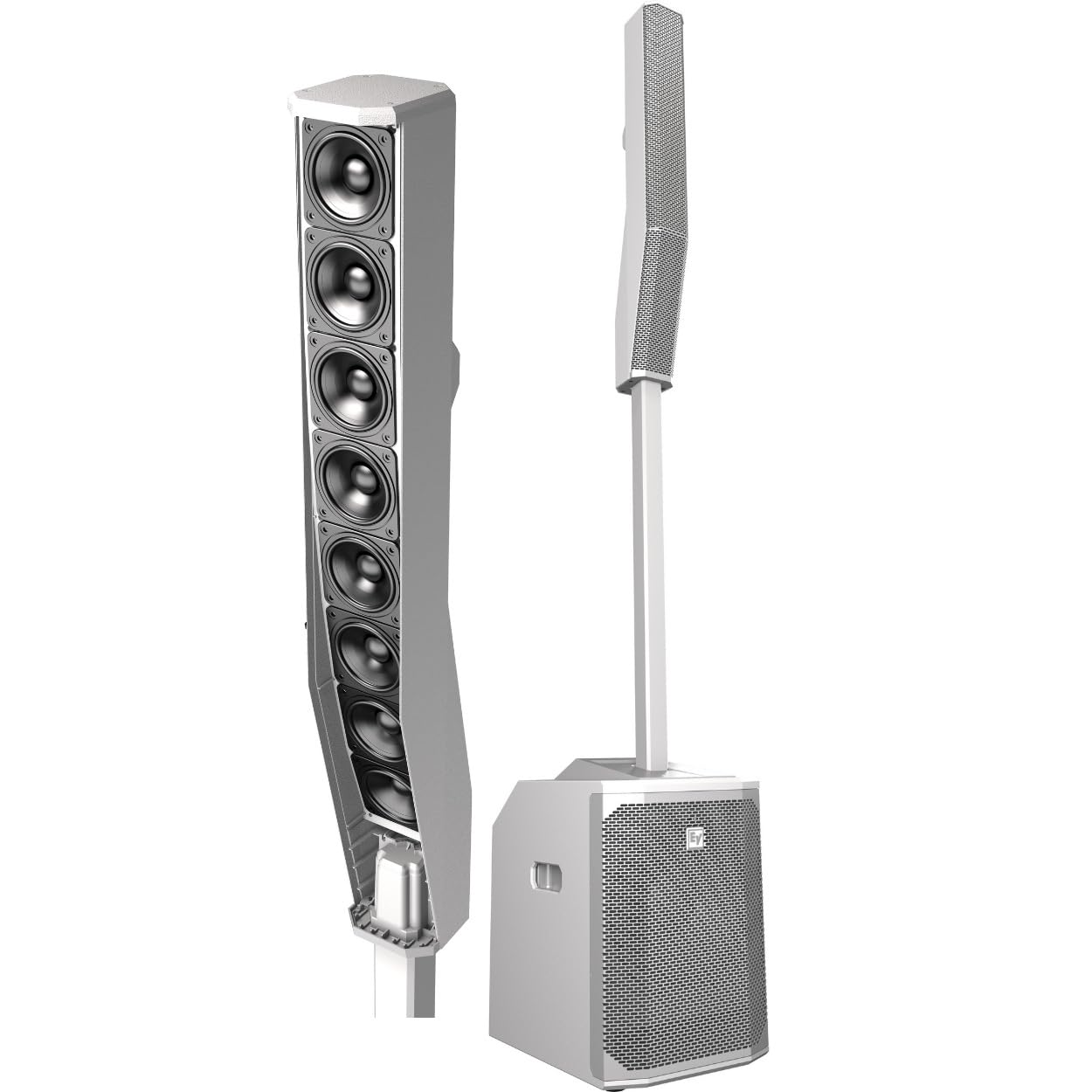
This image displays the fully assembled Electro-Voice EVOLVE 50 system, showing the subwoofer base, the connecting pole, and the column array speaker on top.
2. Kurulum Talimatları
The EVOLVE 50 system is designed for quick and easy assembly. Follow these steps to set up your system:
- Bileşenleri Paketinden Çıkarın: Carefully remove the subwoofer, bi-directional aluminum pole, and column array from their packaging. A carrying bag is included for the subpole and column array.
- Subwoofer'ın Konumu: Place the 15 mm wooden, ported, powered subwoofer enclosure on a stable, flat surface.
- Connect Pole: Insert the bi-directional aluminum pole into the designated slot on top of the subwoofer. The connection is secured using a magnet.
- Attach Column Array: Place the column array onto the top of the pole. The column array is gravity-held to the subpole, ensuring a secure fit. The signal is internally routed through the components.
- Güç Bağlantısı: Connect the power cable to the subwoofer's power input and then to a suitable electrical outlet.
- Giriş Bağlantıları: Connect your audio sources (microphones, line-level devices, auxiliary inputs) to the appropriate input jacks on the subwoofer's control panel.
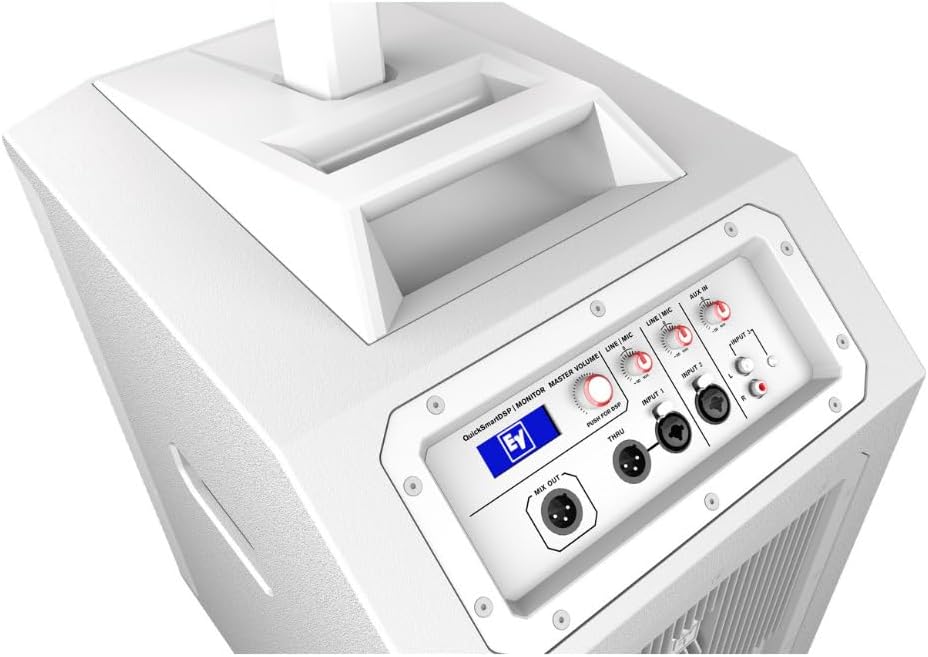
This image shows the top panel of the EVOLVE 50 subwoofer, highlighting the various input and output connections, as well as the QuickSmartDSP display and master volume control.
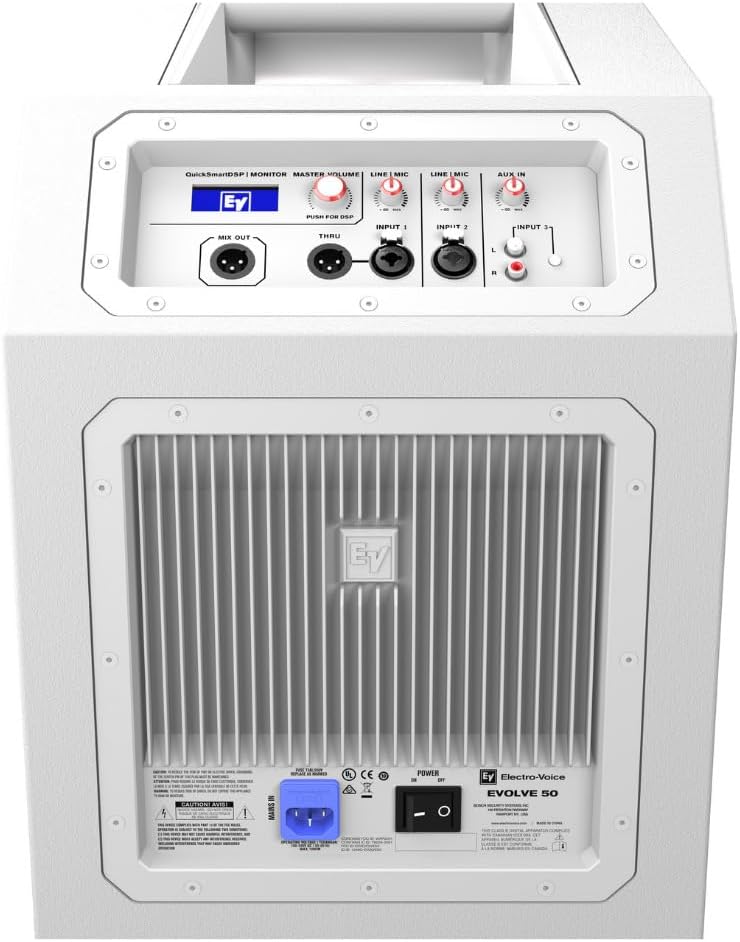
This image displays the rear panel of the EVOLVE 50 subwoofer, including the power input, cooling fins, and the Electro-Voice branding.
3. Kullanım Talimatları
The EVOLVE 50 system offers intuitive controls and advanced DSP features for optimal sound performance.
3.1 QuickSmartDSP Control
The integrated QuickSmartDSP processing engine allows for easy setup and sound customization. Access the DSP settings via the control panel on the subwoofer.
- Ön ayarlar: Select from four optimized presets: Müzik, Canlı, Konuşma, Ve Kulüp to instantly adapt the sound profile Başvurunuza.
- Üç Bantlı Ekolayzır: Adjust the low, mid, and high frequencies to fine-tune your sound.
- User-Programmable Presets: Store and recall up to five of your own custom sound settings.
- Çıkış Gecikmesi: Adjust the delay for synchronized sound in multi-speaker setups.
- Hayali güç: Activate +15V phantom power for condenser microphones on relevant inputs.
- İzleme: Visually monitor limiter status, input levels, and master volume to ensure optimal gain structure and prevent clipping.
3.2 Bluetooth Bağlantısı
The EVOLVE 50 features Bluetooth Low Energy (BTLE) for wireless control and high-quality audio streaming.
- Eşleştirme: Activate Bluetooth on your mobile device and select the EVOLVE 50 from the list of available devices.
- QuickSmart Mobile App: Download the Electro-Voice QuickSmart Mobile application for comprehensive wireless configuration, control, and monitoring of up to six EVOLVE 50 systems simultaneously.
- Ses akışı: Stream background music or musical accompaniment directly from any mobile device with high fidelity.
Bu video, kısa bir özet sunuyorview of the usability and features of the Electro-Voice EVOLVE 50 system, demonstrating its ease of setup and operation.
4. Bakım
Proper maintenance ensures the longevity and optimal performance of your EVOLVE 50 system.
- Temizlik: Dış yüzeyleri temizlemek için yumuşak, kuru bir bez kullanın. Aşındırıcı temizleyiciler veya çözücüler kullanmayın.
- Depolamak: When not in use, store the system in a dry, temperate environment. Utilize the provided carrying bag for the subpole and column array to protect them during transport and storage.
- Denetleme: Periodically check all cables and connections for any signs of wear or damage.
- Havalandırma: Ensure the subwoofer's cooling fins are free from dust and obstructions to prevent overheating.
5. Sorun Giderme
If you encounter issues with your EVOLVE 50 system, refer to the following common troubleshooting steps:
- Güç Yok: Ensure the power cable is securely connected to both the subwoofer and a working electrical outlet. Check the power switch on the subwoofer.
- Ses Çıkışı Yok: Verify that all audio cables are correctly connected. Check input levels on the subwoofer and ensure the master volume is turned up. Confirm the correct input source is selected via the DSP.
- Bozuk Ses: Reduce input levels to prevent clipping. Check for damaged cables. Ensure the column array is properly seated on the pole.
- Bluetooth Bağlantı Sorunları: Ensure Bluetooth is enabled on your mobile device and the EVOLVE 50 is within range (up to 10 meters). Try unpairing and re-pairing the device.
- Sistemin Aşırı Isınması: Check that the subwoofer's cooling fins are not obstructed. Ensure adequate ventilation around the unit.
Sorun devam ederse daha fazla yardım için müşteri desteğiyle iletişime geçin.
6. Teknik Özellikler
| Özellik | Şartname |
|---|---|
| Marka | Elektro-Ses |
| Model Adı | EVRİM 50 |
| Model Numarası | F.01U.335.099 |
| Hoparlör Maksimum Çıkış Gücü | 1000 Watt |
| Frekans Tepkisi | 37 Hz (functional output) |
| Bağlantı Teknolojisi | Bluetooth |
| Ses Çıkışı Modu | Sütun Dizisi |
| Montaj Tipi | Solo |
| Muhafaza Malzemesi | Polypropylene (subwoofer) |
| Hoparlör Tipi | Subwoofer (12-inch), Column Array (8 x 3.5-inch neodymium drivers) |
| Ek Özellikler | Portable, QuickSmartDSP, Built-in Multi-Channel Mixer |
| Renk | Beyaz |
| Kontrol Yöntemi | App Control (QuickSmart Mobile) |
| Bluetooth Menzili | 10 Metre |
| Ürün Ağırlığı | 35.8 Pound |
| Güç Kaynağı | Kablolu Elektrik |
| Dahil Edilen Medya | Carrying Bag, Owner's Manual, Built-in Multi-Channel Mixer |

Bu görüntü bir view of the eight 3.5-inch neodymium drivers within the EVOLVE 50 column array, responsible for high-frequency output.
7. Garanti Bilgileri
The Electro-Voice EVOLVE 50 system comes with a Sınırlı Garanti. For specific terms, conditions, and duration of the warranty, please refer to the official warranty documentation included with your product or visit the Electro-Voice official webSite. Satın alma belgenizi garanti talepleriniz için saklayın.
8. Müşteri Desteği
For technical assistance, service, or additional information regarding your Electro-Voice EVOLVE 50 system, please contact Electro-Voice customer support. Refer to the contact information provided in your product packaging or on the official Electro-Voice webalan.
- Çevrimiçi Kaynaklar: Electro-Voice'un resmi sitesini ziyaret edin. website for FAQs, software updates, and additional product documentation.
- Servis Merkezleri: Information on authorized service centers can be found on the Electro-Voice webalan.