
giriiş
This manual provides instructions for the installation, operation, and maintenance of your Audiovox ELEAUDAX80EXT Wireless Extension. This device is designed to expand the functionality of compatible Audiovox phone models, specifically the AX8001, AX8001E, and AX8101AM, by providing an additional wireless handset.
Paket İçeriği
Kurulum işlemine geçmeden önce lütfen paketteki tüm öğelerin eksiksiz olduğundan emin olun.
- Audiovox ELEAUDAX80EXT Wireless Extension Unit
- Güç Adaptörü (varsa)
- Şarj Edilebilir Pil (önceden takılmış veya ayrı)
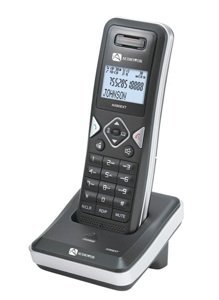
Image: The Audiovox ELEAUDAX80EXT Wireless Extension Unit. This image displays the compact design of the extension handset.
Kurmak
- Pili Şarj Edin: If the battery is not pre-installed, insert it into the extension unit according to the markings. Place the extension unit on its charging cradle (if included) or connect the power adapter directly to the unit and a power outlet. Allow the unit to charge for at least 12-16 hours before initial use.
- Register the Extension:
- Ensure your main Audiovox phone base (AX8001, AX8001E, or AX8101AM) is powered on.
- On the main phone base, locate and press the "Register" or "Page" button. Hold it until the indicator light on the base begins to flash (refer to your main phone's manual for exact instructions).
- While the base is in registration mode, on the ELEAUDAX80EXT extension unit, navigate to the "Menu" and select "Register Handset" or a similar option. Follow the on-screen prompts.
- Once registration is successful, the extension unit will display a confirmation message, and the indicator light on the base will stop flashing.
- Test bağlantısı: Make a test call from the extension unit to ensure proper functionality.
Kullanım Talimatları
Çağrı Yapmak
- Ahizeyi kaldırın veya KONUŞMAK düğme.
- İstediğiniz telefon numarasını çevirin.
- Basın KONUŞMAK button again or place the handset back on the cradle to end the call.
Bir Çağrıyı Cevaplama
- Telefon çaldığında ahizeyi kaldırın veya tuşa basın. KONUŞMAK düğme.
- Aramayı sonlandırmak için tuşuna basın SON button or place the handset back on the cradle.
Intercom Function (if supported by base unit)
- Basın INTERCOM düğme.
- Dial the number of the extension you wish to call (e.g., "2" for the second handset).
- Basmak KONUŞMAK Dahili görüşmeyi başlatmak için.
Bakım
- Temizlik: Üniteyi yumuşak, damp bez. Sert kimyasallar veya aşındırıcı temizleyiciler kullanmayın.
- Pil Bakım: For optimal battery life, avoid fully discharging the battery frequently. Keep the unit on its charger when not in use.
- Depolamak: If storing the unit for an extended period, remove the battery and store it in a cool, dry place.
Sorun giderme
| Sorun | Çözüm |
|---|---|
| Çevir sesi yok / Arama yapılamıyor |
|
| Telefon şarj olmuyor |
|
| Zayıf çağrı kalitesi / Statik |
|
Özellikler
- Model Numarası: ELEAUDAX80EXT
- Uyumlu Ana Üniteler: Audiovox AX8001, AX8001E, AX8101AM
- Boyutlar (U x G x Y): 20 x 40 x 30 milimetre
- Ağırlık: 20 Gram
- UPC: 044476082719
Garanti ve Destek
For specific warranty information and technical support, please refer to the documentation included with your original Audiovox phone system or visit the official Audiovox webSite. Satın alma fişinizi, garanti talepleriniz için satın alma belgeniz olarak saklayın.
For further assistance, please contact Audiovox customer service.