
1. Giriş
Katranamps TR2 P Remote Control is an advanced device designed exclusively for Taramps Group alarm systems. It incorporates anti-cloning (hopping code) technology to provide enhanced security for your vehicle. This remote control also features a presence function and a home function, allowing for the activation of automated gates. Built for durability, it is resistant to moisture infiltration and includes a long-lasting lithium battery with a low battery indicator.
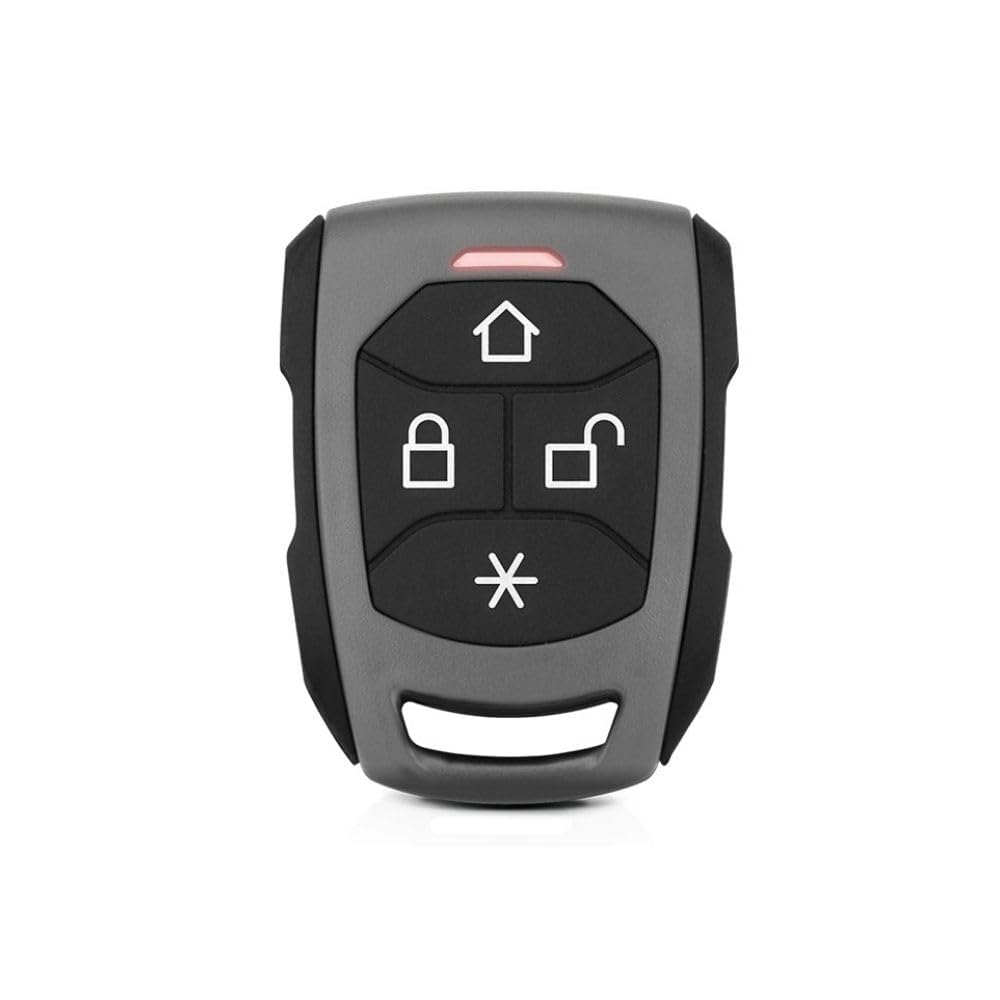
Figure 1: Taramps TR2 P Remote Control. This image shows the front view of the remote control, highlighting its four primary function buttons and the LED indicator.
2. Temel Özellikler
- Anti-Cloning Technology: Utilizes HOPPING CODE for enhanced security against unauthorized duplication.
- Uyumluluk: Fully compatible with all Taramps TW20 series alarm systems.
- Çalışma Frekansı: Operates at 433.92 MHz.
- LED Göstergesi: Features a blue LED for status indication.
- Dayanıklı Yapı: Manufactured from high-density ABS material.
- Suya Dayanıklılık: Designed to be resistant to moisture infiltration.
- Pil: Powered by a CR2032 Lithium 3V battery, known for its long durability.
- Presence Function: Identified by its gray color, this function is integral to the alarm system's presence feature.
- Home Function: Allows for the activation of automated gates.
3. Kurulum
3.1 Pil Kurulumu
The TR2 P remote control comes with a CR2032 lithium battery pre-installed. If replacement is needed, follow these steps:
- Uzaktan kumandayı dikkatlice açın.asing using a small, flat tool.
- Eski CR2032 pili çıkarın.
- Insert a new CR2032 3V lithium battery, ensuring the positive (+) side faces upwards.
- Uzaktan kumandayı kapatın.asinYerine oturana kadar g harfini sıkıca bastırın.
3.2 Pairing with Taramps TW20 Alarm System
To ensure proper functionality, the TR2 P remote control must be paired with your Taramps TW20 alarm system. Refer to your specific Taramps TW20 alarm system manual for detailed pairing instructions, as the procedure may vary slightly between alarm models. Generally, the process involves:
- Entering the alarm system's programming mode (often by turning the ignition on/off a specific number of times or pressing a master button).
- Pressing a button on the TR2 P remote control when prompted by the alarm system.
- Confirming successful pairing (usually indicated by a siren chirp or LED flash from the alarm system).
4. Kullanım Talimatları
The TR2 P remote control features four primary buttons for various functions:
- House Icon Button (⌂): Etkinleştirir Ev İşlevi, typically used for controlling automated gates or other integrated home automation features.
- Locked Padlock Icon Button (🔒): Locks the vehicle and arms the alarm system. Press this button to secure your vehicle.
- Unlocked Padlock Icon Button (🔓): Unlocks the vehicle and disarms the alarm system. Press this button to access your vehicle.
- Asterisk Icon Button (*): This button is typically associated with the Varlık İşlevi or other auxiliary functions depending on your alarm system's configuration. Consult your alarm system manual for specific details.
The blue LED indicator on the remote control will illuminate briefly when a button is pressed, confirming signal transmission.
5. Bakım
5.1 Pil Değişimi
The TR2 P remote control is powered by a CR2032 3V lithium battery. The remote control will indicate a low battery condition, prompting replacement. Refer to section 3.1 for battery installation instructions.
5.2 Temizlik ve Bakım
- Uzaktan kumandayı yumuşak, kuru bir bezle temizleyin.
- Avoid using abrasive cleaners or solvents, as these can damage the casing and buttons.
- While resistant to moisture, avoid prolonged exposure to water or submerging the device.
6. Sorun Giderme
- Uzaktan Kumanda Yanıt Vermiyor:
- Check if the blue LED illuminates when a button is pressed. If not, the battery may be depleted. Replace the CR2032 battery (see section 3.1).
- Ensure you are within range of the alarm system.
- Verify that the remote control is properly paired with your Taramps TW20 alarm system (see section 3.2).
- Aralıklı operasyon:
- Weak battery can cause intermittent operation. Replace the battery.
- Environmental interference might affect signal transmission. Try operating the remote from a different location.
- Alarm System Not Responding to Home Function:
- Ensure the automated gate receiver is powered on and within range.
- Verify that the Home Function is correctly programmed and linked to your automated gate system. Consult the gate system's manual or a professional installer.
7. Özellikler
| Marka | Katranamps |
| Üretici | KatranampElektronik |
| Model Numarası | 900739 (Part Number: TR2 P) |
| Çalışma Frekansı | 433.92 MHz |
| Pil Türü | CR2032 Lithium, 3V |
| Malzeme | High-density ABS |
| Suya Dayanıklılık | Resistant to moisture infiltration |
| Dahil Bileşenler | Garanti Belgesi |
8. Garanti Bilgileri
Katranamps TR2 P Remote Control comes with a 2 yıllık garanti. This warranty is provided directly by the manufacturer, Taramps Electronics, and is valid for 24 months from the date of product purchase. Please retain your proof of purchase for warranty claims. For detailed terms and conditions, refer to the included Warranty Certificate.
9. Destek
For technical assistance, troubleshooting beyond this manual, or warranty claims, please contact Taramps customer support. Refer to the contact information provided on the product packaging or the official Taramps webalan.
Katranamps Official Webalan: www.taramps.com.br