
Ubio Labs 10W Qi Wireless Charging Pad
Ubio Labs 10W Qi Wireless Charging Pad User Manual
Model: 10W Qi Wireless Charging Pad
giriiş
Satın aldığınız için teşekkür ederizasing the Ubio Labs 10W Qi Wireless Charging Pad. This device provides convenient and efficient wireless charging for compatible smartphones and other Qi-enabled devices. This manual will guide you through the setup, operation, and maintenance of your new wireless charging pads.
Kutuda Neler Var?
Paketiniz aşağıdaki öğeleri içermelidir:
- 2 x Ubio Labs 10W Qi Wireless Charging Pads
- 2 x 9VDC Wall Adaptors
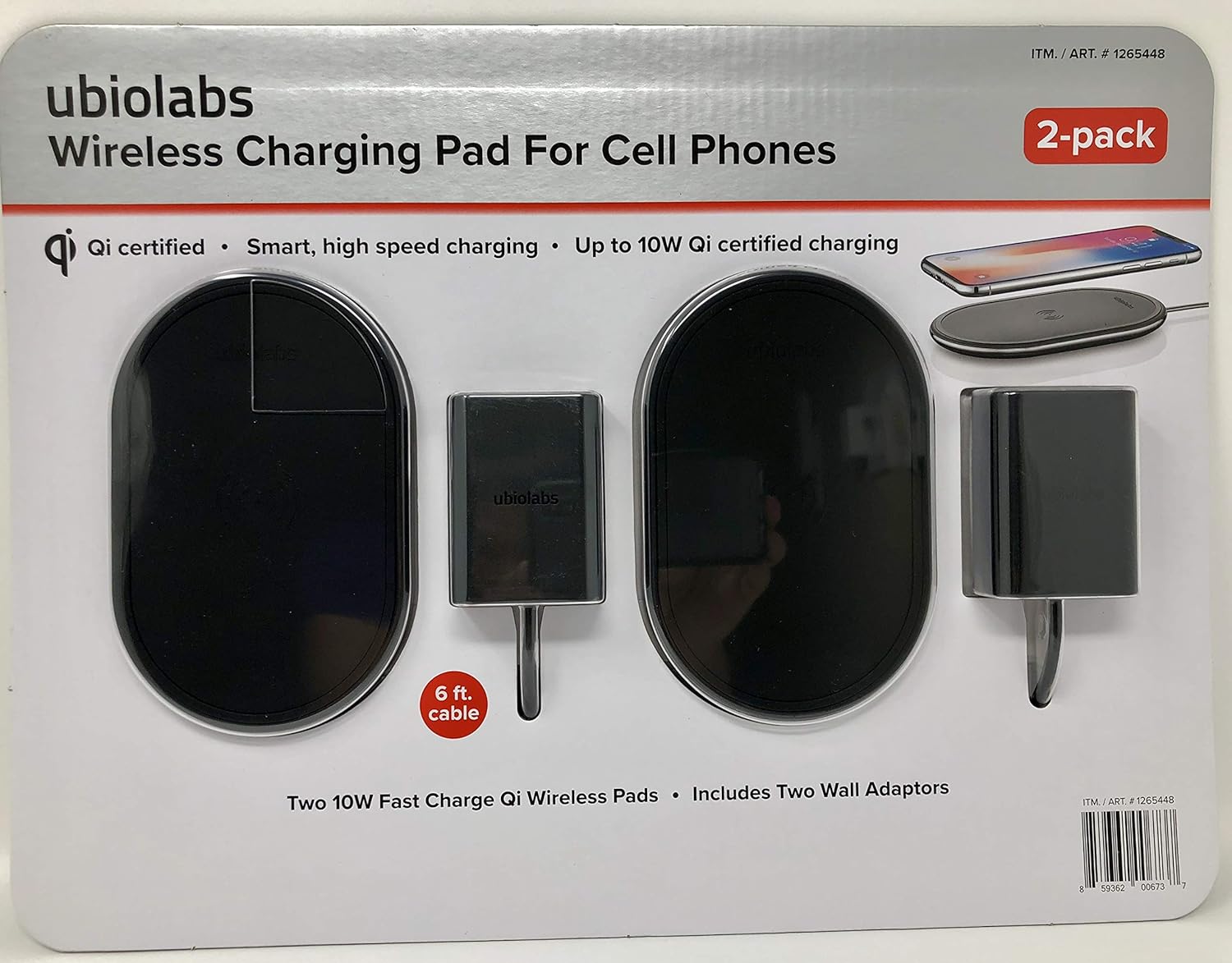
Resim: Ön view of the Ubio Labs 10W Qi Wireless Charging Pad 2-pack packaging, showing two black oval charging pads and two wall adapters.
Özellikler
- Qi Sertifikalı: Ensures compatibility and safe charging with Qi-enabled devices.
- Smart, High-Speed Charging: Optimized power delivery for efficient charging.
- Up to 10W Qi Certified Charging: Provides fast wireless charging speeds.
- Non-slip, rubberized surface: Helps keep your device securely in place during charging.
- LED Gösterge Işığı: Şarj durumuna ilişkin görsel geri bildirim sağlar.
- 6 ft. Cable: Long cable for flexible placement.
Uyumluluk
The Ubio Labs 10W Qi Wireless Charging Pad is designed for use with Qi-enabled smartphones and devices. Charging speeds may vary depending on the device and its wireless charging capabilities.
Android™ Compatibility
Şunlarla çalışır: Android phones including Samsung Galaxy S9, S9+, Note 9, Note 8, S8, S8+, S7 Active, S7 Edge, S7, LG G6, LGV30, Moto Z, Sony Xperia XZ2, Nokia 8 Sirocco.
Does not work with: Galaxy S5, J7 models, J3 models, On5, Luna, Express Prime 3, Amp Prime models, Sol models, Halo, Android tablets, other Android accessories or wearables.
Apple Uyumluluğu
Şunlarla çalışır: Any iPhone released October 2017 or later including iPhone X, iPhone 8 Plus, iPhone 8.
Does not work with: Any iPhone released before October 2017 or other Apple products including iPhone 7 Plus, iPhone 7, iPhone SE, and all older iPhone models, iPad Pro, iPad Mini, iPad Air, iPod Touch, AirPods, Apple Watch.

Resim: Arka view of the Ubio Labs Wireless Charging Pad packaging, detailing phone compatibility for Android and Apple devices, and highlighting 10W and 7.5W charging capabilities.
Kurmak
- Connect the Wall Adaptor: Plug one end of the included 9VDC wall adaptor into the charging port on the Ubio Labs Wireless Charging Pad.
- Güç Çıkışına takın: Plug the other end of the wall adaptor into a standard electrical wall outlet.
- Atama: Place the charging pad on a flat, stable surface, such as a desk or nightstand. Ensure there is adequate ventilation around the pad.
Kullanım Talimatları
- Cihazınızı Yerleştirin: Carefully place your Qi-enabled smartphone or device directly onto the center of the Ubio Labs Wireless Charging Pad.
- Şarjı Doğrulayın: The LED indicator light on the charging pad will illuminate (e.g., green) to confirm that your device is properly aligned and charging. Your device's screen should also indicate that it is charging wirelessly.
- Optimum Yerleştirme: If charging does not begin immediately, slightly adjust the position of your device on the pad until the LED indicator lights up and charging commences. Ensure no foreign objects are between the device and the pad.
- Şarj Tamamlandı: Once your device is fully charged, it will typically display a full battery icon. You may then remove your device from the charging pad.
Not: For optimal charging performance, ensure your device is centered on the charging pad. Some phone cases may interfere with wireless charging; if this occurs, remove the case before placing the device on the pad.
Bakım
- Temizlik: Disconnect the charging pad from the power source before cleaning. Use a soft, dry cloth to wipe the surface of the charging pad. Do not use liquid cleaners or abrasive materials.
- Depolamak: Kullanılmadığı zamanlarda şarj pedini serin, kuru ve doğrudan güneş ışığından ve aşırı sıcaklıklardan uzak bir yerde saklayın.
- İşleme: Avoid dropping or subjecting the charging pad to strong impacts, as this may damage internal components.
Sorun giderme
| Sorun | Olası Çözüm |
|---|---|
| Cihaz şarj olmuyor. |
|
| Yavaş şarj. |
|
| LED göstergesi yanmıyor. |
|
Özellikler
| Özellik | Detay |
|---|---|
| Marka | Ubio Laboratuvarları |
| Örnek | 10W Qi Kablosuz Şarj Pedi |
| Bağlantı Teknolojisi | Kablosuz |
| Bağlayıcı Türü | Kablosuz |
| Uyumlu Cihazlar | Smartphones (Qi-enabled) |
| Dahil Bileşenler | 2 Ubio Labs 10W Qi wireless pads, 2 9VDC wall adaptors |
| Özel Özellik | Kablosuz Şarj |
| Renk | Siyah |
| Giriş Voltage | 9 Volt |
| Netage | 10 watt |
| Ürün Ağırlığı | 1.55 pounds (approx. for the pack) |
| Paket Boyutları | 14.25 x 8.82 x 1.02 inç |
| Üretici | Ubio Laboratuvarları |
| ASIN | B07F22RBK7 |
| İlk Mevcut Tarih | 26 Haziran 2018 |
Garanti ve Destek
For warranty information or technical support, please refer to the contact information provided on the product packaging or visit the official Ubio Labs webalan. Garanti talepleri için satın alma makbuzunuzu saklayın.
Üretici: Ubio Laboratuvarları
Webalan: www.ubiolabs.com (Not: Bu bir yer tutucudur URL as no specific support link was provided in the data.)
Ask a question about this manual
Ask about setup, troubleshooting, compatibility, parts, safety, or missing instructions. Manuals+ will review the question and use this page’s manual context to help answer it.